
How to filter Firestore in real-time using Jetpack Compose?
A simple solution for searching Firestore and listening for real-time updates using Jetpack Compose.

In many of our apps, we need to allow users to search our app content. For example, in an online shop app, we may want to search for products by a certain name. Before Jetpack Compose, we had to create a RecylerView and an adapter so we can display the data that is returned from the database. Each time something in the database changed, we had to inform the adapter about that change.
How about using Jetpack Compose for filtering data?
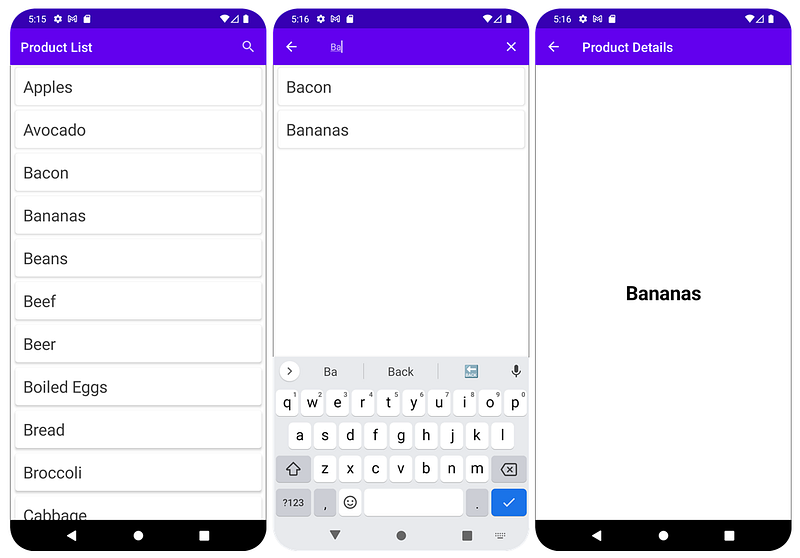
Nowadays, there is no need for any adapters anymore. Each time something changes, the state changes, and the screen is recomposed. So I’ll try to explain in this article, a complete example of how to query Firestore by a searched text, with a full-code example. We’ll use a clean architecture with MVVM. You can download the project and try it directly in Android Studio. So this is what the app looks like:
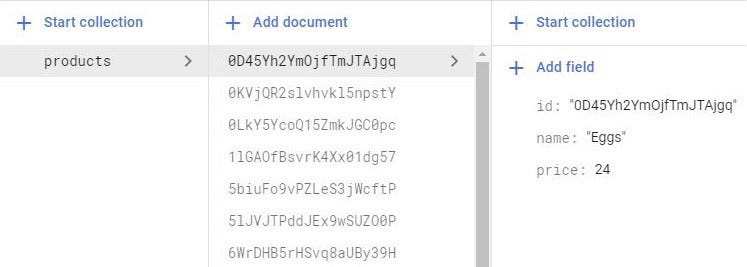
These products are stored in Cloud Firestore, so here is the corresponding schema for the “products” collection:
Before starting, make sure you have added the following dependencies in the build.gradle (Project file):
And the following dependencies in the build.gradle (Module Project file):
As you can see, we’ll use Hilt for Android for dependency injection and Jetpack Compose. We’ll build a clean architecture Android app, where the call to Firestore will be performed using Kotlin Coroutines and Asynchronous Flow.
What can we expect from such an application?
Since we’re creating a very simple app, we’ll use a screen, in which we’ll display the products from Firestore. In the top bar of the app, we’ll add a search icon. When we click on the icon, we’ll be able to perform a search based on the typed keyword. As soon as we receive a result, we can click on the product and we can navigate further to see the details. In this simple scenario, in the product details screen, we’ll only display the name of the product. If our search yields no results, then we’ll display a message that says, “No products found”.
To be able to process the response that we get from Cloud Firestore, we create a Response class that looks like this:
When the operation succeeds, we expect to get List
There is a single operation that we have to do, so we’ll add it to a repository interface:
If you’re wondering what type of data is ProductListResponse, it’s a typealias, used in Kotlin to provide more concise alternative names for our existing types.
The corresponding implementation of the method is present inside the repository implementation class, where we perform the query and attach the realtime-listener:
Now, talking about the UI elements, we only have a single activity that looks as simple as:
When it comes to the UI, this simple application contains three screens:
Which are represented in our NavGraph:
The first screen it’s a really simple screen, it only displays a list of products:
It is composed of a top bar:
And the actual content:
Where the ProductListLazyColumn looks like this:
When we click on the search icon, we navigate to the ProductSearchScreen:
Where we obviously have a different top bar:
There are a few things that need to be mentioned here:
- Each time we click the search icon, we request the focus, so that we do not always have to click the text field.
- If we navigate forward, to the ProductDetailsScreen, or navigate back, to the ProductListScreen, the keyboard is collapsing, so that we do not always have to press the🔻button on our Android device.
- If we hit back in the ProductDetailsScreen, once we get back to the ProductSearchScreen, the cursor is always placed at the end of the searched text.
Regarding the ProductSearchContent, it’s almost the same as the ProductListContent, but here we call getProductList using the serched text:
The last screen is the ProductDetailsScreen, which is the simplest screen in our app:
With a simple top bar:
The content is represented by the product name which is placed in the center of the screen:
Regarding code, that’s pretty much all of it.
Getting back to the search part, this approach cannot be considered a full-text search solution. And that’s because Firestore doesn’t currently have such capabilities. Besides that, downloading an entire collection for searching the fields client-side isn’t practical at all. To enable full-text search, we have to use third-party libraries or use Firebase extensions. So we can search with Algolia or we can search with Elastic App Search.
If you’re interested, I have written an article a couple of years ago regarding a workaround that can help us filter Firestore data in a cheaper way:
However, if you only need a search feature, for example, only against some names, the solution in this article will work perfectly fine.
Are there any other alternatives?
Yes, there is one, which is called Firebase-UI library, which makes it simple to bind data from Cloud Firestore to our app’s UI. In this case, all the heavy work is done behind the scenes by the library. What we need to do, is to create a “FirestoreRecyclerOptions” object, which should be passed to the “FirestoreRecyclerAdapter”. That being said, we have to get back to the old way of handling Firestore requests, which is using an adapter.
Conclusion
That’s the simplest solution for searching Firestore using a certain word. I hope you found this article useful and if you have any questions regarding this topic, feel free and leave a comment in the section below.
You can find the full source code here.
You can also see it on youtube:
If you wanna support me, please join me!
#BetterTogether🔥


