
How to filter and slice data with polars?
Learn how to filter and slice data with polars.
Filtering and slicing data are important skills to master for a data professional. I will show you the easiest ways to slice and dice data in polars. If you find this post useful follow me. You will learn the following from this post:
- How to slice data with
polars? - How to conditionally filter the rows of the
polarsdata frame? - How to filter the columns of the
polarsdata frame? - How to use the
polarsinternal slicing method?
Let’s import the numpy, polars and StringIO packages and then create a simple psv(pipe-seperated values) file.
import io
import polars as pl
import numpy as np
from itertools import compress

text = """farm_id|farm_name|country|cattle_breed|vegetables_grown|veg_land_area|farm_index
az1|Peony|Scotland|Ayshire|onions|31|A0000
az2|Peony|Scotland|aberdeen angus|||A0001
by1|Daisy|Australia|Belmont red|broccoli|70|A0002
by2|Daisy|Australia|greyman cattle|potatoes|250|A0003
by3|Daisy|Australia|droughtmaster|||A0004
cx1|Daffodil|India|bargur cattle|aubergines|75|A0005
cx2|Daffodil|India|brahman|onions|67|A0006
cx3|Daffodil||Amrit mahal|chillies|34|A0007
cx4|Daffodil|India|Deoni|||A0008
dw1|Edelweiss|Switzerland|original simmental|aubergines|55|A0009
dw2|Edelweiss|Switzerland|schwyz|onions|27|A0010
dw3|Edelweiss|Switzerland||broccoli|50|A0011
dw4|Edelweiss|Switzerland|Brauveih|cauliflower|21|A0012
dw5|Edelweiss|Switzerland|simmental|fennel|30|A0013
"""

s = io.StringIO(text)
with open('farm.psv', 'w') as f:
    for line in s:
        f.write(line)
You should see a pipe-separated file with the name farm.psvin your working directory. Let’s import the data file back as a polarsdata frame. Note it is a pipe-separated file so you will have to pass in the separator='|' condition to the polars scan_csv() method.
farm=pl.scan_csv('farm.psv',separator='|').collect()Let’s inspect the polars data frame.
farm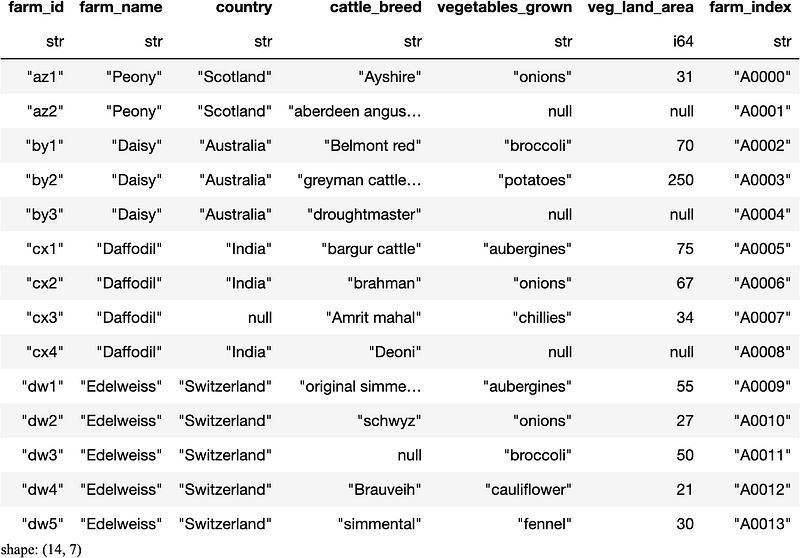
The polarsfarm data frame has seven columns.
How to slice data with polars?
Let’s begin by understanding how to access each data point in polars. It is important to be able to access each data point and understand what that data point represents for the business. Let’s look at how polars allows you to access each data point. In polars, data is accessed through the [row,col] notation. This [row,col] notation is used in many programming languages such as C, pandas and R. So you may be familiar with this notation already. If not, it is a simple notation where each item in the polarsdata frame is referenced as a numerical value. That is beginning from the top left-hand corner of the polars data frame each column is represented as a value starting from zero and going upto the number of columns in the polarsdata frame. Similarly, in the polars data frame each row is represented as a value starting from zero and going upto the number of rows in the polars data frame. You can try it our access the first row and the first column of the polarsdata frame.
farm[0,0]'az1'Note that in polarsthe referencing starts from zero. Try different values and see what results you generate using this polars data frame. This is only referencing different cells not exactly slicing the polarsdata frame. Let’s apply a numerical range to the polars data frame. Say you want the rows row 5,6 and 7 and columns farm_name, country and cattle_bread(i.e column index of 1, 2 and 3 of the polars data frame). This can be done as follows.
farm[5:8,1:4]
As shown in figure 3, the resulting polars data frame does not include the maximum value of the range. That is row eight and column four are not included in the end result of the polars data frame. You will have to be careful specifying ranges in polarsas it stops one element below the maximum value. That is a nice way in which polars allows you to slice the data. Say you don't want every element in the range, you want to cherry-pick specific rows and columns of the polars data frame. You can do that as well by creating a specific row list and column list. You need to provide these as lists into the polars data frame.
row_list = [1,3,4]
column_list = [1,4,5]
farm[row_list,column_list]
So you can now nicely slice polars data frames as you like. Let’s see how to conditionally filter rows with polars.
How to conditionally filter the rows of the polars data frame?
In polars, to filter rows you need to use the filter method. The filter method takes a boolean list of True and False values and selects the rows that have the True value. Let's test it out by creating a list and passing it in to the filter method in polars.
boolean_row_list = [False,True,False,True,True,\
                    False,False,False,False,False,\
                    False,False,False,False]
farm.filter(boolean_row_list)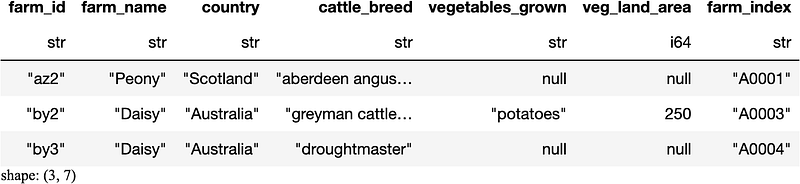
The filter method has selected the correct rows in the polars data frame. Note that the filter method only filters rows and not columns of the polars data frame. If you wanted to get all the rows associated with the Peony farm from the polars data frame you can do so with a simple statement.
farm.filter(farm['farm_name']=="Peony")
Let’s extend the above condition by adding an additional condition to find Peony farms that have no vegetables being grown in the polars data frame.
farm.filter((farm['farm_name']=='Peony') & \
            (farm['vegetables_grown'].is_null()))
The resulting polars data frame shows the Peony farms that have no vegetables growing. Now management decides that they will start growing aubergines on these Peony farms that don't have any vegetables growing. How do we modify the polars data frame? This is a bit more involved in polars.
farm = farm.with_columns(
                  pl.when( (pl.col("farm_name")=='Peony') & (pl.col('vegetables_grown')== None))
                  .then("aubergines")
                  .otherwise(pl.col("vegetables_grown"))
                   .alias("vegetables_grown")
                 )
farm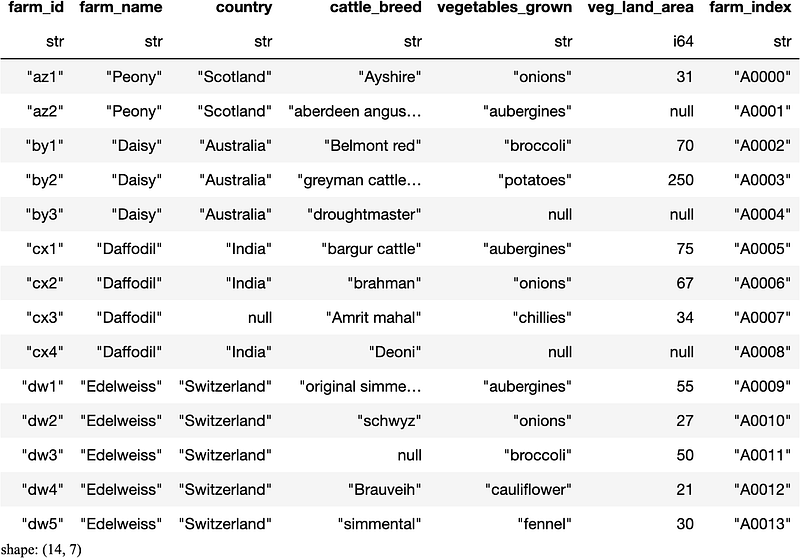
As you can see this process is not that straightforward with polars. It is syntax heavy, which means you have to write a lot more code in polarsto get the result you are after compared to like pandas. Let's try to understand the polars syntax a little bit in more in detail. The polars, .with_column method creates a new column and effectively replaces the old column if it has the same name. The .when, .then, .otherwise methods in polars are affectively, an if-then-else statement where if the condition is met then replace the value specified, if not keep it as it is. The final .alias method in polarschanges the column name to the original column name. It may feel like the polars syntax might be a bit more difficult to understand
How to filter the columns of the polars data frame?
To filter the columns you need to use the method .select in polars, similar to the SQL syntax. You will need to specify a list of columns to filter.
farm.select(['farm_id', 'country', 'veg_land_area', 'farm_index'])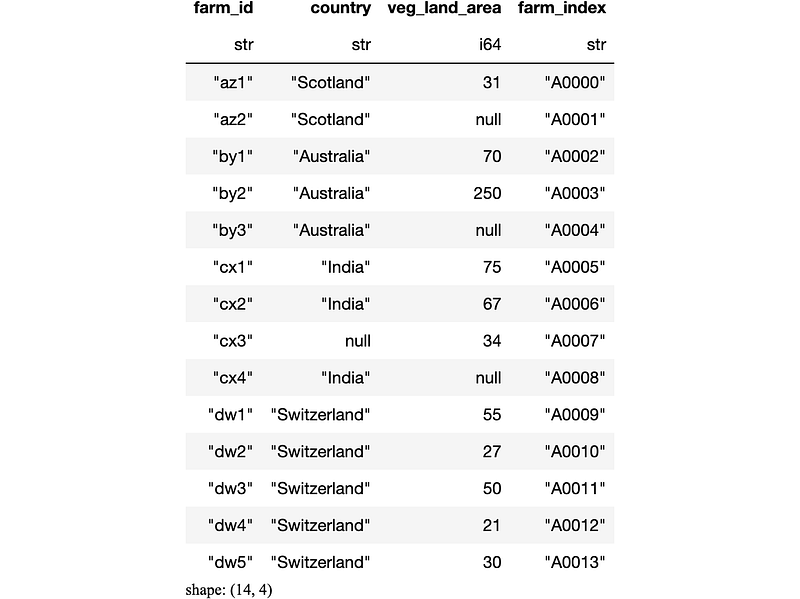
The select method of polars selected the specified columns and organised the columns as specified. However, it is not possible to pass in a list of boolean values into the select method in polars. So if you have a list of boolean values you will need to convert it to a column list before passing it into the select method.
boolean_column_list = [True,False,True,False,False,
                      True,True]
farm.select(list(compress(farm.columns, boolean_column_list)))If you wanted to filter a list according to a list of boolean rows and columns in polarsyou will have to chain the filtermethods together.
boolean_row_list = [False,True,False,True,True,\
                    False,False,False,False,False,\
                    False,False,False,False]
boolean_column_list = [True,False,True,False,False,\
                      True,True]
farm.select(list(compress(farm.columns, boolean_column_list))).filter(boolean_row_list)
Slicing and filtering in polars isn't very user-friendly yet, in my opinion, compared to the older cousins such as pandas. In time if polars gets used widely I presume some of the nice functionality of pandas is likely to be adopted by polars. If you would like to compare, have a look at my blog post on pandas slicing and filtering data.
How to use the polars internal slicing method?
There is also a .slice method in polars, let's have a look at the capabilities of that method. The slice method in polars is a row-slicing method where the slice is created from the row position to start the slice and the length of the slice. Let's try out an example.
farm.slice(2,3)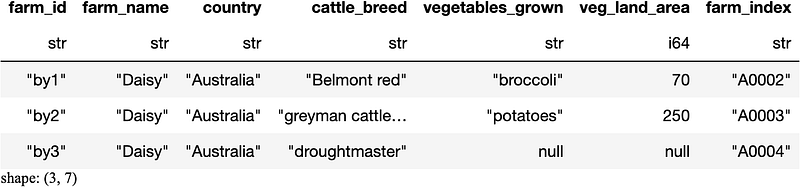
As shown in Figure 11, the resulting polars data frame has the rows nicely sliced. We requested to start the slice from the third row(i.e. note the indexing starts from zero) and go upto three rows, which polars did nicely.
Concluding thoughts
Slicing and filtering data with polars is an acquired taste like a nice beer. It does take a while to master polars as it has some syntactically challenging components, once you get familiar you will be able to use it easily. If you found any of the information helpful, clap and respond to the post. I will add similar content in the future. Well done for making it to the end of the post. You have learnt to do :
- Slice data with
polars, - Conditionally filter the rows of the
polarsdata frame, - Filter the columns of the
polarsdata frame, and - Slice using the
polarsinternal.slicemethod.
I will try to add more additional useful content in the future. Until next time happy learning.
Grab a cup of coffee, relax, and join the medium community here to expand your knowledge and thinking.🧠


