
How to filter and slice data with Pandas?
Learn how to filter and slice data with pandas iloc and loc in python.

Filtering and Slicing data is a critical skill to master in data science and data analysis. Learn how to slice data with iloc and loc . Slicing vegetables and other ingredients and filtering the parts needed are all part of making a great family meal. Slicing and filtering data is part of every data professional’s everyday activities. It is important for each data professional to be able to access each data point and understand what that data point represents for the business. Let’s look at how pandas allows you to access each data point. I will show you common ways that you can slice data in pandas. If you find this post useful follow me. I will add similar content in the future. You will learn the following:
- How to use
iloc? - How to use
loc? - How to conditionally filter data frames with
ilocandloc?
Let’s import the numpy, pandas and StringIO packages and then create a simple PSV (Pipe-Separated Values) file.
import io
import pandas as pd
import numpy as np

text = """farm_id|farm_name|country|cattle_breed|vegetables_grown|veg_land_area|farm_index
az1|Peony|Scotland|Ayshire|onions|31|A0000
az2|Peony|Scotland|aberdeen angus|||A0001
by1|Daisy|Australia|Belmont red|broccoli|70|A0002
by2|Daisy|Australia|greyman cattle|potatoes|250|A0003
by3|Daisy|Australia|droughtmaster|||A0004
cx1|Daffodil|India|bargur cattle|aubergines|75|A0005
cx2|Daffodil|India|brahman|onions|67|A0006
cx3|Daffodil||Amrit mahal|chillies|34|A0007
cx4|Daffodil|India|Deoni|||A0008
dw1|Edelweiss|Switzerland|original simmental|aubergines|55|A0009
dw2|Edelweiss|Switzerland|schwyz|onions|27|A0010
dw3|Edelweiss|Switzerland||broccoli|50|A0011
dw4|Edelweiss|Switzerland|Brauveih|cauliflower|21|A0012
dw5|Edelweiss|Switzerland|simmental|fennel|30|A0013
"""

s = io.StringIO(text)
with open('farm.psv', 'w') as f:
    for line in s:
        f.write(line)
You should see a pipe-separated file with the name farm.psvin your working directory. This is done with python3.10 so the StringIO package is within the io package. If you are using an older python version you will have to replace the line from io import StringIO with from StringIO import StringIO.
Let’s import the data files back as a pandas data frame. Note it is a pipe-separated file so you will have to pass in the sep='|' condition to the `pandas` read_csv() method.
farm=pd.read_csv('farm.psv',sep='|',index_col='farm_index')Let’s inspect the two data frames in pandas. The farm data frame first :
farm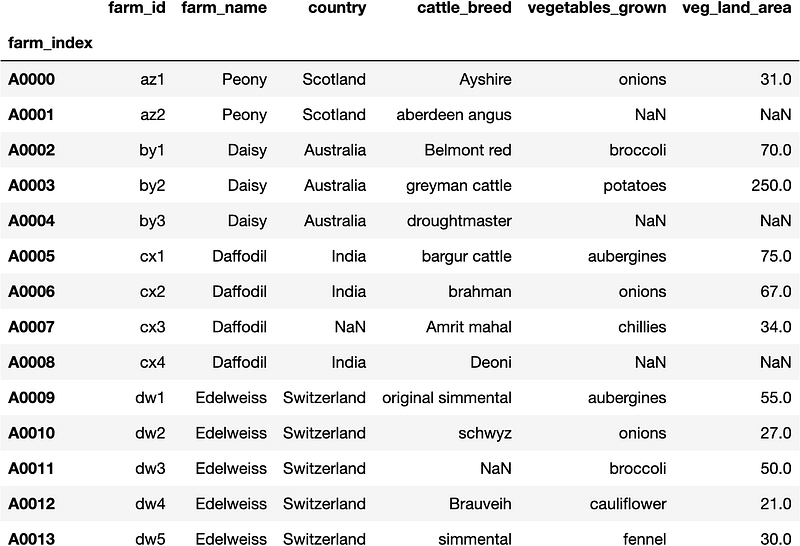
The farm data frame has six columns and a farm_index. So let's look at iloc first.
How to use iloc to slice data?
The pandas data frame can be sliced using many different methods. One commonly used way is the iloc method. In iloc each item in the data frame is referenced as a numerical value. That is beginning from the top left-hand corner each column is represented as a value starting from zero and going up to the number of columns in the data frame. Similarly, each row is represented as a value starting from zero and going up to the number of rows in the data frame. Let's try it out, so you would like to access the value represented in the farm index A0001 and farm_id. The farm_id the column is the first column which will be represented as zero and A0001 is the first row which is represented as zero as well.
farm.iloc[0,0]'az1'Note that the referencing starts from zero and not from one. You can try out different values and see what results get generated. So this is not exactly slicing the data frame, only referencing different cells of the data frame. One neat trick iloc can do is to slice on a numerical range. Say you want the rows A0005,A0006 and A0007 (i.e row index of 5,6 and 7) , and the columns farm_name, country and cattle_bread(i.e column index of 1, 2 and 3). This can be easily achieved.
farm.iloc[5:8,1:4]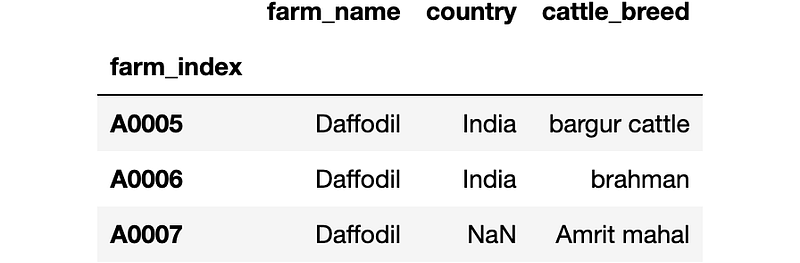
As shown in figure 3 you may have noticed that the maximum value of the range is not included in the end result. That is row eight and column four are not included in the end result. You will have to be careful specifying ranges as it stops one element below the maximum value. This is a nice way in which pandas allows you to slice the data frame. Say you don't want every element in the range, you want to cherry-pick specific values of indexes and specific values of column indexes. How do you do that? You can provide a row index list and a column index list and pass them into the iloc method. Say you want A0001, A0003 and A0004 (i.e. row indexes 1,3,4) and columns farm_name, vegetables_grown, and veg_land_aread (i.e. column indexes 1,4,5). You need to provide these lists.
row_index_list = [1,3,4]
column_index_list = [1,4,5]
farm.iloc[row_index_list,column_index_list]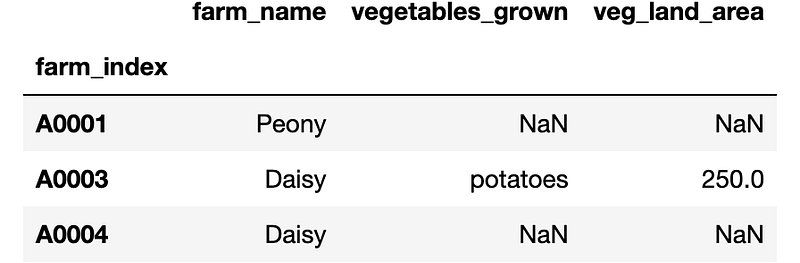
Figure 4 shows a nice and neat way to slice the data frame. A lesser-known way is to provide a list of true and false values into the iloc method. Let's try to use the true and false results to achieve the same result.
boolean_row_list = [False,True,False,True,True,\
                    False,False,False,False,False,\
                    False,False,False,False]
boolean_column_list = [False,True,False,False,\
                      True,True]
farm.iloc[boolean_row_list,boolean_column_list]
Figure 5 shows how the true and false values list can be used to generate the same results as figure 4. Things to note are that the boolean_row_list must have the same length as the number of rows in the data frame, similarly, the boolean_column_list must have the same length as the number of columns in the data frame. This approach is less used with the iloc method. We will show how the boolean lists become very useful when you are conditionally filtering the data later on, so let's keep going. So we have referenced numerically to slice data, is it possible to slice data by providing the column names and the row index values? Yes, you can that is where the loc method becomes useful.
How to use loc to slice data?
Another method that we can use to slice a data frame in pandas is to use the loc method. The loc method takes string values as input rather than numerical values as was the case in the iloc method. Let's try to achieve the same result we achieved with the iloc method.
farm.loc['A0000','farm_id']'az1'So we managed to access the individual values by passing the string values into the loc method. Also in the iloc method, we used a range of values to slice the data frame. Can we do it as the iloc method and select a range of index values and column values with the loc method? Yes, you may be surprised, but you can.
farm.loc['A0005':'A0007','farm_name':'cattle_breed']Figure 6 shows the exact output as figure 3. Selecting the range here is simple you need to pass the start and end values separated by a : for the rows as well as the columns. One key difference is that all values are inclusive that is the start and the end values are included in the sliced data frame rather than in the iloc method. Let's try to see if we can select specific rows and columns as was done in iloc. Rather than passing a list of numerical values in a iloc method, you should only have to pass a list of string values with the loc method. Let's test that out.
row_item_list = ['A0001','A0003','A0004']
column_item_list = ['farm_name','cattle_breed','vegetables_grown']

farm.loc[row_item_list,column_item_list]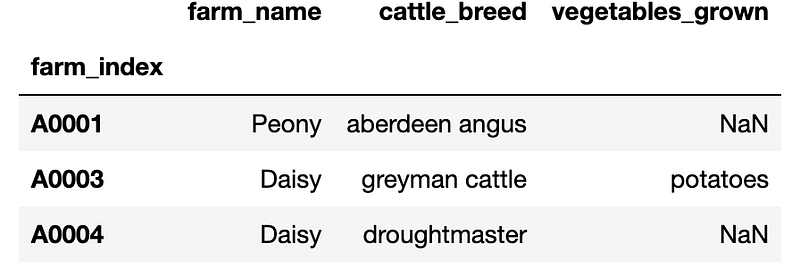
Excellent, figure 7 shows the exact output results as figure 4. So you can see most things iloc can do so can loc. Now you should be able to get the hang of how loc and iloc work. Try out some more examples. Let's look at how we can filter using both loc and iloc. Let's look at some conditional filtering that you can do with both the iloc method as well as the loc method.
How to conditionally filter the data frame?
Conditional filtering allows us to pass a condition in the form of a logical expression to a method to filter the data frame. So when that condition is met the resulting rows and columns will be provided as the output. As we will explore both the iloc and the loc methods together, to avoid confusion we will create two data frames with the names iloc_farm and loc_farm.
iloc_farm = pd.read_csv('farm.psv',sep='|',index_col='farm_index')
loc_farm = pd.read_csv('farm.psv',sep='|',index_col='farm_index')
Say the business requires to identify all the information available for a specific farm. For example, the business requires all the information related to the Peony farm. How do we select only the rows relevant to the Poeny farm? The conditional filtering allows us to explore specific farms like the Peony farm.
loc_farm.loc[loc_farm['farm_name']=='Peony',:]
So Figure 8 shows how to get all the rows that have the farm_name as Peony, you may be surprised the same can be achieved by iloc as well. The only difference is that you will need to convert the filtered values to a list.
iloc_farm.iloc[list(iloc_farm['farm_name']=='Peony'),:]Figure 9 shows the exact output as figure 8. So let’s keep going. The business may want to grow more vegetables and want to know for all Peony farms are there farms(i.e.farm_id) which don't grow vegetables? That is easy to do, simply add an additional condition that filters’ instances where vegetables_grown is NaN (i.e. farm['vegetables_grown'].isna()).
loc_farm.loc[(farm['farm_name']=='Peony') & \
             (farm['vegetables_grown'].isna())]
Nice we have identified that of all Peony farms farm_id of az1 is not growing any vegetables. Also the equivalent can be done easily with iloc.
iloc_farm.iloc[list((farm['farm_name']=='Peony') &\
(farm['vegetables_grown'].isna()))]Nice, Peony farm realises that they are not utilizing farm_id, az2 very well and wants to expand and start growing more vegetables. They want to introduce pumpkins at farm_id az2. So now you want to replace the value of the vegetables_grown to pumpkins for that Peony farm with that farm_id, that can be done easily as well.
loc_farm.loc[(loc_farm['farm_name']=='Peony') &\
          (loc_farm['vegetables_grown'].isna()),'vegetables_grown']\
                  ='pumpkin'
loc_farm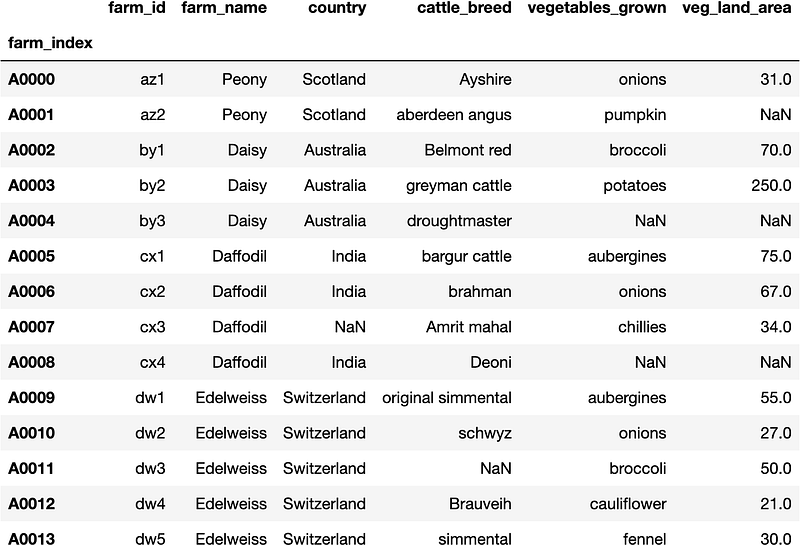
Figure 12 shows that the farm_id az2 shows it is growing pumpkins. Note that veg_land_area for the farm_id az2 is NaN. This can be true as the owners of the Peony farm haven't yet decided how much land area to grow pumpkins yet. Let's try to achieve the same result with the iloc method as well.
iloc_farm.iloc[list((iloc_farm['farm_name']=='Peony') &\
             (iloc_farm['vegetables_grown'].isna())), 4]\
                  ='pumpkin'
iloc_farmNice we got the same result for iloc as well, note that you need to replace the string value vegetables_grown from the loc method with its numerical equivalent value 4 when you are using the iloc method. So a few more things, to be aware. When we filtered for the NaN values we only had one row in this example. How about if there were few other farm_ids with no vegetables being grown? Then you can't simply replace them with one value, because that value will be used for all the other farm_ids. So in this example, the other farms will be labeled as growing pumpkins as well. Too many pumpkins are only good for Halloween. So you would have to conditionally replace each farm_id with the different vegetables that they want to grow. However, there are occasions when you need to replace all the filtered rows with a specific value. Say the business decides that all the Edelweise farms are not making a profit from growing vegetables and the business has decided to stop growing vegetables. Representing this can be easily done.
loc_farm.loc[(loc_farm['farm_name']=='Edelweiss'),\
             ['vegetables_grown','veg_land_area']] = np.nan
loc_farm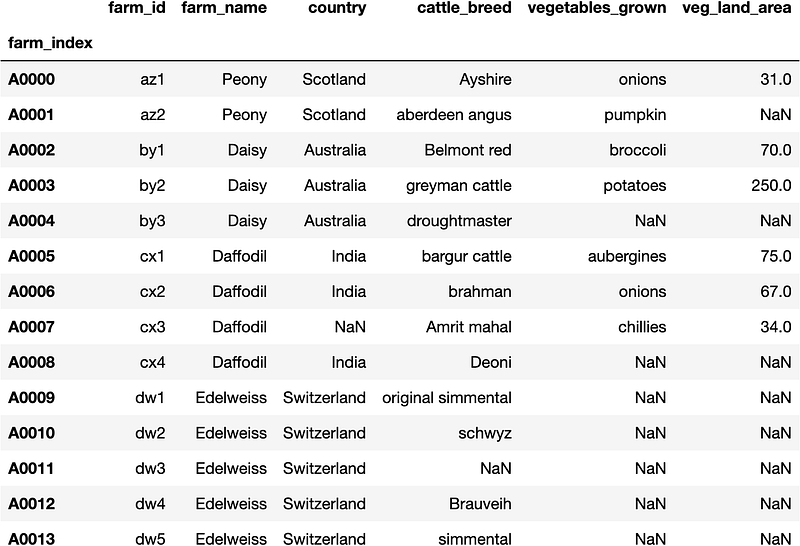
So as shown in figure 14 for the Edelweiss farms' vegetables_grown column is showing NaN values. Similarly, note I passed the veg_land_area column as well and it is showing NaN values as well. That shows that theEdelweiss farm has stopped all operations of vegetable growth. So let's be consistent and try to achieve the same with the iloc method.
iloc_farm.iloc[(iloc_farm['farm_name']=='Edelweiss'),\
               [4,5]] = np.nan
iloc_farm
Figure 14 shows the exact output as figure 13. So there you have it now you should be able to slice and dice and filter pandas data frames like a professional. If you found any of the information helpful follow me. Well done for making it to the end of the post. If you enjoyed the post write a comment. You have learnt to do :
- Slice data frames with
loc. - Slice data frames with
iloc, and - Conditionally filter data frames with
locandiloc.
Now you can slice and filter data to cook up a nice data story. Until next time happy learning.
Grab a cup of coffee, relax, and join the medium community here to expand your knowledge and thinking.🧠


