
IMPACT OF CHANGE
How to Feature Your Stories on Your Profile
Easy — once you know how. Also, how to change your story display order so readers see your most important stories first.

Synopsis
- Medium’s recent Portfolio changes have wreaked havoc in many areas. Some caused pieces to stop working (linked article at the end). However, the “Pin” and one-screen display as new readers scroll your profile can be an improvement — if you add a synopsis at the top of your stories. That’s a lot of extra work, but may be worth it.
- My article provides a step-by-step procedure on how to do both, plus how to build a Table-of-Contents.
- NOTE Nov 13, 2020: A bug cropped up that limits the number pinned. You won’t know if it happens. I found that more than 5 will not allow new stories to be displayed on your profile. I had 12. Unpinning them fixed the problem.
- NOTE July 22, 2021: Medium introduced a new feature, Lists, that reduces the work about 70%. The link to my article on how to use it is at the end.
What happened
Medium has made it extremely difficult for a new reader to see your entire portfolio.
Before, your profile displayed a list of titles and subtitles in the order published. You could pick one story as your featured story to appear first, at the top. I usually wanted two stories and choosing was difficult. I frequently wished that I could feature two.
Now, the visitor sees the top part of a story as if they opened it — picture, title, subtitle and a screen full of text with the option to click “more” to load the entire article. Nobody wants to scroll through 100 pages to see your full story list.
At first, I was very upset.
Then I noticed the “Pin” option. It will let you put the story you have open at the top of the list. It is far more powerful than the old “Featured” story option.
Story order
You can pin as many as you want, but you have to do it in reverse order. Whenever you publish a new story, it automatically goes to the top, pushing the current pinned story down one.
Fortunately, I have all of my articles in a spreadsheet. So, I ranked the top 20 and pinned all of them. That meant doing it in reverse order. Also, I had to go through the entire profile list, one page per story, to find the next one.
I almost got a cramp in my mouse finger!
Fortunately, I discovered an easier way today. Here is the process:
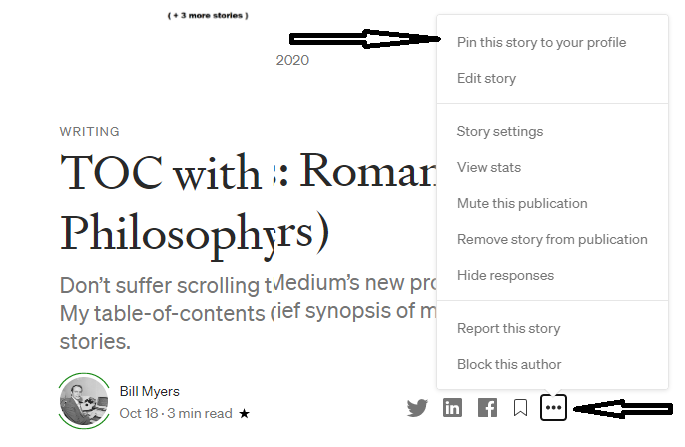
- Go to your Stats list
- Open the story you want to pin at the top
- Click the 3 dots menu on the author line
- Click “Pin this story to your profile”
- The top line changes to “Unpin” if the story is already pinned. It then goes back to date order.
You still have to do them in reverse order and you may have to redo your entire list if you want to rearrange them, but you can order as many as you want.
If you have pinned stories, a new story will automatically go to the top and those stories will be pushed down one position.
Story display
My initial reaction was to create a Table of Contents (TOC) story for a couple of categories and always keep it at the top. It worked well, so I was going to build 3 or 4 TOC stories to cover my main categories.
I put my most significant stories first with a synopsis for each, then listed the remainder.
Before I started, sanity prevailed!!!
One TOC story was good, but 3 or 4 would just propagate the problem. I will keep the TOC story, but just add more categories.
The synopsis is the key
Since a reader may be scrolling through your profile looking at stories, I am adding a synopsis to the beginning of each story.
My stories now follow this structure:
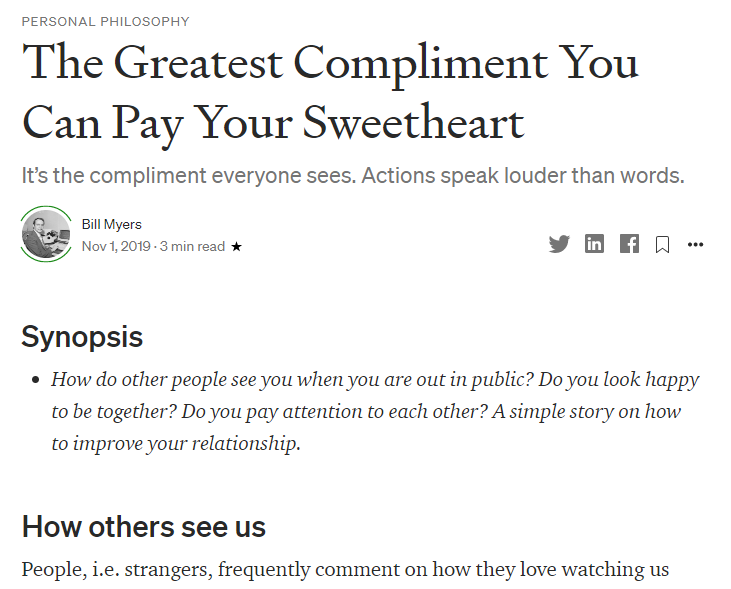
- Picture
- Kicker
- Title
- Subtitle
- Synopsis — an object summary, teaser, or what you want the reader to get out of the story. It provides the reason to read the story.
- Startup Heading
- Story
It will take about a week to add a synopsis to each of my 100 stories. I already have a few from my Table of Contents story.
Table of Contents
I had been thinking of this the last few weeks as a workaround for only one featured story, but the “Pin” feature turns out to be a better solution.
However, the Table of Contents is still important. The reader can see what you, the author, feel is significant.
I started with two sections, “My Favorites” and “Other.” I wrote a synopsis for my favorites and linked them into the story in order. I just linked the Others.
The nice thing about Medium is that you can fix or change something after it is already published. The publication date does not change, nobody is notified, and it does not change its position on your profile, but you don’t have to live with a typo forever.
In this case, I changed the approach to the story structure. I created sections for Romance and Philosophy after my writers club got through critiquing it at my reading this morning. It was not obvious where my links belonged, among a few dozen other things.
I will also add a TOC synopsis and more categories. You can even change the title after a story is published, but the old links containing the old title remain the same. That way, links in other stories do not fail.
I will add stories to the TOC as I write them. If it gets too large, I MAY add a second TOC for less important stories.
Conclusion
The most recent changes concerning the profile have not been nearly as bad as I first thought.
The “Pin” feature, if it wasn’t already there, is actually very powerful. The new full-page display method may also work better — when I get all of the synopses added. It would have been better, though, to add a synopsis field and just display the titles and that field instead of entire pages.
I have to complain about something, so, I don’t like the new logo. It is not obviously a part of Medium and implies 3 clickable buttons. Took me a while to get used to it. Also, instructions should be published and featured the instant changes are made.
Other than that, I like the “Pin” feature and maybe the page display, after I got used to it.
Many other changes, though, had a negative operational impact.
My greatest fear as a developer when installing an upgrade was that a feature already there would stop working. Evidently, that has happened with some Medium features that I, myself, do not use.
This article has 6 instances where that has happened with Medium’s latest upgrade. They are critical, stopping functionality, where my problems were just cosmetic.
Lists impact — July 2021
Medium installed a new feature that lets readers and writers create lists. That feature eliminates about 70% of the work needed to build a table-of-contents (TOC).
References
(added Jan 4, 2024)
These TOC lists are pinned at the top.
- Link to my biography story
- Other 14 TOC lists since I have over 200 stories
- TOC with the latest 10 stories, the latest story first


