
How to Enable Email Subscriptions on Medium
Generate more reads on your articles every time you publish!
Think about your droves of loyal readers — you wouldn’t want them to miss out on a word you write, right? And neither would you want to miss out on the chance to maximise your Medium Partner Program earnings — double right?
Whether you’ve 100 or 100,000 of them, give your Medium followers a gentle nudge each time you publish a new piece on Medium with a simple email alert. By enabling the feature on your profile, visitors to your stories will have the option to sign up to email notifications if they so desire. Once signed up, they’ll receive an email every time you press that ‘publish’ button on a brand new story.
Turn on and promote email subscriptions:
The good news? You’ll be up and running in a mere minute. Follow these simple steps to activate the email alert option.
- Click your profile icon 💁
- Click on ‘Settings’
- On the ‘Publishing’ tab, click on ‘Customize your subscription promotion message’
- Edit a promotion message as you wish (see below). Get your voice across and attract attention with your own creativity!
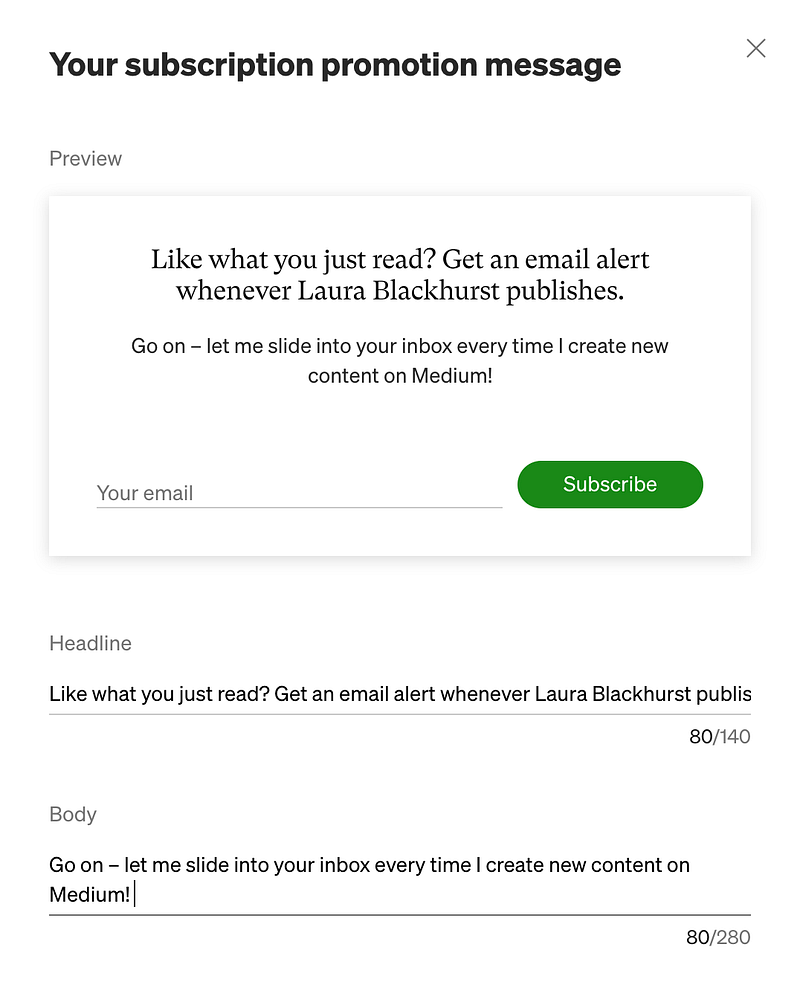
And where will it appear on your profile and articles? Visitors to your page will now see the green email button under your profile picture. One click will take them to the option to enter their email address to be alerted as soon as you publish. Secondly, you’ll see a promotion at the end of your articles, with your custom message included:

That’s it — really! Go forth and switch on this feature to give yourself another opportunity to encourage views. Not only will this equal greater awareness of your work, but it will increase your earnings on metered stories via time spent reading. Win-win-earn!
If you’d like to support my writing, you can join Medium as a member. For every member who signs up using my link will allow me to get a small portion of your membership fee. Thank you!


