Free AI web copilot to create summaries, insights and extended knowledge, download it at here
1653
Abstract
d">
</div>
</div>
</figure></iframe></div></div></figure><p id="b0f8">On a side note, look at the example in the code. If you’re into Basketball, a great way to keep motivated alone on the court day after day…after day…is to track your score :) I learned with the top shooter <a href="http://www.davehopla.com/">Dave Hopla</a>, in a shooting clinic.</p><h1 id="9d5b">Exporting to CSV File</h1><p id="25a6">The code responsible for the exporting to a CSV file part couldn’t be simpler. It’s a one-liner.</p>
<figure id="1f38">
<div>
<div>
            <iframe class="gist-iframe" src="/gist/vinimonteiro/fed503eaa1fb32af6650a6fca7f5d495.js" allowfullscreen="" frameborder="0" height="undefined" width="undefined">
          </div>
        </div>
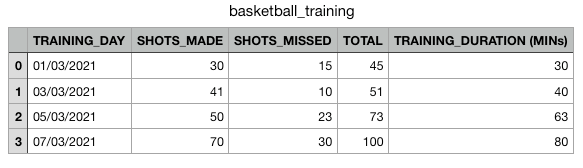
    </figure></iframe></div></div></figure><p id="97dd">After double-clicking the file, here’s how it shows in the “Numbers” tool (macOS alternative to Microsoft Excel)</p><figure id="7aef"><img src="https://cdn-images-1.readmedium.com/v2/resize:fit:800/1*EuQhB4-WycHUmIg2TA4NWg.png"><figcaption>Image by the author.</figcaption></figure><p id="2a62">I hope you enjoyed it, and thanks for reading.</p><p id="1532"><b><i>For further reading:</i></b></p><div id="0902" class="link-block">
      <a href="https://readmedium.com/python-for-beginners-install-and-run-your-first-code-50e51d6b8896">
        <div>
          <div>
            <h2>Python For Beginners: Install and Run Your First Code</h2>
            <div><h3>Take one step at a time.</h3></div>
            <div><p>medium.co
Options
m</p></div>
</div>
<div>
<div style="background-image: url(https://miro.readmedium.com/v2/resize:fit:320/0*8zzdSDxNSP4IbEE9)"></div>
</div>
</div>
</a>
</div><div id="c20d" class="link-block">
<a href="https://towardsdatascience.com/why-linear-regression-is-all-you-need-afb1304f8f8e">
<div>
<div>
<h2>Why Linear Regression is All You Need</h2>
<div><h3>Understand it, and getting into deep learning will become less of a struggle (still a struggle, but less)</h3></div>
<div><p>towardsdatascience.com</p></div>
</div>
<div>
<div style="background-image: url(https://miro.readmedium.com/v2/resize:fit:320/1*0JodALuTJPWfZw0UYGXB2w.png)"></div>
</div>
</div>
</a>
</div><div id="347b" class="link-block">
<a href="https://towardsdatascience.com/deploy-mnist-trained-model-as-a-web-service-ba333d233a5d">
<div>
<div>
<h2>Deploy MNIST Trained Model as a Web Service</h2>
<div><h3>I cover the training, service and client implementation. The service receives an image of a hand-written digit between…</h3></div>
<div><p>towardsdatascience.com</p></div>
</div>
<div>
<div style="background-image: url(https://miro.readmedium.com/v2/resize:fit:320/1*8XBXI91-GLsnsQ0HZIQVgg.png)"></div>
</div>
</div>
</a>
</div></article></body>