avatarCasey Botticello

Free AI web copilot to create summaries, insights and extended knowledge, download it at here

10525

Abstract

e55"><img src="https://cdn-images-1.readmedium.com/v2/resize:fit:800/1*BcjnxQvfcwfxF7xb0Kev9g.png"><figcaption></figcaption></figure><figure id="3a10"><img src="https://cdn-images-1.readmedium.com/v2/resize:fit:800/1*agFdr9Tapw4cX3hkATAa8A.png"><figcaption><b>Source</b>: <a href="http://www.medium.com/substack-writing">Substack Writing</a></figcaption></figure><p id="02bc"><b>Next, set up your publication name, tagline, and domain name. You also need to set up your profile:</b></p><figure id="b5e2"><img src="https://cdn-images-1.readmedium.com/v2/resize:fit:800/1*7Her8vt92zxk1w02wVhZpg.png"><figcaption></figcaption></figure><figure id="c25f"><img src="https://cdn-images-1.readmedium.com/v2/resize:fit:800/1*uW43pM87yXXPh1Bq9bYGiQ.png"><figcaption><b>Source</b>: <a href="http://www.medium.com/substack-writing">Substack Writing</a></figcaption></figure><p id="77f7">Don’t worry about having all this information figured out yet. You can edit any of these fields after completing your profile.</p><p id="b396">If you are wondering what the above field inputs look like once displayed on your profile, below are screenshots of my publication:</p><p id="fea8"><b>Note</b>: You publication name can be the same as your profile name (as seen below).</p><figure id="a832"><img src="https://cdn-images-1.readmedium.com/v2/resize:fit:800/1*0WNQzh9fIBEKklewSfmmPw.png"><figcaption><b>Source</b>: <a href="http://bit.ly/medium-featured-image">Medium Blogging Guide</a></figcaption></figure><figure id="ed9a"><img src="https://cdn-images-1.readmedium.com/v2/resize:fit:800/1*yzI5wkcJ6ahr4LnoNbBLZg.png"><figcaption><b>Source</b>: <a href="http://bit.ly/medium-featured-image">Medium Blogging Guide</a></figcaption></figure><p id="9ced"><b>Next, you can import your contacts. These are people who have opted in to receive email newsletters from you.</b></p><figure id="0bf4"><img src="https://cdn-images-1.readmedium.com/v2/resize:fit:800/1*n-k4xoqnYbefHQHyEXtDrA.png"><figcaption><b>Source</b>: <a href="http://www.medium.com/substack-writing">Substack Writing</a></figcaption></figure><p id="f19a">You can import from TinyLetter, MailChimp, or any spreadsheet — just save the file as CSV. The import tool will import any email it finds, so make sure you only upload current subscribers.</p><p id="e461">If you want to add emails one at a time (you only have a few), you can enter them under the “Import free signup for email” section.</p><p id="fa85">You can also give away paid subscriptions to users you want to grant access to your premium content, but do not want to charge. Enter their email below the section header “Give away paid subscription for free” and choose the length of their free access (free subscriptions can range in duration from 7 days to forever):</p><figure id="f32f"><img src="https://cdn-images-1.readmedium.com/v2/resize:fit:800/1*QhCL697OY7ePYmM8ZHEarw.png"><figcaption><b>Source</b>: <a href="http://www.medium.com/substack-writing">Substack Writing</a></figcaption></figure><p id="872f">The last step is to enable payments.</p><p id="9e8f"><b>Note</b>: You may have to write one post before payments can be enabled and fully linked to your Stripe account (step 3).</p><p id="ff12"><b>To enable payments, click the “Settings” button at the top of your account:</b></p><figure id="88c8"><img src="https://cdn-images-1.readmedium.com/v2/resize:fit:800/1*UgqNfzDg7Bgpcznwm_2fYQ.png"><figcaption><b>Source</b>: <a href="http://www.medium.com/substack-writing">Substack Writing</a></figcaption></figure><p id="cb3a">You must check the enable payments button and follow the steps to connect your Stripe account:</p><figure id="3817"><img src="https://cdn-images-1.readmedium.com/v2/resize:fit:800/1*lABV69ll1FQzrialQT3NAw.png"><figcaption><b>Source</b>: <a href="http://bit.ly/medium-featured-image">Medium Blogging Guide</a></figcaption></figure><p id="b81f"><b>If you don’t have a Stripe account you will be prompted to create one.</b></p><p id="de4e">You can also enter the amount of money you want to charge paying subscribers. Currently, 5 per month and 30 per month are the minimum payment amounts. The only way to lower this is to create a special offer (as I have, in the example above, as a limited time offer).</p><h1 id="1c11">Step 3. Write and Publish Your First Post</h1><p id="0a27">As with most publishing platforms, taking the initial plunge and writing your first post can seem daunting.</p><p id="c6b3">Fortunately, Substack (like Medium) makes writing and publishing content very simple.</p><p id="19c1">The Substack editor is fairly straightforward, but if you want to learn more about formatting your post, you can refer to this diagram:</p><figure id="40c5"><img src="https://cdn-images-1.readmedium.com/v2/resize:fit:800/1*GEciJLV0JCJWNUrdFCsg7A.png"><figcaption><b>Source</b>: <a href="http://www.medium.com/substack-writing">Substack Writing</a></figcaption></figure><p id="843b">Substack also makes email marketing very simple.</p><p id="fb19">After writing a post, you are presented with a few options for publishing:</p><figure id="02df"><img src="https://cdn-images-1.readmedium.com/v2/resize:fit:800/1*RoGiiiBh6r-kxRtSZKGINA.png"><figcaption><b>Source</b>: <a href="http://www.medium.com/substack-writing">Substack Writing</a></figcaption></figure><p id="1053">You can publish your post to three main groups of people:</p><ol><li><b>Everyone </b>— meaning anyone, regardless of whether they submit their email or pay for access, can read your content.</li><li><b>Only Paying Subscribers </b>— Meaning that the content can only be viewed by paying subscribers.</li><li><b>Only Free Signups</b> — This means that only readers who provide an email (and essentially opt in to the free version of your newsletter) can sign up.</li></ol><p id="f9d1">Similarly, you can restrict who is allowed to comment on your post, depending upon which of the three options above you select.</p><p id="dc44">You can also choose whether you want to only make a post on your Substack website or whether you also want all your subscribers to receive an email. To send all your subscribers an email, you must check the box labeled “Send email to subscribers.”</p><figure id="efd6"><img src="https://cdn-images-1.readmedium.com/v2/resize:fit:800/1*ptppqWrqcuRXf9BZrummVw.png"><figcaption><b>Source</b>: <a href="http://www.medium.com/substack-writing">Substack Writing</a></figcaption></figure><p id="c8b9">If you wish to schedule your post for a later date, simply click on the “Schedule for later…” link and select the time you want your email sent at:</p><figure id="515e"><img src="https://cdn-images-1.readmedium.com/v2/resize:fit:800/1*bwKH4wQ2c2AYqnDkUE4KXA.png"><figcaption><b>Source</b>: <a href="http://www.medium.com/substack-writing">Substack Writing</a></figcaption></figure><h1 id="f300">Step 4. Promote Your Newsletter</h1><p id="bc13">Substack handles most of the technical details associated with creating a subscription email newsletter, allowing you to focus more of your energy on writing.</p><p id="dd6a">However, Substack is a publishing tool, not a marketing tool.</p><p id="fdce">In order for your newsletter/website to receive traffic and subscribers, you are going to need to promote your newsletter.</p><h2 id="9110">What are some way to promote your newsletter?</h2><ul><li><b>Include a link to your newsletter in the call to action (CTA) section at the end of articles published on other platforms</b>. Below is an example of a link to my newsletter at the end of a Medium article:</li></ul><figure id="9e53"><img src="https://cdn-images-1.readmedium.com/v2/resize:fit:800/1*QD4lvWRR7mB7BdLplBqZ8Q.png"><figcaption><b>Source</b>: <a href="http://bit.ly/medium-featured-image">Medium Blogging Guide</a></figcaption></figure><ul><li><b>Include links to your newsletter on various <a href="https://mediumbloggingguide.substack.com/p/platforms-to-write-on-besides-medium">social media platforms</a> in the bio section.</b></li><li><b>Share your newsletter on forums or niche sites related to your chosen topic.</b></li><li><b>Use targeted Facebook advertising to sort people by their interests and promote your newsletter to people who already like the topic you write about </b>(but have likely never heard of your newsletter).</li><li><b>Share your newsletter with friends, family, and pretty much anyone who will listen to you</b>. Remember, getting paid subscribers is very hard, but the ROI is extremely high because, if you do a good job producing content, you have now found an audience that will continue to pay to read about your passion, on a recurring basis.</li></ul><h1 id="761e">Step 5. Monitor Your Newsletter Results</h1><p id="59b6">Substack provides data analytics tools to help you understand where your traffic (and viewers) are coming from, how many people are reading your newsletter, and the user-specific activity of each subscriber.</p><p id="f6a6"><b>To see how many people have viewed your Substack newsletter, click on the “Stats” button in the upper right hand corner of the page:</b></p><figure id="4610"><img src="https://cdn-images-1.readmedium.com/v2/resize:fit:800/1*cAG6GuuQg9hJDffuYYwk_Q.png"><figcaption><b>Source</b>: <a href="http://bit.ly/medium-featured-image">Medium Blogging Guide</a></figcaption></figure><p id="e6b2">The first image on the page is a graph displaying your website visitors over the last month:</p><figure id="5123"><img src="https://cdn-images-1.readmedium.com/v2/resize:fit:800/1*46g8vSe6q9NPk6rzwYLD8w.png"><figcaption><b>Source</b>: <a href="http://bit.ly/medium-featured-image">Medium Blogging Guide</a></figcaption></figure><p id="509e">Below the graph is a chart which tracks the sources of your web traffic, and perhaps most importantly, breaks down whether those visitors signed up for your newsletter, and if so, whether they became a free or paid subscriber.</p><figure id="c8e0"><img src="https://cdn-images-1.readmedium.com/v2/resize:fit:800/1*vQF0jbQtlPDno3lsOx3fuQ.png"><figcaption><b>Source</b>: <a href="http://bit.ly/medium-featured-image">Medium Blogging Guide</a></figcaption></figure><p id="45a7">This an extremely valuable feature. For those <a href="https://readmedium.com/medium-data-analytics-tools-fcb390edf366">familiar with my analysis of Medium data analytics</a>, Substack’s data analytics are a bit more sparse than Medium’s. But Substack’s data analytics includes conversion rates, which from a content creator’s perspective, is of the utmost importance.</p><p id="bfac">If you wa

Options

nt to see the activity of an individual subscriber (free or paid), click on the <b>“Subscribers” button in the upper right hand corner of the page:</b></p><figure id="ba9e"><img src="https://cdn-images-1.readmedium.com/v2/resize:fit:800/1*1Xl2gOT9Vu1VXQ_TlavBfg.png"><figcaption><b>Source</b>: <a href="http://bit.ly/medium-featured-image">Medium Blogging Guide</a></figcaption></figure><p id="99cb"><b>If you scroll down the page, you will see a list of your email subscribers:</b></p><figure id="0c79"><img src="https://cdn-images-1.readmedium.com/v2/resize:fit:800/1*tkNvgV1MwVt_5nqWuE29kg.png"><figcaption><b>Source</b>: <a href="http://bit.ly/medium-featured-image">Medium Blogging Guide</a></figcaption></figure><p id="d95b">If you click on a specific email, you can see the detailed activity of each subscriber:</p><figure id="b29e"><img src="https://cdn-images-1.readmedium.com/v2/resize:fit:800/1*59NRGcGQBY0LzAB44uQIvg.png"><figcaption><b>Source</b>: <a href="http://bit.ly/medium-featured-image">Medium Blogging Guide</a></figcaption></figure><p id="aedc">For example, in the screenshot above, you can see that the user:</p><blockquote id="d2af"><p>— First signed up for <a href="https://mediumbloggingguide.substack.com">Medium Blogging Guide</a> on March 11th.</p></blockquote><blockquote id="fa63"><p>— Next, they received an email with my post on March 13th (<a href="https://mediumbloggingguide.substack.com/p/gumroad-and-medium">Gumroad & Medium</a>).</p></blockquote><blockquote id="995f"><p>— A few days later, they received another email, on March 16th (<a href="https://mediumbloggingguide.substack.com/p/platforms-to-write-on-besides-medium">Platforms to Write on Besides Medium</a>)</p></blockquote><blockquote id="d555"><p>They opened first email twice on March 17th (<a href="https://mediumbloggingguide.substack.com/p/gumroad-and-medium">Gumroad & Medium</a>).</p></blockquote><blockquote id="ef37"><p>They upgraded to become a paid subscriber on March 21st</p></blockquote><p id="c0e3">Substack’s subscriber-specific analytics provide enormous insight into the patterns of your subscribers.</p><p id="1a4f">You can use this data to:</p><ul><li>Determine what posts lead to a higher subscriber sign up rate</li><li>See whether a specific user opened your latest email</li><li>Establish the proper ratio of free to paid content in order to optimize paying subscribers</li></ul><p id="8a12">You can also view traditional stats associated with each email you send. These metrics include:</p><ul><li><b>Total views</b></li><li><b>How many people received your email (email recipients)</b></li><li><b>What percentage of those recipients opened your email (open rate)</b></li><li><b>How many people subscribed to your newsletter after reading a post</b></li><li><b>Percentage of people who read an email and clicked on <i>any </i>link (click rate)</b></li><li><b>Top links among the links that were clicked (subset of click rate)</b></li></ul><figure id="9178"><img src="https://cdn-images-1.readmedium.com/v2/resize:fit:800/1*dL_5pitFRv4377wO6e4n2Q.png"><figcaption><b>Source</b>: <a href="http://bit.ly/medium-featured-image">Medium Blogging Guide</a></figcaption></figure><h1 id="8ff7">Step 6. Establish Publishing Pattern</h1><p id="d655">The final step in creating a successful Substack newsletter is to establish (and stick to) a planned publishing pattern.</p><p id="b939">Many writers on Substack attempt to monetize their newsletter too early — unless you are providing readers with truly exceptional content, most will not subscribe to a newsletter until they have at least sampled your back catalogue of posts.</p><p id="2cc3">Conversely, it can be hard to flip the switch and start charging readers for access to your publication. After all, you are committing to produce up to a year of additional content for them.</p><p id="e1b8">The strategy I would suggest is following one of the two sample newsletter posting schedules, below:</p><blockquote id="3418"><p><b>Strategy 1</b>— Post 1–3 free posts per week for 3 months (to build an audience) and then switch to 1 free post per week + 2 paid posts per week</p></blockquote><blockquote id="e93a"><p><b>Strategy 2 </b>— Post 4–5 posts per week from the start, with one or two of the posts being free and the other posts for paying subscribers only.</p></blockquote><p id="2f6c">However, there is no single magic posting schedule that will work for every newsletter.</p><p id="ba10">How soon you can successfully monetize your newsletter depends on many factors, including the value of your content to readers, the size of your existing fan base (if any), and your willingness to promote your publication.</p><p id="8410">Another consideration when establishing a publishing pattern is establishing the value of your back catalogue of subscriber only-posts.</p><p id="21a9">You back catalogue of subscriber-only posts simply refers to all the paid posts which exist in your archives and become instantly accessible once someone becomes a paying subscriber.</p><p id="eae6">If you are writing a topical newsletter, the value of old paid posts may be relatively small (<i>are your new subscribers going to read you posts on a news topic from a year ago?</i>).</p><p id="09e3">If your posts are mostly valuable, <a href="https://readmedium.com/what-is-evergreen-content-and-why-is-it-important-43ab14c74406">evergreen content</a>, meaning the content is essentially timeless and will always be of interest or value to your fan base, you may be able to factor these posts into the subscription cost (possibly increase the cost if you have a valuable back catalogue of paid posts)</p><div id="141e" class="link-block"> <a href="https://readmedium.com/what-is-evergreen-content-and-why-is-it-important-43ab14c74406"> <div> <div> <h2>What Is Evergreen Content and Why Is It Important?</h2> <div><h3>The importance of evergreen content for any writer, marketer, or entrepreneur</h3></div> <div><p>medium.com</p></div> </div> <div> <div style="background-image: url(https://miro.readmedium.com/v2/resize:fit:320/1*udcFEyb3ABsJelJcpexy-g.png)"></div> </div> </div> </a> </div><p id="5150">Regardless of how much you end up charging or how many times per week you end up posting, Substack is definitely not a get rich quick scheme.</p><p id="c794">But for writers who are already exploring their passion, it may be the perfect vehicle to monetize their content.</p><p id="5019"><a href="undefined">Casey Botticello</a></p><p id="5ece"><i>Thanks for reading this article! Leave a comment below if you have any questions, and if you want to learn more about blogging, content marketing, or subscription newsletter strategy, be sure to sign up for the <a href="https://bloggingguide.substack.com"><b>Blogging Guide Newsletter</b></a>!</i></p><div id="6c7e" class="link-block"> <a href="https://bloggingguide.substack.com"> <div> <div> <h2>Blogging Guide</h2> <div><h3>Learn how to make money writing online and navigate the digital publishing landscape! ✔️ Medium ✔️ Substack ✔️ Amazon…</h3></div> <div><p>bloggingguide.substack.com</p></div> </div> <div> <div style="background-image: url(https://miro.readmedium.com/v2/resize:fit:320/0*AAcjK3UII8QUo4u9)"></div> </div> </div> </a> </div><h2 id="f68a">If you liked this article, here are some other articles you may enjoy:</h2><div id="8955" class="link-block"> <a href="https://bloggingguide.com/how-to-sell-your-blog/"> <div> <div> <h2>How to Sell Your Blog - Blogging Guide</h2> <div><h3>You've worked hard to build, scale, and monetize your blog. And now you're ready to sell. But how? Read our guide on…</h3></div> <div><p>bloggingguide.com</p></div> </div> <div> <div style="background-image: url(https://miro.readmedium.com/v2/resize:fit:320/0*0uUCcQua8VosXyA7)"></div> </div> </div> </a> </div><div id="9a27" class="link-block"> <a href="https://bloggingguide.com/how-to-start-a-subscription-newsletter/"> <div> <div> <h2>How to Start a Subscription Newsletter — Blogging Guide</h2> <div><h3>Learn how to start a subscription newsletter.</h3></div> <div><p>bloggingguide.com</p></div> </div> <div> <div style="background-image: url(https://miro.readmedium.com/v2/resize:fit:320/0*sjSwCPQhsvpgI2X1)"></div> </div> </div> </a> </div><figure id="04d0"><img src="https://cdn-images-1.readmedium.com/v2/resize:fit:800/0*jxGUDN_JEbAGoOsa.png"><figcaption></figcaption></figure><p id="1c21"><a href="http://www.caseybotticello.com"><b>Casey Botticello</b></a> is an internet entrepreneur and the founder of <a href="https://bloggingguide.com"><b>Blogging Guide</b></a>, an online community of writers with an<b> <a href="https://bloggingguide.substack.com">award-winning newsletter</a></b>. He is also the creator of the popular <a href="https://gumroad.com/l/medium-course"><b>Medium Writing Course</b></a><b> and the <a href="https://bloggingguide.gumroad.com/l/substack-course">Substack Newsletter Course</a>.</b></p><p id="2a73">Casey previously worked at several tech startups, a lobbying & strategic communications firm, and has created several businesses of his own. He is a graduate of The University of Pennsylvania, where he received his B.A. in Urban Studies.</p><blockquote id="7edb"><p><i>You can connect with him on <a href="https://www.linkedin.com/in/caseybotticello/"><b>LinkedIn</b></a>, <a href="https://twitter.com/blogging__guide"><b>Twitter</b></a>, <a href="https://www.facebook.com/groups/mediumwriting"><b>Facebook</b></a>, follow his Medium publications, <a href="https://medium.com/digital-marketing-lab"><b>Digital Marketing Lab</b></a><b> </b>and <a href="https://medium.com/blogging-guide"><b>Medium Blogging Guide</b></a><b>, </b>or reach out to him directly on his<b> <a href="http://www.caseybotticello.com">personal website</a>.</b></i></p></blockquote></article></body>

Blogging Guide Presents:

How to Create a Substack Newsletter

How to create a successful subscription email newsletter on Substack
Source: Casey Botticello of Blogging Guide

UPDATED ARTICLE (2023):

What is Substack?

Substack is an email newsletter platform designed for small publishers hoping to turn their subscribers into paying customers.

Writers get a content management system (CMS) built for publishing email newsletters, integrated payments through Stripe, and a website that can host free and subscriber-only content.

Substack makes it very simple for a writer to start a paid or free newsletter.

Why Should I Create a Substack Newsletter?

There are numerous benefits to publishing on Substack, as opposed to your own self-hosted blog or another digital publishing platform:
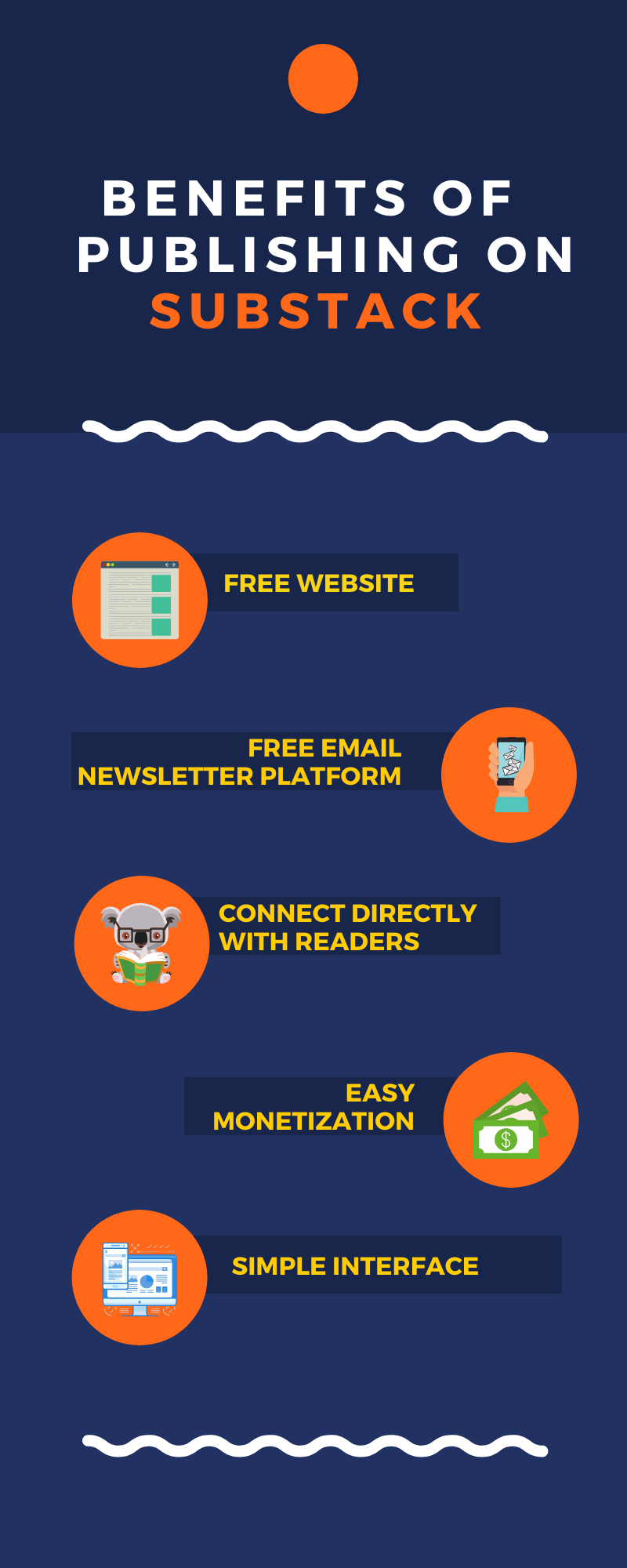
Source: Substack Writing

How Do I Create a Substack Newsletter?

Creating a Substack newsletter is surprisingly easy. Below is an infographic outlining the main steps. Below the infographic you can find the detailed step-by-step instructions.
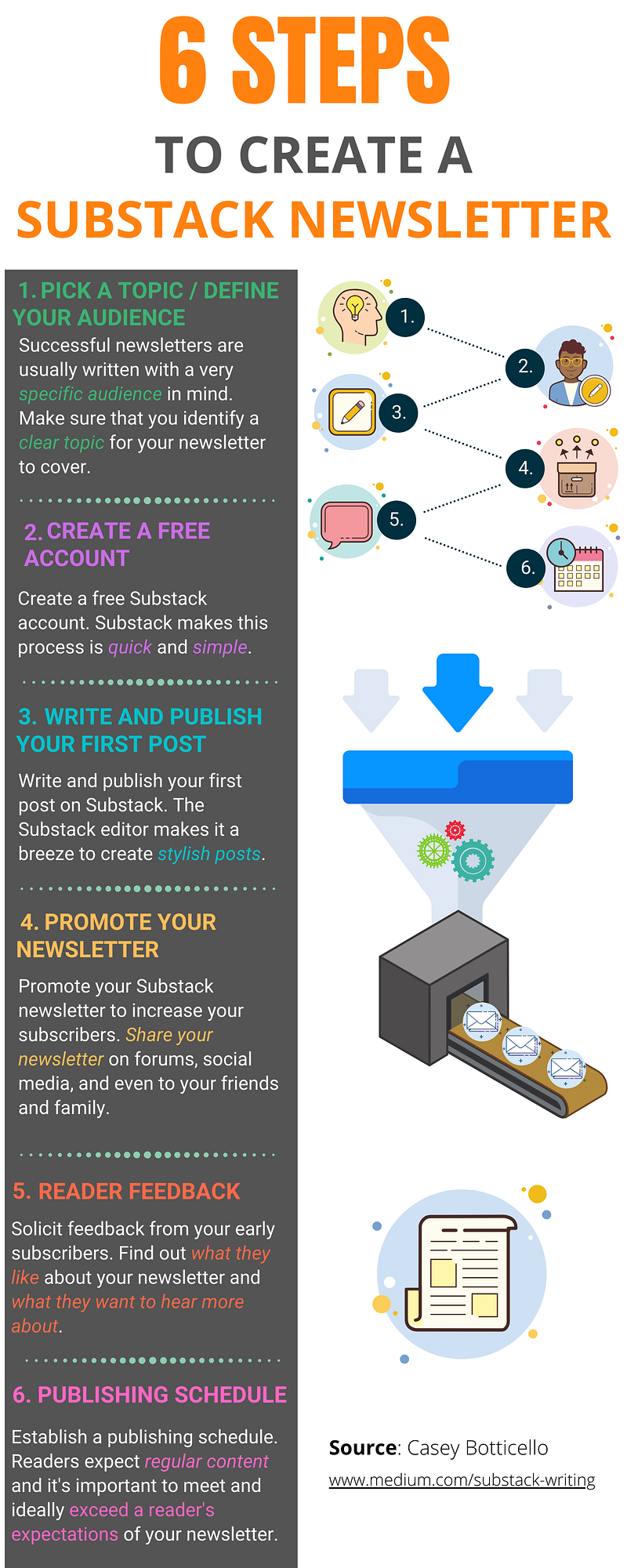
Source: Substack Writing

Step 1. Define Your Audience / Pick Topic

Substack is, in many ways, a publishing tool which enables writers to monetize their writing in accordance with the 1,000 True Fans concept.

More than a decade ago, Wired editor Kevin Kelly wrote an essay called “1,000 True Fans,” predicting that the internet would allow large swaths of people to make a living off their creations, whether an artist, musician, author, or entrepreneur.

Rather than pursuing widespread fame and recognition, he argued that creators only needed to build a modest base of “true fans” — those who will “buy anything you produce.”

By embracing online networks, he believed creators could bypass traditional gatekeepers and middlemen, and get paid directly by a smaller but highly devoted base of fans.

Substack is the embodiment of this concept.

So one of the first steps is to identify your audience.

Some of the questions you should be able to answer are:

  • What niche am I providing content for?
  • Do I have the time to consistently produce content for this group?
  • Is my intended niche conducive to writing newsletter posts, which my audience will receive several times per week?

As an example, one of Substack’s most successful newsletters is Sinocism. The Sinocism China Newsletter is an email newsletter written by Bill Bishop that helps readers better understand China.

The newsletter typically consists of 4 posts weekly. These are delivered to readers via email and available on the Substack website. Three of those posts are “locked” or “paid” posts — meaning they are only viewable for paying subscribers. The remaining post is usually “unlocked” or a “free” post. These posts do not require a paid subscription and are available to any reader (they basically serve as a free preview of his newsletter).

Sinocism offers content promising to “make you smarter about China.” The newsletter is considered a must read by diplomats, policymakers, investors, executives, journalists, and academics who want to better understand China and get regular commentary on Chinese and English language news.

While you do not need to be an industry veteran to publish a newsletter on a topic, obviously it goes a long way toward establishing credibility on a certain subject.

Before writing Sinocism, Bill Bishop was a media executive with more than a decade’s experience living in and decoding China. He previously wrote the Axios China weekly newsletter and the China Insider column for the New York Times Dealbook.

Due to his expertise on the subject, the tremendous demand for cutting edge news on China, and his consistently high quality content, Bishop is able to charge $15 per month or $168 per year to his nearly 80,000 paying subscribers!

In contrast, my newsletter, Medium Blogging Guide focuses on helping writers make money on Medium. Making money on Medium is not nearly as complex a topic as China, but there is a strong demand for help navigating and optimizing the digital publishing landscape, and Medium is one of the major sites.

My newsletter is (currently discounted to) $2.50 per month or $15 per year. However, this price point works because I am easily able to provide value to my readers, which can boost their Medium writing earnings far more than the $15 per year my newsletter costs.

This price point works because I am easily able to provide value to my readers, which can boost their Medium writing earnings far more than the $15 per year my newsletter costs.

As with any product you create, and intend to monetize, it is important to make sure there is sufficient demand.

However, with the global reach of the internet, finding your “1,000 True Fans” has never been easier.

You can also make all of your content free, and take of advantage of Substack’s content management system (CMS) built specifically for publishing email newsletters and the free website, which is included with a free Substack account.

Step 2. Create a Free Account

Once you have identified a topic and prospective audience for your newsletter, you need to create a Substack account.

Luckily, Substack makes this process very simple.

Simply go to www.substack.com and click on Publish on Substack or the Get Started Button in the upper right hand corner of the page.
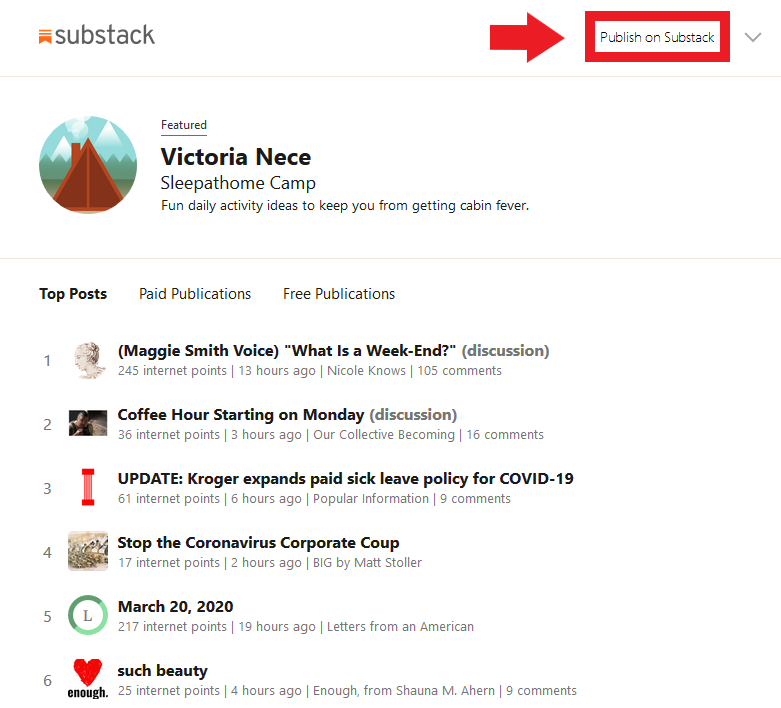
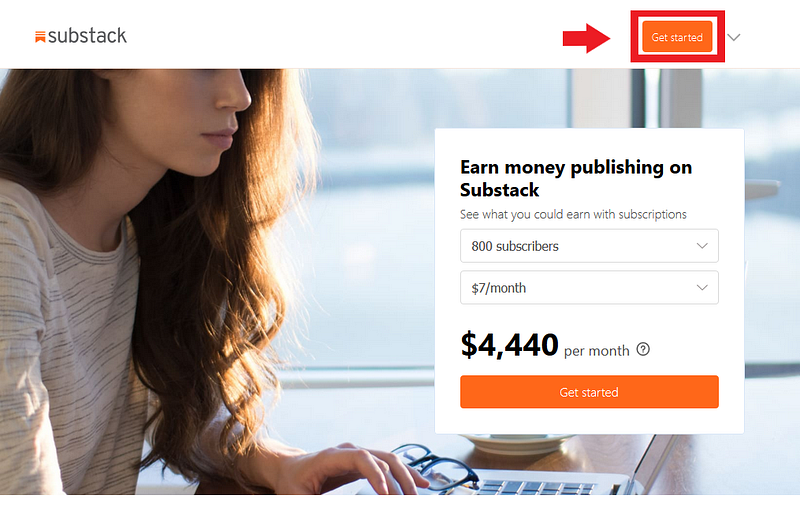
Source: Substack Writing

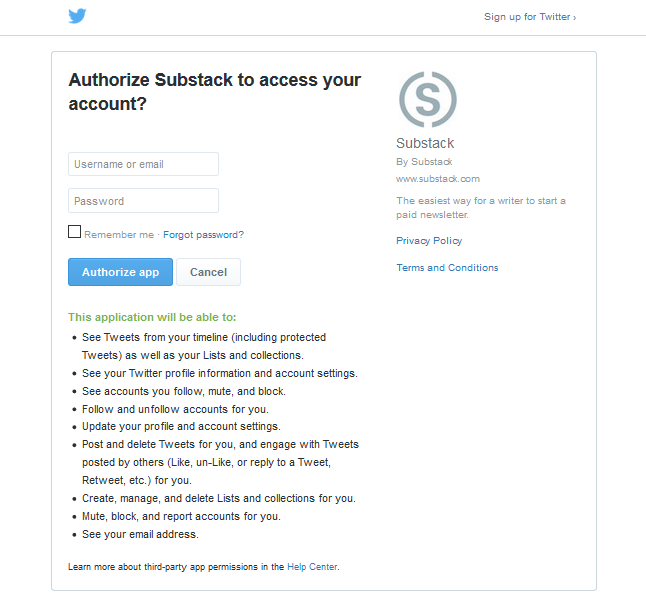
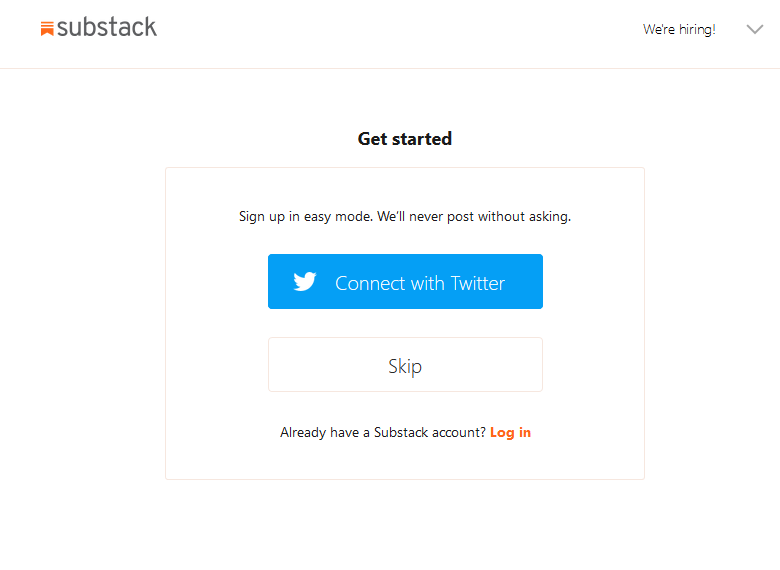
You can then sign up using either your email or Twitter account:
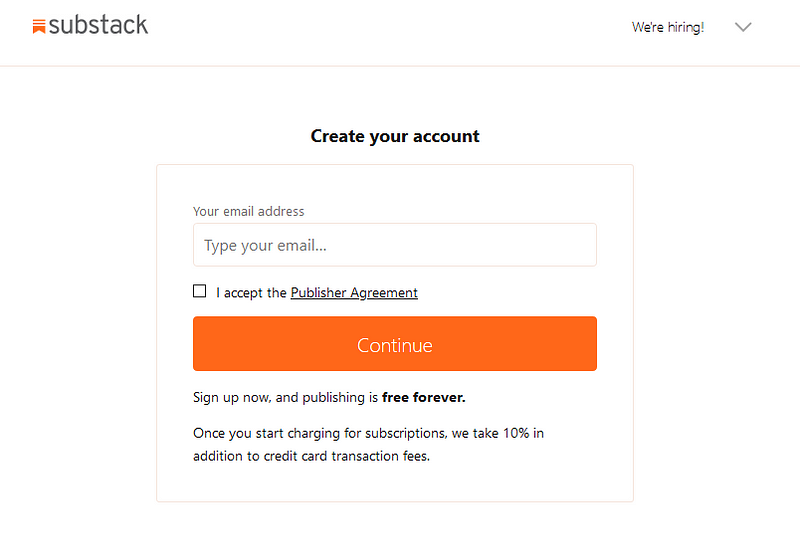
Source: Substack Writing

Next, set up your publication name, tagline, and domain name. You also need to set up your profile:
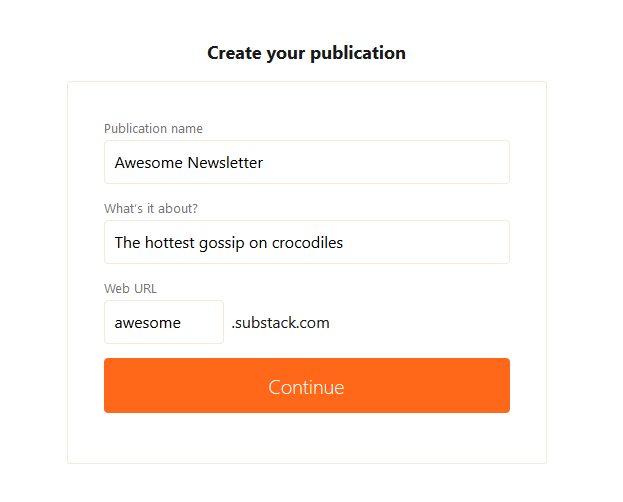
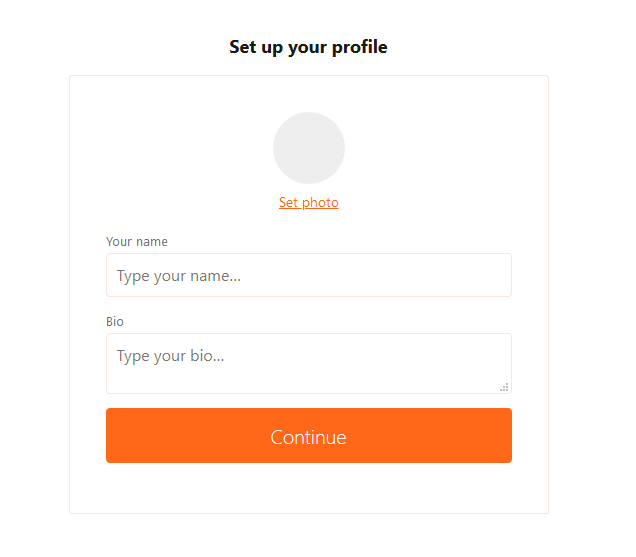
Source: Substack Writing

Don’t worry about having all this information figured out yet. You can edit any of these fields after completing your profile.

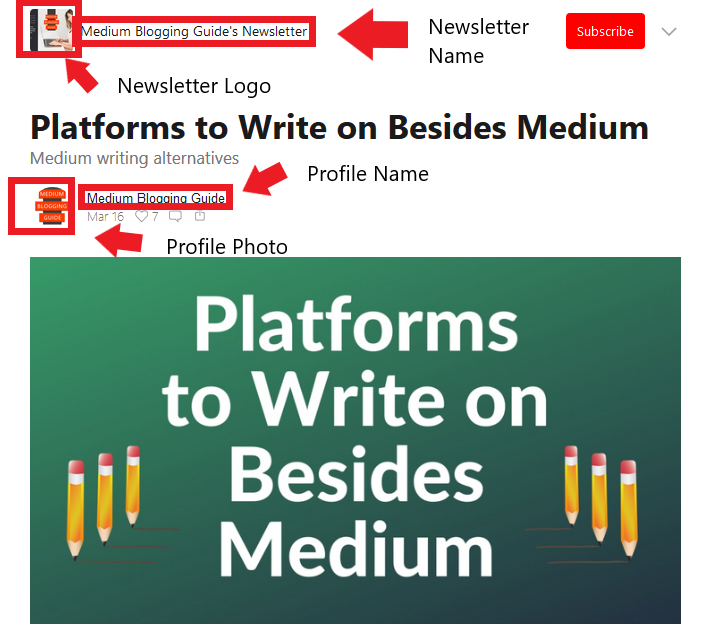
If you are wondering what the above field inputs look like once displayed on your profile, below are screenshots of my publication:

Note: You publication name can be the same as your profile name (as seen below).
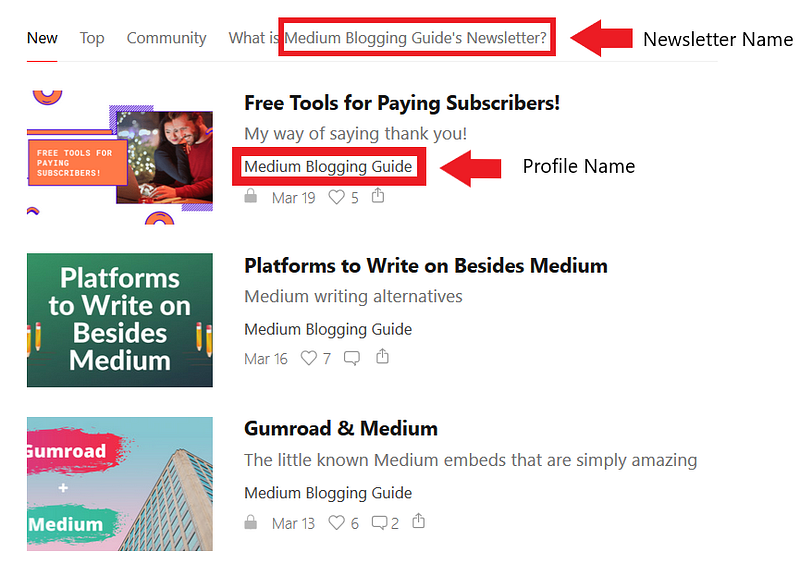
Source: Medium Blogging Guide

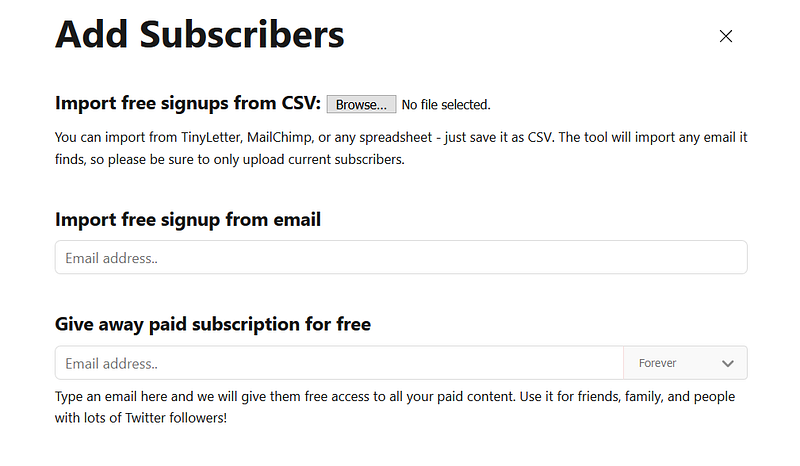
Next, you can import your contacts. These are people who have opted in to receive email newsletters from you.
Source: Substack Writing

You can import from TinyLetter, MailChimp, or any spreadsheet — just save the file as CSV. The import tool will import any email it finds, so make sure you only upload current subscribers.

If you want to add emails one at a time (you only have a few), you can enter them under the “Import free signup for email” section.

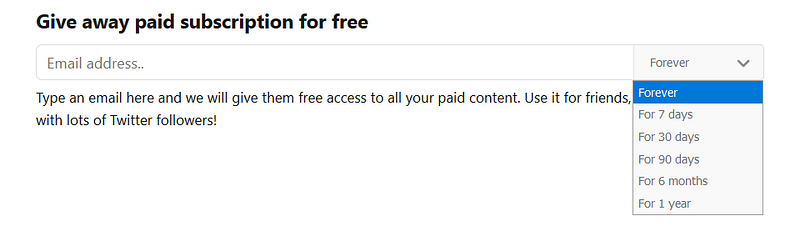
You can also give away paid subscriptions to users you want to grant access to your premium content, but do not want to charge. Enter their email below the section header “Give away paid subscription for free” and choose the length of their free access (free subscriptions can range in duration from 7 days to forever):
Source: Substack Writing

The last step is to enable payments.

Note: You may have to write one post before payments can be enabled and fully linked to your Stripe account (step 3).

To enable payments, click the “Settings” button at the top of your account:

Source: Substack Writing

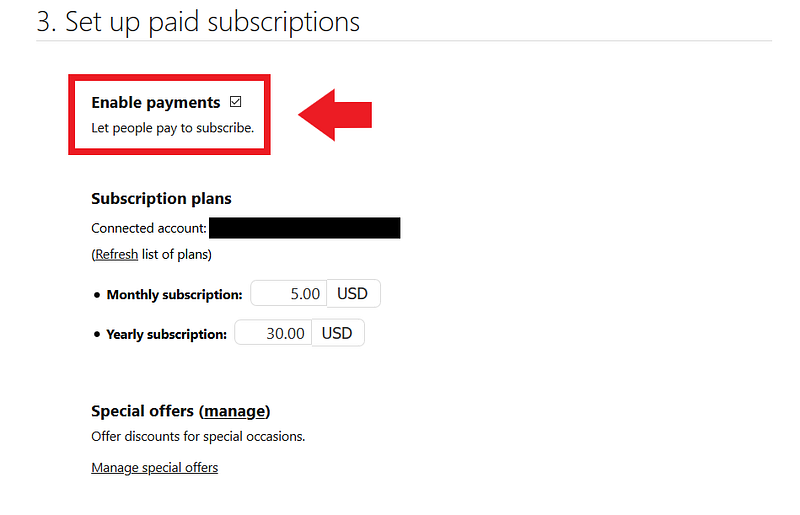
You must check the enable payments button and follow the steps to connect your Stripe account:
Source: Medium Blogging Guide

If you don’t have a Stripe account you will be prompted to create one.

You can also enter the amount of money you want to charge paying subscribers. Currently, $5 per month and $30 per month are the minimum payment amounts. The only way to lower this is to create a special offer (as I have, in the example above, as a limited time offer).

Step 3. Write and Publish Your First Post

As with most publishing platforms, taking the initial plunge and writing your first post can seem daunting.

Fortunately, Substack (like Medium) makes writing and publishing content very simple.

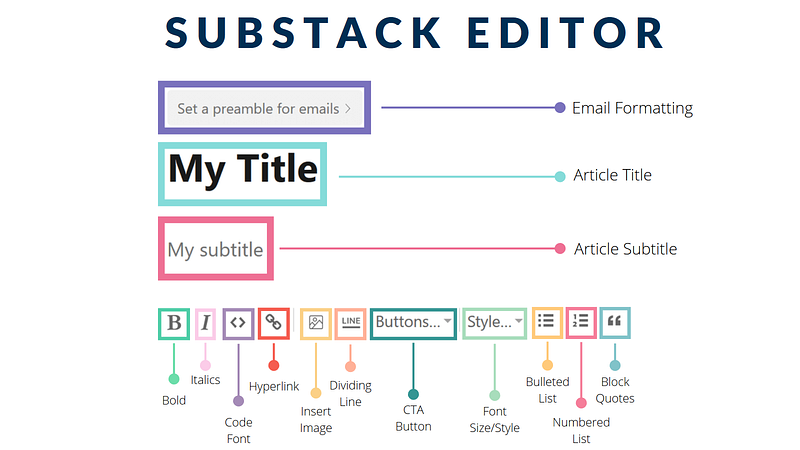
The Substack editor is fairly straightforward, but if you want to learn more about formatting your post, you can refer to this diagram:
Source: Substack Writing

Substack also makes email marketing very simple.

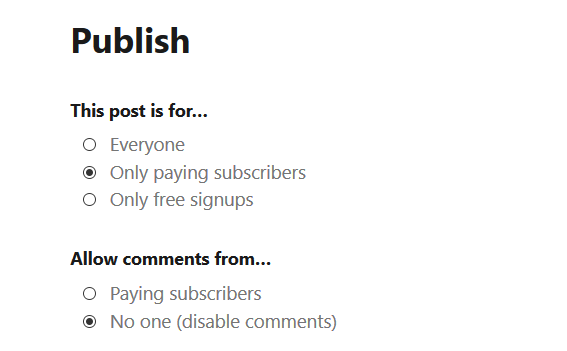
After writing a post, you are presented with a few options for publishing:
Source: Substack Writing

You can publish your post to three main groups of people:

  1. Everyone — meaning anyone, regardless of whether they submit their email or pay for access, can read your content.
  2. Only Paying Subscribers — Meaning that the content can only be viewed by paying subscribers.
  3. Only Free Signups — This means that only readers who provide an email (and essentially opt in to the free version of your newsletter) can sign up.

Similarly, you can restrict who is allowed to comment on your post, depending upon which of the three options above you select.

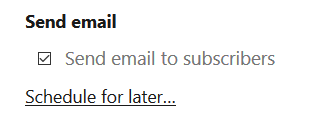
You can also choose whether you want to only make a post on your Substack website or whether you also want all your subscribers to receive an email. To send all your subscribers an email, you must check the box labeled “Send email to subscribers.”
Source: Substack Writing

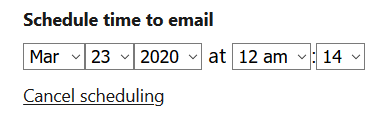
If you wish to schedule your post for a later date, simply click on the “Schedule for later…” link and select the time you want your email sent at:
Source: Substack Writing

Step 4. Promote Your Newsletter

Substack handles most of the technical details associated with creating a subscription email newsletter, allowing you to focus more of your energy on writing.

However, Substack is a publishing tool, not a marketing tool.

In order for your newsletter/website to receive traffic and subscribers, you are going to need to promote your newsletter.

What are some way to promote your newsletter?

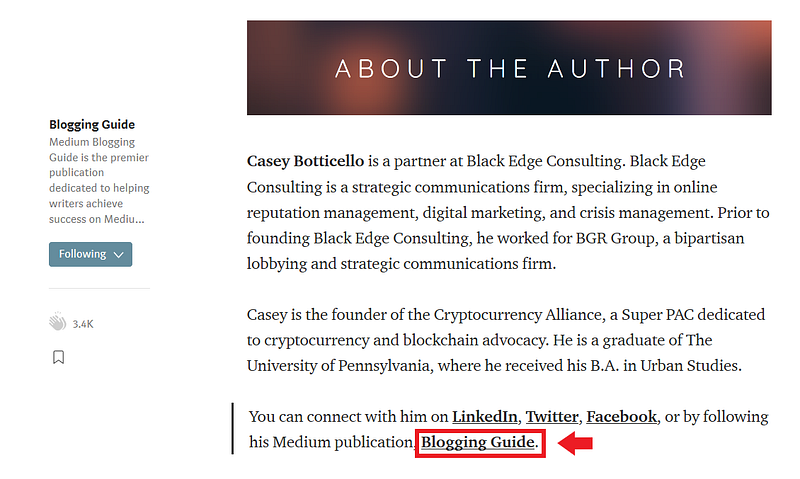
  • Include a link to your newsletter in the call to action (CTA) section at the end of articles published on other platforms. Below is an example of a link to my newsletter at the end of a Medium article:
Source: Medium Blogging Guide
  • Include links to your newsletter on various social media platforms in the bio section.
  • Share your newsletter on forums or niche sites related to your chosen topic.
  • Use targeted Facebook advertising to sort people by their interests and promote your newsletter to people who already like the topic you write about (but have likely never heard of your newsletter).
  • Share your newsletter with friends, family, and pretty much anyone who will listen to you. Remember, getting paid subscribers is very hard, but the ROI is extremely high because, if you do a good job producing content, you have now found an audience that will continue to pay to read about your passion, on a recurring basis.

Step 5. Monitor Your Newsletter Results

Substack provides data analytics tools to help you understand where your traffic (and viewers) are coming from, how many people are reading your newsletter, and the user-specific activity of each subscriber.

To see how many people have viewed your Substack newsletter, click on the “Stats” button in the upper right hand corner of the page:

Source: Medium Blogging Guide

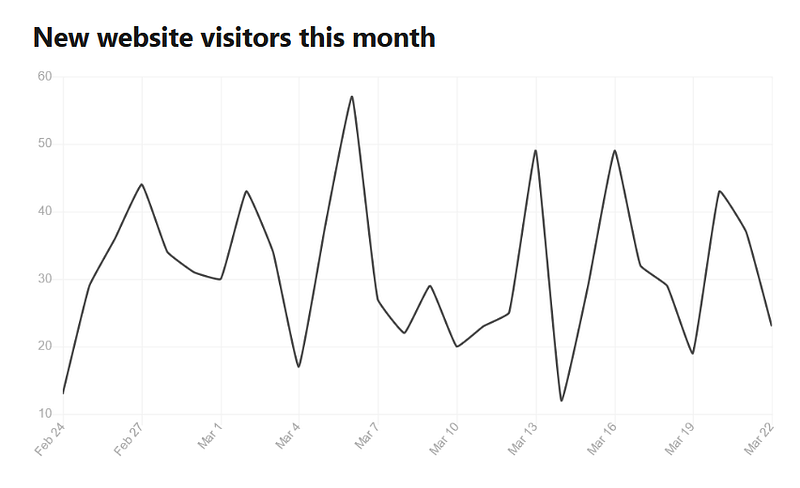
The first image on the page is a graph displaying your website visitors over the last month:
Source: Medium Blogging Guide

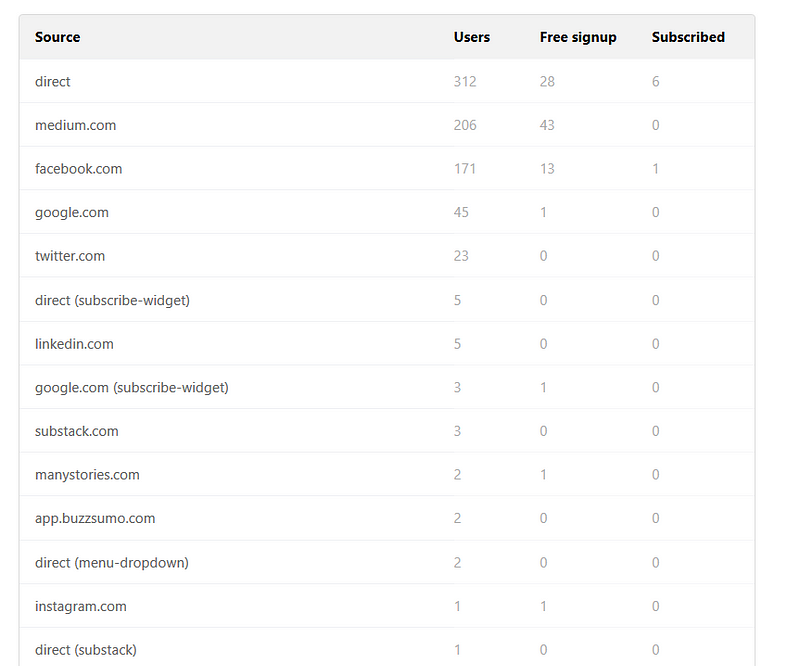
Below the graph is a chart which tracks the sources of your web traffic, and perhaps most importantly, breaks down whether those visitors signed up for your newsletter, and if so, whether they became a free or paid subscriber.
Source: Medium Blogging Guide

This an extremely valuable feature. For those familiar with my analysis of Medium data analytics, Substack’s data analytics are a bit more sparse than Medium’s. But Substack’s data analytics includes conversion rates, which from a content creator’s perspective, is of the utmost importance.

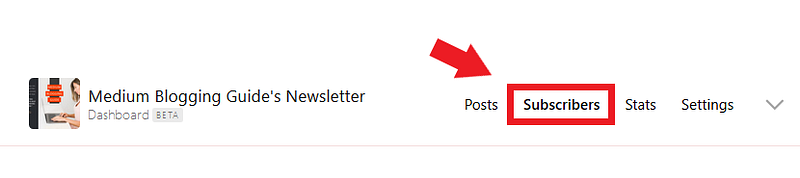
If you want to see the activity of an individual subscriber (free or paid), click on the “Subscribers” button in the upper right hand corner of the page:
Source: Medium Blogging Guide

If you scroll down the page, you will see a list of your email subscribers:

Source: Medium Blogging Guide

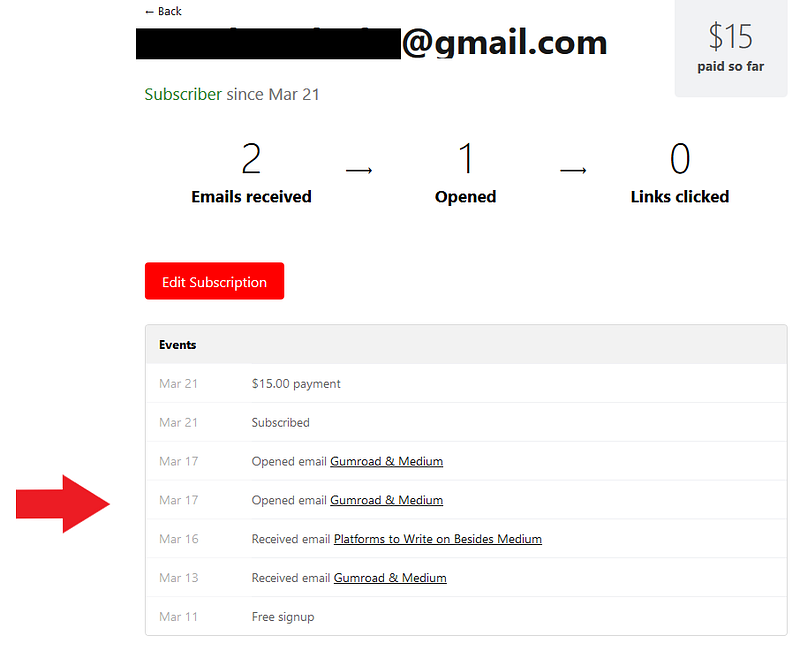
If you click on a specific email, you can see the detailed activity of each subscriber:
Source: Medium Blogging Guide

For example, in the screenshot above, you can see that the user:

— First signed up for Medium Blogging Guide on March 11th.

— Next, they received an email with my post on March 13th (Gumroad & Medium).

— A few days later, they received another email, on March 16th (Platforms to Write on Besides Medium)

They opened first email twice on March 17th (Gumroad & Medium).

They upgraded to become a paid subscriber on March 21st

Substack’s subscriber-specific analytics provide enormous insight into the patterns of your subscribers.

You can use this data to:

  • Determine what posts lead to a higher subscriber sign up rate
  • See whether a specific user opened your latest email
  • Establish the proper ratio of free to paid content in order to optimize paying subscribers

You can also view traditional stats associated with each email you send. These metrics include:

  • Total views
  • How many people received your email (email recipients)
  • What percentage of those recipients opened your email (open rate)
  • How many people subscribed to your newsletter after reading a post
  • Percentage of people who read an email and clicked on any link (click rate)
  • Top links among the links that were clicked (subset of click rate)
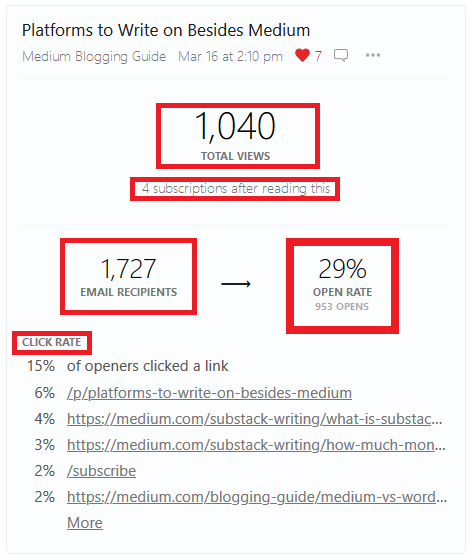
Source: Medium Blogging Guide

Step 6. Establish Publishing Pattern

The final step in creating a successful Substack newsletter is to establish (and stick to) a planned publishing pattern.

Many writers on Substack attempt to monetize their newsletter too early — unless you are providing readers with truly exceptional content, most will not subscribe to a newsletter until they have at least sampled your back catalogue of posts.

Conversely, it can be hard to flip the switch and start charging readers for access to your publication. After all, you are committing to produce up to a year of additional content for them.

The strategy I would suggest is following one of the two sample newsletter posting schedules, below:

Strategy 1— Post 1–3 free posts per week for 3 months (to build an audience) and then switch to 1 free post per week + 2 paid posts per week

Strategy 2 — Post 4–5 posts per week from the start, with one or two of the posts being free and the other posts for paying subscribers only.

However, there is no single magic posting schedule that will work for every newsletter.

How soon you can successfully monetize your newsletter depends on many factors, including the value of your content to readers, the size of your existing fan base (if any), and your willingness to promote your publication.

Another consideration when establishing a publishing pattern is establishing the value of your back catalogue of subscriber only-posts.

You back catalogue of subscriber-only posts simply refers to all the paid posts which exist in your archives and become instantly accessible once someone becomes a paying subscriber.

If you are writing a topical newsletter, the value of old paid posts may be relatively small (are your new subscribers going to read you posts on a news topic from a year ago?).

If your posts are mostly valuable, evergreen content, meaning the content is essentially timeless and will always be of interest or value to your fan base, you may be able to factor these posts into the subscription cost (possibly increase the cost if you have a valuable back catalogue of paid posts)

Regardless of how much you end up charging or how many times per week you end up posting, Substack is definitely not a get rich quick scheme.

But for writers who are already exploring their passion, it may be the perfect vehicle to monetize their content.

Casey Botticello

Thanks for reading this article! Leave a comment below if you have any questions, and if you want to learn more about blogging, content marketing, or subscription newsletter strategy, be sure to sign up for the Blogging Guide Newsletter!

If you liked this article, here are some other articles you may enjoy:

Casey Botticello is an internet entrepreneur and the founder of Blogging Guide, an online community of writers with an award-winning newsletter. He is also the creator of the popular Medium Writing Course and the Substack Newsletter Course.

Casey previously worked at several tech startups, a lobbying & strategic communications firm, and has created several businesses of his own. He is a graduate of The University of Pennsylvania, where he received his B.A. in Urban Studies.

You can connect with him on LinkedIn, Twitter, Facebook, follow his Medium publications, Digital Marketing Lab and Medium Blogging Guide, or reach out to him directly on his personal website.

Journalism
Social Media
Privacy
Entrepreneurship
Writing
Recommended from ReadMedium