
A MuddyUm How-to-torial
How To Create a Newsletter On Medium
Somewhat similar to ‘how to win friends and influence people’
I don’t know how it is with other publications, but on MuddyUm, we get Mudd-led when we start working on newsletters. We can blame ourselves or we can blame the convoluted mind of the newsletter feature designers. We choose the latter. Every time! We have a lot of Mudditors on the newsletter team. All of us have been Mudd-led equally. So it is not us.
Without much Muddo, let us launch into ‘how to create and send a newsletter in 206 easy steps.’
Step 1: Check if you ‘want’ to create a newsletter for your publication
Really! Examine your life choices. You don’t have to create a newsletter. There are wants and then there are needs. Do you want to create a newsletter or do you need to? Do you really need to?
If step 1 hasn’t scared you off, let’s proceed with the other 493 steps.
Step 2: Check if you are an editor for the publication that you want to newslet
If you are not an editor, you cannot create a newsletter. End of how to. You may exit now.
Step 3: Beg, grovel, or plead with the publication owner to give you editorial rights
Yes, you must right this wrong right away, else you cannot write away.
Step 4: Click your publication icon and select Newsletter
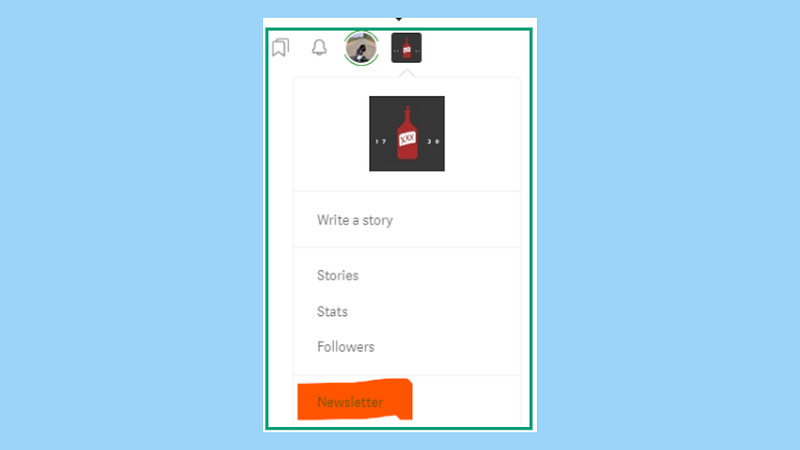
Step 5: You’ll know what to do next on the screen that appears. I hope
If you can’t figure out what to do on this screen, exit now.
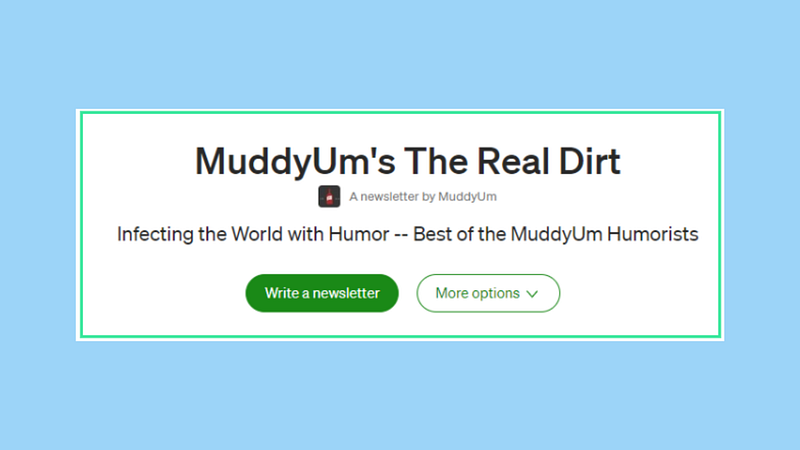
Step 6: Feel confused
It is the only way forward. It is a part of the initiation. It builds character. Makes you a true newsletter artist. Gives you fodder for ‘tales I will tell my grandchildren by the fireside.’
If you weren’t confused this far, this step will stymie you. I guarantee.
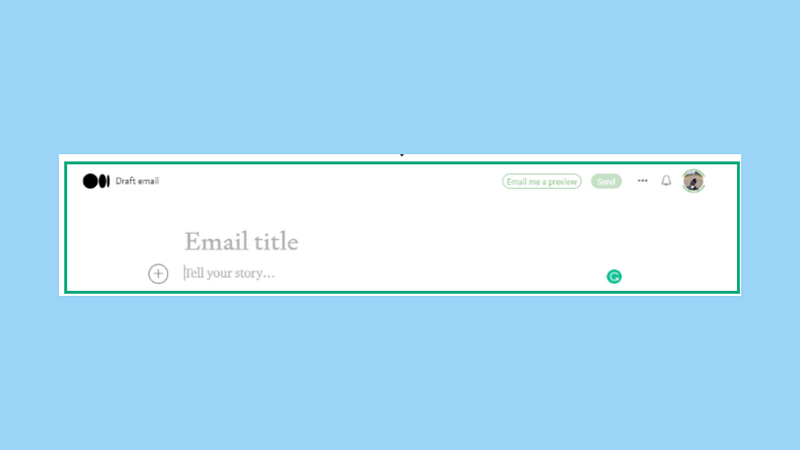
You were on the path to creating a newsletter. What’s this ‘Email title’ business? And what’s the story you want to tell? Isn’t ‘story’ the thing you tell in your articles?
Don’t go by the UI text. It is thoughtfully designed to Mudd-le you as I said earlier.
Just type your newsletter title in the ‘Email title’ area. The rest is as usual.
Step 7: This is not really a step. It is information. A step in the right direction
How else can I make up 563 steps?
Anyway, newsletters are meant to be sent to your loyal audience. A Medium newsletter is cleverly designed to be delivered to your subscribers as soon as you hit publish. Saves you a step. But adds a step for me because I had to explain it to you. Convoluted.
Step 8: Be afraid
Step 7 is meant to make you quiver all the way to the tips of your toes. If you have a hundred subscribers, they will ALL get your newsletter in their Inbox as soon as you hit Publish. Isn’t that scary? What if you made a mistake? You cannot recall the mail. It’s gone. That’s right. Shake and shiver.
Step 9: Just kidding. You have an exit route
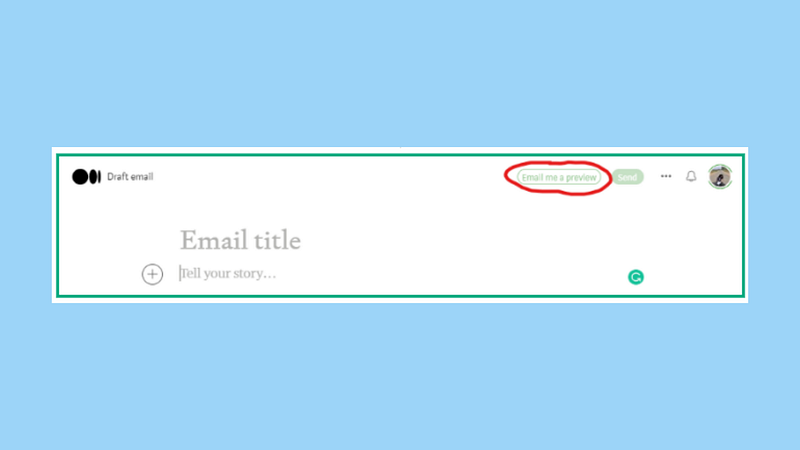
Help is available at MuddyUm (and other publications) for those who ask for it. See that nearly invisible button called Email me a preview?
- When you are ready with a draft of your newsletter, click that button to generate a mock copy of the newsletter.
- Check your Inbox. Refresh it 500 times till the newsletter appears.
- Or check your spam folder. Google hates newsletters. I wonder why. I love them. I’ve subscribed to hundreds of them over the years.
- Review the newsletter. View it through the eyes of your audience. Catch all the ‘ouches’.
Step 10–193: Follow these steps carefully
- Add useful and relevant tags using the Change Tags option. If you don’t know how to do this, go to step 5.
- Add any last words at the bottom of the newsletter. Mudditors — copy the footer from previous newsletters. We have a bunch of information we want our readers to be aware of.
Step 194: Careful with those links
- Add Friend Links where possible. All subscribers to your publication may not be paid members of Medium. Don’t confuse readership and views with the cents you make at the end of the day. Does that make sense?
- Don’t add the usual box links to articles. This doesn’t work in the newsletter. Take my word for it. I am not sure why it doesn’t work. No one I know knows.
- Type the name of the article. Paste the URL using the link option. See below.
How to create a newsletter on Medium — Anu Anniah
Yes. This is a circular reference. You could be stuck in this infinite loop for ever……….
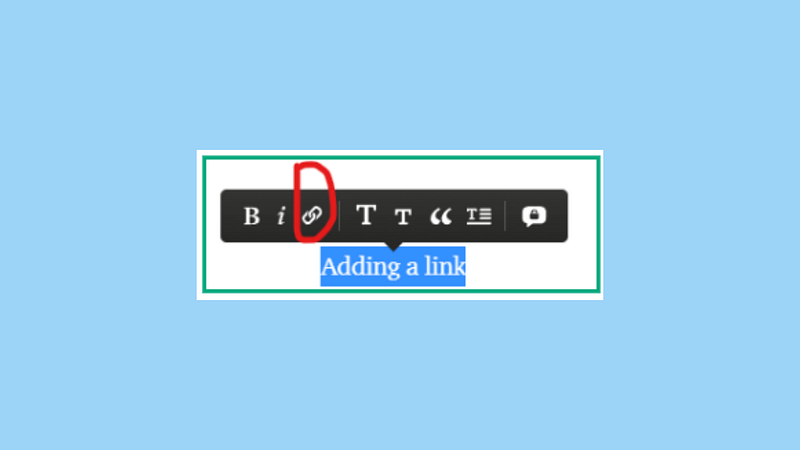
- Don’t forget to add the writer’s name using the @ symbol. If you don’t know how to do this, go to step 5.
Step 200: Grit your teeth. Say your prayers. Hit Send
Keep refreshing and checking your Inbox 600 times until the newsletter crawls in at current network speeds.
Carry out one last check to make sure the newsletter looks the way you wanted it to.
No? Missed something? Uh oh. Sit in the corner for the next 15 minutes. Face the wall. There’s really not much else you can do.
Ok. Wait. You can edit the newsletter. Breathe. But you can’t send it again.
Step 206: This really is the most important step. Yacht no one remembers!
This is the step that will get you your dream yacht.
After you have published your newsletter and checked that it looks ok as an email, turn on the meter settings for the newsletter. It is off by default. I know, that’s quite offul! A wicked move by the newsletter designers.
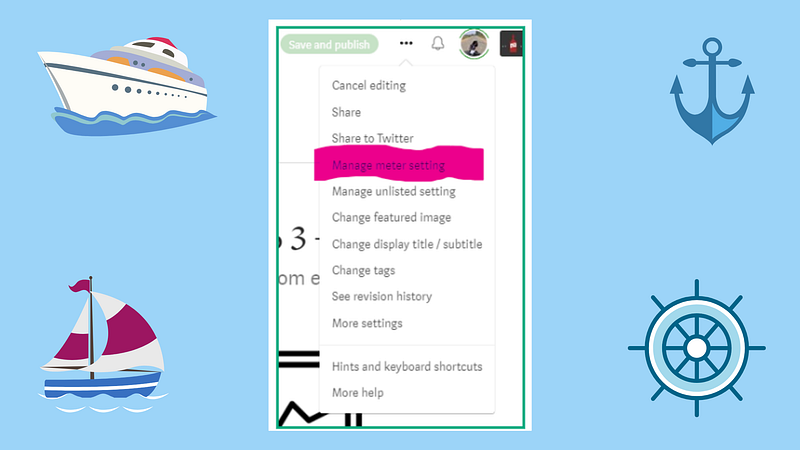
There! You are done! In 206 steps as promised.
Sit back and browse through your yacht-buying options as the coins noisily drop into the hat.