
Medium Publications
How to Create a Medium Publication
A comprehensive guide to starting a Medium publication
For an up-to-date guide on how to start a Medium publication, check out my more recent article:
What Is a Medium Publication?
Medium publications are “shared spaces” for stories written around a common theme or topic, usually by multiple authors.
There are generally three types of Medium publications:
- Publications that contain posts from many authors, on a broad series of topics. These can range in size from less than 100 followers to 100K or more. Examples of these publications are Towards Data Science, Publishous, and Slackjaw.
- Publications run by a single author, showcasing their posts around a specific topic. Some examples include, Blogging Guide, Escaping The 9 to 5, and The Blog Of Darius Foroux.
- Publications run by Medium (AKA in-house publications). These publications are managed by Medium employees and function like a magazine. Examples of these publications are Forge, OneZero, and Elemental.
Medium publications function like small, independent magazines. Publications have owners, editors, and writers. Some publications have “approved writers” who can always submit content, while others require an application for each article.
Some publications only want brand new content, meaning they will not accept stories that have already been posted. Some allow articles to be added to publications after they are published.
Why Should I Create a Medium Publication?
1. Control The Visibility and Distribution of Your Own Content
For new writers on Medium, there is a bit of a paradox when it comes to writing for publications. When you don’t have a large following and haven’t written for major Medium publications — it can be very difficult to become approved as a writer for any Medium publications. Conversely, once you are published in a few major publications — seemingly everyone wants your work.
For writers that want to control the circulation of their own content, creating a Medium publication can be a great option. I’m a big believer in the idea that you should never let others stop you from pursuing your goals. So I started several Medium publications to better showcase my articles. While this doesn’t magically grant you followers, it does allow you to pick and choose which stories you would like to feature in your publication. Even if your article is selected for a major publication, it will most likely be pushed off the publications “featured article” section, fairly quickly.
2. Gain Access to More Detailed Analytics
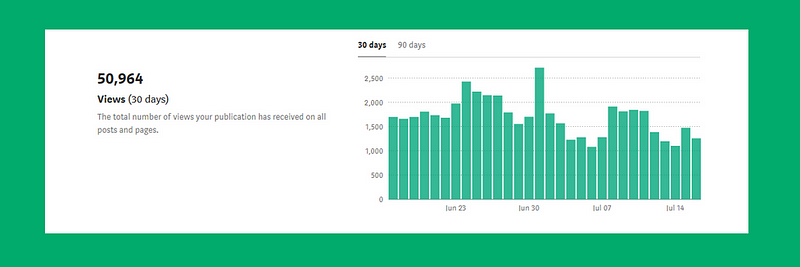
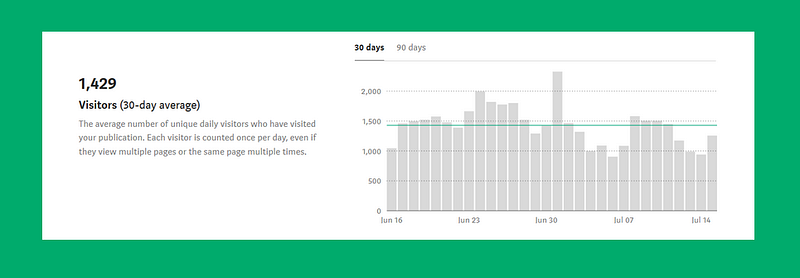
A second benefit of creating your own publication is the increased access to data analytics pertaining to your articles. Medium only gives writers a relatively small amount of data on their articles (number of views, reads, claps, fans, and some traffic sources). So any increased insight into your content’s data analytics is extremely valuable.
Below are screenshots of the enhanced “views” and “visitors” data that Medium publication owners have:
Views: The total number of views your publication has received on all posts and pages.
Visitors: The average number of unique daily visitors who have visited your publication. Each visitor is counted once per day, even if they view multiple pages or the same page multiple times.
3. Utilize Features Only Available in Medium Publications
When you create your own publication, there are several useful features that you gain access to. The two features I find the most useful are the “homepage promos” tabs and the “letters” function.
Homepage promotions enable you to add custom blocks to your publication that link your readers to a post, a feature page, or even, an external link (outside of Medium). Below is an example from one of my publications, Blogging Guide:

You can choose to include a section title, image, headline text, button and specify a custom background color. Whichever combination of elements you choose, they will appear as a clickable link to the URL of your choosing.
This can be used to redirect to your personal website, a product, company, a landing page for your mailing list, etc. Medium generally does not allow writers many options to so obviously redirect traffic to external sites, so not utilizing this feature can be a major waste!
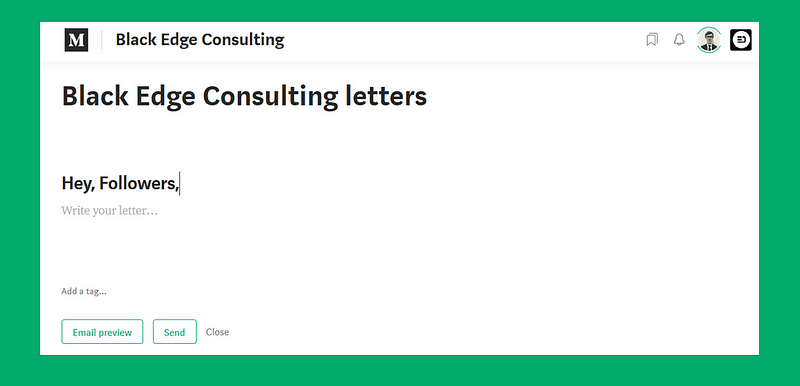
Letters are a way of connecting with your publication’s followers and starting a conversation. Letters are delivered to the inboxes of all the people who follow your publication. They are also a post, so they can be recommended, highlighted, built upon, and have a life of its own.
4. Search Engine Optimization (SEO)
This publication advantage is purely anecdotal and based on my observation of how Medium articles index in Google. I’ve played around with publishing articles under my own publications (which did not have many followers) vs. simply posting my article to no publications and the results seemed clear — even without a meaningful presence, publishing the same post in a publication resulted in it being indexed higher in Google’s search results. If this is indeed true, one of the explanations may have to do with the URL Medium assigns articles in publications:

Again, this is merely an observation based on past experience, but it may be worth it to explore with your articles.
5. Help Fellow Medium Writers
The last reason to create your own Medium publication is if you simply want to help/interact with other writers. Unless you restrict your publication to your own articles, exclusively, Publications give you the chance to highlight other articles that you discover from other writers. It’s also a good way to find writers who share common interests and may be interested in collaboration.
How Do I Create a Medium Publication?
Step 1
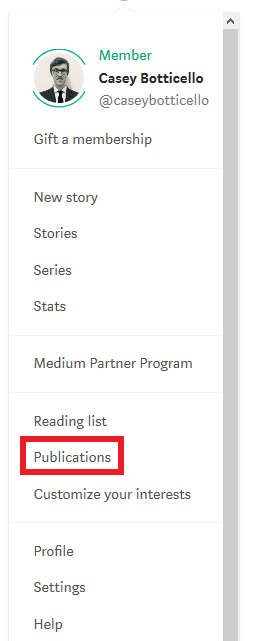
Click on your profile picture in the top-right corner of the page and choose Publications from the menu.
Step 2
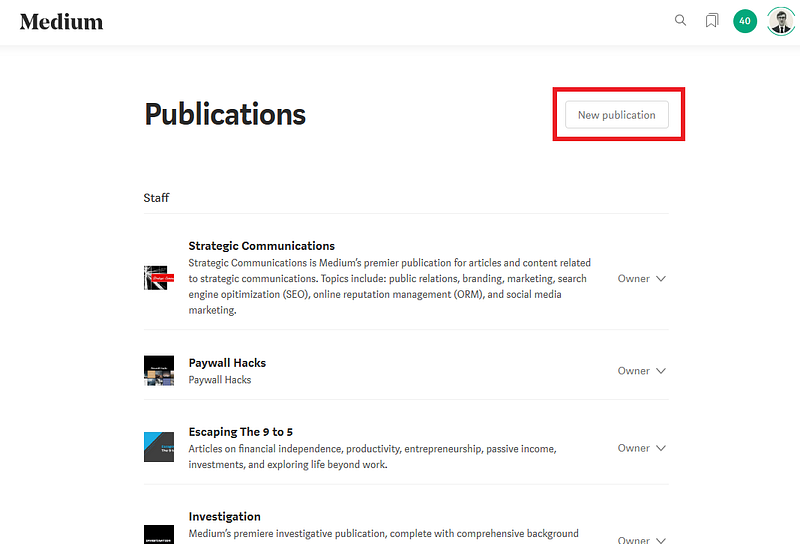
Click New publication.
Step 3
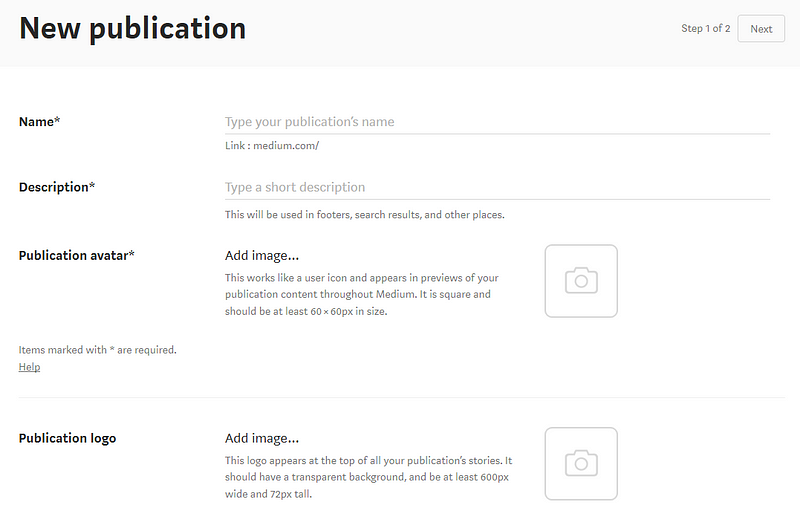
Enter your publication’s name, description, and upload your publication avatar. These steps are required to create a publication.
Step 4
Additionally, you can:
- Add a logo that appears at the top of all posts in the publication
- Add contact information. Note: Any email address or Twitter/Facebook link is public
- Add tags
- Add editors and writers to your publication

Step 5
Click Next in the lower right corner to go to the publication layout screen. Under the Homepage screen, you customize your publication’s homepage.
Step 6
Click Create to create your publication.
Additional Notes on Creating a Medium Publication
- You can create a maximum of seven Medium publications.
- You can be the editor or writer for an unlimited number of publications.
- Only the publication owner can delete a publication.
- Publications can only be created using desktop mode (not supported on mobile apps).
- Publication names/links cannot consist solely of the Medium list of topics, which are eligible for curation.
- To transfer publication ownership, you need to contact Medium support.
- To change the URL extension of your publication, you need to contact Medium support.
- You may have seen some publications with custom URLs, however, the only publications with custom URLs are the ones grandfathered in (created years ago). Medium is no longer offering new custom domains as a feature. Instead, you can create a publication on Medium that will live on a medium.com/publication-name URL.

Thanks for reading this article! Leave a comment below if you have any questions. Be sure to sign up for the Blogging Guide newsletter, to get the latest tips, tricks, and news about writing on Medium and to join our Facebook group, Medium Writing, to share your latest Medium posts and connect with other writers.
If you liked this article, here are some other articles you may enjoy:

Casey Botticello is an internet entrepreneur and the founder of Blogging Guide, an online community of writers with an award-winning newsletter. He is also the creator of the popular Medium Writing Course and the Substack Newsletter Course.
Casey previously worked at several tech startups, a lobbying & strategic communications firm, and has created several businesses of his own. He is a graduate of The University of Pennsylvania, where he received his B.A. in Urban Studies.
You can connect with him on LinkedIn, Twitter, Facebook, follow his Medium publications, Digital Marketing Lab and Medium Blogging Guide, or reach out to him directly on his personal website.


