avatarKappdev

Free AI web copilot to create summaries, insights and extended knowledge, download it at here

4262

Abstract

targetValue = <span class="hljs-number">1f</span>,
animationSpec = animationSpec,
label = <span class="hljs-string">"Wave Progress"</span>

)</pre></div><h2 id="ba05">Building the Layout 🛠️</h2><p id="c343">To achieve this custom layout, we use the <code>Layout</code> composable:</p><div id="8b44"><pre>Layout( modifier = modifier, content = content ) { measurables, constraints -> <span class="hljs-comment">// Convert wave dimensions to pixels</span> <span class="hljs-keyword">val</span> waveWidthPx = waveWidth.roundToPx() <span class="hljs-keyword">val</span> waveHeightPx = waveHeight.roundToPx()

<span class="hljs-comment">// Measure items</span>
<span class="hljs-keyword">val</span> placeables = measurables.map { measurable -&gt;
    measurable.measure(constraints)
}

<span class="hljs-comment">// Calculate row dimensions</span>
<span class="hljs-keyword">val</span> rowWidth = placeables.sumOf { it.width }
<span class="hljs-keyword">val</span> maxHeight = placeables.maxOf { it.height }
<span class="hljs-keyword">val</span> rowHeight = maxHeight + waveHeightPx

<span class="hljs-comment">// Define layout</span>
layout(width = rowWidth, height = rowHeight) {
    <span class="hljs-comment">// Track x position for placing items</span>
    <span class="hljs-keyword">var</span> xPosition = <span class="hljs-number">0</span>

    <span class="hljs-comment">// Calculate wave effect bounds</span>
    <span class="hljs-keyword">val</span> totalDistance = rowWidth + waveWidthPx
    <span class="hljs-keyword">val</span> waveStart = -waveWidthPx + (totalDistance * waveProgress)
    <span class="hljs-keyword">val</span> waveEnd = waveStart + waveWidthPx

    <span class="hljs-comment">// Place items</span>
    placeables.forEach { placeable -&gt;
        <span class="hljs-comment">// Calculate item's center X</span>
        <span class="hljs-keyword">val</span> itemCenterX = xPosition + (placeable.width / <span class="hljs-number">2f</span>)
        <span class="hljs-comment">// Calculate Y position without wave effect</span>
        <span class="hljs-keyword">val</span> baseYPosition = rowHeight - placeable.height

        <span class="hljs-comment">// Apply wave effect if within bounds</span>
        <span class="hljs-keyword">val</span> yPosition = <span class="hljs-keyword">if</span> (itemCenterX <span class="hljs-keyword">in</span> waveStart..waveEnd) {
            <span class="hljs-comment">// Normilize x position</span>
            <span class="hljs-keyword">val</span> normalizedX = normalizeX(itemCenterX, waveStart, waveEnd, -<span class="hljs-number">2f</span>, <span class="hljs-number">2f</span>)
            <span class="hljs-comment">// Calculate wave effect</span>
            <span class="hljs-keyword">val</span> waveEffect = waveCurve(normalizedX)
            <span class="hljs-comment">// Apply wave effect to Y position</span>
            (baseYPosition - waveHeightPx * waveEffect).toInt()
        } <span class="hljs-keyword">else</span> {
            baseYPosition
        }
        
        <span class="hljs-comment">// Place the item</span>
        placeable.place(x = xPosition, y = yPosition)
        xPosition += placeable.width
    }
}

}</pre></div><figure id="089c"><img src="https://cdn-images-1.readmedium.com/v2/resize:fit:800/1*vo_Sa1n_D6rY1qJbU0a9ug.png"><figcaption>Created by <a href="undefined"><b>Kappdev</b></a></figcaption></figure><p id="52ab">Congratulations 🥳! We’ve successfully built it 👏. You can find the full code on <a href="https://gist.github.com/L10n42/a24ef2310213332c6aa1d6371e4a7a24"><b>GitHub Gist</b></a>. Let’s explore the usage 👇</p><figure id="8bdf"><img src="https://cdn-images-1.readmedium.com/v2/resize:fit:800/1*k-e9aTwqEjrNkq-eETC6Vg.png"><figcaption></figcaption></figure><h1 id="3cc4">Practical Example 💁‍♂️</h1><p id="4ed6">Let’s explore how to use this layout in action 💥</p><h2 id="0de5">Jumpy Text</h2><p id="4f3c">Create a playful <i>Jumpy Text</i> effect:</p><div id="9634"><pre>JumpyRow( waveWidth = <span class="hljs-number">160.</span>dp, waveHeig

Options

ht = <span class="hljs-number">20.</span>dp, ) { <span class="hljs-keyword">for</span> (s <span class="hljs-keyword">in</span> <span class="hljs-string">"JETPACK COMPOSE"</span>) { Text( text = s.toString(), color = Color.Black, fontWeight = FontWeight.Bold, fontSize = <span class="hljs-number">32.</span>sp ) } }</pre></div><figure id="1e11"><img src="https://cdn-images-1.readmedium.com/v2/resize:fit:800/1*oDATsfAlH4kAlLpSCRacfw.gif"><figcaption></figcaption></figure><h2 id="5647">Two-Directional Jumpy Text</h2><p id="2935">Play the animation in both directions:</p><div id="58a6"><pre>JumpyRow( <span class="hljs-comment">/* Parametes... /</span> animationSpec = infiniteRepeatable( tween(<span class="hljs-number">1800</span>, easing = LinearEasing), repeatMode = RepeatMode.Reverse ) ) { <span class="hljs-comment">/ Content... */</span> }</pre></div><figure id="5658"><img src="https://cdn-images-1.readmedium.com/v2/resize:fit:800/1*MInEC-SWo3dRr_l__9douQ.gif"><figcaption></figcaption></figure><h2 id="20da">Jumpy Lines</h2><p id="02c8">Create some animated lines:</p><div id="01c0"><pre>JumpyRow { repeat(<span class="hljs-number">60</span>) { Box( modifier = Modifier .padding(horizontal = <span class="hljs-number">1.</span>dp) .size(<span class="hljs-number">4.</span>dp, <span class="hljs-number">50.</span>dp) .background(Color.Blue, CircleShape) ) } }</pre></div><figure id="808b"><img src="https://cdn-images-1.readmedium.com/v2/resize:fit:800/1*mynDbBFWYVGndW2CvC8-lQ.gif"><figcaption></figcaption></figure><h2 id="6aee">Mirrored Dots</h2><p id="77de">Create a mirrored dots layout by flipping the vertical scale:</p><div id="d14c"><pre>Column { JumpyRow( waveHeight = <span class="hljs-number">35.</span>dp ) { repeat(<span class="hljs-number">15</span>) { Box( modifier = Modifier .padding(horizontal = <span class="hljs-number">2.</span>dp) .size(<span class="hljs-number">20.</span>dp) .background(Color.Magenta, CircleShape) ) } } JumpyRow( waveHeight = <span class="hljs-number">35.</span>dp, modifier = Modifier.scale(scaleY = -<span class="hljs-number">1f</span>, scaleX = <span class="hljs-number">1f</span>) ) { repeat(<span class="hljs-number">15</span>) { Box( modifier = Modifier .padding(horizontal = <span class="hljs-number">2.</span>dp) .size(<span class="hljs-number">20.</span>dp) .background(Color.Yellow, CircleShape) ) } } }</pre></div><figure id="543b"><img src="https://cdn-images-1.readmedium.com/v2/resize:fit:800/1*5JeFd-Yz3u_EUkbgUDpAfQ.gif"><figcaption></figcaption></figure><figure id="7151"><img src="https://cdn-images-1.readmedium.com/v2/resize:fit:800/1*xQzj0_h9M_IyGvYWRnjmzw.gif"><figcaption></figcaption></figure><div id="83b1" class="link-block"> <a href="https://readmedium.com/how-to-create-a-shimmering-text-animation-in-jetpack-compose-eb4a553d924c"> <div> <div> <h2>How to Create a Shimmering Text Animation in Jetpack Compose</h2> <div><h3>Welcome 👋 In this article, we’ll create a stunning Shimmering Text Animation in Jetpack Compose, perfect for a…</h3></div> <div><p>medium.com</p></div> </div> <div> <div style="background-image: url(https://miro.readmedium.com/v2/resize:fit:320/1*xiGKaZmLN_3Nyj2Sv5wRlA.png)"></div> </div> </div> </a> </div><p id="eb9c"><b>Thank you</b> for reading this article! ❤️ If you found it <i>enjoyable</i> and <i>valuable</i>, show your appreciation by <b>clapping</b> 👏 and following <a href="undefined"><b>Kappdev</b></a> for more exciting articles 😊</p><figure id="122a"><img src="https://cdn-images-1.readmedium.com/v2/resize:fit:800/1*mNczrq3VXxgT9ghcSKiRFg.png"><figcaption></figcaption></figure></article></body>

How to Create a Jumpy Row Layout in Jetpack Compose

Welcome 👋

In this article, we’ll create an engaging Jumpy Row Layout using Jetpack Compose. This layout allows its components to jump smoothly with a wave-like effect 🎢

Excited? 🤩 Let’s dive in 🚀👇
Created by Kappdev

Defining the Function

Let’s start by defining the function. Below is the signature of the JumpyRow composable function:

@Composable
fun JumpyRow(
    modifier: Modifier = Modifier,
    waveWidth: Dp = 200.dp,
    waveHeight: Dp = 25.dp,
    animationSpec: InfiniteRepeatableSpec<Float> = infiniteRepeatable(
        animation = tween(2000, easing = LinearEasing),
        repeatMode = RepeatMode.Restart
    ),
    content: @Composable () -> Unit
)

Parameters

🌀 modifier 👉 The Modifier to be applied to the layout;

🌀 waveWidth 👉 The width of the wave effect, measured in Dp;

🌀 waveHeight 👉 The height of the wave effect, measured in Dp;

🌀 animationSpec 👉 Defines the animation specifications that control the animation behavior;

🌀 content 👉 The content to be displayed inside the row.

Implementing the Function

Let’s implement this exciting effect ✨

Utility Functions

Before we dive into the function’s code, let’s define a couple of utility functions:

normalizeXThis function maps an x-coordinate from one range to another:

fun normalizeX(x: Float, originalMin: Float, originalMax: Float, targetMin: Float, targetMax: Float): Float {
    return targetMin + ((x - originalMin) / (originalMax - originalMin)) * (targetMax - targetMin)
}

waveCurveThis function calculates the y-coordinate of a wave based on its x-coordinate:

fun waveCurve(x: Float): Float {
    return exp(-x.pow(2))
}
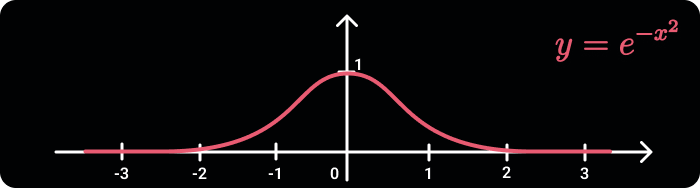
Wave Curve

Defining Animation

Next, we create an infinite transition that drives the wave’s animation:

val infiniteTransition = rememberInfiniteTransition("Wave Transition")
val waveProgress by infiniteTransition.animateFloat(
    initialValue = 0f,
    targetValue = 1f,
    animationSpec = animationSpec,
    label = "Wave Progress"
)

Building the Layout 🛠️

To achieve this custom layout, we use the Layout composable:

Layout(
    modifier = modifier,
    content = content
) { measurables, constraints ->
    // Convert wave dimensions to pixels
    val waveWidthPx = waveWidth.roundToPx()
    val waveHeightPx = waveHeight.roundToPx()

    // Measure items
    val placeables = measurables.map { measurable ->
        measurable.measure(constraints)
    }

    // Calculate row dimensions
    val rowWidth = placeables.sumOf { it.width }
    val maxHeight = placeables.maxOf { it.height }
    val rowHeight = maxHeight + waveHeightPx

    // Define layout
    layout(width = rowWidth, height = rowHeight) {
        // Track x position for placing items
        var xPosition = 0

        // Calculate wave effect bounds
        val totalDistance = rowWidth + waveWidthPx
        val waveStart = -waveWidthPx + (totalDistance * waveProgress)
        val waveEnd = waveStart + waveWidthPx

        // Place items
        placeables.forEach { placeable ->
            // Calculate item's center X
            val itemCenterX = xPosition + (placeable.width / 2f)
            // Calculate Y position without wave effect
            val baseYPosition = rowHeight - placeable.height

            // Apply wave effect if within bounds
            val yPosition = if (itemCenterX in waveStart..waveEnd) {
                // Normilize x position
                val normalizedX = normalizeX(itemCenterX, waveStart, waveEnd, -2f, 2f)
                // Calculate wave effect
                val waveEffect = waveCurve(normalizedX)
                // Apply wave effect to Y position
                (baseYPosition - waveHeightPx * waveEffect).toInt()
            } else {
                baseYPosition
            }
            
            // Place the item
            placeable.place(x = xPosition, y = yPosition)
            xPosition += placeable.width
        }
    }
}
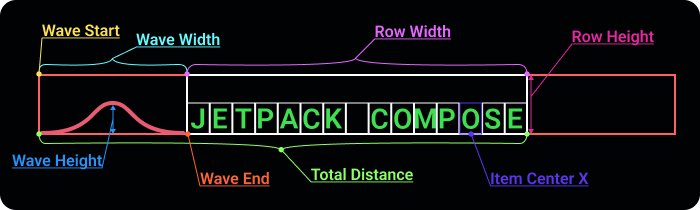
Created by Kappdev

Congratulations 🥳! We’ve successfully built it 👏. You can find the full code on GitHub Gist. Let’s explore the usage 👇

Practical Example 💁‍♂️

Let’s explore how to use this layout in action 💥

Jumpy Text

Create a playful Jumpy Text effect:

JumpyRow(
    waveWidth = 160.dp,
    waveHeight = 20.dp,
) {
    for (s in "JETPACK COMPOSE") {
        Text(
            text = s.toString(),
            color = Color.Black,
            fontWeight = FontWeight.Bold,
            fontSize = 32.sp
        )
    }
}

Two-Directional Jumpy Text

Play the animation in both directions:

JumpyRow(
    /* Parametes... */
    animationSpec = infiniteRepeatable(
        tween(1800, easing = LinearEasing),
        repeatMode = RepeatMode.Reverse
    )
) {
    /* Content... */
}

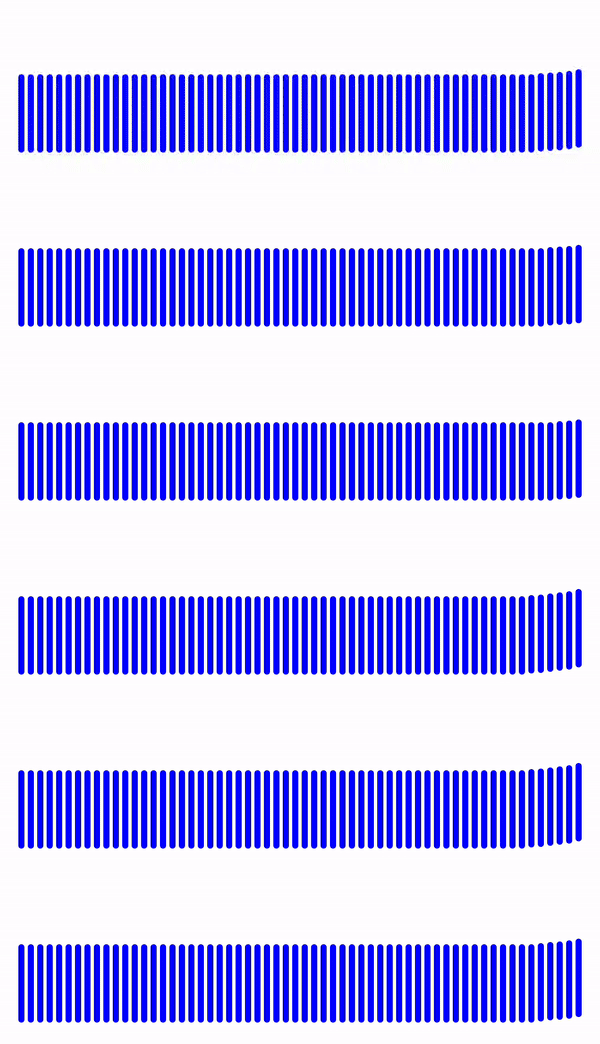
Jumpy Lines

Create some animated lines:

JumpyRow {
    repeat(60) {
        Box(
            modifier = Modifier
                .padding(horizontal = 1.dp)
                .size(4.dp, 50.dp)
                .background(Color.Blue, CircleShape)
        )
    }
}
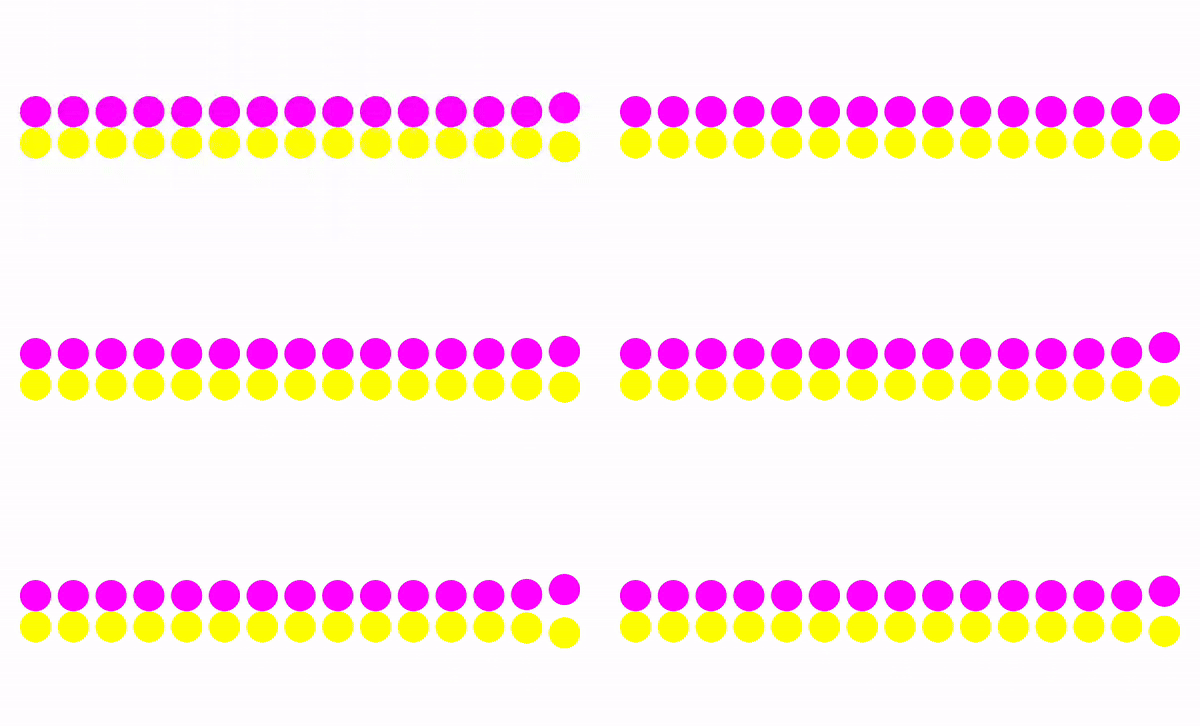
Mirrored Dots

Create a mirrored dots layout by flipping the vertical scale:

Column {
    JumpyRow(
        waveHeight = 35.dp
    ) {
        repeat(15) {
            Box(
                modifier = Modifier
                    .padding(horizontal = 2.dp)
                    .size(20.dp)
                    .background(Color.Magenta, CircleShape)
            )
        }
    }
    JumpyRow(
        waveHeight = 35.dp,
        modifier = Modifier.scale(scaleY = -1f, scaleX = 1f)
    ) {
        repeat(15) {
            Box(
                modifier = Modifier
                    .padding(horizontal = 2.dp)
                    .size(20.dp)
                    .background(Color.Yellow, CircleShape)
            )
        }
    }
}

Thank you for reading this article! ❤️ If you found it enjoyable and valuable, show your appreciation by clapping 👏 and following Kappdev for more exciting articles 😊

Jetpack Compose
Android
Android Development
Software Engineering
Programming
Recommended from ReadMedium