
How to Create a Shimmering Text Animation in Jetpack Compose
Welcome 👋
In this article, we’ll create a stunning Shimmering Text Animation in Jetpack Compose, perfect for a minimalistic loader ✨
Excited? 🤩 Let’s dive in 🚀👇

Defining the Function
Let’s start by defining the ShimmeringText composable function:
@Composable
fun ShimmeringText(
    text: String,
    shimmerColor: Color,
    modifier: Modifier = Modifier,
    textStyle: TextStyle = LocalTextStyle.current,
    animationSpec: DurationBasedAnimationSpec<Float> = tween(1000, 500, LinearEasing)
)
Parameters
🖤 text 👉 The text that will be displayed.
🖤 shimmerColor 👉 The color used for the shimmer effect.
🖤 modifier 👉 A Modifier to be applied to the Text composable.
🖤 textStyle 👉 The style of the text.
🖤 animationSpec 👉 The animation specification for controlling the shimmer speed, delay, and easing.
Implementing the Function
In this section, we’ll implement the ShimmeringText function.
Creating an Infinite Animation
First, we define an infinite animation transition:
val infiniteTransition = rememberInfiniteTransition(label = "ShimmeringTextTransition")Using this transition, we create a shimmerProgress animation that runs from 0 to 1 and repeats:
val shimmerProgress by infiniteTransition.animateFloat(
    initialValue = 0f,
    targetValue = 1f,
    animationSpec = infiniteRepeatable(animationSpec),
    label = "ShimmerProgress"
)
Creating the Shimmer Brush
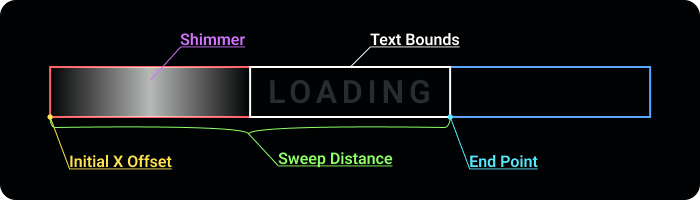
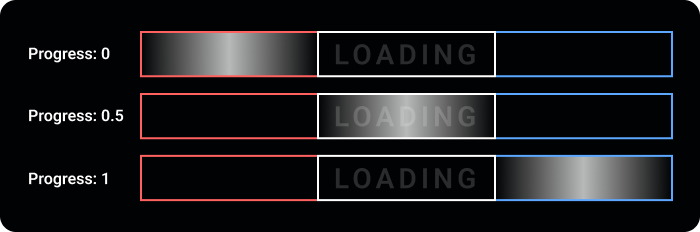
Next, we create the shimmer brush that moves across the text based on the shimmerProgress value:
val brush = remember(shimmerProgress) {
    object : ShaderBrush() {
        override fun createShader(size: Size): Shader {
            // Define the starting X offset, beginning outside the left edge of the text
            val initialXOffset = -size.width
            // Total distance the shimmer will sweep across (double the text width for full coverage)
            val totalSweepDistance = size.width * 2
            // Calculate the current position of the shimmer based on the animation progress
            val currentPosition = initialXOffset + totalSweepDistance * shimmerProgress

            return LinearGradientShader(
                colors = listOf(Color.Transparent, shimmerColor, Color.Transparent),
                from = Offset(currentPosition, 0f),
                to = Offset(currentPosition + size.width, 0f)
            )
        }
    }
}
Rendering the Text
Finally, we render the Text composable with the animated shimmer brush applied:
Text(
    text = text,
    modifier = modifier,
    style = textStyle.copy(brush = brush)
)
Congratulations 🥳! We’ve successfully built it 👏. You can find the full code on GitHub Gist 🧑💻. Let’s explore the usage 👇

Practical Example 💁♂️
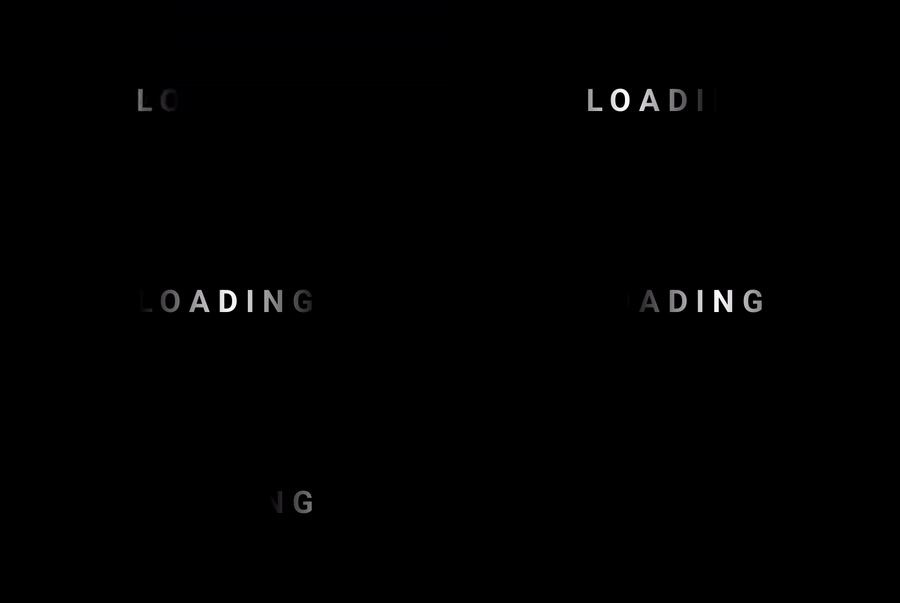
For this example, let’s create a simple loading text animation:
Box(
    modifier = Modifier
        .fillMaxSize()
        .background(Color.Black),
    contentAlignment = Alignment.Center
) {
    ShimmeringText(
        text = "LOADING",
        shimmerColor = Color.White,
        textStyle = LocalTextStyle.current.copy(
            fontSize = 20.sp,
            letterSpacing = 5.sp,
            fontWeight = FontWeight.Bold
        )
    )
}
Output ✨

Thank you for reading this article! ❤️ If you found it enjoyable and valuable, show your appreciation by clapping 👏 and following Kappdev for more exciting articles 😊



