
How to Convert JavaScript Classes to React’s useReducer Hook
A case study on how to apply functional programming in React applications

Object-oriented programming is a programming paradigm based on the concept of “objects,” which are defined as classes. It is imperative programming that uses statements to change a program’s state.
Functional programming is another programming paradigm where programs are constructed by applying and composing functions. It is a declarative programming paradigm where functions are treated as first-class citizens (i.e. they can be assigned to variables, passed as arguments, and returned from other functions). It is highly recommended to compose pure functions, avoiding shared state, mutable data, and side effects.
As big libraries and frameworks such as React, Angular, and Vue arrived, functional programming has become appealing for the front-end web development community. React is a strong advocate of functional programming. After hooks were introduced in May 2018, it has become possible to write the entire application with just functions as React components.
You may have existing object-oriented programming code or you may be familiar with object-oriented programming. How can you construct things in a functional way now?
We are going to offer an example to show how to convert classes to React’s useReducer hooks.
The Object-Oriented Approach
We set up a working environment using Create React App (npx create-react-app my-app) and change src/App.css to the following for minimal styling:
ECMAScript 2015 (ES 6) introduced class, which is the syntactical sugar over JavaScript’s existing prototype-based inheritance. Classes can be defined as class expressions or class declarations, which are similar to functions.
A class, Cat, is declared in src/Cat.js:
This class has initial values for state (i.e. member variables) that are name (line 7), isHappy (line 2) , isHungry (line 3), and isTired (line 4). It uses a constructor to instantiate name (lines 6-8).
The example above illustrates two places to initiate a class’ state: the class body and the constructor.
The Cat class also implements behaviors (i.e. member functions, also called methods) that are play (lines 10-14), sleep (lines 16-18), bathe (lines 20-22), and eat (lines 24-27). getStatus (lines 29-36) is another method that describes the state.
On line 39, a cat instance is instantiated with the new operator. This instance is exported for use.
We define an interface to express the class:
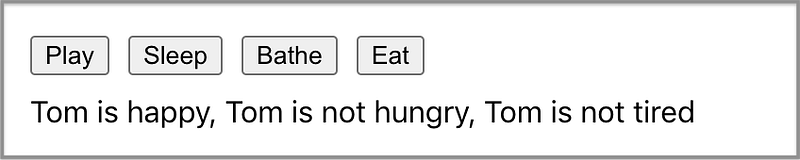
There are four buttons to invoke four member functions, and getStatus’ value is displayed to exhibit the class state.
The cat instance is used in the revised src/App.js:
- On line 2, the
catinstance is imported. - Lines 9-16 define the
Playbutton. When this button is clicked,cat.playis called and the display string is updated. - Lines 17-24 define the
Sleepbutton. When this button is clicked,cat.sleepis called and the display string is updated. - Lines 25-32 define the
Bathebutton. When this button is clicked,cat.batheis called and the display string is updated. - Lines 33-40 define the
Eatbutton. When this button is clicked,cat.eatis called and the display string is updated. - Line 41 displays the value of
cat.getStatus().
This program works, except it does not take a functional approach.
The Functional Approach
useReducer is a built-in hook that is more suited for managing state objects that contain multiple sub-values. It is a good fit for defining a class.
This is how useReducer is utilized:
const [state, dispatch] = useReducer(reducer, initialArg, init?);On the left side, it is destructured into two items:
state: An object that can hold things, equivalent to member variables of a class.dispatch: A method that can handle state changes, equivalent to member functions of a class. Thedispatchfunction’s reference is stable and will not change on re-renders. Therefore, it is safe to be omitted from theuseEffectoruseCallbackdependency list.
On the right side, it takes three properties:
reducer: A function that has the(state, action) => newStatetype. It is supplied with two parameters — the current state and a user-performed action. Then it returns a new state conditionally on the action that is dispatched.initialArg: The initial state of the reducer.init?: An optional function for initialization. If it is supplied, the initial state will be set toinit(initialArg). Otherwise,initialArgis directly applied.
Before defining a reducer, we declare actions that are similar to Cat’s member functions in src/catActions.js:
Then these actions are used by the reducer in src/catReducer.js:
We converted member variable declarations to default state (lines 3-7). There is a state initializer, initConfig (lines 9-12), that combines defaultState with useReducer’s initial state (name: “Tom”).
Member functions that change state are converted to action processing in the reducer function (lines 14-47). It is important that the state is immutable. ECMAScript 2015’s spread operator provides an easy way to do it. If the state with the same reference is returned, React will bail out without rendering the children or firing effects.
This is the src/App.js to use catReducer:
useReducer is used on line 7. The constructor parameter, name, is initialized there.
The getStatus member function is converted to status on lines 9-17. useMemo memorizes the value until state is changed. It is an optimization to avoid recalculations on every render.
When each button is clicked, it invokes the dispatch function instead of calling a member function.
That’s it. Now our Cat example works in a functional way.
More About Dispatch
You may have a question about the dispatch function. A class member function can take parameters. How can the same thing be accomplished in the dispatch function?
In our simple example, type is used for the reducer to conditionally transform a state:
dispatch({ type: actions.play });Optionally, we can pass in a payload as a parameter for the action. The payload can be called payload or any other name. There can be as many payloads as needed.
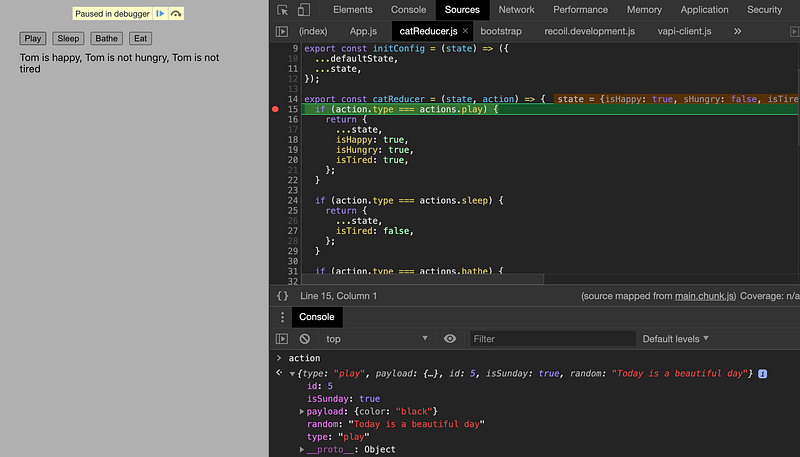
dispatch({ type: actions.play, payload: { color: 'black' }, id: 5, isSunday: true, random: 'Today is a beautiful day' });Besides type, the dispatch above is called with payload, id, isSunday, and random.
At the following breakpoint, we can see that catReducer receives all the parameters to build its logic.
What if the payload is a result of an asynchronous operation?
Then dispatch should be called as a result of the asynchronous operation. This way, we keep side effects outside of the reducer to ensure that it is a pure function.
The example above shows that the asynchronous operation initially sets isLoading to be true (line 2). When the call is successful, the result is dispatched for processing (line 4). When the call fails, the error is dispatched for error handling (line 5). In the end, isLoading is set to be false (line 6).
More About State
We want to make a new interface with the capability to change the cat’s name:

A new name-changing action (line 6) is needed in src/catActions.js:
This new action is processed in src/catReducer.js:
The case for actions.changeName is added on lines 46-51 to handle the name change.
The following is the revised src/App.js to use the catReducer:
Lines 20-28 define the input element. When the value changes, it dispatches the action changeName along with the payload of name.
This works as expected.
We can also break down the cat’s properties into two states. catReducer, isHappy, isHungry, and isTired are in one state. name is in its own state. This way, we don’t need to have the new action (changeName).
The changes are only in src/App.js:
On line 7, name is managed by useState. Line 21 defines the input element to manage the cat’s name. The useMemo dependency list on line 17 needs to have name.
On line 8, the cat’s other properties remain managed by useReducer.
The second approach seems simpler. States can be designed differently based on the use case. useState works for a simple state, and useReducer fits for a multiple-value state.
When a state is managed, it is important to avoid shared state, which is a state shared between more than one function or more than one data structure.
Conclusion
We have shown an example of how to use useReducer. It is essential that the reducer function is a pure function and the state generated by the reducer function is immutable.
useReducer is equivalent to useState in that it works on a particular component and all of its descendants.
We can pass down the dispatch function via context: const ParentDispatch = React.createContext(null).
Wrap a child inside the context:
<ParentDispatch.Provider value={dispatch}>
  <Child someProps={someProps} />
</ParentDispatch.Provider>
Then any child component can access the dispatch function by calling useContext: const dispatch = useContext(ParentDispatch).
In our React projects, useReducer works well. We are happy with 100% functional programming.
Thanks for reading. I hope this was helpful. You can see my other Medium publications here.


