avatarLucy Dan 蛋小姐 (she/her/她)

Summary

The web content provides a detailed guide on automating the categorization of Medium email notifications to enhance productivity and engagement with the platform.

Abstract

The article titled "How to Automate Categorizing Medium Email Notifications" offers a systematic approach to managing Medium notifications more efficiently. The author shares a personal two-pronged system: firstly, checking responses directly on Medium, and secondly, using Gmail filters to sort emails based on notification type. The guide includes instructions for creating filters in Gmail to categorize emails related to amplifying articles, highlights, mentions, prompts, responses, and submissions. The author emphasizes the benefits of this organization in fostering personal growth as a writer and maintaining an ever-growing database of favorite articles. The article also includes practical tips, such as opening new tabs in Chrome without leaving the current tab, and acknowledges the role of a significant other in suggesting life-changing productivity hacks.

Opinions

  • The author finds the new system for checking Medium responses "brilliant but simple" and takes pride in the efficiency it brings to their routine.
  • The author's boyfriend is credited with providing a valuable tip for opening new tabs in Chrome, which is described as life-changing.
  • The author values organization and automation, as evidenced by the meticulous categorization of Medium-related emails and the enthusiasm for Gmail filters.
  • The author appreciates reader engagement, using highlighted sections as a learning tool to improve their writing.
  • The author expresses a particular excitement when mentioned in writing prompts, indicating a fondness for community interaction and new ideas.
  • The author humorously refers to a potential future project, "Lucy's Waffle Maker," as a metaphorical tool for tracking stats and notifications, suggesting a playful approach to managing online presence.

How to Automate Categorizing Medium Email Notifications

A guide to saving you time and clicks

I got some brilliant responses to my earlier rant about notifications!

My new system is now two-pronged. First, I check responses via Medium, because it now has a separated tag for responses. I check them about once a day at the same time, so I can just open up the notifications in a new tab. I now to stop at roughly “1 day ago”. Brilliant but simple? I can only toot my own horn.

My boyfriend has also pointed out that the way to open up new tabs in Chrome while staying at the current tab is to click using the middle scroll thingy on your mouse. It’s changed my life. Here’s hoping it changes yours too.

The second prong is to check emails. I have my Gmail filters to sort Medium articles based on the type of notification it is.
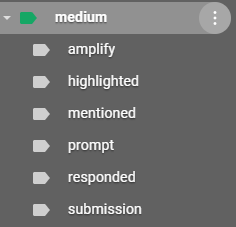
Screenshot by the author (who likes to be organized shh)

Amplify: articles that I email myself to make sure I include in my ever-growing database of favourite articles to shoutout. (manual filter)

Highlighted: houses all of the emails that include what people have highlighted. (automatic filter). I use these to learn about what readers are loving from my writing, to help me grow as a writer.

Mentioned: houses all of the emails where people have mentioned me, so I can make time to read them. (automatic filter)

Prompt: houses all potential prompts or ideas I have on the go, including random notes I email myself on mobile, and/or articles where I’m mentioned for a prompt. (manual filter)

Responded: houses all of the responses. Now that I’m manually checking via Medium, it’s now a defunct tab, though I’m still getting emails, so I sometimes check-in to see if I’m seeing any unfamiliar ones that I’ve missed.

Submission: houses all TBIN submissions, which I batch review!

How to create automatic filters

On Gmail:

  • Go to “settings”
  • Click on “see all settings”
  • Click on the “Filters and blocked addresses tab”
  • Click on “create a new filter”

For any and all emails from Medium:

screenshot from author, who loves organization and automation… a lot

For emails from Medium specific to highlights:

screenshot from author, who loves when people highlight things she didn’t anything would read, like dumb photo captions

For emails from Medium specific to responses:

screenshot from author, who loves responding in emojis and will not be stopped

For emails from Medium containing mentioned posts:

screenshot from author, who jumps a little in her mind when she gets tagged in writing prompts so keep ’em coming yo

For emails from Medium regarding new submissions to a publication:

screenshot from author, who had to think a little bit harder on this one because the gmail filter wasn’t entirely working if you solely put “submission”

Lucy (The Eggcademic) [she/her] might still program that Lucy’s Waffle Maker as a way to better track stats and notifications, but we’ll see. 👀

Freelance
Medium
Organization
Automation
Gmail
Recommended from ReadMedium