
How to Add Chapters to YouTube Videos (And Why You Should)
Your audience will thank you for it
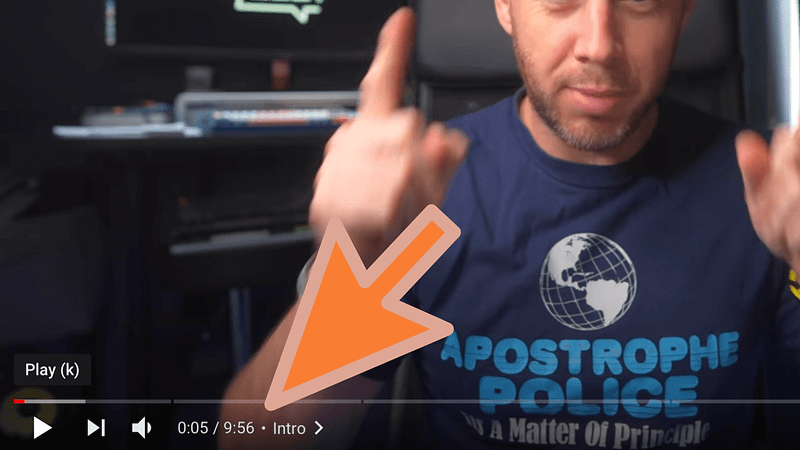
Ever found yourself ‘scrubbing’ through a YouTube video trying to find the bit you’re interested in?
I’m under no illusion — most people who watch my videos don’t watch them for the entire duration. In fact, the average viewing duration over the last three months on my channel is five minutes, 31 seconds (most of my videos are nine minutes or longer).
This means that, often, only around 20% of the viewers remain by the time I reach the wrap up section. It’s pretty normal, and nothing to be worried about, but it does reveal why chapters are so important on YouTube.
Why add chapters to YouTube videos?
As noted above, most people won’t hang around for your entire video. Only your die-hard fans and those who fall for your storytelling abilities will be there from the moment the little red dot starts to the moment it hits the buffer.
The reason for this is simple. Think about your own YouTube viewing habits; do you watch 100% of every video, or do you digest what you need and head elsewhere?
Unless you’re watching one of your absolute favourite YouTubers, it’s probably the latter. But, often, finding that single piece of information you need isn’t particularly easy.
That is, unless the YouTuber in question has added chapters to their video!
What are YouTube chapters?
YouTube chapters do what they say on the tin, but they’re not always that obvious if you haven’t encountered them before.
A YouTube chapter is simply a section of a video that has been timestamped in the video description. If the YouTuber adds several of these timestamps, each chapter is signified on the video’s progress bar with a dark vertical line (otherwise known as a chapter marker).
Chapter names also appear to the right of the time on the video itself, and if the user clicks the name, it’ll reveal a handy list of the chapters to the right-hand side of the video.
You can see an example of chapters in action in this video:
YouTube chapters essentially ‘chop up’ a video into sections that can be easily navigated and skipped-to by the viewer. This can be done by clicking or pressing the chapter marker, or selecting the timestamp in the video description.
There’s no built-in tool for it
Weirdly, YouTube doesn’t currently offer a built-in tool for marking chapters in your videos. The method for doing so feels like an odd workaround which is crying out for an official feature.
There have been rumours about automatic chapter creation (I hate the sound of that), and, indeed, a more foolproof way of doing it, but until then, you’re stuck with the following method.
How to add YouTube video chapters
To add chapters to your video, you simply need to add timestamps somewhere in your description.
It doesn’t matter where you place the timestamps — they just need to be present and in the correct format.
The good news is that it’s super easy, and I’m going to provide a template for your own YouTube chapters. Just add this to a note somewhere (or to your YouTube description template ,if you have one):
CHAPTERS
00:00 — Intro
00:00 — Chapter 1
00:00 — Chapter 2
00:00 — Chapter 3
00:00 — Chapter 4
00:00 — Chapter 5
00:00 — Wrap up
Copy and paste the above text into your video description, and simply change the ‘00:00’ to whatever time each chapter starts (the format is mm:ss). Leave the intro at 00:00, give your chapters short names (and add more if you need to), and you’re done.
Here’s what the chapters look like for the video above:
CHAPTERS
00:00 — Intro
01:22 — If you’re worried, buy it
03:00 — Find people like you
05:39 — Try it
07:26 — Don’t wait
09:21 — Wrap up
Simple, right?
How to identify chapters
The chapters for each YouTube video are a creative decision. The idea is to ‘chop up’ the video into sections to which people may want to skip.
For instance, if it’s a review, it might be the individual features of a product you cover. Or if your video is a tutorial, the chapters may signify each step, thus enabling people to revisit specific steps if they need a reminder.
I make note of the chapters in my videos during the final polish of the edit. While I’m watching it (before exporting), I note down the chapter markers in my description template, so that when I upload it to YouTube, they can simply be pasted in. This method saves a massive amount of time.
Does adding chapters to YouTube videos damage engagement?
No.
If you’re worried that adding chapters to your videos is going to somehow reduce overall watch time and dissuade people to subscribe, think again. You can’t fool people into watching your entire video simply because they can’t easily find what they want (in fact, they’ll be far more likely to head off elsewhere).
Every single video I’ve published on YouTube has chapter markers, and it hasn’t harmed the channel’s growth at all. In fact, it has often resulted in some very lovely comments. People like it; the presence of chapters on your video helps them find the stuff they came for.
I’d love to see YouTube add a more ‘official’ way to include chapters in videos, but until then, we’re stuck with this workaround.
But don’t let that put you off — it’s one of the most important processes you’ll go through for each video.
Get a behind-the-scenes look at my channel
Every week, I send a behind-the-scenes video exclusively to my newsletter subscribers. It’s free to join, and provides a weekly glimpse of what goes into my channel — blood, sweat, tears and all!
Join my behind-the-scenes mailing list
_If you enjoy my writing, it’s only a snippet of what’s on Medium. I’m a paying member myself and highly recommend joining. Click here to do so (a portion of your membership fee will be sent my way and therefore directly support my work!). Join here.
Originally published at https://markellisreviews.com on September 22, 2021.


