avatarSuraj Ghimire, MSc

Free AI web copilot to create summaries, insights and extended knowledge, download it at here

1754

Abstract

account.</li><li>Go to your story and edit. You will see add audio at the top of the browser.</li></ol><figure id="78b5"><img src="https://cdn-images-1.readmedium.com/v2/resize:fit:800/1*yeU0JotYR__CgmIeptZxiA.jpeg"><figcaption>screenshot by author</figcaption></figure><p id="54c5">You will have two options to select. Either create audio using an AI voice or upload an MP3. If you have pre-recorded audio, you can upload it, else select using AI voice.</p><figure id="27eb"><img src="https://cdn-images-1.readmedium.com/v2/resize:fit:800/1*UTbURDubqb607kF25B8Mkw.jpeg"><figcaption>screenshot by author</figcaption></figure><p id="1de6">In a new screen, you can edit as per your compatibility. Click to convert. You can listen to the converted audio .</p><figure id="5ae9"><img src="https://cdn-images-1.readmedium.com/v2/resize:fit:800/1*14j3jHYVdZ7ZJyAJuheZzg.jpeg"><figcaption>screenshot from author</figcaption></figure><p id="5d36">Click done. Publish when done or save and publish if it is your old story.</p><p id="9a69">I had encountered a few problems earlier but solved it. You can see all of your recorded audios from play.ht dashboard. As you can see, I have 0 words remaining, but I can use audio for Medium stories through its extension.</p><p id="0461">Once you record through extension, you can embed it to your personal blog or download the audio to host in the different portal as per your convenience.</p><p id="62d4">Take away:- Use play.ht if you don’t enjoy adding your own voice on your blog. I prefer an AI voice to a self-recorded voice. With the premium version, you can choose several accents and voice.</p><h2 id="75e6">Allears</h2><p id="59ec"><a href="https://allears.cc/">Allears </a>is in an early development phase and i

Options

f you are lucky, you might get early access if you approach them. Unlike play.ht, it yet doesn’t have an AI voice, and it relies on you to record your voice. The dashboard is pretty well and allows you to edit audio once you finish recording. I haven’t uploaded it yet because I am not comfortable with my English accents.</p><h2 id="54da">Sound cloud</h2><p id="2191">There are various podcasts host including <a href="https://soundcloud.com/">SoundCloud </a>that offers you similar service in premium rate. Those services will be like above.</p><p id="dc62">Along with embedding your voice on Medium, you can also use your recorded audio in various podcast platform. Recording podcast opens a door to various opportunities, but it can come with some monthly costs. To date, I find play.ht useful and easily compatible with the Medium blog.</p><p id="afb1">I haven’t added voice to this blog because it needs proper reading. But I have added voice to my earlier blog which you can read/listen.</p><div id="5f3b" class="link-block"> <a href="https://readmedium.com/how-to-boost-the-performance-of-your-window-computer-c58871e7907b"> <div> <div> <h2>How to Boost the Performance of Your Windows Computer?</h2> <div><h3>Do you hate your slow windows? 6 tips for you</h3></div> <div><p>medium.com</p></div> </div> <div> <div style="background-image: url(https://miro.readmedium.com/v2/resize:fit:320/1*8rpctfLifiQOuSAKvv7Vdw.jpeg)"></div> </div> </div> </a> </div><p id="be61">What are the other ways you prefer to add a voice to your blog? Please share it with us.</p></article></body>

How to Add a Voice to Your Blog

Do not miss a chance of engaging with readers

Photo by Alphacolor on Unsplash

Writers are choosing unique ways to engage with readers, and one of the most recent trend is adding voice in their blog. It not only helps to reach differently-abled readers but also normal readers. Adding voice to your blog helps users engaged in your blog while they are busy in some activities. For an example, while cooking or traveling, apart from listening to music, I also have an option to listen to audio bible.

You can add your voice in one of the following ways

  1. You read it yourself.
  2. Read by professional.
  3. Let Artificial Intelligence read your blog.

Medium allows you to embed recorded audio for your blog with no hassles. The only prerequisite is you need recorded audio. I know about three methods to add sound to your blog.

Play.ht

With Play.ht you have various ways to create audio for your blog post. For external bloggers its unlimited service comes with a cost, but for Medium users, you can add unlimited audios to date. It is a painless process.

  1. Install play.ht chrome extension to your browser (I use with chrome) and create an account.
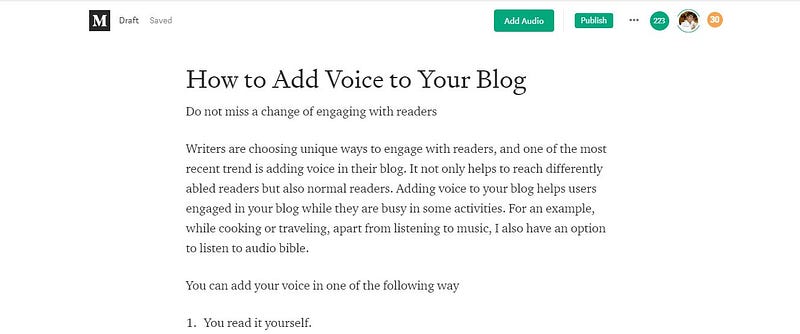
  2. Go to your story and edit. You will see add audio at the top of the browser.
screenshot by author

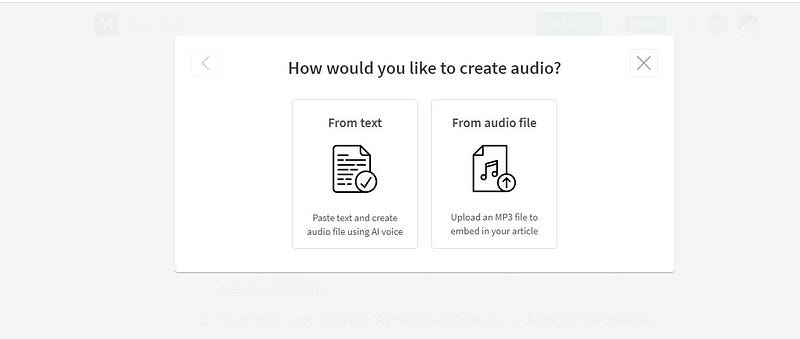
You will have two options to select. Either create audio using an AI voice or upload an MP3. If you have pre-recorded audio, you can upload it, else select using AI voice.
screenshot by author

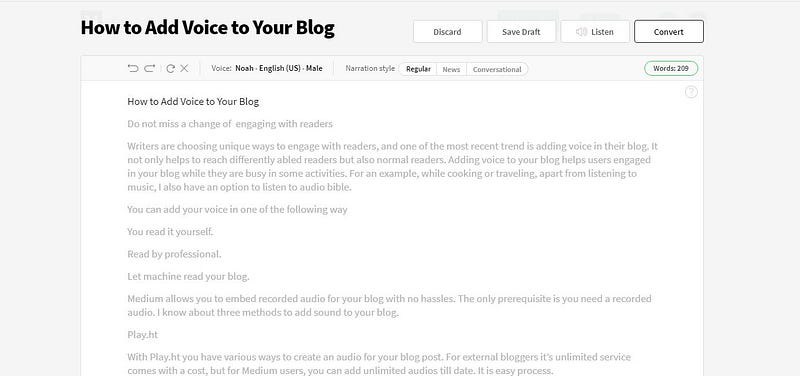
In a new screen, you can edit as per your compatibility. Click to convert. You can listen to the converted audio .
screenshot from author

Click done. Publish when done or save and publish if it is your old story.

I had encountered a few problems earlier but solved it. You can see all of your recorded audios from play.ht dashboard. As you can see, I have 0 words remaining, but I can use audio for Medium stories through its extension.

Once you record through extension, you can embed it to your personal blog or download the audio to host in the different portal as per your convenience.

Take away:- Use play.ht if you don’t enjoy adding your own voice on your blog. I prefer an AI voice to a self-recorded voice. With the premium version, you can choose several accents and voice.

Allears

Allears is in an early development phase and if you are lucky, you might get early access if you approach them. Unlike play.ht, it yet doesn’t have an AI voice, and it relies on you to record your voice. The dashboard is pretty well and allows you to edit audio once you finish recording. I haven’t uploaded it yet because I am not comfortable with my English accents.

Sound cloud

There are various podcasts host including SoundCloud that offers you similar service in premium rate. Those services will be like above.

Along with embedding your voice on Medium, you can also use your recorded audio in various podcast platform. Recording podcast opens a door to various opportunities, but it can come with some monthly costs. To date, I find play.ht useful and easily compatible with the Medium blog.

I haven’t added voice to this blog because it needs proper reading. But I have added voice to my earlier blog which you can read/listen.

What are the other ways you prefer to add a voice to your blog? Please share it with us.

Productivity
Writing
Blogging
Technology
Relationships
Recommended from ReadMedium