
How I’ve Started Remembering What I’ve Read
I use Readwise.io, Spaced Repetition (lite), and Obsidian to help remind me of the best things I’ve read and heard.

I am a natural speed reader. You’d think, since I read so many books, I would be swimming in quotes and amazing little stories from all that I’ve read.
But my memory doesn’t really work that way.
Instead, I tend to remember bits and pieces. I’ve written about my memory issues before, but for those unaware, because of my CPTSD and ADD, I have trouble with some long-term memories and with day-to-day memories. And also with focusing while I read (sometimes).
It’s frustrating.
So I use different tools and techniques to help remember the things important to me, like quotes and stories, facts and figures, even my own memories of the past.
After years of trying one technique after another, I’ve settled on three different tools/ways to help me remember the things I read.
Keep in mind this doesn’t discount the importance of journaling in general and bullet journaling through the day.
Readwise.io
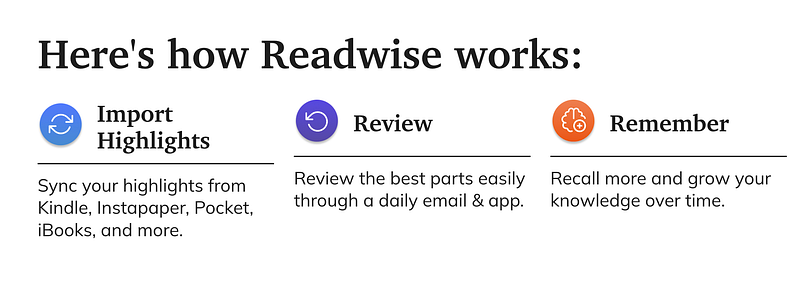
I didn’t jump on the Readwise bandwagon right away, but I’ve been using it for a couple years now and I tell everyone about it. Readwise is, hands down, the best thing ever if you read a lot of books and articles and always have trouble remembering what you’ve read.
Import and Connect Highlight Sources
When you sign up, you have the chance to connect different sources, like your Kindle, Goodreads or Scribd accounts, or like Pocket, Medium or other highlights. They’re constantly adding more sources. You pull your highlights, notes and even tags into Readwise and that’s where the magic happens.
After you import your current highlights and notes in, you can review them any time by browsing through your highlights. You can sort them, search them, and further break them up by tag. You can add or edit your tags or the meta data associated with any of the highlights you have.
Review Regularly (see Spaced Repetition Below)
The beauty of Readwise is that you can review your highlights and notes regularly through their app and/or through a daily highlight email.
And you can choose how frequently you want to have highlights sent to you by email (if you want them), and how many of those highlights you want to be able to review at a time (anywhere from 5 to 15 highlights at a time). On your mobile device, you can choose if you want reminded each morning. And you can try to wrack up the streaks.
Streaks are great, but don’t feel bad if you’re like me — I rarely use my phone on Sundays. So my streaks almost always start over on Monday. And that’s okay!

Process your Highlights
Now this step is my own, but essential. When you read and highlight, you tend to move on. Maybe you add notes sometimes and other times don’t. Maybe you highlighted a bunch out of a book you’d prefer not to ever look at again.
As you go through your daily highlights (or review them anytime) you should process them. What I mean by processing is that you should discard any highlights you don’t want to look at again (click to discard!), add notes about thoughts that come to you as you review, and update the tags.
The regular review that Readwise offers (through their app or email links) is a form of Spaced Repetition, and I use it via Readwise’s implementation and through my own note-taking within another app called Obsidian.
Obsidian for Writing and Note-taking
I use Obsidian to keep track of all my notes about the things I read, fleeting thoughts that I’d forget if I didn’t write them down, and even to track my characters and plotting for the novel I’m working on. It’s the all-in-one app that wraps around almost every type of writing project I do.
I process notes in Obsidian much the same way I do in Readwise, except I have a more powerful search engine at my fingertips in Obsidian. It searches titles, pages, and metadata for words or phrases. And since I have all my highlights from Kindle and other articles, my notes, and all my personal writings in my Obsidian vault, I can search through all the documents at once.
This helps with pulling information together as I’m writing, but it’s also amazing at helping me find connections between different topics. Sometimes, the connections I find are surprising, and leads to new things to write about and discover.
The only thing I haven’t used it for extensively yet is my Technical Writing work. While it would be amazing for that, my company doesn’t use markdown in our knowledge base, so syncing back and forth wouldn’t be as easy. For now.
Review is Essential
Other people have better memory and recall than I do. But I have Readwise and Obsidian, so I’ve managed to build a network of my own thoughts and content I’ve read.
In the same way I review and process highlights and notes from my sources in Readwise, I review and process my notes in Obsidian. I spend at least 10–20 minutes every morning going through at least a few random notes.
Spaced Repetition
Spaced repetition is a memory technique where you remind yourself of things you want to remember (by quizzing or rereading, taking notes, flashcards, etc.). The idea is that you repeatedly see the facts you want to remember and over time, your brain stores the fact in your long-term memory.
I have used multiple techniques to set up this kind of spaced repetition and I’ll go over those in case they work better for you. Whatever you use, there are a couple important steps to make it work for you.
- try to build it in to your routine (attach it to something you do regularly, to habit-stack, for example) so you do it every day
- quiz yourself on what you read, restate it, and continue processing it as you use repetition to help remember more of it
Spaced Repetition in Readwise
The daily email and app for Readwise prompt a kind of spaced repetition, and you can quiz using the app and their website (they call it mastery). Using the app, you can build flashcards from different highlights. But you can also just review your highlights and notes.
I call it spaced repetition-lite because it’s a low-friction way to start going back over things you’ve read.
Spaced Repetion in Obsidian
I manually do a very lightweight kind of spaced repetition in Obsidian, but there are ways to build it in with Obsidian plugins. I’ll go into more detail in an upcoming post, but in general I go through my content and literature notes looking for ways to further process them into my own thoughts (or whittle down the quotes I want to think about from the work). From there I spend time either making more notes, linking between additional notes, or even moving onto a new idea that was sparked because of what I reviewed.
Spaced repetition is more complex that just reviewing your notes — you should also be reviewing them right after taking them and then again periodically to refresh your memory and help lock it into your long term memory.
You can use the plugin in Obsidian to set up a more detailed approach to Spaced Repetition. If it’s interesting to you, research it further because I have barely touched the tip of the iceberg when it comes to using it. There are apps you can use for it instead (Anki is one I know of).
Some people just go old school and use index cards and set up a schedule on their calendar for review periodically.
Remembering What I Read Has Never Been This Easy
I pay for Readwise, but I don’t pay for the Obsidian app, and the version of spaced repetition I do doesn’t cost me anything extra either. But together, these tools have changed the way I read books and articles. And they’ve helped me remember more of what I read.
If you have trouble with your own memory or if, like me, you read enough that you’re having trouble remembering more of what you’ve read, maybe give one or more of these a chance. See if they help you.
I’d love to know how you combat memory issues with the things you read. Do you use different tools? Do you use spaced repetition?