
How I’m using Cubits from the Bloc library to manage my states
As soon as you start with Flutter there will be this moment when you have to decide how you are going to handle your state. There are lots of opportunities and especially packages around and it feels like everyone is handling it differently. State Management is still one of the most discussed Flutter topics these days and I just found my own way of handling it.
In the following article, I’m going to explain how and why I use Cubits, why I almost never need a Bloc, and the benefits and drawbacks of using this approach.
Personal Background
I started with Flutter in late 2018 and decided to use Bloc. I was told it’s the most difficult solution to learn but also that it has all the features you probably need in the long run. Since then I experimented a lot, changed my structure and approaches several times, and completely switched over to Cubit in Summer 2021.
I’m always asked what I think about other state management solutions and I don’t really have an opinion on it because I’m so happy with that Cubit approach — I have no intention to switch. It works for me and it worked within the teams I helped build up. This doesn’t automatically mean it works for you as well. So please consider experimenting on your own, to find an approach that makes you happy to work with. I’m sure there is one!
Quick Note: Difference between Blocs & Cubits
When Cubit got released I first continued using Blocs because I was used to it. After I tried Cubit for the first time myself I completely switched over because it was so much faster and way less boilerplate. Why is that? Cubit is a lightweight version of Bloc because instead of the states AND events stream it only provides the states stream and functions.


Please consider checking out more in-depth articles (or documentation) if you want to get to know more about the basics in particular.
Enough introduction, let’s get started!
Setup
Apart from having Flutter installed and your project created you need to add the Bloc library as well as equatable to your pubspec.yaml file:
flutter_bloc: 8.1.2
equatable: ^2.0.5
Since I’m using VSCode there’s an extension I can’t live without when working with the Bloc library.
It helps you generate Blocs and Cubits with one click and wrap your code with BlocBuilders, BlocProviders, BlocListeners, and all those stuff.
There seems to be an extension for Android Studio as well, but I have never worked with it.
Simple Use Case Example
To explain everything in an easy way let’s imagine the following app: You want to keep track of your new year goals instead of just writing them down once and then totally forgetting about them ;)!
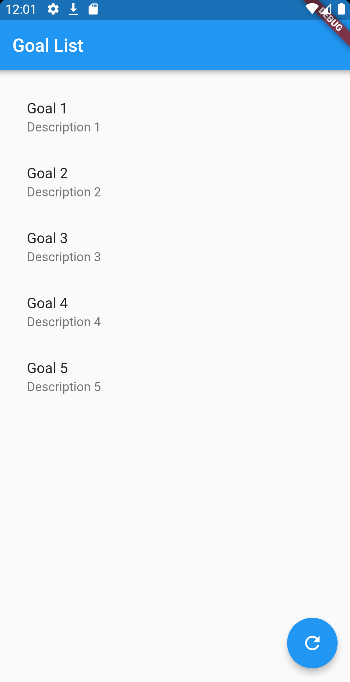
So we’ll have a GoalListScreen where your fresh set-up goals will be fetched from an API (Firebase, Supabase, custom backend — doesn’t really matter atm) and displayed to you.
We want to be able to display a different UI for those four states: the initial state, the loading state, the successfully retrieved goals list, and an error message if something went wrong (e.g. backend issue, no internet connection).
Upcoming Next Steps
- We will start creating the Cubit and modify it to be able to handle our state wishlist above when fetching the goals list from the API
- After that, we will add our Cubit to the screen using the BlocProvider and see how we can tell our four different states to display a different UI and/or a snackbar if something worked or failed
- And finally, we’ll do a quick wrap-up!
Creating the Cubit
So thanks to the VSCode Bloc Plugin mentioned above, I can generate a new Cubit by right-clicking in the folder where the Cubit should go, clicking “New Cubit” and giving it a name. We’ll name it GoalListCubit in this example.
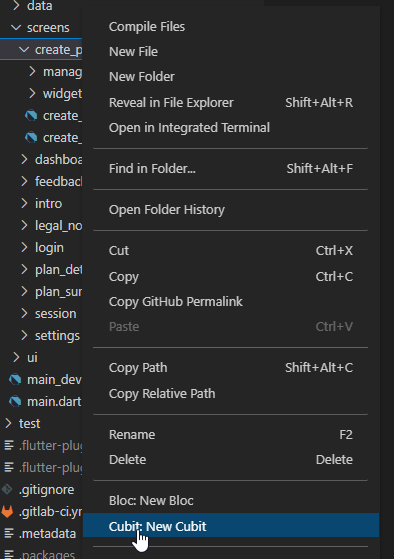
After creating the Cubit you got two files goal_list_cubit.dart and goal_list_state.dart looking as follows:
Modifying the GoalListCubit to match our needs
As described above we want to fetch a list with goals from a backend. We would do this by creating a method called fetchGoals() within the Cubit. This method is later going to trigger a repository that will return the data.
Modifying the GoalListState to match our needs
While fetching the list from the backend we want to handle four different states:
- initial (we could skip this one in this case, but often it’s handy to have it)
- loading (while we are waiting for the backend response with the result)
- success (backend response successfully received)
- failure (something went wrong with the request)
Instead of creating a class for every single state (which is definitely a working approach!) I like to put the states into an enum GoalListStatus . We can get rid of the GoalListInitialState class and remove the abstract from the GoalListState.
After we’ve done that we can add the enum to be a property within the GoalListState and add some additional changes.
Now you probably think “What the hell is going on?”
No worries, I got you ;)! Let’s break it down!
One state class for four states? Why? How?
The first thing important thing to note is we only have one state class to represent our four different states. A state in this case is defined by three different properties: GoalListStatus (= status), List<Goal> (= goals) and Exception (= exception).
So let’s check what our prepared states would look like:
- initial =
GoalListState();// GoalListStatus.initial is the default value for the status - loading =
GoalListState(status: GoalListStatus.loading); - success =
GoalListState(status: GoalListStatus.success, goals: goalsList); - error =
GoalListState(status: GoalListStatus.failure, exception: exception);
… and with that information, we can completely finish our Cubit class already!
Hint: Just for completion — the GoalRepository just fetches data from the backend and returns it as a List<Goal> .
What’s the copyWith method for?
Looks great so far, but we could go one step further. Imagine the following example:
You successfully fetched the goals list from the backend and emitted it. Your app is displaying it within a ListView. You have a button with “Refresh” or even a Pull-to-refresh mechanism like “RefreshIndicator” implemented and for whatever reason, after you triggered it you get back an error from the backend. This could have various reasons like a lost/unstable internet connection or the backend is down/has an error etc.
In the example we created above this would mean your repository is throwing an Exception which will put us into the catch-block within our fetchGoals() method. After that our Cubit will emit a new GoalListState instance with status=GoalListStatus.failure, goals=
What we could do, to keep our previous state from being cleared is use the copyWith method within the state and adjust our Cubit as follows.
The UI Part
After we implemented the Cubit we can use it in our GoalScreen .
Adding the BlocProvider
The official documentation of the Bloc Library gives a great example of how you can create BlocProviders without having a builder in the same widget. This also gives it a really clean look.
Our build method will look like this then. Make sure to take the advantage of using an enum as the status and provide a switch method:
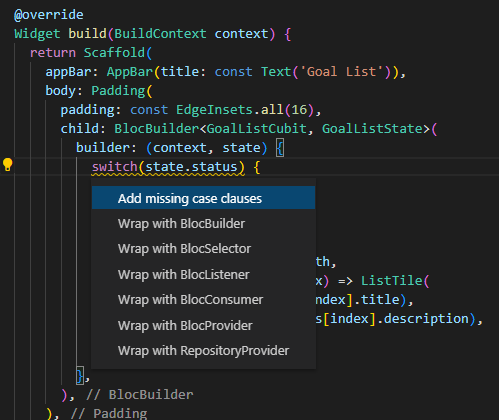
Since our goalList is available all the time (maybe empty, but still available) we can easily build that ListView for all the states. For the error state, we are just displaying a SnackBar with the Exception thrown in the GoalRepository .
Wrap Up
I think it’s a super fast and handy approach and doesn’t come with much boilerplate. I’m using it for all my projects — from small to big apps and teams and it works pretty well. Although Cubits are limited in their features compared to Bloc I’m still able to handle most of the cases with them.
Like with all approaches you still have to know what you’re doing. Since we only have one state class, we need to make sure we only access the properties which are available and either wrap them with a null-check or be absolutely sure they are not null. For e.g. the exception property is only available if we ran into the catch-bloc and got the exception from the GoalRepository .
I hope I helped you understand this approach and maybe there are some things that you liked and will try out implementing yourself.
Feel free to check out the repository on GitHub with the full code and please do throw questions at me if something is unclear!
Testing
If you are interested in testing all of this — here is part 2: “How I’m testing my Cubits”.
Your support would be awesome 💙
If you’re happy and you know it clap your hands :D! If you have questions feel free to ask them in the comments and if you want to see this approach and me in action, make sure to follow me on:
Twitter: verry_codes Twitch: verry_codes YouTube: verryCodes
Your support is veeeeeeeerry appreciated ❤!
(Re)-Sources
The Bloc library has awesome documentation. Repository on GitHub including all the code we wrote above. Special thanks to danlampl, za_geek, skipjip for providing me feedback on my drafts!
Follow Flutter Community on Twitter: https://twitter.com/FlutterComm


