
How I used Postman to test different pagination solution
How I used Postman to benchmark API performance in 30 minutes
Setup quick automated API tests with reporting
In my earlier post, I analyzed different pagination techniques. The goal was to check for performance degradation with large number of pages. I had mentioned that I had used Postman to test the response of requests over time.
In this post, I share an approach of using Postman to run API tests for benchmarking.
Postman is never on the list of top load-testing tools. Postman has the capability to run many tests in a repeated manner. But, the challenge was that it was not straightforward to get the stats from Postman.

I stumbled upon the utility called Newman.
Newman is a command-line collection runner for Postman. It allows you to effortlessly run and test a Postman collection directly from the command-line. It is built with extensibility in mind so that you can easily integrate it with your continuous integration servers and build systems.
With Newman, I can run a test from the command line. It also has a feature to export results into any required format. The other advantage was that I could get data in raw format. It would enable me to play around with data to get deeper insights.
This post covers:
- Install and configure Postman
- Setup Newman
- Execute Tests
- Testing Second API
- API Comparison
- How I used this approach to arrive at an efficient
- Summary
- Conclusion
There are other solutions such as JMeter which serve the same purpose. But, most of us developers use Postman for functional testing. Thus, it is easier to move straight to load testing using the same tool.
The goal was to check for performance degradation with many pages. Thus, we did not need concurrent tests.
JMeter and other tools help in doing advanced load tests with concurrent threads. It will also entail extra time for developers.
Setup Postman
- Install Postman. Use link → https://www.postman.com/downloads/
- Create collection. For this example, I used a sample Todos API → https://jsonplaceholder.typicode.com/todos/1
- Add test to validate the response
pm.test("Status code is 200", function() {pm.response.to.have.status(200)})
- The entire collection is given below for reference:
Setup Newman
- Install newman
npm install -g newman- Install newman-reporter for csv format
npm install -g newman-reporter-csv- To get nice report in HTML format, install newman-reporter-htmlextra package
npm install -g newman-reporter-htmlextraExecute Tests
- Run Test to generate CSV data
newman run test.prostmn_collection.json -n 10 -r csv- Run test to generate data in HTML format
newman run newman.postman_collection.json -n 10 -r htmlextra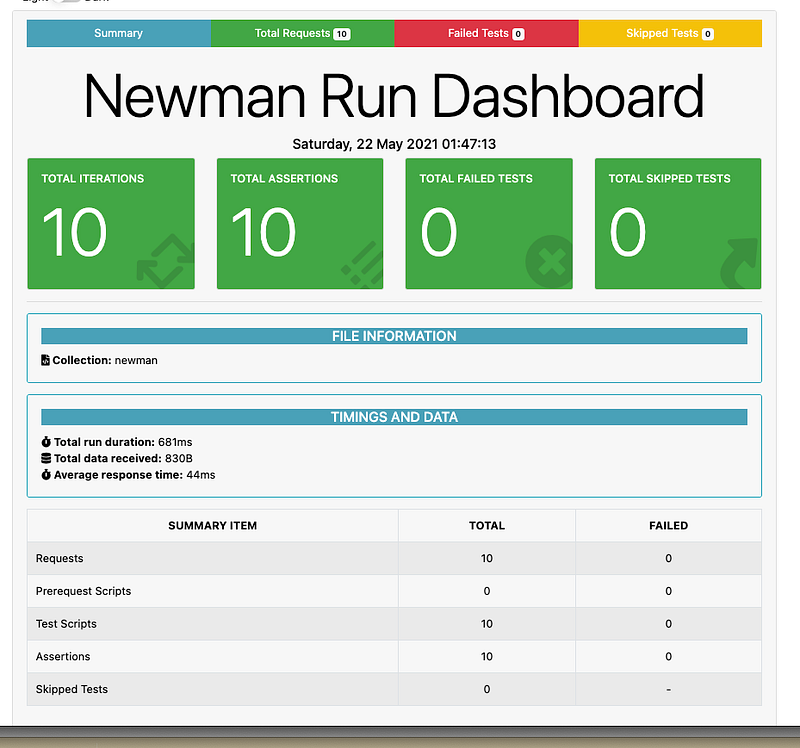
Testing Second API
For the second API, I used photos API → https://jsonplaceholder.typicode.com/photos. The rest of the details remained the same. Photos API would return a large amount of data. This would make the comparison of response time the response time should be higher.
API Comparison
I used CSV export as I could then use Excel to create a comparison chart. It would provide me a visual difference of the performance impact. I have attached the results below:
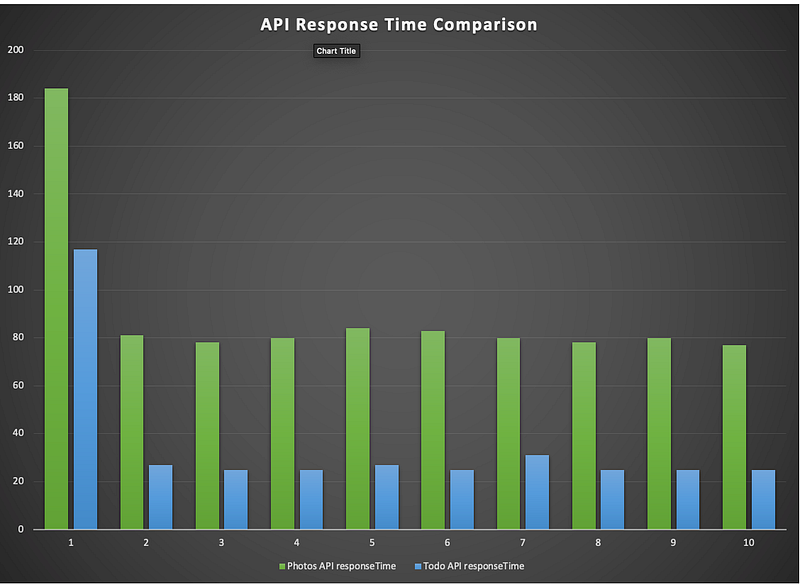
As expected, the response time for the photos API was much higher than the response time for Todo API
How I used this approach to arrive at an efficient pagination solution
- I implemented the Spring boot offset pagination on a branch within my IDE.
- Created second branch using slice approach in Springboot.
- Created third branch with cursor pagination token approach
- I created test data using Postgres functions
- I enabled logs in Postgres DB so that it monitors all the queries fired
- Enabled debug logs on to make sure I am not missing anything
- Used postman-newman combination to run tests on three branches
- Used excel to view the visual difference on response times
Summary
Key points covered in the posts are:
- Setting up Postman
- Setting up newman and key plugins
- API comparison
- How I used Postman-Newman for benchmarking
Conclusion
This article showcases an approach of using Postman with Newman. We can use them to run API tests through command line and can export results. It is not the ideal way. But as developers, this is one extra weapon that we can have as developers in our arsenal to test our hypotheses.
A key takeaway that I had was finding a way of using an existing tool in a different way than envisaged before.
Do share the post if you have enjoyed the article!


