
[New Update] How I turn my blog articles into Faceless YouTube Videos Automatically
Get 20% of my secret tool that creates Faceless Youtube Videos in less than 5 minutes
Join Our Online Entrepreneurs Club where you can be part of a growing community of online entrepreneurs that are on a similar journey like yourself.
How do I turn my blog articles into Faceless YouTube videos?
How do I create Faceless YouTube videos from my blog articles?
How do I create Faceless YouTube videos automatically?
The idea of creating a Faceless YouTube channel has been on my mind lately.
But here are some challenges that came to mind when I thought about doing this:
- I don’t know how to edit YouTube videos
- I don’t know where to get royalty free music, videos, and stock images
- I really don’t want to spend hours creating YouTube videos
And last but not least, I’m a lazy unicorn and I don’t want my “I don’t feel like it” attitude to be a bottleneck to my business productivity.
It happens way too often.
How many times have you decided not to write or create because you were lazy?
How often do you procrastinate on deadlines?
If you thought “too many times to count”, then you’re going to love the tool that I use.
How do you turn blog articles into Faceless YouTube Videos Automatically?
In my spare time I like to “research” for the next best automation software. I stumbled across Pictory AI on Product Hunt.
If you want to learn more about getting really great software, read this article:
Pictory AI uses artificial intelligence to create and edit videos from text.
I thought, too good to be true.
But alas, I was wrong. It’s true, and it’s phenomenal.
They have four options to create videos at the time of this writing:
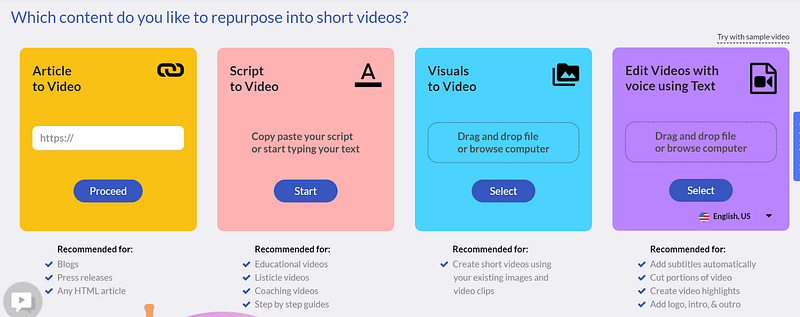
- You can drop your article link and create a Faceless YouTube Video
- You can drop your copy from your article and create a Faceless YouTube Video (fav)
- You can create a video from existing images and video clips
- You can edit videos with voice using text.
My favorite is copying and pasting my copy from my articles to their platform. I used their Article link to video option but I have to select which text I want to keep. I want to create a video with all the text, so I choose the second option.
From there, it will use AI to read your text to select the royalty free images and videos for your blog article.
For example, if you write about dogs, it will use AI to select images and videos relating to dogs.
Pretty cool.
Also, you can choose to have royalty free music playing in the background, add subtitles (which is your text), and have a voiceover for the video.
Once you make your selections, you click generate and download your video.
Upload it to YouTube and you’re ready!
How do I automate the YouTube Upload process and Faceless YouTube Video Creation?
Okay, these are for all my Hella lazy folks out there.
AKA me.
I don’t want my laziness to be a bottleneck to my productivity.
Creating Faceless YouTube videos is a matter of taking the time to sit down and click a bunch of buttons.
Instead of wasting my precious time clicking buttons, I rather have a bot do it for me.
So, my automation nerd hat came on and I created a bot that receives the blog article and manually uploads the blog text to Pictory AI.
If you’re wanting to learn more instructions about how I created this bot and how you can plug and play a Faceless YouTube Automation Workflow + Bot, fill out this interest form. It allows me to gauge interest to see if people are interested in this type of content and resource.
In summary, I’ve shared with you my favorite tool, Pictory AI, and how you can create Faceless YouTube videos from your blog articles. I’ve also shared with you I created a bot to automate this process even further. If you want to learn more, fill out this interest form.
UPDATE: Blog Articles to Youtube Video Costs + Example
I’m so happy that this article has been getting some traffic and many of you would like to learn more about this tool!
It was mentioned in the comments that I forgot to mention the price, at the time of this writing, this is how much the platform is:
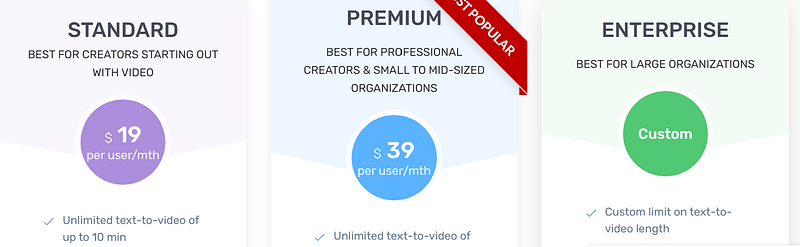
If you’re wondering which plan I’m on, I personally like to pay annually to take advantage of the annual pricing. Now, you may be wondering if it’s worth paying for it when you could just do this for free on Canva.
Let me clear something up. Nothing is free in life. It will either cost you time or money.
What do you value more?
I personally value my time more. I absolutely hate wasting time on something that I could easily automate. Instead of spending 2+ hours finding royalty free images, video and music to create a Youtube video, you can do that in less than 5 minutes.
Blog Article to Faceless YouTube Video Example:
I created a video off of this article:
Here’s the YouTube Video:
UPDATE #2: Here’s what I have to say if you hate the Bot Voice.
I have good and bad news.
Nothing in life is perfect, but thankfully with this tool you can have the option to get rid of the bot voice — ain’t that pretty close to perfect? (you’ll love my sarcastic humor haha)
In all seriousness, I’ve read through some of your comments and some of you have stated that you don’t like the bot sounding voice. I did some research and found that you can do voice overs with an upgraded plan from their standard one.
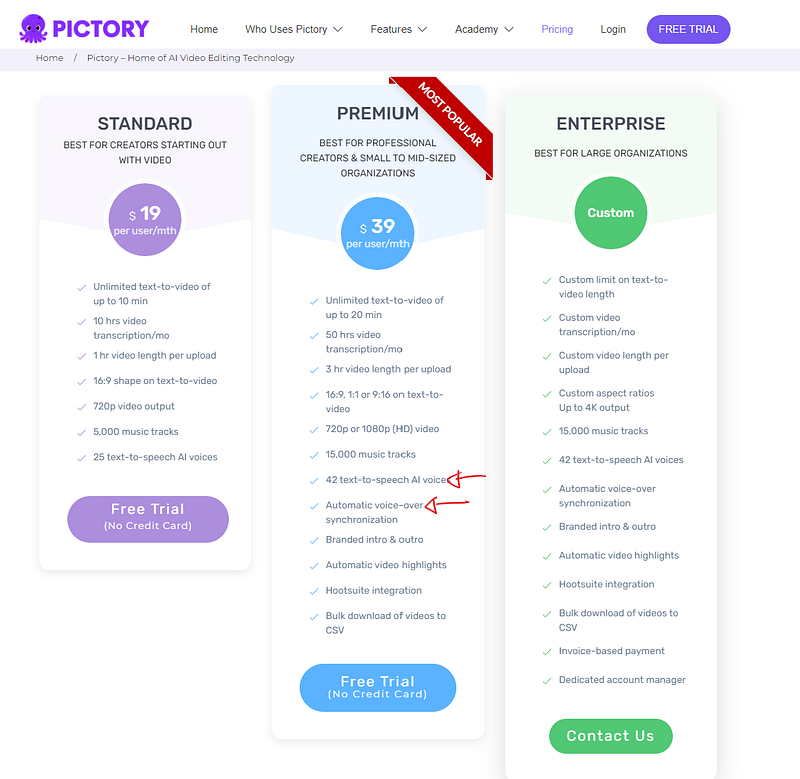
Remember, if you use the discount below you get 20% off. So the premium plan will run you about $31.20/mo (discount included).
If you now say “Tina, that’s out of my budget”
I don’t know what to tell you.
Running a business takes expenses, and unfortunately, it takes money to make money (Remember, I’ll always be 100% honest with you).
Again, nothing in life is free. It will either cost you time or money. I value my time because it’s the one thing you can’t get back once you “spend” it.
Make your priorities and decide accordingly. There is absolutely no pressure to purchase or buy something that doesn’t work for you. My goal with my content is to save you time and share resources and tools that help you in your content creation process.
So, if you don’t mind the bot voice, go for the standard plan. If you want more voice options and want to do voice overs, go for the premium plan.
PICTORY AI DISCOUNT CODE:
When you sign up with this Pictory AI Link (affiliate link) and use this discount code: 22OFF20 you can get 20% off of your subscription. I spoke with customer service to get this code for you. If you purchase the annual subscription it comes out to $15.20/mo!
This code may only be valid for the year of 2022.
Special 20% OFF Discount Code — July 4th Week 2022
Y’all are going to love me, as an affiliate for this software I also get great discounts for you all — at no extra cost!
When you sign up with this link (aff)
Apply this lifetime discount code (only works for annual plans): TINA (all caps)
You get 20% off of Pictory AI Annually FOR LIFE.
Your Welcome.
I invite you to my marketing automations interest form, sign up for this interest form so I can gauge interest to see if people want to learn more about marketing automation — you can even share some ideas that you want me to figure out for you!.
Join Our Online Entrepreneurs Club Below:
Check out our Online Entrepreneur Resources (You Don’t Want to Miss Out)
Check out our Gumroad Store for Automation Workflows, Strategy, and much more!
Bookmark this article, click that follow button and mail+ icon to get content about all things business, productivity, money, and self improvement. Get a Medium membership to get access to amazing content by amazing writers. Affiliate links may be present in the article and the author receives a commission if a purchase is made.


