
How I Stopped Writing CSS
I changed the way I use CSS thanks to Tailwind
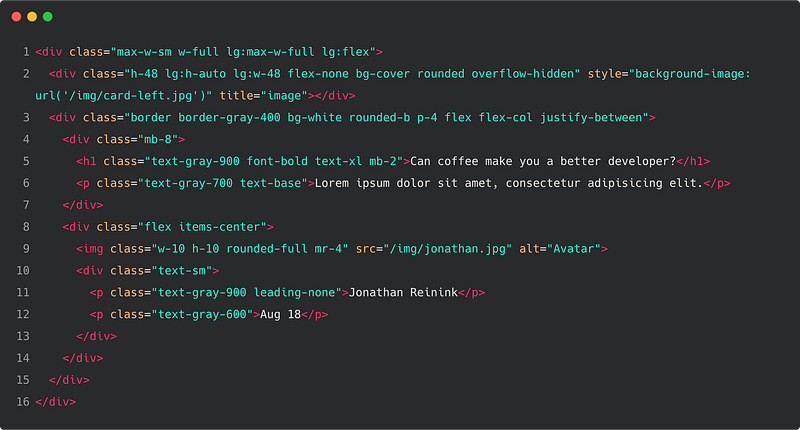
As a frontend developer focused on the CSS architecture, I like to use the best methodologies to write my code. I always do research to understand the frameworks that suit my needs and can be scalable.
A few months ago talking with my colleague the name of a CSS framework came out: Tailwind CSS.
Usually, I used Bootstrap for most of my projects, but a few weeks ago, I started to use Tailwind and it completely changed my way of using CSS.
What is Tailwind CSS
As we can read on the official website
Tailwind CSS is a highly customizable, low-level CSS framework that gives you all of the building blocks you need to build bespoke designs without any annoying opinionated styles you have to fight to override.
The truth is that many CSS frameworks have too many components predesigned and many times we are forced to overwrite them, especially when we work with highly customized UIs.
Instead of predesigned components, Tailwind provides utility classes that let you build your custom designs without ever leaving your HTML.
Let’s look at some examples of how my way of writing CSS has changed since I started using Tailwind.
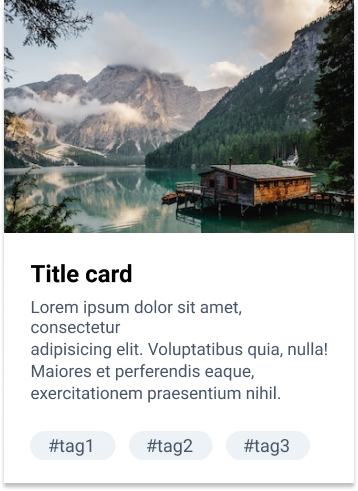
Now I would like to show you an example of creating this card component using Tailwind and only CSS.
It’s impressive to see how you can create a component like this without even a line of code.
Do not you believe it? I will prove it with a practical example.
Card component only with CSS
HTML
<div class="card"> <img class="card__img" src="https://images.unsplash.com/photo-1470770841072-f978cf4d019e?ixlib=rb-1.2.1&ixid=eyJhcHBfaWQiOjEyMDd9&auto=format&fit=crop&w=1050&q=80" alt="" /> <div class="card__body"> <h1 class="card__title">Title card</h1> <p class="card__description">Lorem ipsum dolor sit amet, consectetur adipisicing elit. Voluptatibus quia, nulla! Maiores et perferendis eaque, exercitationem praesentium nihil.</p> <span class="card__tag">#tag1</span> <span class="card__tag">#tag2</span> <span class="card__tag">#tag3</span> </div></div>CSS
.card {
  box-shadow: 0 1px 3px 0 rgba(0, 0, 0, 0.1), 0 1px 2px 0 rgba(0, 0, 0, 0.06);
  max-width: 24rem;
  &__img {
    width: 100%;
  }
  &__body {
    padding: 1rem 1.5rem;
    background-color: #fff;
  }
  &__title {
    font-size: 1.25rem;
    margin-bottom: 0.5rem;
    font-weight: 700;
  }
  &__description {
    color: #4a5568;
    margin-bottom: 4rem;
  }
  &__tag {
    color: #4a5568;
    padding: 0.25rem 0.75rem;
    margin-right: 0.5rem;
    font-weight: 600;
    display: inline-block;
    border-radius: 9999px;
    background-color: #edf2f7;
  }
}
pay attention, there are 29 lines of CSS.
Card component with Tailwind CSS
HTML
<div class="max-w-sm shadow"> <img class="w-full" src="https://images.unsplash.com/photo-1470770841072-f978cf4d019e?ixlib=rb-1.2.1&ixid=eyJhcHBfaWQiOjEyMDd9&auto=format&fit=crop&w=1050&q=80" alt="" /> <div class="bg-white px-6 py-4"> <h1 class="font-bold text-xl mb-2">Title card</h1> <p class="text-gray-700 mb-16">Lorem ipsum dolor sit amet, consectetur adipisicing elit. Voluptatibus quia, nulla! Maiores et perferendis eaque, exercitationem praesentium nihil.</p> <span class="inline-block bg-gray-200 rounded-full px-3 py-1 text-sm font-semibold text-gray-700 mr-2">#tag1</span> <span class="inline-block bg-gray-200 rounded-full px-3 py-1 text-sm font-semibold text-gray-700 mr-2">#tag2</span> <span class="inline-block bg-gray-200 rounded-full px-3 py-1 text-sm font-semibold text-gray-700">#tag3</span> </div></div>What have you noticed?
We have the same output(the card component) but without writing any line of CSS. You can save 29 lines of code only with a simple component, so think on large scale projects how much time and code you can save.
Something else?
The HTML is less readable, but the effort is much less!
Let’s see also how to create the same things as Bootstrap
If you have always used Bootstrap, I understand that can be scary to change CSS framework and switch to something completely based on utility classes.
Now I will show you how to replicate some of the Bootstrap classes with Tailwind CSS.
Bootstrap
<div class="container">
  <div class="row">
    <div class="col-6 col-md-4">column 1</div>
    <div class="col-6 col-md-4">column 2</div>
    <div class="col-6 col-md-4">column 3</div>
  </div>
</div>
Tailwind CSS
<div class="container mx-auto px-4">
  <div class="flex flex-wrap">
    <div class="w-6/12 md:w-4/12">column 1</div>
    <div class="w-6/12 md:w-4/12">column 2</div>
    <div class="w-6/12 md:w-4/12">column 3</div>
  </div>
</div>
What is the difference?
In Bootstrap you have classes that contain multiple properties while in Tailwind CSS each class corresponds only to one property.
What do I miss of Bootstrap?
Some of the JavaScript features!
Bootstrap, unlike Tailwind, also has a JavaScript part. Some JavaScript features that I used most were the modals, collapse, tabs and tooltips.
Using Tailwind, I had to recreate these features by myself. But to be honest, this effort was minimal.
Bootstrap or Tailwind CSS?
Depending on your needs, for many projects, Bootstrap can be fine, but for projects that have very customized User Interfaces there is no doubt, Tailwind gives you much more flexibility and freedom.
If you decide to use Tailwind, I suggest you to use PurgeCSS to remove the unused CSS. This method is also used by Mozilla, they built Firefox Send with Tailwind and used PurgeCSS to remove the unnecessary CSS.
Conclusion
I have used Bootstrap for years and it’s always been fast and easy to use. But since I started using Tailwind, I feel much more free and my CSS code has dropped more than 70%. Well, yes I didn’t completely stop but if I consider the amount of code that I used to write before, I can say that it’s like I have almost stopped to write CSS.
In the beginning, it can be challenging to write and remember all those classes. I can tell you though that once you get used to it, you will love it, I guarantee that.


