
How I Prepared to Take the Google Cloud Associate Cloud Engineer Certification
Recently, a friend asked me how I prepared to take the Google Cloud Associate Cloud Engineer exam.
I published my experience in this article, in Portuguese. But I figured it would be a good idea to share that in English since many of my friends and followers do not speak Portuguese.
Test Overview
According to the official Google Cloud Associate guide, the Cloud Engineer is searched in 5 Cloud Associate search topics and validated as experiences with an engineer with the skills to:
- Setting up a cloud solution environment 1.1 Setting up cloud projects and accounts 1.2 Managing account and payment settings 1.3 Installing and configuring a command-line interface (CLI), using Cloud SDK
- Planning and configuring a cloud solution
- Implementing a cloud solution
- Ensuring successful operation of a cloud solution
- Configuring access and security
The exam description, according on Google’s website:
Cloud engineers implement applications, monitor operations, and manage enterprise solutions. Use Google Cloud Console for common command-line solutions or to maintain solution or command-line them to maintain managed services or more common maintenance solutions to maintain services managed by Google Cloud.
More details about the exam
Currently, an exam is available in English, Japanese, and Spanish. To check all Google certifications and their available languages, click here.
The cost of the test is $125 and can be taken at an accredited center or online.
The value of the exam is the same regardless of the method chosen.
The test is valid for 2 years, and GCP sends notifications of 3, 2, and 1 month as the only one for those who recertify.
More information about recertification can be found at this link.
The test is 120 minutes long and has 60 questions in total. Google does not say the minimum score a person must achieve to pass the test. According to Google’s website:
“Why don’t I receive my score or any feedback when I submit my exam? Our exams are designed to determine only whether or not an individual meets a minimum passing standard. They are not intended to be used as a diagnostic tool or to spread people out on a scale of ability. For this reason, numerical scores are not meaningful for the examinee and can be misinterpreted.”
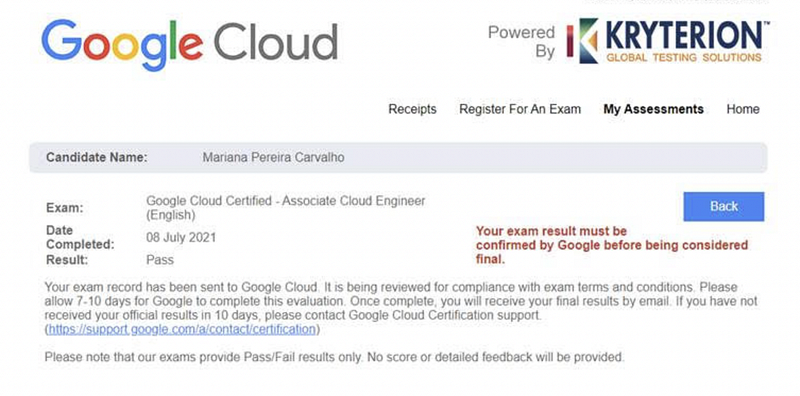
At the end of the test, you receive a notification if you passed or not, but you receive a communication that the confirmation that you passed needs to be validated by Google, so you can receive your badge and the OK that you passed.
Here below is an example of what appeared on my screen right after the test.
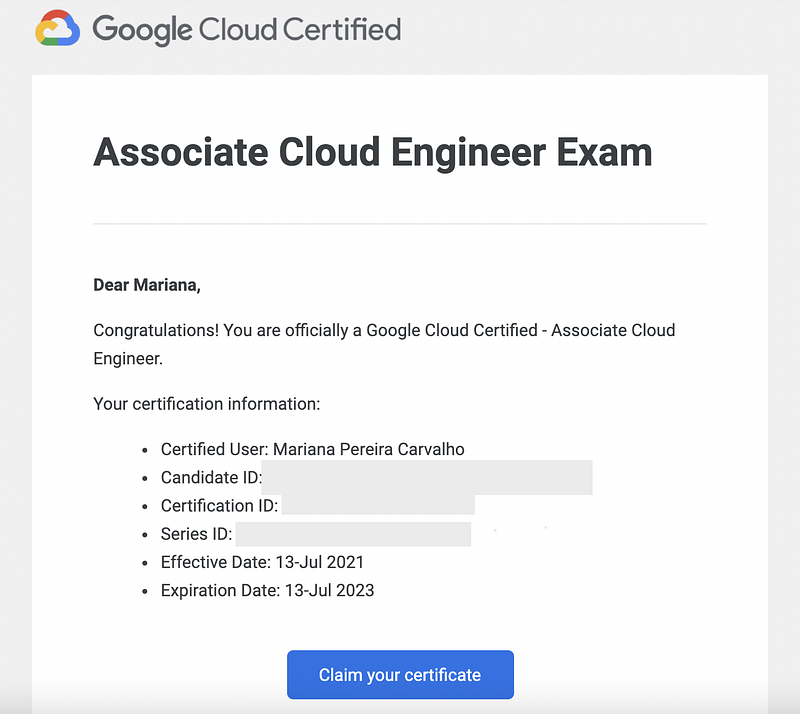
Here is the confirmation email I received after 5 days of the exam:
How I studied for the test
Unlike many people looking to become GCP certified, I do not manage a cloud environment in my current job.
I am a Solutions Engineer at Dell in the sales area, and studying and learning more about GCP is part of my professional development to learn more about the cloud services that Dell’s competitors (Google, AWS, Microsoft) offer.
I studied for about 2.5 months for the exam, about 4 hours a day, and also on weekends.
I scheduled my test 3 weeks in advance (I recommend you do the same if you have a deadline because there were few places when I went to schedule mine).
In the last 10 days before the test, I had already consumed all the study material. I studied doing the practice exam (simulated exam), and the official book.
In the official book, I went straight to the end of the chapter, answered the 20 questions, and then checked the answers; count how many stitches I made, and move on to the next chapter. Doing the exercises for all the chapters took about 3 days. At the end of all the chapters, I did the summation of the scores by chapter and saw the ones I had “done worse”. And I reviewed the study material. This helped me A LOT to review the content and assimilate the concepts more.
The resources I used to study for the test are all in English and are listed here:
- Coursera, 6 modules cover everything from the basics of cloud infrastructure to container services;
- Qwiklabs, which are available within Coursera itself (I found that doing the labs helped me A LOT to have more confidence in taking the test and memorizing how the GCP services are arranged on the dashboard;
- GCP videos are available on YouTube;
- Official exam book: “Official Google Cloud Certified Associate Cloud Engineer Study Guide”;
- Content by one of the women who is a Google Cloud Advocate from Google (super interesting infographics that helped a lot in understanding the different services!);
- I attended a Google webinar called “Cloud OnBoard: Begin with Cloud Foundations”. You can view the recording of that session at this link. But I encourage you to check out the scheduled webinars and watch them in real time. Search for upcoming ones here;
Important: When doing the Qwiklabs labs, be careful not to use or activate services that are outside of the walkthrough. I say this because I once tried to “play” inside the lab to explore datasets in BigQuery and I received a notification/alert that I was prohibited from doing that (kkkrying) and that if I did it again they would take away my access to the portal. Whoops…
Other resources and websites that can help you prepare for the test:
- Google Cloud Skills Challenge: I suggest looking at this Google Challenge and looking to study there before entering a more structured (and paid) Coursera course;
- Cloud Guru: Lots of courses, forums, and resources for preparation. They also have training tests.
I hope these tips and step-by-step guides can help you prepare for Google certification! And if you want to explore the other options the company has, take a look at this link.
If you want to learn more about other certifications impactful on your resume, check this article I wrote.
If you want to access a complete guide on how to obtain technical certifications, check this other article I wrote.
Book a time with me to help you prepare for your next certification exam.
Become a member of Medium and read all the articles, including mine. Use this link to sign up, you don’t pay anything extra for the membership, and I get a small commission from Medium. ◡̈ Thank you!


