avatarQendel AI

Free AI web copilot to create summaries, insights and extended knowledge, download it at here

5262

Abstract

ep-2</h2><p id="d06c"><b>Import Dataset</b></p><div id="9509"><pre><span class="hljs-comment"># Import saved dataset split from the drive (saved during fine-tuning)</span> <span class="hljs-comment"># Connect colab with my drive </span>

drive.mount(<span class="hljs-string">'/content/drive'</span>)

<span class="hljs-comment"># Load dataset and prepare evaluation prompts </span> dataset = load_from_disk(<span class="hljs-string">'/path/to/your/saved/dataset/split'</span>)

test_dataset = dataset[<span class="hljs-string">'test'</span>]

<span class="hljs-comment"># dataset</span> <span class="hljs-string">""" Dataset({ features: ['instruction', 'context', 'response', 'category'], num_rows: 3164 }) """</span>

<span class="hljs-comment"># Prepare evaluation prompts </span> prompts = [ <span class="hljs-string">f"""### Instruction: Use the input below to create an instruction, which could have been used to generate the input using an LLM.

### Input 
<span class="hljs-subst">{sample[<span class="hljs-string">'response'</span>]}</span>

### Response:
"""</span> <span class="hljs-keyword">for</span> sample <span class="hljs-keyword">in</span> test_dataset

]

<span class="hljs-comment"># Get references / Ground Truth the model will be evaluated against</span> references = [sample[<span class="hljs-string">'instruction'</span>] <span class="hljs-keyword">for</span> sample <span class="hljs-keyword">in</span> dataset]</pre></div><h2 id="a756">Step 3</h2><p id="b8bb"><b>Evaluate Base Mistral 7B Instruct Model</b></p><p id="f23f">There are two approaches for downloading Mistral 7B Instruct model:</p><p id="e5f2"><b>Approach 1</b>: <i>Directly using</i> <i>AutoModelForCausalLM</i></p><p id="dea7"><b><i>This approach takes at least 2 hours for evaluation — not recommended.</i></b></p><div id="50e6"><pre><span class="hljs-comment"># Loading full model weights (might need larger GPU) </span> <span class="hljs-comment"># Use 'load_in_4bit=True' to load the quantized version </span> model = AutoModelForCausalLM.from_pretrained(<span class="hljs-string">"mistralai/Mistral-7B-Instruct-v0.1"</span>, device_map=<span class="hljs-string">'auto'</span>, use_cache=<span class="hljs-literal">False</span>) tokenizer = AutoTokenizer.from_pretrained(<span class="hljs-string">"mistralai/Mistral-7B-Instruct-v0.1"</span>)</pre></div><p id="1608">If you prefer this approach, please refer to my <a href="https://readmedium.com/bye-bye-llama-2-mistral-7b-is-taking-over-get-started-with-mistral-7b-instruct-1504ff5f373c">previous article</a> to learn how to generate model responses.</p><p id="4d5d"><b>Approach 2:</b> <i>Use vLLM to load the model and generate text</i></p><p id="0b1c"><b><i>An approach that only takes 1 minute for evaluation — ideal.</i></b></p><div id="da45"><pre><span class="hljs-comment"># Sampling parameters </span> sampling_params = SamplingParams(temperature=<span class="hljs-number">0.8</span>, top_p=<span class="hljs-number">0.95</span>)

<span class="hljs-comment"># LLM instance </span> llm = LLM(model=mistral_7b_model)

<span class="hljs-comment"># Generate model responses </span> outputs = llm.generate(prompts, sampling_params)

<span class="hljs-comment"># List for base model responses </span> base_model_responses = []

<span class="hljs-comment"># Loop over outputs to get each response </span> <span class="hljs-keyword">for</span> output <span class="hljs-keyword">in</span> outputs: prompt = output.prompt generated_text = output.outputs[<span class="hljs-number">0</span>].text base_model_responses.append(generated_text)</pre></div><h2 id="e254">Step 4</h2><p id="fe29"><b>Evaluate Finetuned Mistral 7B Instruct Model</b></p><p id="b28a">Similar to Step 3, you also have two approaches here:</p><p id="830c"><b>Approach 1:</b> <i>Load finetuned Mistral 7B Instruct Model directly</i></p><p id="c250"><b><i>This approach takes at least 2 hours for evaluation — not ideal.</i></b></p><div id="711f"><pre><span class="hljs-comment"># Load the finetuned model </span> finetuned_model = AutoPeftModelForCausalLM.from_pretrained( <span class="hljs-string">"/path/to/your/finetuned/model/"</span>, low_cpu_mem_usage=<span class="hljs-literal">True</span>, torch_dtype=torch.bfloat16, device_map=<span class="hljs-string">"auto"</span> )

<span class="hljs-comment"># Load tokenizer </span> tokenizer = AutoTokenizer.from_pretrained(<span class="hljs-string">"/path/to/your/finetuned/model/"</span>)</pre></div><p id="3ebd">Please check my <a href="https://readmedium.com/fine-tuning-mistral-7b-instruct-model-in-colab-a-beginners-guide-0f7bebccf11c">previous article</a> to see how to generate responses using this approach.</p><p id="4c8c"><b>Approach 2:</b> <i>Load finetuned Mistral 7B Instruct Model using vLLM</i></p><p id="0f06"><b><i>An approach that takes only 1 minute for evaluation — perfect!</i></b></p><div id="1c05"><pre><span class="hljs-comment"># Sampling parameters </span> sampling_params = SamplingParams(temperature=<span class="hljs-number">0.8</span>, top_p=<span class="hljs-number">0.95</span>)

<span class="hljs-comment"># My finetuned model is pushed to this hf repository path </span> hf_finetuned_model_path = <span cl

Options

ass="hljs-string">"qendel-ai/aq-LORA-finetuned-mistral-7b-instruct-model-v01"</span>

<span class="hljs-comment"># An LLM instance </span> llm = LLM(model=hf_finetuned_model_path)

<span class="hljs-comment"># Generate responses</span> outputs = llm.generate(prompts, sampling_params)

<span class="hljs-comment"># A list to save finetuned model responses </span> finetuned_model_responses = []

<span class="hljs-comment"># loop over outputs to get each response </span> <span class="hljs-keyword">for</span> output <span class="hljs-keyword">in</span> outputs: prompt = output.prompt generated_text = output.outputs[<span class="hljs-number">0</span>].text finetuned_model_responses.append(generated_text)</pre></div><p id="1136"><i>If loading the finetuned Mistral 7B Instruct Model does not work for you in this step, please try first restarting your Google Colab session.</i></p><h2 id="dcd1">Step 5</h2><p id="e2d5"><b>Evaluate and Compare</b></p><p id="9e14">Let’s now use the Rouge score to evaluate and compare the base model responses, finetuned model responses, and references (ground truth).</p><p id="e6b7"><b>Base Model Evaluation</b></p><div id="953c"><pre><span class="hljs-comment"># Base model evaluation </span> base_model_evaluation = rouge.compute(predictions=base_model_responses, references=references)

<span class="hljs-comment"># Print 'rouge1', 'rouge2', and 'rougeL'</span> <span class="hljs-built_in">print</span>(<span class="hljs-string">"Rouge-1 Evaluation:"</span>) <span class="hljs-built_in">print</span>(base_model_evaluation[<span class="hljs-string">"rouge1"</span>]) <span class="hljs-built_in">print</span>(<span class="hljs-string">"--"</span><span class="hljs-number">20</span>) <span class="hljs-built_in">print</span>(<span class="hljs-string">"Rouge-2 Evaluatiom:"</span>) <span class="hljs-built_in">print</span>(base_model_evaluation[<span class="hljs-string">"rouge2"</span>]) <span class="hljs-built_in">print</span>(<span class="hljs-string">"--"</span><span class="hljs-number">20</span>) <span class="hljs-built_in">print</span>(<span class="hljs-string">"Rouge-L Evaluation:"</span>) <span class="hljs-built_in">print</span>(base_model_evaluation[<span class="hljs-string">"rougeL"</span>])

<span class="hljs-comment">### Results</span> <span class="hljs-string">""" Rouge-1 Evaluation: 0.21262300055717825

Rouge-2 Evaluatiom: 0.07594736564358157

Rouge-L Evaluation: 0.1843040811475238 """</span></pre></div><p id="0700"><b>Finetuned Model Evaluation</b></p><div id="1f0e"><pre><span class="hljs-comment"># Finetuned model evaluation </span> finetuned_model_evaluation = rouge.compute(predictions=finetuned_model_responses, references=references)

<span class="hljs-comment"># Print 'rouge1', 'rouge2', and 'rougeL'</span> <span class="hljs-built_in">print</span>(<span class="hljs-string">"Rouge-1 Evaluation:"</span>) <span class="hljs-built_in">print</span>(finetuned_model_evaluation[<span class="hljs-string">"rouge1"</span>]) <span class="hljs-built_in">print</span>(<span class="hljs-string">"--"</span><span class="hljs-number">20</span>) <span class="hljs-built_in">print</span>(<span class="hljs-string">"Rouge-2 Evaluation:"</span>) <span class="hljs-built_in">print</span>(finetuned_model_evaluation[<span class="hljs-string">"rouge2"</span>]) <span class="hljs-built_in">print</span>(<span class="hljs-string">"--"</span><span class="hljs-number">20</span>) <span class="hljs-built_in">print</span>(<span class="hljs-string">"Rouge-L Evaluation:"</span>) <span class="hljs-built_in">print</span>(finetuned_model_evaluation[<span class="hljs-string">"rougeL"</span>])

<span class="hljs-comment"># Result</span> <span class="hljs-string">""" Rouge-1 Evaluation: 0.4803503825176066

Rouge-2 Evaluation: 0.30831922549034696

Rouge-L Evaluation: 0.4561721122477083 """</span></pre></div><h2 id="6f6a">🧠 Review</h2><p id="aa0a">In the evaluation stage, it is evident that the Mistral 7B Instruct Model Rouge score has significantly improved after finetuning. Surprisingly, it is important to note that this comparison is between a 4-bit quantized finetuned model and a full Mistral 7B Instruct Model.</p><h2 id="5352">🚀 What’s Next</h2><p id="0c04">I am certain that your model will experience further improvement after fine-tuning. We must deploy and utilize it within an application to make it practical and functional. This step is crucial to harness the full potential of your model and maximize its benefits in real-world scenarios.</p><p id="36a3"><b>STAY TUNED for my upcoming articles on 👇</b></p><p id="4bfa">💡<i> <a href="https://readmedium.com/the-easiest-and-cheapest-way-to-deploy-finetuned-mistral-7b-instruct-model-or-any-model-3f236182e8b8">Deploy Finetuned mistral 7B Instruct Model: A Step-by-Step Guide</a></i></p><p id="34ca"><i>💡 Build an App Powered by Finetuned Mistral 7B Instruct Model</i></p><p id="bfaf" type="7">🎖️Thanks For Reading🎖️</p><p id="3b6d">⚡️LIGHT UP⚡️ this article with a C-L-A-P👏</p><p id="9fdd">🚀 F-O-L-L-O-W <b><i>Qendel AI</i></b> for <b>more🚀</b></p></article></body>

How I Easily Evaluate Finetuned Mistral 7B Instruct Model
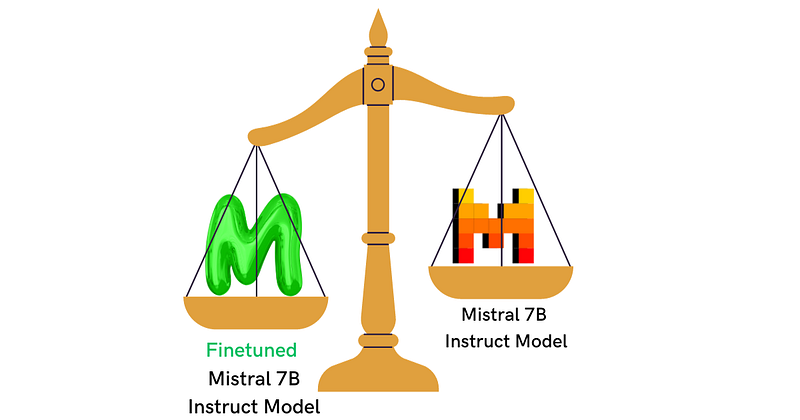
Comparing Finetuned and Base Mistral 7B Instruct Model. Source: Created by author.

You can’t improve what you don’t measure.

I recently finetuned the Mistral 7B Instruct Model for a specific QA task, and after thoroughly evaluating the performance, I picked the finetuned Mistral 7B Instruct Model over its base version. Ensuring improvement isn’t just about intuition but about quantifiable results.

In this article, I’ll guide you through using the Rouge Score to compare finetuned and base LLMs effectively.

The “Recall-Oriented Understudy for Gisting Evaluation” (Rouge) Score

If you are unfamiliar with the Rouge score, I will briefly explain how it works.

What is Rouge Score and How Does it Work?

Rouge is a simple metric that compares words generated by an LLM to reference words provided by humans.

The Rouge Score uses unigrams, bigrams, and n-grams to compare responses.
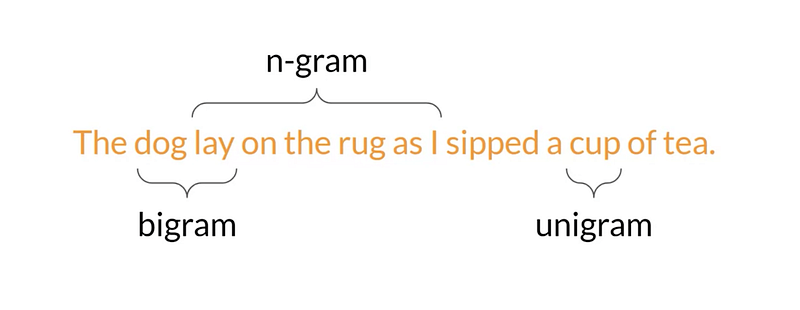
unigram, bigram and n-gram. Source: page link.

If you are not familiar with these terms, here are quick descriptions:

  • unigram: A single word
  • bigram: A group of two words
  • n-grams: A group of n-words

Now that we understand the terms, let’s see the 3 categories of Rouge score:

Rouge-1 Metric

To compare the responses generated by LLM with the reference words, Rouge-1 utilizes unigrams, as shown in the example below:
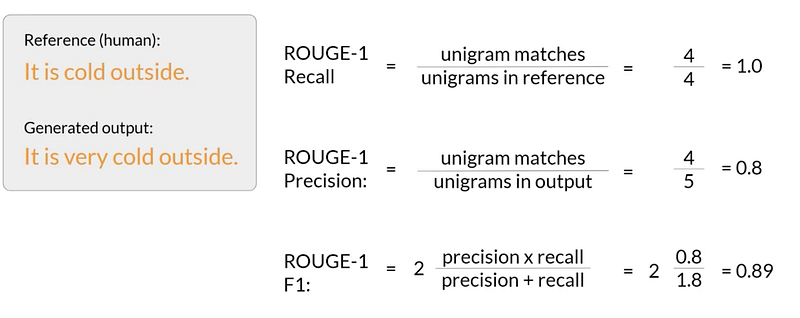
Rouge-1 LLM evaluation metric. Source: page link.

Rouge-2 Metric

Utilizing bigrams, Rouge-2 is a more robust metric that compares LLM-generated responses with reference.
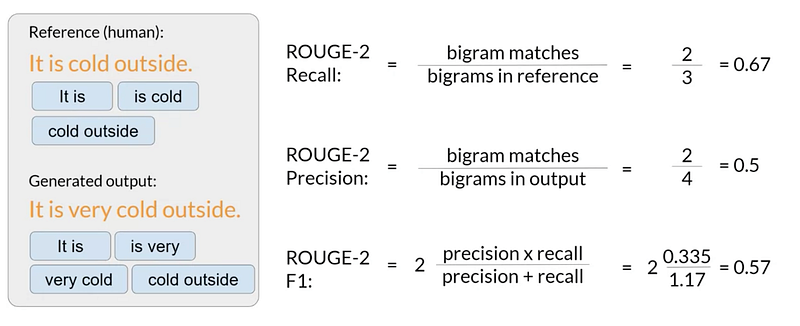
Rouge-2 LLM evaluation metric. Source: page link.

Although Rouge-3, …, Rouge-n can be used to evaluate LLM responses, Rouge-L is a very common and effective metric.

Rouge-L Metric

Rouge-L examines the “Longest Common Subsequence” (LCS) to compare the responses generated by LLM with the reference text in terms of words.
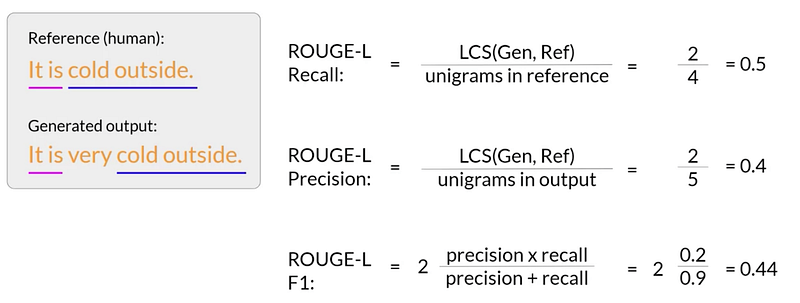
Rouge-L LLM evaluation metric. Source: page link.

📝 Note

When comparing different models or a single model with its fine-tuned versions, Rouge-1, Rouge-2, and Rouge-L are reliable metrics. However, it’s important to remember that the scores can only be compared for the same task and can’t be compared across different tasks.

Now that the Rouge score is clear, I will evaluate how my fine-tuned Mistral 7B Instruct model has improved. If you haven’t already, check how I finetuned the model and executed a qualitative comparison.

Evaluate Finetuned Mistral 7B Instruct Model

This evaluation will show how much the finetuned Mistral 7B Instruct Model has improved compared with its base version.

Step-1

Install & Import Libraries

# Install libraries 
!pip3 install transformers evaluate rouge-score datasets vllm 
# Import libraries 
from dataset import load_from_disk 
from google.colab import drive
from vllm import LLM, SamplingParams
from huggingface_hub import notebook_login
import evaluate 

rouge = evaluate.load('rouge')

Step-2

Import Dataset

# Import saved dataset split from the drive (saved during fine-tuning)
# Connect colab with my drive 

drive.mount('/content/drive')


# Load dataset and prepare evaluation prompts 
dataset = load_from_disk('/path/to/your/saved/dataset/split')

test_dataset = dataset['test']

# dataset
"""
Dataset({
    features: ['instruction', 'context', 'response', 'category'],
    num_rows: 3164
})
"""


# Prepare evaluation prompts 
prompts = [
    f"""### Instruction: 
    Use the input below to create an instruction, which could have been used to generate the input using an LLM. 

    ### Input 
    {sample['response']}

    ### Response:
    """ for sample in test_dataset
]

# Get references / Ground Truth the model will be evaluated against
references = [sample['instruction'] for sample in dataset]

Step 3

Evaluate Base Mistral 7B Instruct Model

There are two approaches for downloading Mistral 7B Instruct model:

Approach 1: Directly using AutoModelForCausalLM

This approach takes at least 2 hours for evaluation — not recommended.

# Loading full model weights (might need larger GPU) 
# Use 'load_in_4bit=True' to load the quantized version 
model = AutoModelForCausalLM.from_pretrained("mistralai/Mistral-7B-Instruct-v0.1", device_map='auto', use_cache=False)
tokenizer = AutoTokenizer.from_pretrained("mistralai/Mistral-7B-Instruct-v0.1")

If you prefer this approach, please refer to my previous article to learn how to generate model responses.

Approach 2: Use vLLM to load the model and generate text

An approach that only takes 1 minute for evaluation — ideal.

# Sampling parameters 
sampling_params = SamplingParams(temperature=0.8, top_p=0.95)

# LLM instance 
llm = LLM(model=mistral_7b_model)

# Generate model responses 
outputs = llm.generate(prompts, sampling_params)

# List for base model responses 
base_model_responses = []

# Loop over outputs to get each response 
for output in outputs:
    prompt = output.prompt
    generated_text = output.outputs[0].text
    base_model_responses.append(generated_text)

Step 4

Evaluate Finetuned Mistral 7B Instruct Model

Similar to Step 3, you also have two approaches here:

Approach 1: Load finetuned Mistral 7B Instruct Model directly

This approach takes at least 2 hours for evaluation — not ideal.

# Load the finetuned model 
finetuned_model = AutoPeftModelForCausalLM.from_pretrained(
    "/path/to/your/finetuned/model/",
    low_cpu_mem_usage=True,
    torch_dtype=torch.bfloat16,
  device_map="auto"
)

# Load tokenizer 
tokenizer = AutoTokenizer.from_pretrained("/path/to/your/finetuned/model/")

Please check my previous article to see how to generate responses using this approach.

Approach 2: Load finetuned Mistral 7B Instruct Model using vLLM

An approach that takes only 1 minute for evaluation — perfect!

# Sampling parameters 
sampling_params = SamplingParams(temperature=0.8, top_p=0.95)

# My finetuned model is pushed to this hf repository path 
hf_finetuned_model_path = "qendel-ai/aq-LORA-finetuned-mistral-7b-instruct-model-v01"

# An LLM instance 
llm = LLM(model=hf_finetuned_model_path)

# Generate responses
outputs = llm.generate(prompts, sampling_params)

# A list to save finetuned model responses 
finetuned_model_responses = []

# loop over outputs to get each response 
for output in outputs:
    prompt = output.prompt
    generated_text = output.outputs[0].text
    finetuned_model_responses.append(generated_text)

If loading the finetuned Mistral 7B Instruct Model does not work for you in this step, please try first restarting your Google Colab session.

Step 5

Evaluate and Compare

Let’s now use the Rouge score to evaluate and compare the base model responses, finetuned model responses, and references (ground truth).

Base Model Evaluation

# Base model evaluation 
base_model_evaluation = rouge.compute(predictions=base_model_responses, references=references)

# Print 'rouge1', 'rouge2', and 'rougeL'
print("Rouge-1 Evaluation:")
print(base_model_evaluation["rouge1"])
print("--"*20)
print("Rouge-2 Evaluatiom:")
print(base_model_evaluation["rouge2"])
print("--"*20)
print("Rouge-L Evaluation:")
print(base_model_evaluation["rougeL"])


### Results
"""
Rouge-1 Evaluation:
0.21262300055717825
----------------------------------------
Rouge-2 Evaluatiom:
0.07594736564358157
----------------------------------------
Rouge-L Evaluation:
0.1843040811475238
"""

Finetuned Model Evaluation

# Finetuned model evaluation 
finetuned_model_evaluation = rouge.compute(predictions=finetuned_model_responses, references=references)

# Print 'rouge1', 'rouge2', and 'rougeL'
print("Rouge-1 Evaluation:")
print(finetuned_model_evaluation["rouge1"])
print("--"*20)
print("Rouge-2 Evaluation:")
print(finetuned_model_evaluation["rouge2"])
print("--"*20)
print("Rouge-L Evaluation:")
print(finetuned_model_evaluation["rougeL"])

# Result
"""
Rouge-1 Evaluation:
0.4803503825176066
----------------------------------------
Rouge-2 Evaluation:
0.30831922549034696
----------------------------------------
Rouge-L Evaluation:
0.4561721122477083
"""

🧠 Review

In the evaluation stage, it is evident that the Mistral 7B Instruct Model Rouge score has significantly improved after finetuning. Surprisingly, it is important to note that this comparison is between a 4-bit quantized finetuned model and a full Mistral 7B Instruct Model.

🚀 What’s Next

I am certain that your model will experience further improvement after fine-tuning. We must deploy and utilize it within an application to make it practical and functional. This step is crucial to harness the full potential of your model and maximize its benefits in real-world scenarios.

STAY TUNED for my upcoming articles on 👇

💡 Deploy Finetuned mistral 7B Instruct Model: A Step-by-Step Guide

💡 Build an App Powered by Finetuned Mistral 7B Instruct Model

🎖️Thanks For Reading🎖️

⚡️LIGHT UP⚡️ this article with a C-L-A-P👏

🚀 F-O-L-L-O-W Qendel AI for more🚀

Data Science
Machine Learning
Large Language Models
Llm
NLP
Recommended from ReadMedium