The Cheapest Way to Deploy Finetuned/Base LLMs

What use is the finest model if it isn’t serving efficiently?
Zero!
If not serving efficiently, models are useless. Some counter-intuitive truths I learned over the years:
- A small model might outshine a larger model.
- A 50% accurate model could be better than a 100% accurate model.
- A simple model might just be more beneficial than a more complex model.
- And the list goes on…
They could be better if they serve and meet the needs of the use case at hand.
Although it can be adapted for almost any LLM, specifically, this article will demonstrate how to efficiently deploy a finetuned Mistral 7B Instruct Model and explain how to:
- Merge model adapters with its base model.
- Push the model and tokenizer to HuggingFace (HF)
- Add deployment files to your HF repository for serving.
- Deploy the model to the HF Inference Endpoint.
- Query the deployed model.
Ready to start? Let’s dive deep into the deployment process.
Deploying Finetuned Mistral 7B Instruct Model
Step 1
Install and Import Libraries
# Install libraries
!pip3 install transformers bitsandbytes accelerate torch peft
# Import libraries
import torch
import requests
from google.colab import drive
from peft import AutoPeftModelForCausalLM
from huggingface_hub import notebook_login
from transformers import AutoTokenizerStep 2
Load Mistral 7B Instruct Model
If you read my previous article on finetuning, I saved finetuned model weights in my Google Drive folder. Now, I will import and load the finetuned model and tokenizer — if you have your model loaded, skip this step.
# Mount your drive
drive.mount('/content/drive')

# Define the data type
dtype = torch.bfloat16 if torch.cuda.get_device_capability()[0] == 8 else torch.float16

# Your finetuned model's path (either in google drive or local)
model_path = "/path/to/your/finetuned/model/"

# Load the finetuned model and tokenizer
finetuned_model = AutoPeftModelForCausalLM.from_pretrained(
    model_path,
    low_cpu_mem_usage=True,
    torch_dtype=dtype,
    device_map='auto'
)
tokenizer = AutoTokenizer.from_pretrained(model_path)
Step 3
Merge and Push Finetuned Mistral 7B instruct Model
In this step, I will merge the finetuned model adapters with the base model and then push the finetuned model to the HuggingFace repository. I am merging the adapters because Inference Endpoints doesn't currently support adapters. If you don’t have an HF repository, please create one first.
# Login to HF
notebook_login()

# Define a path in HF repository you want to push your model --> CHANGE THIS TO YOUR HF PATH
model_path = "qendel-ai/aq-LORA-finetuned-mistral-7b-instruct-model-v01"

# Merge the finetuned model adapters with the base model
finetuned_model = finetuned_model.merge_and_unload()

# Push the finetuned model along with adapters
finetuned_model.push_to_hub(model_path, use_auth_token=True)
tokenizer.push_to_hub(model_path, use_auth_token=True)
Step 4
Create Deployment Files
We will now upload two files for deployment along with your model files in the Files and Versions tab.
The first file should contain the necessary libraries. We will define the text generation pipeline in the second file. To add a file, click on ‘+ Add file’ in the upper right corner of the window.
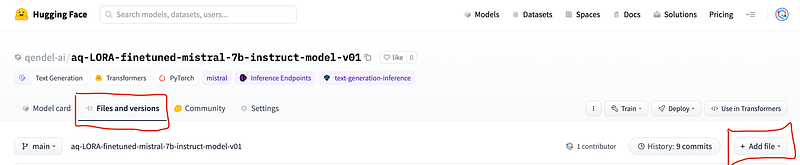
Note that you should use the exact file names as given below. Check my HF repository for your reference.
requirements.txt
torch==2.0.1
transformers==4.34.0
bitsandbytes==0.41.1
accelerate==0.23.0
handler.py
import torch
import transformers
from typing import Dict, Any
from transformers import AutoTokenizer, AutoModelForCausalLM, pipeline


dtype = torch.bfloat16 if torch.cuda.get_device_capability()[0] == 8 else torch.float16

class EndpointHandler:
    def __init__(self, model_path: str = ""):

        tokenizer = AutoTokenizer.from_pretrained(model_path)

        model = AutoModelForCausalLM.from_pretrained(
            model_path,
            return_dict=True,
            device_map='auto',
            load_in_8bit=True,
            torch_dtype=dtype,
            trust_remote_code=True)


        self.pipeline = transformers.pipeline(
            "text-generation",
            model=model,
            tokenizer=tokenizer,
            temperature=0.8,
            repetition_penalty=1.1,
            max_new_tokens=1000,
            pad_token_id=tokenizer.pad_token_id,
            eos_token_id=tokenizer.eos_token_id

        )


    def __call__(self, data: Dict[str, Any]) -> Dict[str, Any]:
        prompt = data.pop("inputs", data)

        llm_response = self.pipeline(
            prompt,
            return_full_text=False
        )

        return llm_response[0]['generated_text'].strip()
At this stage, your repository should be identical to mine.
Step 5
Deploy Finetuned Mistral 7B Instruct Model
I will use Inference Endpoints to deploy the model but you can experiment with the other options. These are the steps I followed:
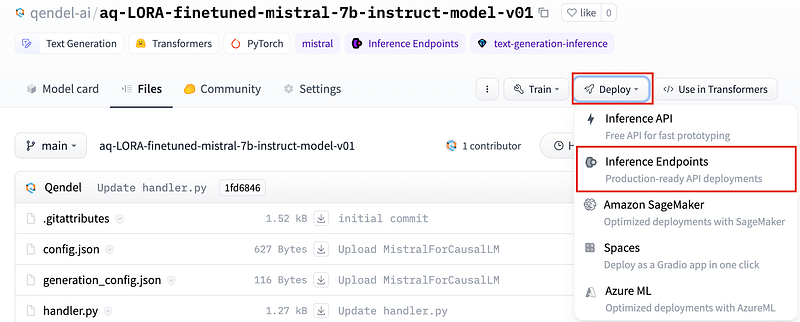
I. Select Inference Endpoints
On the right corner, click on ‘Deploy’ and select Inference Endpoints.
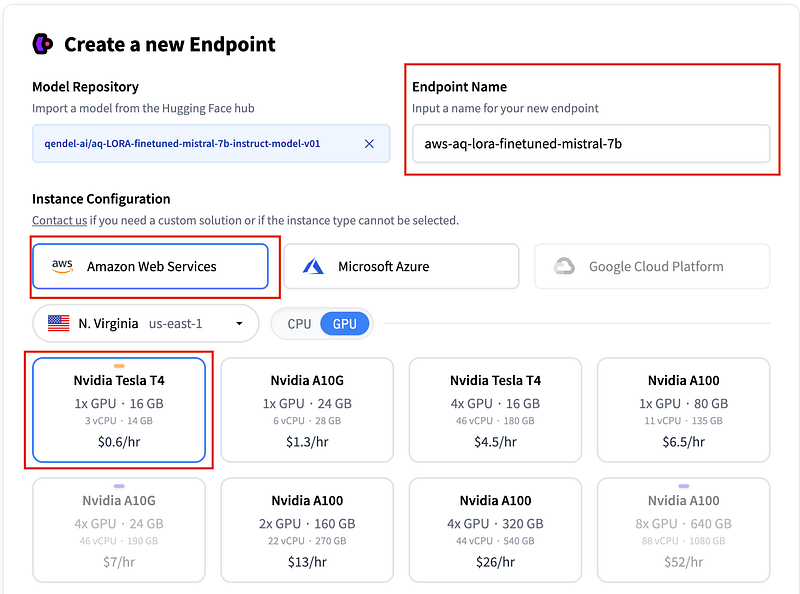
II. Pick a GPU instance
Since I am using an 8-bit quantized version of the Finetuned Mistral 7B Instruct Model, the Nvidia Tesla T4 with a single 16GB GPU costing 60 cents per hour is sufficient.
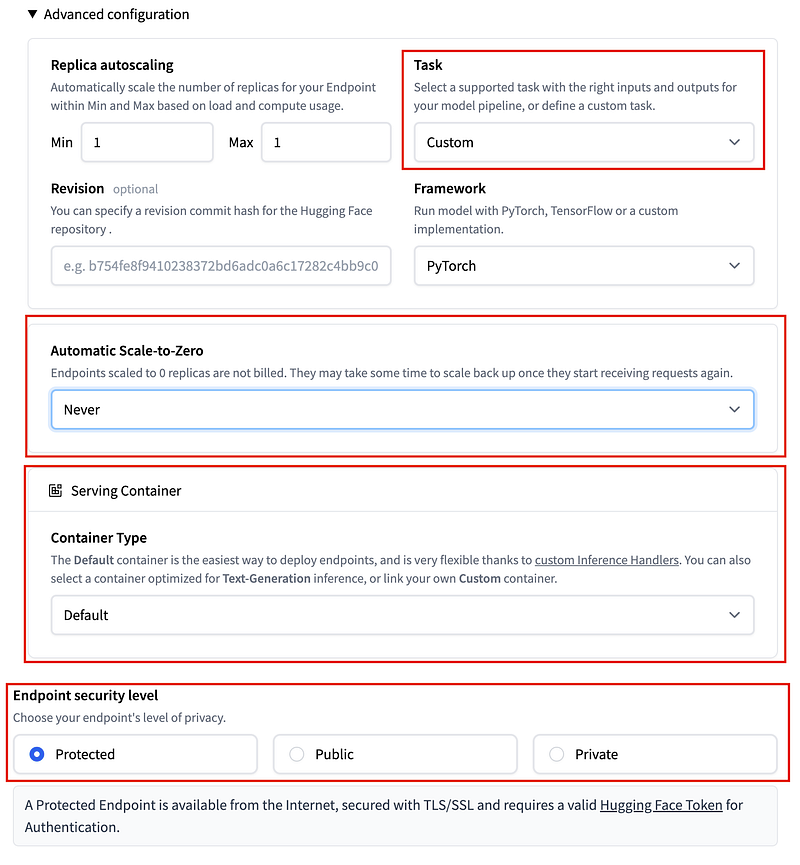
III. Set your Advanced Configuration
In the "Advanced Configuration" section, select "Custom" for the "Task" and "Default" for "Container Type" since we have defined our own handler Python script. If you only plan on using your model occasionally, you can save on costs by setting "Automatic Scale-to-Zero" to the idle time of your preference.
Finally, click on ‘Create Endpoint’ and monitor through the logs as your new instance spins up.
Step 7
Query the model
After successfully deploying your finetuned Mistral 7B Instruct Model, you can find your API URL in the Overview section of your endpoint. To query your model, use your API URL and Auth Token as shown below:
import requests

API_URL = "https://XXXX"
headers = {
 "Authorization": "Bearer XXX",
 "Content-Type": "application/json"
}

def query(payload):
 response = requests.post(API_URL, headers=headers, json=payload)
 return response.json()

prompt = """### Instruction:
         Use the input below to create an instruction, which could have been used to generate the input using an LLM.

        ### Input
          - Orange juice: liquid
          - Gatorade: liquid
          - Eye drops: liquid
          - Water: liquid
          - Peanut butter: solid
          - Iphone: solid
          - Beer: liquid
          - Guitar: solid

        ### Response:
    """


output = query({
 "inputs": prompt
})


print(output)

# output
"""
Tell me whether these are liquids or solids:
orange juice, gatorade, eye drops, water, peanut butter, iphone, beer, guitar
"""
This is a perfect response generated by our Finetuned Mistral 7B Instruct Model!
🧠 Review
Deploying a quantized version of a model can be done efficiently using HuggingFace Inference Endpoints. With the API call taking around 10 seconds, it provides a decent throughput. However, if your application requires faster throughput, deploying with vLLMs could be a better option for you. Do note that a larger GPU might be needed for this deployment.
🚀 What’s Next
Finally, we have successfully deployed our model! Now, it's time to integrate it into my Streamlit application.
STAY TUNED for my upcoming content 👇
💡 Build an App Powered by Finetuned Mistral 7B Instruct Model
🎖️Thanks For Reading🎖️
⚡️LIGHT UP⚡️ my day with 21 C-L-A-P-S 👏
🚀 F-O-L-L-O-W for more🚀