
How Do Web Apps Like Medium Work? (Part 2)
And what can they teach us about the world?
There are 200 million active websites.¹ If only 1% offered a full-featured web application, that’s two million.
A long tail of web apps!
This series
This series is written for people who don’t know much about software, but are curious how it works.
Part 1 explained how people organize to build web applications.
In Part 2, we’re looking at the process of writing web application software.
In Part 3, we’ll look at how web applications operate in production.
BONUS: As we learn about web applications, we’ll learn some interesting things that generalize to the world around us.
Development methodologies — oh what a boring name!
Methodology. Now there’s a term guaranteed to induce ennui. Any word that’s five syllables is a soporific.
Let’s think of development methodology as nothing more than the process a team follows to write software.
Most of us have heard of the New York Mafia’s Five Families? Luckily, in software, we have only two:
- Waterfall has been around for decades. It describes a sequential process, with gates. A team defines Product Requirements, passes a gate and writes Functional Specifications, passes a gate and writes Design Specifications, etc. Waterfall is best suited for software that is infrequently updated and/or is highly complex and/or exists in environments with an exceedinly low tolerance for errors. Everything a web app isn’t.
- Agile is newer, though it has been around for decades also. While Agile is a specific development methodology, it also refers to a software development mindset, i.e., a family of similar processes with similar values. These processes are all agile (lower case a). Unlike Waterfall, agile is not sequential. It’s iterative. An agile team focuses on developing a small chunk of software, and then another, ad infinitum. In agile, specifications are very lightweight, if they exist at all.
Most web app teams use an agile process.
Takeaway 1: Whether to go Waterfall or agile is a generic problem that transcends software. In writing, “planner” and “pantser” map to Waterfall and agile. There are advantages and disadvantages to both. The optimum method depends on the context.
It’s useful to consider factors like complexity (bias toward planner) and expertise (bias toward pantser). It’s not worth worrying about this distinction if all you’re doing is making toast, but if you’re taking on more substantial tasks, it’s well worth the effort to consider when to go pantser and when to go planner.
Languages
Next, let’s consider programming languages. According to Wikipedia, there are some 700+ languages.² A lot of those are outdated, or used for highly specific purposes, so only a fraction of those are serious candidates for a web application.
Let’s look at language properties.
- Back end vs. front end: A language like HTML is designed for the front end. A language like Java, though it is sometimes used on the front end, is really designed for the back end.
- Functional vs. imperative: Most languages use functions as a basic building block. Functions are small routines that can be called repeatedly to do a specific thing. In functional languages, all functions have no side effects. In imperative programming, there can be side effects, such as taking input from a user. Imperative programming is more common in web applications.
- High level vs. low level languages: A high level language, such as Java, uses syntax similar to a human language. A low level language, such as Assembler, uses syntax that closely maps to a computer’s capability, and does not resemble human language. Ultimately, every instruction must be converted into machine codes that are specific to the microprocessor running the computer. Low level languages resemble machine codes. High level languages resemble human language. Web apps use high level languages.
Java example

public class Main {
    public static void main String([] args) {
    System.out.println("Hello World");
  }
}
Assembler example
MOV AL, 61H ; Load AL with 97 decimal (61 hex)- Interpreted vs. compiled: A program in an interpreted language, such as Javascript³, is parsed one line at a time as the program runs and gets converted to instructions that a computer can understand. A program in a compiled language, like C++⁴, is converted to assembler and then machine-specific code before the program runs. . Interpreted Javascript is ubiquitous in the front end of a web app; compiled languages, in the back end. There are a number of reasons, but primarily, compiled languages execute much more quickly and the back end is where web application scaling is a challenge.
Databases
Web applications use databases on the back end. Think about an application like Facebook, which has user, groups, pages, marketplace products, and dozens of other types of data which it must organize. Databases are where a web application organizes data.
There are multiple database flavors, but diving into these is too detailed for this article. Suffice it to say that a web application will generally standardize on one or more databases. As with programming languages, there are trade-offs between a) standardizing on a small set of tools and b) selecting the optimum tool for each task.
Takeaway 2: Where to standardize and where to specialize is a generic issue. We looked at this in Part 1, with respect to people. The same trade-off exists with tools. The average auto mechanic invests between $7,500 and $11,000 on tools, while specialists might spend $27,000.⁵ You can’t succeed as an auto mechanic without spending a fortune on highly specialized tools. A driveway mechanic who only wants to change her oil spends less than a hundred dollars.
Choosing languages
Most teams select a limited set of front end and back end languages, and stick to them. In doing so, they strike a balance between standardization and specialization.
Front end and back end environments differ dramatically. Back end machines store front end code and serve it on demand to a specific computer browser, from which it executes. Back end machines do all kinds of other things, and in a web application with thousands or millions of simultaneous users, back end software must be highly scalable.
Front end languages
A typical front-end “stack” consists of:
- HyperText Markup Language (HTML) for structuring pages
- Cascading Style Sheets (CSS) for efficiently making pages attractive through specifying templates for fonts, colors, etc.
- Javascript for front end computing. HTML and CSS are for formatting only.
HTML, CSS, and Javascript are so ubiquitous on the front end, they’re called the building blocks of the Web.
Back end languages
Teams have more discretion with back end languages. Common choices include Python, Ruby, C#, PHP, C++, Java, Rust, and Go.
When choosing languages, developers will consider factors like execution speed, ease of use, robustness of internal tools, breadth of ecosystem, etc.
Most teams will pick one back-end language. Picking two or even three isn’t right or wrong. It depends on the context.
Developer tools
Developers use a lot of tools to write code. Here are some widely used tools. There are many others not listed here.
- Source code repository: Most web applications have a lot of source code. Google has about 2 billion lines of code.⁶ That code has to live somewhere secure, but accessible, so that developers can pull down chunks, work on them, and update the centrally stored code so others can use it. Web applications use a source code repository for this purpose. The most popular one is Github.
- Version control system (VCS): The source code repository stores the code but it leverages a version control system as a standard way of enabling developers to share that code. The most popular VCS is called git. So yes, Github uses git. Note that Github is a company (owned by Microsoft) and git is an open source tool. For a web app company, Github costs money. Git does not.
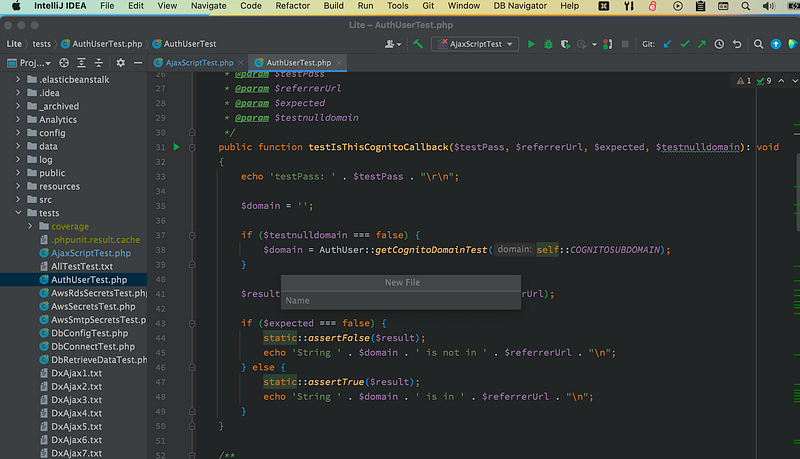
- Integrated Development Environment (IDE): You could use TextEdit on your Mac to write code. No one would do this because TextEdit is not designed for this purpose. IDEs are designed for this purpose. IDEs have loads of built-in functionality. A developer can live in their IDE and get almost anything done from there. The featured photo in this article depicts a widely used IDE called IntelliJ.
- Other editors: Some developers, particularly those working on front end code, prefer a lighter weight but still powerful editor. There are many choices, including Atom, Sublime, and VSCode.
- Build system: Packaging a bunch of files in a source control repository into a bundle that can be loaded into actual web servers requires a lot of steps. Development teams use build automation tools for this purpose. These may be home grown tools, or popular open source tools like Jeeves, or Gradle.
- Work management tool: Some teams use tools to track tasks. JIRA is a popular work management tool.
Putting it all together
Every web application product team operates differently. Following is a representative example of how actual teams operate, focusing primarily on developers.
- Meet periodically (often daily) as a team to discuss goals and priorities.
- Write code, and ideally automated tests to verify its integrity as new code is written.
- When a small discrete chunk of code is ready, submit it for a code review.
- Other coders review the code and offer comments, questions, and suggestions, or possibly note bugs.
- Continue iterating until code is deemed ready.
- Check the code in. This involves moving it from the developer’s machine to the source code repository in such a way that each code check-in is stored as a discrete unit in the source code repository’s database.
- Lather, rinse, repeat.
- Note: no specs! Not even code comments. Good code is self-documenting. If you’re not meeting with your team, you’re coding or code reviewing.
But that ain’t all!
We understand how web application product teams organize.
We know what tools and languages they use, and how they get work done.
What we still don’t know is how software is deployed in a production environment so people like you and me can use it.
Let’s tackle that in Part 3, the last installment of the series.
¹ Forbes. ² Wikipedia. ³ Interpreted languages Python and Javascript can be compiled. They usually aren’t. ⁴ Java is compiled but its compilation process is unique. ⁵ Chron ⁶ Wired


