avatarAndrew Rodwin

Free AI web copilot to create summaries, insights and extended knowledge, download it at here

4670

Abstract

</p><p id="5c05">This implies that as a developer, you fully own the quality of the code you write. The buck stops with you. And you know the code better than anyone, so you should be able to test it better than anyone.</p><h2 id="880d">A note about user experience</h2><p id="a9d6">You may notice a lot of web app software is confusing. There’s a simple reason. Most web app companies under-invest in user experience specialists. If you have one user experience specialist for every twenty developers, or you don’t empower them, you’re guaranteeing your users will be frustrated.</p><p id="5272">I’ve seen it happen. In companies like that, leaders focus on technical wizardry or schedules. They don’t know how to build usable software. They don’t know what they don’t know. There’s a good story about that <a href="https://readmedium.com/for-my-thoughts-are-not-your-thoughts-8b90b1cea46a">here</a>.</p><p id="865b" type="7">Takeaway 1: If you don’t take the time to create something usable, you might as well not create it.</p><h2 id="8a7d">More specialization</h2><p id="56e8">As we dig deeper into the structure of a Product Development organization, we find more specialization.</p><p id="b5f8">User experience specialists are either <i>designers</i> or <i>researchers</i>. Designers works in the trenches with the product team, advising on usability. Researchers spend time with customers getting input on how to make existing and new features easier to use. They pass this information on to the people in the trenches.</p><p id="149b">Web applications developers come in several flavors.</p><ul><li><b>Front end</b> developers own the user interface the web application presents in a browser. I.e., where you read and type.</li><li><b>Back end</b> developers own the software that does the heavy lifting users request via the browser.</li><li>Web app <b>mobile</b> developers specialize in mobile apps that act as the user interface instead of a browser. Web app mobile developers are sometimes part of the front end team. Of course, some mobile apps may not have much of a web presence, i.e., most functionality is in the app.</li><li><b>Tools</b> developers build tools to help front-end and back-end developers write and deploy code efficiently. Organizations use both third-party and home-grown tools. A web app tools team build those home-grown tools.</li></ul><p id="7382">Not all web application product teams draw such distinctions. A developer that does either front-end or back-end is called a <i>single-stack developer</i>. Some teams embrace this division, preferring single-stack developers. Their reasoning is that front end and back end development is so different that you need specialized expertise to be at the top of your game.</p><p id="cd96">Others teams prefer dual-stack developers, reasoning that developers are more effective if they understand both ends.</p><p id="3b2b">Even within a product team, there may be a mixture of single-stack and dual-stack developers.</p><p id="7eae" type="7">Takeaway 2: There’s an inherent tension between the value of specializing and generalizing. One is not better than the other. It all depends on context. But it’s crucial to get this right because it can make a huge difference in effectiveness.</p><h2 id="a09f">A Simple Example</h2><p id="8b5e">Imagine you’re shopping for power tools and want to see what Facebook Marketplace offers. You log into Facebook. The front end handles collecting your username and password, and sends them to the back end which performs the validation, and lets the front end know the result.¹</p><figure id="a54b"><img src="https://cdn-images-1.readmedium.com/v2/resize:fit:800/1*r7n6xYr_O9Trxk5bzV2i6g.png"><figcaption>Screenshot by author</figcaption></figure><p id="3a4f">Then you click <i>Marketplace</i>.</p><figure id="39a8"><img src="https://cdn-images-1.readmedium.com/v2/resize:fit:800/1*o9fyqm_Yrrku-yewWPqaMw.png"><figcaption>Screenshot by author</figcaption></figure><p id="e6b2">The front end handles a) presenting you information and b) dealing with whatever you click and type. Believe it or not, you can actually view the front end code. Every browser allows this.² Below is a snippet from <i>this</i> <i>very webpage</i>.</p><div id="14b1"><pre><span class="hljs-tag">&lt;<span class="hljs-name">p</span> <span class="hljs-attr">name</span>=<span class="hljs-string">"3a4f"</span> <span class="hljs-attr">class</span>=<span class="hljs-string">"graf graf--p graf-after--figure is-selected"</span>&gt;</span> Then you click <span class="hljs-tag">&lt;<span class="hljs-name">em</span> <span class="hljs-attr">class</span>=<span class="hljs-string">"m # Options arkup--em markup--p-em"</span>&gt;</span>Marketplace<span class="hljs-tag">&lt;/<span class="hljs-name">em</span>&gt;</span> . <span class="hljs-tag">&lt;/<span class="hljs-name">p</span>&gt;</span></pre></div><p id="a330">All that stuff you see in FB Marketplace is a) requested by the front-end and b) sent from the back-end using what is known as an Application Programming Interface (API). That’s a fancy term. All it means is that the front and back ends have an agreement on how to communicate.</p><p id="d2a1">There’s a lot of software to handle requests like these in the back end. At the highest level, there’s a division in the back end between application code and databases. All of that Marketplace stuff is stored in a database. And databases contain not only records of stuff, like power tools in this example, but also their own code routines for accessing the database.</p><p id="cff6">You can’t see the back end code. It’s proprietary. Most commercial organizations have all of their secret sauce in the back end and take great pains to protect their intellectual property. Where would you guess the software that implements Google’s page rank algorithm lives?</p><h2 id="b2a6">And does this all apply to Medium?</h2><p id="890e">The short answer is <i>yes</i>. The longer answer is <i>probably and mostly</i>.</p><p id="57ed">For example, I don’t know details like whether Medium has QA engineers, or user researchers. At a higher level, Medium certainly has a front end and a back end, and an API that enables communication.</p><p id="5d2d">When you log in, the front end and back end cooperate to handle authentication and present your home page. Here’s mine.</p><figure id="525b"><img src="https://cdn-images-1.readmedium.com/v2/resize:fit:800/1*wtLlx0cjDWItWrbSrvhDfw.png"><figcaption>Screenshot by author</figcaption></figure><p id="2ef8">All of that information comes from the back end. The front end takes that information and formats it in a — hopefully — user-friendly way.</p><p id="dd8f">That article by <a href="undefined">Felicia Wu</a> under <i>Staff Picks</i> looks interesting. Let’s take a look at the front end code.</p><div id="0138"><pre><span class="hljs-tag">&lt;<span class="hljs-name">a</span> <span class="hljs-attr">class</span>=<span class="hljs-string">"af ag ah ai aj ak al am an ao ap aq ar as at"</span> <span class="hljs-attr">rel</span>=<span class="hljs-string">"noopener follow"</span> <span class="hljs-attr">href</span>=<span class="hljs-string">"/user-experience-design-1/my-first-layoff-was-the-best-thing- that-could-happen-to-my-career-b3250a0fa7ba?source=list_module ---two_column_layout_sidebar-------------c7bc6e1ee00f---------------------"</span>&gt;</span> <span class="hljs-tag">&lt;<span class="hljs-name">h2</span> <span class="hljs-attr">class</span>=<span class="hljs-string">"be jy ee z ef bj"</span>&gt;</span>My first layoff was the best thing that could happen to my career<span class="hljs-tag">&lt;/<span class="hljs-name">h2</span>&gt;</span><span class="hljs-tag">&lt;/<span class="hljs-name">a</span>&gt;</span></pre></div><p id="b90d"><i>href</i> is the <i>Hyper Text Markup Language</i> keyword for links. You can see the URL link for that article. If you prepend <a href="https://medium.com"><code>https://medium.com</code></a><code>/</code> you can manually find that article.</p><p id="f755">What happens when I click the link? Using the API, the front-end lets the back-end know. The back-end serves up the webpage with that article.</p><figure id="148f"><img src="https://cdn-images-1.readmedium.com/v2/resize:fit:800/1*3_h75N-Ozv4eAjZSXwrKnQ.png"><figcaption>Screenshot by author</figcaption></figure><p id="c734">Now the front-end has a new webpage of code.</p><figure id="e4eb"><img src="https://cdn-images-1.readmedium.com/v2/resize:fit:800/1*vz4O6A42nkizNyLvvOrB5g.png"><figcaption>Screenshot by author</figcaption></figure><p id="b415">We’ll take a look at what these bizarre codes mean, as well as drill down into back end code, development tools, and process in Part 2.</p><p id="d5be">¹ You don’t always need to log in when you use Facebook. The front end stores authentication <i>cookies</i> on your device after you log in. A cookie is just a code. When you next use Facebook, the front end validates the cookie. These cookies have an expiration date.</p><p id="5ded">² In Chrome, click <i>View-&gt;Developer-Developer Tools</i>.</p><p id="8c9d"><a href="https://muddyum.net/subscribe/@andrew-rodwin">Want an email heads-up for new articles? Click me.</a></p><p id="c9a0"><a href="https://andrew-rodwin.medium.com/membership">Join Medium? Click me.</a></p></article></body>

How Do Web Apps Like Medium Work? (Part 1)

And what can they teach us about the world?
Photo by Antonio Batinić

Do you write e-checks, shop at Amazon, or read stories on Medium?

Obviously that’s rhetorical. Of course!

When you read a story on Medium, you’re using a type of software called a web application. You could easily use a dozen web applications a day without even thinking about it.

Software comes in many flavors. Consider an Alexa device. A Bitcoin wallet. Your iPad. They all run a different kind of software. And that’s a small sample.

Web applications are interesting because they’re pervasive. Web apps are the vanilla of the software world. We use web apps many times daily. But when you’re buying that vintage Beatles album on eBay, do you have any idea what’s actually happening?

Time to clear up the mystery.

This series

This series is written for people who don’t know much about software, but are curious how it works.

  • In Part 1, we’ll tackle how people organize to build web applications.
  • In Part 2, we looked at the process of writing web application software, up to but not including deploying the software into production. That’s where people actually use it.
  • In Part 3, we’ll look at how web applications operate in production.

BONUS: As we learn about web applications, we’ll learn some interesting things that generalize to the world around us.

Meet the players

Some software is coded by one person. Consider browser extensions. These are small applications that add specific bits of functionality to browsers. In the screenshot below, active browser extensions appear between the arrows.

Screenshot by author.

Let’s look at an extension called ProKeys, which automates keystroke sequences.
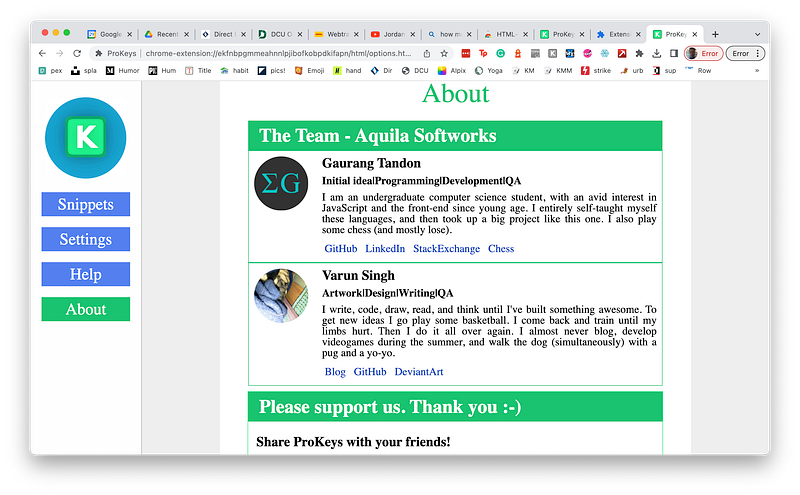
Screenshot by author

A coder and a jack-of-all trades. That’s it. Extensions are small. That’s why they’re often coded by one or two people.

Web applications, particularly widely used ones, are very different. They’re typically built by large teams of people in specialized roles. Let’s look at who builds web applications.

Product Managers

Product Managers (PMs) are the voice of the business, commercial or otherwise. They own the what, meaning they bring product requirements to the rest of the team. They’re often technical, but they have a strong business and customer background.

Developers

Developers write the software. They own the how. A PM will ask the team to build a widget to do a thing. The PM doesn’t get involved in the specifics of how the widget does what it does, because the PM doesn’t care. As long as the widget does what the PM requests securely, reliably, scaleable, etc., the PM is happy to let the developers figure out the details.

User Experience Specialists

User experience (UE) specialists ensure the software is easy to use. They have a say in the how. That’s because most developers aren’t great at designing software that’s easy to use. Nor should they be. In a large team, it’s more efficient to use experts with specialized skills.

Quality Assurance Engineers

Some web app teams have dedicated engineers to test the software. This role is disappearing. That may sound bad, but it isn’t.

Most web application teams task developers to do the testing. That may sound like the fox watching the henhouse, but there are significant advantages to this scheme. The developers will automate all of the tests, and ideally will write these tests as they write new code.

This implies that as a developer, you fully own the quality of the code you write. The buck stops with you. And you know the code better than anyone, so you should be able to test it better than anyone.

A note about user experience

You may notice a lot of web app software is confusing. There’s a simple reason. Most web app companies under-invest in user experience specialists. If you have one user experience specialist for every twenty developers, or you don’t empower them, you’re guaranteeing your users will be frustrated.

I’ve seen it happen. In companies like that, leaders focus on technical wizardry or schedules. They don’t know how to build usable software. They don’t know what they don’t know. There’s a good story about that here.

Takeaway 1: If you don’t take the time to create something usable, you might as well not create it.

More specialization

As we dig deeper into the structure of a Product Development organization, we find more specialization.

User experience specialists are either designers or researchers. Designers works in the trenches with the product team, advising on usability. Researchers spend time with customers getting input on how to make existing and new features easier to use. They pass this information on to the people in the trenches.

Web applications developers come in several flavors.

  • Front end developers own the user interface the web application presents in a browser. I.e., where you read and type.
  • Back end developers own the software that does the heavy lifting users request via the browser.
  • Web app mobile developers specialize in mobile apps that act as the user interface instead of a browser. Web app mobile developers are sometimes part of the front end team. Of course, some mobile apps may not have much of a web presence, i.e., most functionality is in the app.
  • Tools developers build tools to help front-end and back-end developers write and deploy code efficiently. Organizations use both third-party and home-grown tools. A web app tools team build those home-grown tools.

Not all web application product teams draw such distinctions. A developer that does either front-end or back-end is called a single-stack developer. Some teams embrace this division, preferring single-stack developers. Their reasoning is that front end and back end development is so different that you need specialized expertise to be at the top of your game.

Others teams prefer dual-stack developers, reasoning that developers are more effective if they understand both ends.

Even within a product team, there may be a mixture of single-stack and dual-stack developers.

Takeaway 2: There’s an inherent tension between the value of specializing and generalizing. One is not better than the other. It all depends on context. But it’s crucial to get this right because it can make a huge difference in effectiveness.

A Simple Example

Imagine you’re shopping for power tools and want to see what Facebook Marketplace offers. You log into Facebook. The front end handles collecting your username and password, and sends them to the back end which performs the validation, and lets the front end know the result.¹
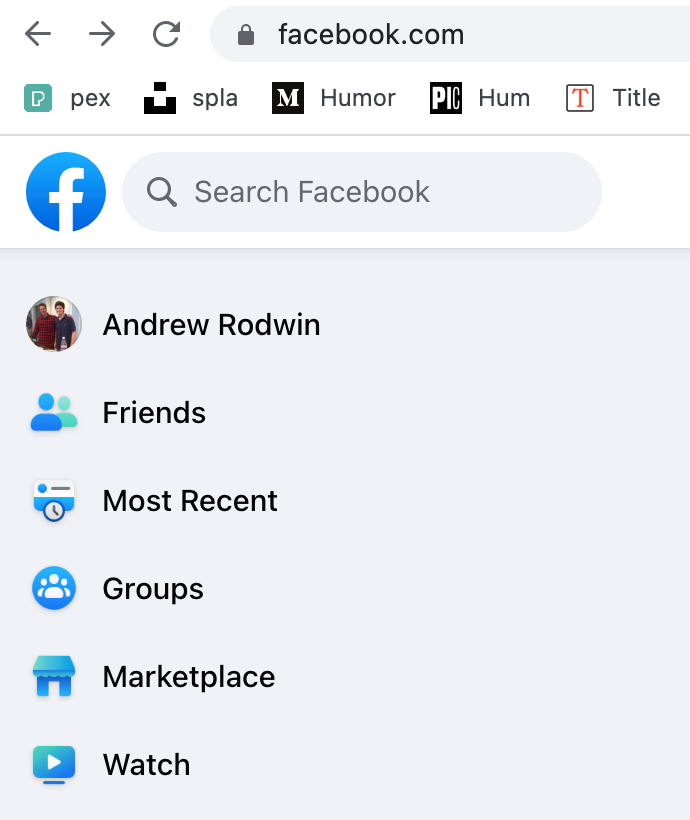
Screenshot by author

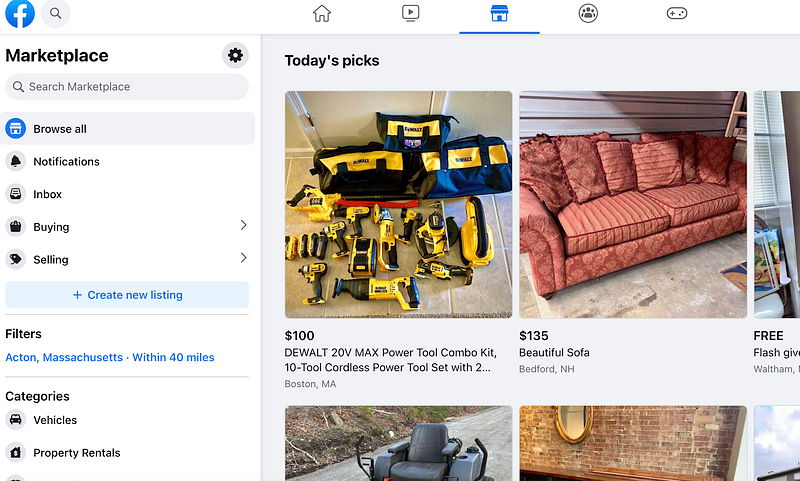
Then you click Marketplace.

Screenshot by author

The front end handles a) presenting you information and b) dealing with whatever you click and type. Believe it or not, you can actually view the front end code. Every browser allows this.² Below is a snippet from this very webpage.

<p name="3a4f" class="graf graf--p graf-after--figure is-selected">
Then you click 
<em class="markup--em markup--p-em">Marketplace</em>
.
</p>

All that stuff you see in FB Marketplace is a) requested by the front-end and b) sent from the back-end using what is known as an Application Programming Interface (API). That’s a fancy term. All it means is that the front and back ends have an agreement on how to communicate.

There’s a lot of software to handle requests like these in the back end. At the highest level, there’s a division in the back end between application code and databases. All of that Marketplace stuff is stored in a database. And databases contain not only records of stuff, like power tools in this example, but also their own code routines for accessing the database.

You can’t see the back end code. It’s proprietary. Most commercial organizations have all of their secret sauce in the back end and take great pains to protect their intellectual property. Where would you guess the software that implements Google’s page rank algorithm lives?

And does this all apply to Medium?

The short answer is yes. The longer answer is probably and mostly.

For example, I don’t know details like whether Medium has QA engineers, or user researchers. At a higher level, Medium certainly has a front end and a back end, and an API that enables communication.

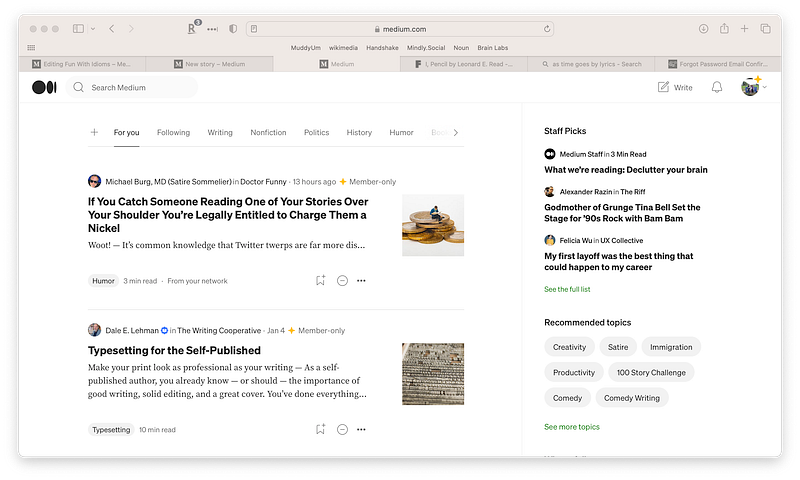
When you log in, the front end and back end cooperate to handle authentication and present your home page. Here’s mine.
Screenshot by author

All of that information comes from the back end. The front end takes that information and formats it in a — hopefully — user-friendly way.

That article by Felicia Wu under Staff Picks looks interesting. Let’s take a look at the front end code.

<a class="af ag ah ai aj ak al am an ao ap aq ar as at" rel="noopener
follow" href="/user-experience-design-1/my-first-layoff-was-the-best-thing-
that-could-happen-to-my-career-b3250a0fa7ba?source=list_module
---two_column_layout_sidebar-------------c7bc6e1ee00f---------------------">
<h2 class="be jy ee z ef bj">My first layoff was the best thing that 
could happen to my career</h2></a>

href is the Hyper Text Markup Language keyword for links. You can see the URL link for that article. If you prepend https://medium.com/ you can manually find that article.

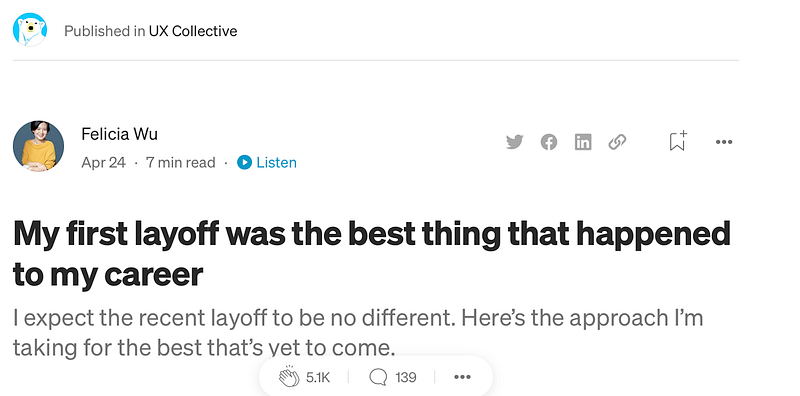
What happens when I click the link? Using the API, the front-end lets the back-end know. The back-end serves up the webpage with that article.
Screenshot by author

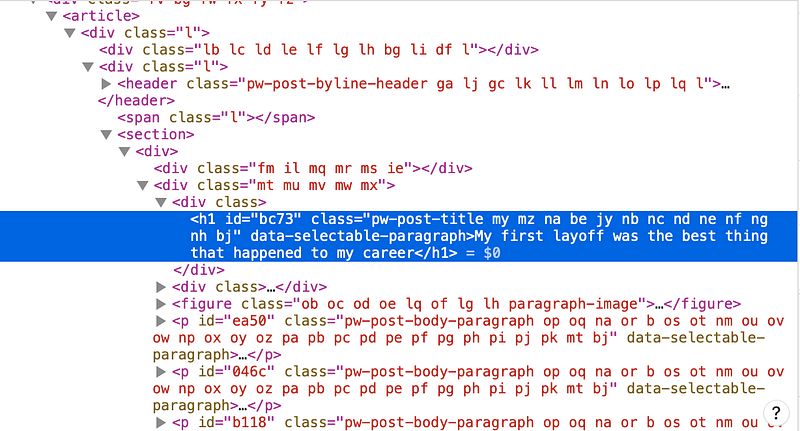
Now the front-end has a new webpage of code.
Screenshot by author

We’ll take a look at what these bizarre codes mean, as well as drill down into back end code, development tools, and process in Part 2.

¹ You don’t always need to log in when you use Facebook. The front end stores authentication cookies on your device after you log in. A cookie is just a code. When you next use Facebook, the front end validates the cookie. These cookies have an expiration date.

² In Chrome, click View->Developer-Developer Tools.

Want an email heads-up for new articles? Click me.

Join Medium? Click me.

Ideas
Software
Technology
Tech
Web Development
Recommended from ReadMedium