
How Artists Can Protect Their Work From AI Image Generators
Safeguarding Creativity With Glaze
As the field of generative AI continues to evolve, we are all learning how to navigate it ethically and responsibly.
So one of the things that I’ve stopped doing in my image prompts is including the names of artists.
I believe that artists who share their creations online should have the right to choose if their original art is to be used as training data for AI systems.
What Can An Artist Do?
If you are an artist whose work is online, it is likely that it has been used as training data.
For example, Stable Diffusion was trained on a dataset called LAION-5B which is comprised of 5.85 billion image-text pairs crawled from the internet. Since LAION-5B is open, you can search if your art or name is included in the dataset from his site.
However, it is impossible to remove your art from the dataset, and unlikely to opt out of future datasets.
Basically, as long as your images are visible on the internet, it is likely to be used for training.
So what can an artist do to protect their artwork/images?
What if we are able to alter the way AI sees the image?
The Glazed Image
Researchers at the University of Chicago have developed a tool called Glaze that can trick AI learning models by obscuring artists’ unique stylistic features while keeping the changes imperceptible to the human eye.
“Think of Glaze like a new dimension of the art, one that AI models see but humans do not (like UV light or ultrasonic frequencies), except the dimension itself is hard to locate/compute/reverse engineer.” - the Glaze team
The software ‘cloaks’ images so that models can’t detect the styles.
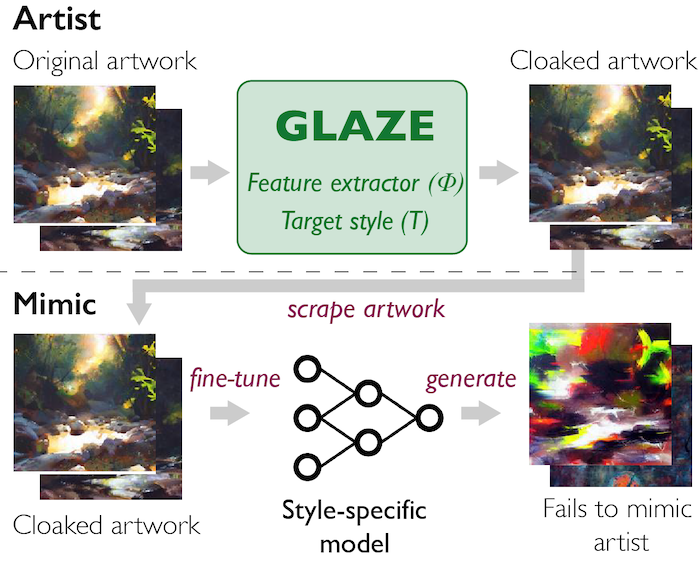
When using Glaze, you can choose the intensity of the “style cloak” added to your artwork.
A higher intensity leads to more robust protection against AI mimicry, but also more noticeable alterations. The more changes Glaze makes to disguise your work’s unique style, the harder it is for AI to learn and copy it.
Glaze is free to use, so you can download it and install it on your Mac or Windows PC.
A user guide is available here for step-by-step instructions.
Glaze has already been downloaded 893,000 times since its release in March.
A Promising First Step
It seems likely that AI systems could eventually be designed to detect and remove the “glaze” alterations, much like how watermarks can be stripped out currently.
While this first attempt at protection is promising, this may turn into an ongoing cat-and-mouse game of new AI scraping techniques versus AI defenses trying to shield it.
But this is a promising first step.
“The whole point of security is to raise the bar so high, that someone who is doing something they shouldn’t be doing will give up and instead find something cheaper to do” - Ben Zhao, professor and lead on the project
Final Thoughts
The significance here is that the Glaze team has proven a method of protection that can continue to be improved upon.
As the generative AI industry works to adopt ethical practices and explore mechanisms for obtaining artist consent, tools like Glaze represent an encouraging first step that artists have been hoping for.
If you liked this article, throw out some Medium love… claps, comment, and be sure to follow.


