avatarJosep Ferrer

Free AI web copilot to create summaries, insights and extended knowledge, download it at here

5934

Abstract

        </div>
    </figure></iframe></div></div></figure><h1 id="5175">#4. Compose AI</h1><p id="31a2">This extension takes the task of generating any kind of text to a new level, helping you to write clearer and more impactful writing than ever before.</p><div id="a017" class="link-block">
      <a href="https://chrome.google.com/webstore/detail/compose-ai-ai-powered-wri/ddlbpiadoechcolndfeaonajmngmhblj">
        <div>
          <div>
            <h2>Compose AI: AI-powered Writing Tool</h2>
            <div><h3>Accelerate your writing with AI</h3></div>
            <div><p>chrome.google.com</p></div>
          </div>
          <div>
            <div style="background-image: url(https://miro.readmedium.com/v2/resize:fit:320/0*fuNWjP20bfxY37vJ)"></div>
          </div>
        </div>
      </a>
    </div><p id="3977">Working on google docs or word online, just type <code>//</code> and Compose AI will be there!</p><figure id="bbf2"><img src="https://cdn-images-1.readmedium.com/v2/resize:fit:800/0*eohwJA8_KXnq8YNB.gif"><figcaption>Self-made gif. Compose AI writing a text on Google docs.</figcaption></figure><p id="7696">It works especially well for email replying. You don’t trust me… go check on your own</p><figure id="39f1"><img src="https://cdn-images-1.readmedium.com/v2/resize:fit:800/0*zEt4Vp_8y4tACrDW.gif"><figcaption>Self-made gif. Compose AI writing a mail.</figcaption></figure><h1 id="4b5f">#5. YouTube Summary by Glasp</h1><p id="e498">Watching a long, intriguing video but short on time?</p><p id="2e98"><i>Use this extension to get a summary of the key points in a single click.</i></p><div id="2b48" class="link-block">
      <a href="https://chrome.google.com/webstore/detail/youtube-article-summary-p/nmmicjeknamkfloonkhhcjmomieiodli/related">
        <div>
          <div>
            <h2>YouTube &amp; Article Summary powered by ChatGPT</h2>
            <div><h3>Summarize YouTube videos and web articles and save time with this extension, powered by ChatGPT.</h3></div>
            <div><p>chrome.google.com</p></div>
          </div>
          <div>
            <div style="background-image: url(https://miro.readmedium.com/v2/resize:fit:320/0*ks8S5jBV_56ThDJz)"></div>
          </div>
        </div>
      </a>
    </div><p id="d7c5">Just go check any YouTube video you want, and Glas will produce an automatic summary of it. Extremely useful when you do not want to watch the whole video or just want to check if it is gonna be useful.</p><figure id="ca06"><img src="https://cdn-images-1.readmedium.com/v2/resize:fit:800/1*p1OwjM4McIfp8Hhvop2VzQ.png"><figcaption>YouTube Screenshot. Glasp extension generating a summary for a YouTube video.</figcaption></figure><h1 id="d73c">#6. TeamSmart AI</h1><p id="6819">Your AI assistant for everything from brainstorming and writing drafts to reviewing your code.</p><div id="1313" class="link-block">
      <a href="https://chrome.google.com/webstore/detail/teamsmart-ai/fmfdbonhjnokbdancdohbanbiiikhlai">
        <div>
          <div>
            <h2>TeamSmart AI</h2>
            <div><h3>Boost your productivity with one-click access to a team of AI assistants.</h3></div>
            <div><p>chrome.google.com</p></div>
          </div>
          <div>
            <div style="background-image: url(https://miro.readmedium.com/v2/resize:fit:320/0*2JvBkQJirVhHCfPx)"></div>
          </div>
        </div>
      </a>
    </div><p id="d4c8">Once it is installed in our device, we first need to choose our AI professionals.</p><p id="026a">The magic here is <b>there are some default AI assistants already created with a focus on a topic </b>— for instance Marc as Software Engineer or Christina as a Professional Writer.</p><figure id="c390"><img src="https://cdn-images-1.readmedium.com/v2/resize:fit:800/1*Sm-j61nHs4Ve5ZTNzBtPOw.png"><figcaption>Self-made image. Screenshot of the Teamsmart AI assistants.</figcaption></figure><p id="6a80">Then we need to add our OpenAI API key here.</p><figure id="c5e3"><img src="https://cdn-images-1.readmedium.com/v2/resize:fit:800/1*IrjP5_8GIivfqUJJsqXSMg.png"><figcaption>Self-made image. Screenshot of the Teamsmart UX: Adding our OpenAI API key.</figcaption></figure><p id="d1c6">Everything is set up! You will have different personalized AI assistants to use any time you need.</p><figure id="5fc1"><img src="https://cdn-images-1.readmedium.com/v2/resize:fit:800/1*k6HHVwuTNjCW8xuldUB9GA.png"><figcaption>Self-made image. Screenshot of the Teamsmart UX. Everything is set up!</figcaption></figure><h1 id="3cea">#7. ChatGPT Prompt Genius</h1><p id="522e">Master one of the most essential skills of the 21st century with this extension. Basically it allows to get, compare and use thousands of prompts generated by others.</p><div id="ee15" class="link-block">
      <a href="https://chrome.google.com/webstore/detail/chatgpt-prompt-genius/jjdnakkfjnnbbckhifcfchagnpofjffo">
        <div>
          <div>
            <h2>ChatGPT Prompt Genius</h2>
            <div><h3>Discover, share, import, and use the best prompts for ChatGPT &amp; save your chat history locally (formerly ChatGPT…</h3></div>
            <div><p>chrome.google.com</p></div>
          </div>
          <div>
            <div style="background-image: url(https://miro.readmedium.com/v2/resize:fit:320/0*vclZDyWe3JOyUSdc)"></div>
          </div>
        </div>
      </a>
    </div><p id="dd48">Share with a huge community all your pompt knowledge and browse and find the most powerful prompts to level up your ChatGPT game.</p>
    <figure id="aeed">
        <div>
          <div>
            <img class="ratio" src="http://placehold.it/16x9">
            <iframe class="" src="https://cdn.embedly

Options

.com/widgets/media.html?src=https%3A%2F%2Fwww.youtube.com%2Fembed%2FONdSkCERTYU%3Ffeature%3Doembed&display_name=YouTube&url=https%3A%2F%2Fwww.youtube.com%2Fwatch%3Fv%3DONdSkCERTYU&image=https%3A%2F%2Fi.ytimg.com%2Fvi%2FONdSkCERTYU%2Fhqdefault.jpg&key=d04bfffea46d4aeda930ec88cc64b87c&type=text%2Fhtml&schema=youtube" allowfullscreen="" frameborder="0" height="480" width="640"> </div> </div> </figure></iframe></div></div></figure><h1 id="1fdc">#8. Transcribing your digital calls using Fireflies</h1><p id="7c89">This AI-powered browser intern not only records and transcribes meetings but also summarizes emails, documents, YouTube videos, and news articles, freeing up your time for more important tasks.</p><div id="5d7a" class="link-block"> <a href="https://chrome.google.com/webstore/detail/fireflies-summarize-meeti/meimoidfecamngeoanhnpdjjdcefoldn"> <div> <div> <h2>Fireflies: Summarize meetings, articles, docs</h2> <div><h3>Record & Transcribe meetings & calls directly from the browser</h3></div> <div><p>chrome.google.com</p></div> </div> <div> <div style="background-image: url(https://miro.readmedium.com/v2/resize:fit:320/0*E5XOU-IjCg9YXWzn)"></div> </div> </div> </a> </div><p id="026b"><b>It generates transcripts, summaries, notes, and action items</b>, and leverages AskFred, a GPT-4-powered AI assistant, to summarize articles, videos, and more. With features like speaker identification and sentiment analysis, Fireflies streamlines research and content consumption.</p><h1 id="45f4">Main Conclusions</h1><p id="daf6"><b>In conclusion, AI browser extensions are the new productivity powerhouses. </b>They are making complex tasks more manageable and time-consuming tasks quicker, bringing the power of AI right into your browser.</p><p id="cc6c">If you haven’t explored these AI extensions yet, now is the time.</p><p id="4fcd"><b>AI browser extensions are undeniably the next big thing in the AI space!</b></p><p id="f4dd"><i>Hope you find those ChatGPT extensions useful! :)</i></p><p id="c2c3"><i>If you have any further questions, or you know any other extension, feel free to comment!</i></p><p id="e418"><i>Do you want to try the new AI autonomous model — AutoGPT?</i></p><p id="b541"><b>Just give a look at the following article!</b></p><div id="f9b4" class="link-block"> <a href="https://readmedium.com/autogpt-unleashed-the-autonomous-ai-agent-revolution-chat-gpt-ai-artificial-intelligence-productivity-19ad5b71c436"> <div> <div> <h2>AutoGPT Unleashed — The Autonomous AI Agent Revolution</h2> <div><h3>Discover the Next-Generation AI System Designed to Perform Tasks Without Human Intervention</h3></div> <div><p>medium.com</p></div> </div> <div> <div style="background-image: url(https://miro.readmedium.com/v2/resize:fit:320/1*AcqWHnUN4bjsKV-4-5BTOg.png)"></div> </div> </div> </a> </div><p id="1971">You can subscribe to my <a href="https://medium.com/subscribe/@rfeers"><b>Medium Newsletter</b></a><b> to stay tuned and receive my content</b>. <i>I promise it will be unique!</i></p><p id="9862">If you are not a full Medium member yet, <b>just check it out <a href="https://medium.com/@rfeers/membership">here</a> to support me and many other writers. </b><i>It really helps </i>:D</p><p id="f2cc">You can find me on <a href="https://twitter.com/intent/user?screen_name=rfeers"><b>Twitter</b></a> and <a href="https://www.linkedin.com/in/josep-ferrer-sanchez/"><b>LinkedIn</b></a> as well!</p><p id="dbf2">Some other nice medium related articles you should go check out! :D</p><div id="543d" class="link-block"> <a href="https://readmedium.com/how-to-accelerate-career-with-7-chatgpt-powerful-prompt-artificial-intelligence-engineering-productivity-6b741e57ed44"> <div> <div> <h2>How to Accelerate Your Career with 7 ChatGPT Powerful Prompts</h2> <div><h3>And Leveraging it for Personal and Professional Success</h3></div> <div><p>medium.com</p></div> </div> <div> <div style="background-image: url(https://miro.readmedium.com/v2/resize:fit:320/1*TNArcCVJ7rBBaQK05lyi5A.png)"></div> </div> </div> </a> </div><div id="663b" class="link-block"> <a href="https://readmedium.com/6-ai-tools-chatgpt-blow-your-mind-productivity-leverage-artificial-intelligence-research-chatbot-69ad2f66a317"> <div> <div> <h2>5 AI tools beyond ChatGPT that will blow your mind</h2> <div><h3>And how to leverage your productivity using them</h3></div> <div><p>medium.com</p></div> </div> <div> <div style="background-image: url(https://miro.readmedium.com/v2/resize:fit:320/1*kqlCz-YbMuDLiUyOt4LuNQ.png)"></div> </div> </div> </a> </div><div id="f682" class="link-block"> <a href="https://readmedium.com/5-chatgpt-features-to-boost-your-daily-work-404478fd70ca"> <div> <div> <h2>5 ChatGPT features to boost your daily work</h2> <div><h3>And how to enhance your code quality using it</h3></div> <div><p>medium.com</p></div> </div> <div> <div style="background-image: url(https://miro.readmedium.com/v2/resize:fit:320/1*XiVzB765eBip73jVQiAxkA.png)"></div> </div> </div> </a> </div></article></body>

8 AI Extensions That Will Revolutionize Your Internet Browsing Experience

And why AI Chrome extensions are the next BIG thing
Image created using Leonardo AI.

The world of artificial intelligence — or AI for friends ;) — is continually evolving, and its latest innovation is redefining our productivity.

Right?

While you may be familiar with AI assistants like ChatGPT, it is not just about virtual assistants anymore as there’s a newer player in town — AI Chrome extensions.

These handy tools are revolutionizing the landscape of productivity.

Let’s discover together 8 AI extensions that can supercharge your efficiency! 👇🏻

AI browser extensions serve as powerful tools that can boost productivity in unimaginable ways.

They integrate seamlessly with your daily internet browsing, making complex tasks simple and time-consuming tasks swift.

The AI extension ecosystem offers a wide range of capabilities, from transcribing meetings to summarizing complex documents or even drafting emails.

#1. SciSpace Copilot

Imagine having a personal tutor simplifying complex academic papers for you?

Well… this is actually possible and it is called SciSpace Copilot!

Highlight any text, number, or chart and this extension provides you with a straightforward explanation.

SciSpace Copilot is always there to help you understand any website.
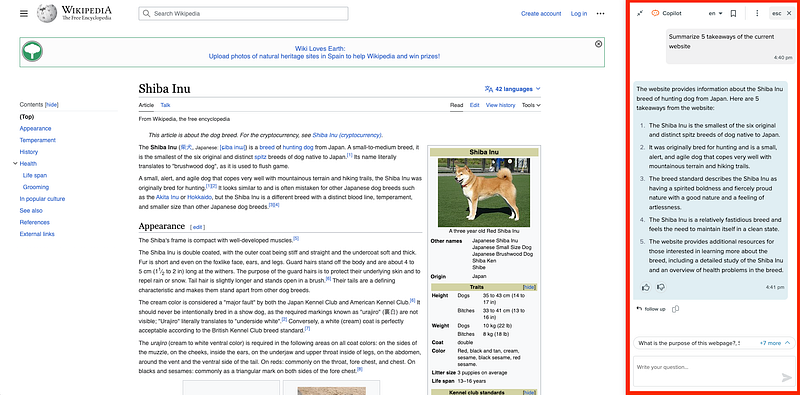
Screenshot of the Siba Inu website. SciSpace copilot states 5 takwaways.

#2. AIPRM for ChatGPT

A go-to resource for professionals, this extension offers a curated list of powerful prompt templates, useful in fields like marketing, customer support, and sales among others.

The main idea behind AIPRM for ChatGPT is to democratize the knowledge of prompts to improve our experience using AI tools like ChatGPT.

#3. ChatGPT Sidebar

With the power of ChatGPT and GPT-4, this extension allows you to summarize webpages, get definitions, explanations, and translations, and even perform grammar checks.

ChatGPT SideBar can become our digital intern every time we need to optimize our time and boost our productivity.

#4. Compose AI

This extension takes the task of generating any kind of text to a new level, helping you to write clearer and more impactful writing than ever before.

Working on google docs or word online, just type // and Compose AI will be there!
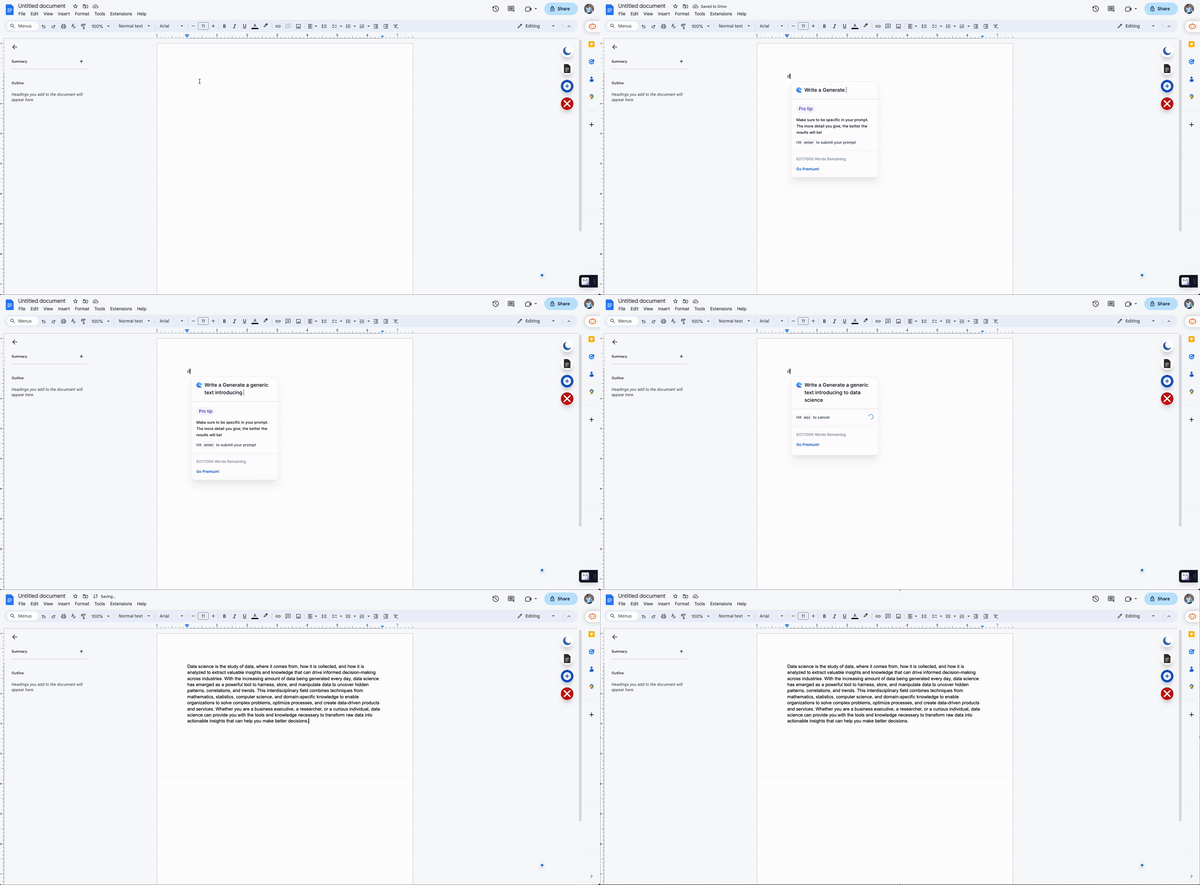
Self-made gif. Compose AI writing a text on Google docs.

It works especially well for email replying. You don’t trust me… go check on your own
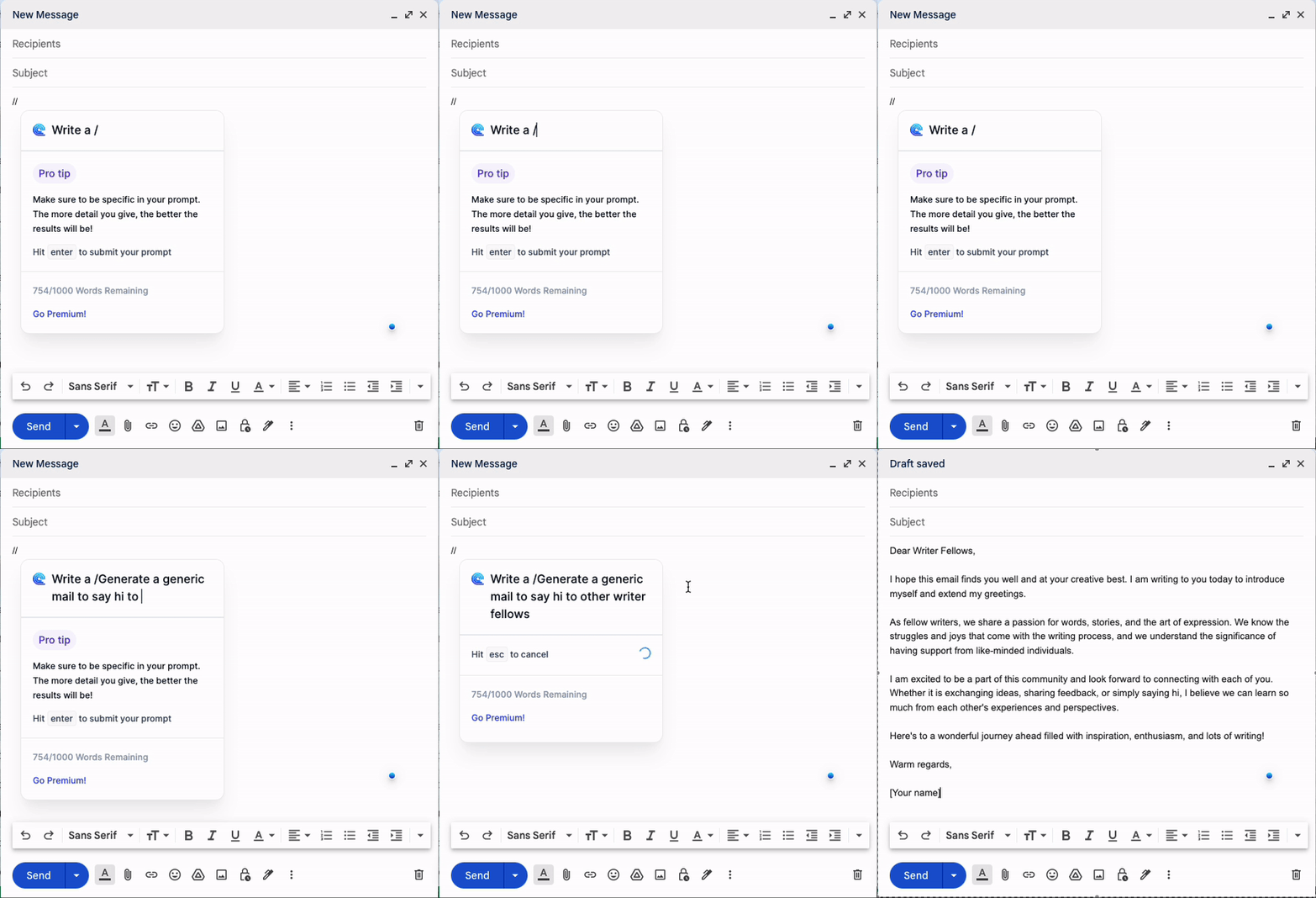
Self-made gif. Compose AI writing a mail.

#5. YouTube Summary by Glasp

Watching a long, intriguing video but short on time?

Use this extension to get a summary of the key points in a single click.

Just go check any YouTube video you want, and Glas will produce an automatic summary of it. Extremely useful when you do not want to watch the whole video or just want to check if it is gonna be useful.
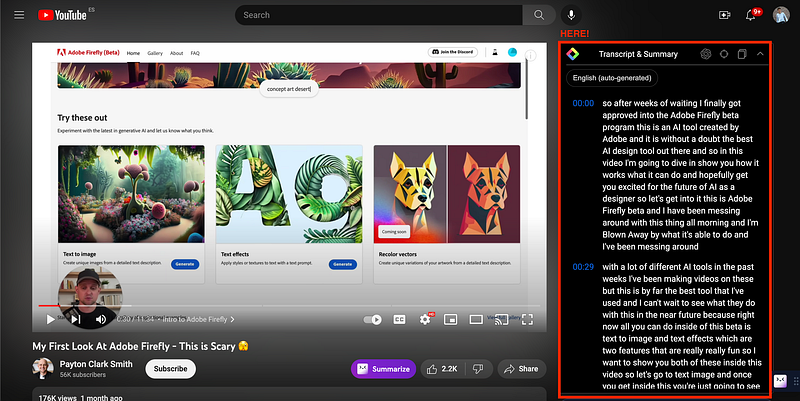
YouTube Screenshot. Glasp extension generating a summary for a YouTube video.

#6. TeamSmart AI

Your AI assistant for everything from brainstorming and writing drafts to reviewing your code.

Once it is installed in our device, we first need to choose our AI professionals.

The magic here is there are some default AI assistants already created with a focus on a topic — for instance Marc as Software Engineer or Christina as a Professional Writer.
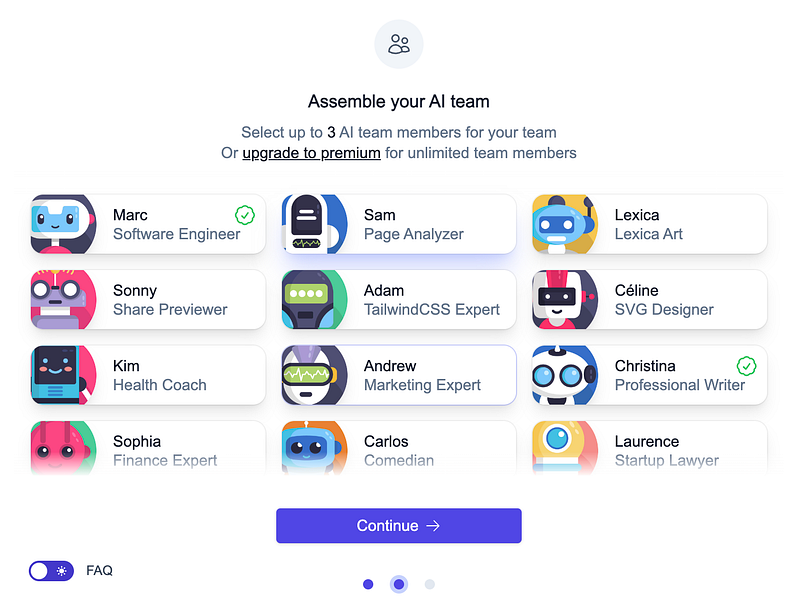
Self-made image. Screenshot of the Teamsmart AI assistants.

Then we need to add our OpenAI API key here.
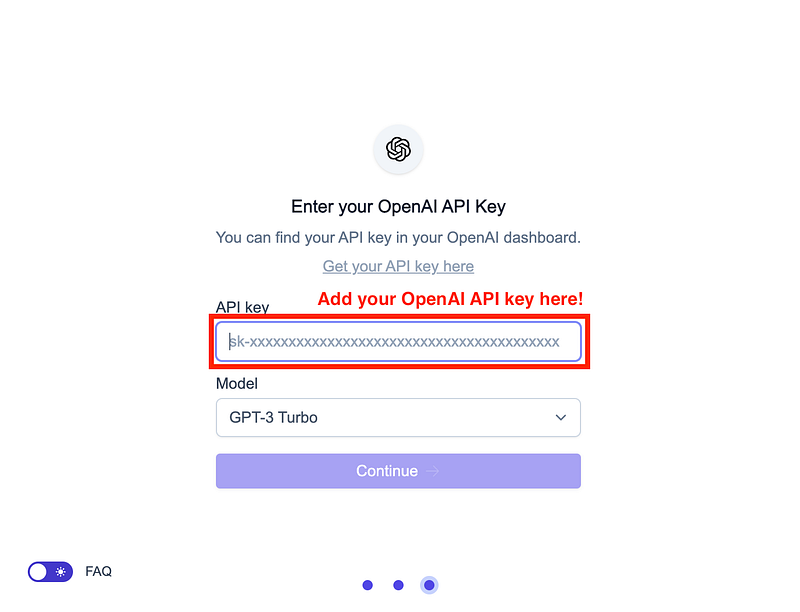
Self-made image. Screenshot of the Teamsmart UX: Adding our OpenAI API key.

Everything is set up! You will have different personalized AI assistants to use any time you need.
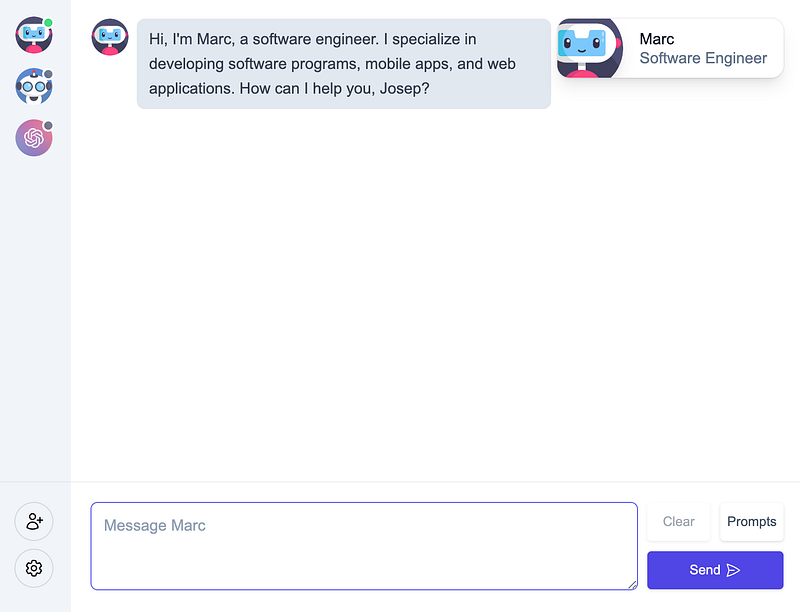
Self-made image. Screenshot of the Teamsmart UX. Everything is set up!

#7. ChatGPT Prompt Genius

Master one of the most essential skills of the 21st century with this extension. Basically it allows to get, compare and use thousands of prompts generated by others.

Share with a huge community all your pompt knowledge and browse and find the most powerful prompts to level up your ChatGPT game.

#8. Transcribing your digital calls using Fireflies

This AI-powered browser intern not only records and transcribes meetings but also summarizes emails, documents, YouTube videos, and news articles, freeing up your time for more important tasks.

It generates transcripts, summaries, notes, and action items, and leverages AskFred, a GPT-4-powered AI assistant, to summarize articles, videos, and more. With features like speaker identification and sentiment analysis, Fireflies streamlines research and content consumption.

Main Conclusions

In conclusion, AI browser extensions are the new productivity powerhouses. They are making complex tasks more manageable and time-consuming tasks quicker, bringing the power of AI right into your browser.

If you haven’t explored these AI extensions yet, now is the time.

AI browser extensions are undeniably the next big thing in the AI space!

Hope you find those ChatGPT extensions useful! :)

If you have any further questions, or you know any other extension, feel free to comment!

Do you want to try the new AI autonomous model — AutoGPT?

Just give a look at the following article!

You can subscribe to my Medium Newsletter to stay tuned and receive my content. I promise it will be unique!

If you are not a full Medium member yet, just check it out here to support me and many other writers. It really helps :D

You can find me on Twitter and LinkedIn as well!

Some other nice medium related articles you should go check out! :D

Artificial Intelligence
Data Science
ChatGPT
Productivity
Writing
Recommended from ReadMedium