
Build a Host Micro Frontend with Vite, React, and TypeScript

Welcome back! 🎉 In this article, we’ll dive into building the host application for our micro-frontend setup using Vite, React, and TypeScript. After setting up the remote app in the last guide, it’s time to connect everything and make our micro-frontend architecture come to life. Whether you’re looking to enhance your projects or just curious about micro-frontends, this guide has you covered. Let’s get started! 🫡
In this guide, I am using, Vite, Typescript, and React to build the project, please check their documentation website.
So for those who just came in and do not know what this article is about and why I said “Welcome Back!”, I have created an article on how to create the Remote application that we will use in this Host application. You can find it here, please make sure you have all set before continuing here since we will be using it.
Ok great, now that we have done our Remote application is time to start the Host application. Are you ready?
Spoiler alert!!! 🚨🚨
The steps below are basically the same as the Remote application (just replacing the remote name with host), but I need to do them in order to make the guide consistent, do not get mad at me. Feel free to jump right to the Creating the connection with the Remote app section or just bear here with me, since I do change some of the settings. And let's do this together. 👊🙂
Setting Up Your Micro Frontend Host Application
1. Create a Project Folder
mkdir micro-frontend-host
cd micro-frontend-host
2. Set Up Vite with React and TypeScript
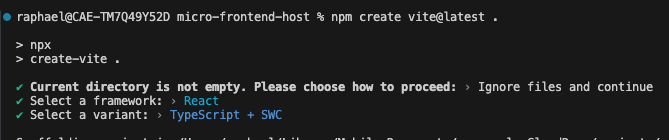
Since we are already in the micro-frontend-host folder, we can run the command below with the ., which means the project will be created in the same directory without creating a new folder for it.
npm create vite@latest .
When prompted:
- Current directory is not empty. Please choose how to proceed: Choose Ignore files and continue.
- Choose React as your framework.
- Choose TypeScript + SWC as the variant.
Install dependencies
npm install
4. Run the project
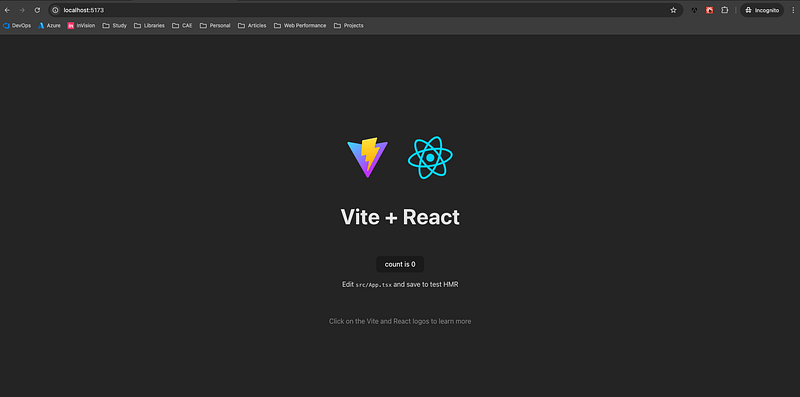
npm run dev
You should see something like this.
Change some default configurations.
1. Strict Port (Optional)
If you remember, this is a required configuration in the remote, here, even though I strongly suggest you change it, it’s totally optional. However, if you follow the environments approach, you should stick with the strictPort .
So if we want to be consistent with where our app is hosted, even locally, we cannot have random ports when we run the application, so let’s change our package.json to look like this
{
  "name": "micro-frontend-host",
  "private": true,
  "version": "0.0.0",
  "type": "module",
  "scripts": {
    "dev": "vite --port 3000 --strictPort --mode dev",
    "build": "tsc && vite build",
    "lint": "eslint .",
    "preview": "vite preview"
  },
  "dependencies": {
    "react": "^18.3.1",
    "react-dom": "^18.3.1"
  },
  "devDependencies": {
    "@eslint/js": "^9.9.0",
    "@types/react": "^18.3.3",
    "@types/react-dom": "^18.3.0",
    "@vitejs/plugin-react-swc": "^3.5.0",
    "eslint": "^9.9.0",
    "eslint-plugin-react-hooks": "^5.1.0-rc.0",
    "eslint-plugin-react-refresh": "^0.4.9",
    "globals": "^15.9.0",
    "typescript": "^5.5.3",
    "typescript-eslint": "^8.0.1",
    "vite": "^5.4.1"
  }
}
Here I do not need to set serve since the dev option should work just fine for our host. And I also set the port to be 3000 so we don't have conflicts when running the remote and host together.
2. Vite Configuration (Optional)
This configuration is totally personal so feel free to add them or not in your project, they just make my life easier and more organized. In your vite.config.ts file, do the following
import { defineConfig } from 'vite';
import react from '@vitejs/plugin-react-swc';
export default defineConfig({
  plugins: [react()],
  resolve: {
    alias: {
      '@/': new URL('./src/', import.meta.url).pathname,
    },
  },
  envDir: './src/environments',
});
Here I added the resolve and envDir, since I will be setting up this project for multiple environments, I like to organize all the respective files under a folder called environments in my src folder. And also I like to have the@ as my starting point since pretty much everything related to the project is inside src folder. But we need one more step for this to work fine since we are using Typescript, we need to also define the @ path there and say that it’s a valid path. So go to the tsconfig.json (it might be also called tsconfig.app.json)and add the path to it.
Another tip, for a cleaner view, I prefer to clean a bit of the file tsconfig.node.json, delete the tsconfig.app.json and replace the content of the tsconfig.json with this one below.
{
  "compilerOptions": {
    "paths": {
      "@/*": ["./src/*"]
    },
    "target": "ES2020",
    "useDefineForClassFields": true,
    "lib": ["ES2020", "DOM", "DOM.Iterable"],
    "module": "ESNext",
    "skipLibCheck": true,
    "moduleResolution": "node",
    "allowImportingTsExtensions": true,
    "allowSyntheticDefaultImports": true,
    "resolveJsonModule": true,
    "isolatedModules": true,
    "noEmit": true,
    "jsx": "react-jsx",
    "strict": true,
    "noUnusedLocals": true,
    "noUnusedParameters": true,
    "noFallthroughCasesInSwitch": true,
    "removeComments": true,
    "types": ["vite/client"]
  },
  "include": ["src"],
  "references": [{ "path": "./tsconfig.node.json" }]
}
And your tsconfig.node.json should look like this
{
  "compilerOptions": {
    "composite": true,
    "skipLibCheck": true,
    "module": "ESNext",
    "moduleResolution": "bundler",
    "allowSyntheticDefaultImports": true,
    "strict": true
  },
  "include": ["vite.config.ts"]
}
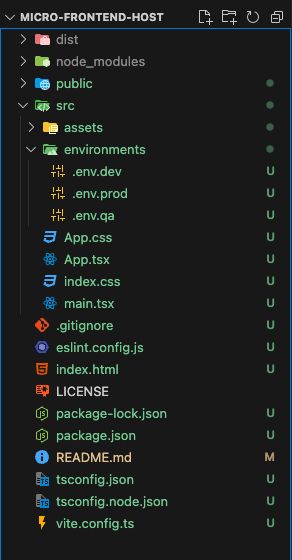
Alright, so after these custom changes, your project folder structure should look like this. 👍👍
Installing plugin for Module Federation
Now that we have the project ready and configured, we are ready to jump into the world of Micro-Frontend with the Module Federation approach. There is a plugin that helps us to set up, it’s the vite-plugin-federation that you can find the documentation here.
A short description of it is the vite-plugin-federation enables Module Federation in Vite projects, allowing multiple applications to dynamically share and load code from each other at runtime. It simplifies building micro-frontends by handling remote and host module loading more efficiently.
Ok, no need for more introduction, we see it’s good! so now let’s install it in our project.
Open the terminal and run
npm install @originjs/vite-plugin-federation --save-dev
Now we can start creating the connection with our remote application. 👏
Creating the connection with the Remote app
Now that we have the plugin installed it’s time to make the connection! 🔌
Go to vite.config.ts and add the following.
import { defineConfig, loadEnv } from "vite";
import react from "@vitejs/plugin-react-swc";
import federation from "@originjs/vite-plugin-federation";

export default defineConfig(({ mode }) => {
  // Optional if you are following the environments
  const env = loadEnv(mode, "./src/environments/");
  const MICRO_FRONTEND_URL = `${
    env.VITE_CASE_MFE_URL ??
    "https://localhost:5000/assets/microFrontendRemoteEntry.js"
  }`;

  return {
    plugins: [
      react(),
      federation({
        name: "micro-frontend-remote",
        remotes: {
          micro_frontend_remote: MICRO_FRONTEND_URL,
        },
        shared: ["react", "react-dom"],
      }),
    ],
    resolve: {
      alias: {
        "@/": new URL("./src/", import.meta.url).pathname,
      },
    },
    envDir: "src/environments/",
    build: {
      modulePreload: false,
      target: "esnext",
    },
  };
});
So, a little bit different from our remote application, right? This is because we are not exposing anything here, we are “consuming” from another source, and since we are doing that we need to specify where that source is, in this case, our remote application is located at “https://localhost:5000/assets/microFrontendRemoteEntry.js" .
If you are not following the environments approach, make sure you add the remote URL entry for your remote application in the micro_frontend_remote property.
So now we should be ready to consume the FeatureOne.tsx component in our host application, right? No 🥹, we are not ready just yet, and it’s because of typescript!
Creating a Module for our remote feature
When using TypeScript with micro frontends, we face a challenge: Webpack generates JavaScript modules, but TypeScript needs to know how to handle these imports. Try to add the following at the top of your App.tsx component
import { FeatureOne } from "micro_frontend_remote/FeatureOne";You will get the following error
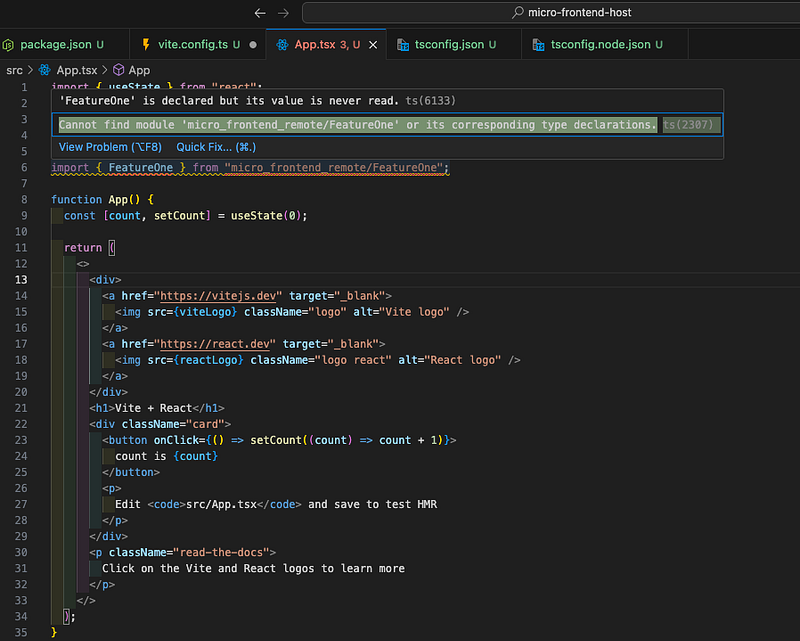
This error occurs because TypeScript doesn’t recognize the module generated by Webpack. To resolve this, we need to create a module declaration for our remote component, allowing TypeScript to understand its existence and types, by enabling proper type checking and autocompletion.
Great then! so now we know how to fix it, what should we do next?
Under the src folder create a new folder called micro-frontends , the plural word is more useful if you deal with multiple micro-frontend entries so you can better organize the modules under this folder, but if you stick with only one, feel free to name it singular.
After that, create a folder with our remote application name, which is called micro_frontend_remote so again, just for organizing purposes since we defined that name in the vite.config.ts and I like organization. 🙂
And now create a FeatureOne.d.ts file under it, and inside the file let’s declare the module and export it like this
declare module "micro_frontend_remote/FeatureOne" {
  import * as React from "react";

  const FeatureOne: React.FC;

  export default FeatureOne;
}
So now, you can use your remote feature in your host application 🥳
If you still have the import in your App.tsx file, now you need to
Steps to test it
Open your Remote Application and run
npm run serve:devOpen the Host Application and run
npm run dev
If you follow all the steps so far, you should see something like this in your host application on the browser
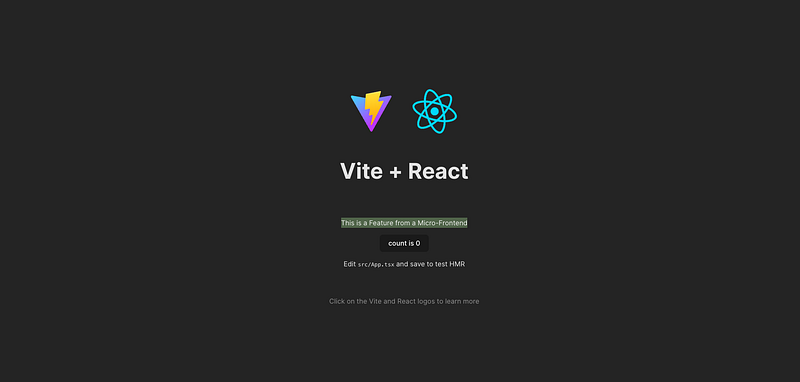
YAY! it's working! 🎉🎉🎉
Now, just use your imagination, you can do endless things with this architecture!
I will be posting more things soon using these same repositories, with probably different branches, I will decide later, but I will be covering:
- How to test both applications including the remote in the host.
- Show in practice, the usage of the environment variables.
- ESLint 9 in both applications.
- Communication between host > remote and vice versa.
- Lazy load the remote import as well as handle any errors with the import. Right now, whenever the remote is down, the host breaks because it cannot find the
importsource. - And probably more. 🙂
Conclusion Addition
Thank you for following along! 🙏
I hope this guide helps you set up your own micro-frontend host application. If you have questions or want to share your experiences, feel free to comment below.
If you found this guide helpful, consider following my profile for more articles on micro-frontends and other exciting topics. Happy coding! 🎉
If you want to check the repository with this host application, you can check it in my GitHub profile.
In Plain English 🚀
Thank you for being a part of the In Plain English community! Before you go:
- Be sure to clap and follow the writer ️👏️️
- Follow us: X | LinkedIn | YouTube | Discord | Newsletter
- Visit our other platforms: CoFeed | Differ
- More content at PlainEnglish.io


