
Here’s the most efficient way to iterate through your Pandas Dataframe
Achieve 280x times faster data frame iteration
Pandas is one of the popular Python libraries among the data science community, as it offers vast API with flexible data structures for data explorations and visualization. Pandas is the most preferred library for cleaning, transforming, manipulating, and analyzing data.
The presence of vast API makes Pandas easy to use, but when it comes to handling and process large-size datasets, it fails to scale the computations across all the CPU cores. Dask, Vaex are open-sourced libraries that scale the computations to speed up the workflow.
Feature engineering and feature explorations require iterating through the data frame. There are various methods to iterate through the data frame, iterrows() being one of them. The computation time to iterate through the data frame using iterrows() is slower.
Sometimes it's a tedious task to shift from Pandas to other scalable libraries just to speed up the iteration process. In this article, we will discuss various data frame iteration techniques and benchmarking their time numbers.
Iterrows():
Iterrows() is a Pandas inbuilt function to iterate through your data frame. It should be completely avoided as its performance is very slow compared to other iteration techniques. Iterrows() makes multiple function calls while iterating and each row of the iteration has properties of a data frame, which makes it slower.
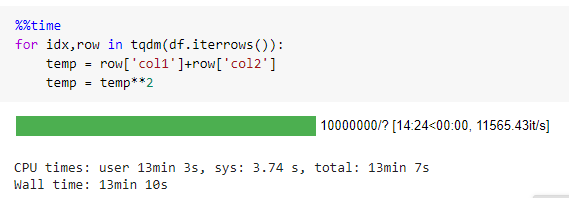
iterrows() takes 790 seconds to iterate through a data frame with 10 million records.
There are various techniques (discussed below) that perform quite better than iterrows().
Itertuples():
Itertuples() is a Pandas inbuilt function to iterate through your data frame. Itertuples() make a comparatively less number of function calls than iterrows() and carry much lesser overhead. Itertuples() iterates through the data frame by converting each row of data as a list of tuples.
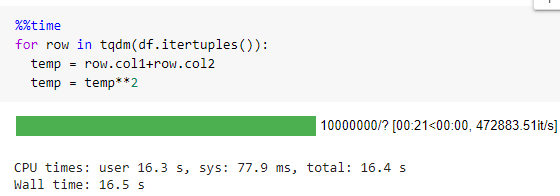
itertuples() takes 16 seconds to iterate through a data frame with 10 million records that are around 50x times faster than iterrows().
Read the below-mentioned article to get an in-depth understanding of why iterrows() is slower compared to itertuples()
Numpy Array Iteration:
Iteration beats the whole purpose of using Pandas. Vectorization is always the best choice. Pandas come with df.values() function to convert the data frame to a list of list format.
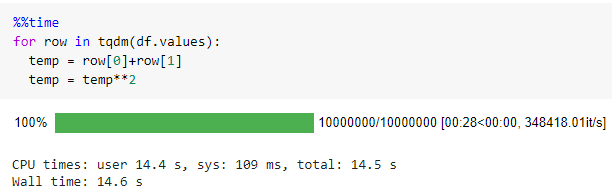
It took 14 seconds to iterate through a data frame with 10 million records that are around 56x times faster than iterrows().
Dictionary Iteration:
Now, let's come to the most efficient way to iterate through the data frame. Pandas come with df.to_dict('records') function to convert the data frame to dictionary key-value format.
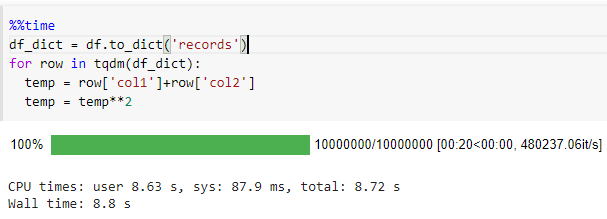
It took 8.8 seconds to iterate through a data frame with 10 million records that are around 90x times faster than iterrows().
Benchmark:
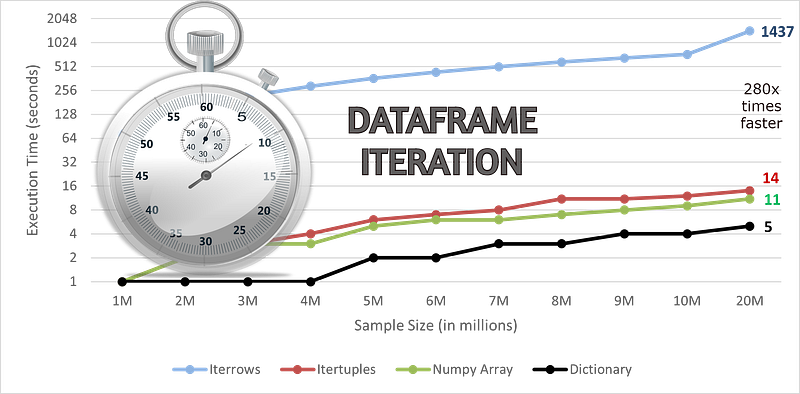
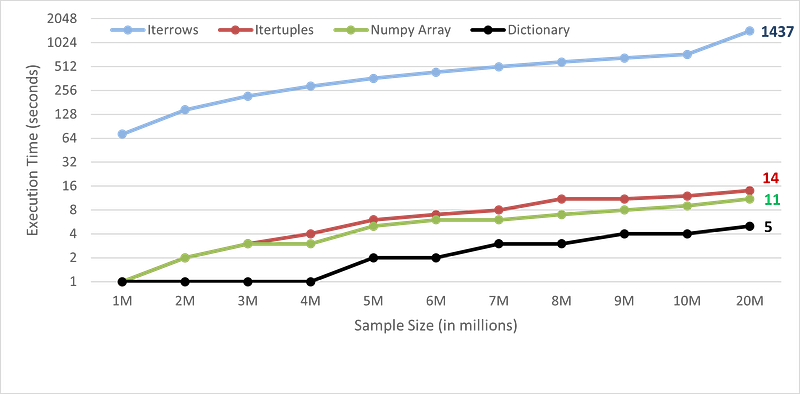
I have compared the benchmark time numbers for iterating through the data frame using the above-discussed techniques.
The performance is recorded on a Google Colabratory.
Conclusion:
Usage of itertools() is never recommended to iterate through the data frame, as it carries a lot of overhead and makes a lot of function calls. Itertuples convert the data frame to a list of tuples, then iterates through it, which makes it comparatively faster.
Vectorization is always the first and best choice. You can convert the data frame to NumPy array or into dictionary format to speed up the iteration workflow. Iterating through the key-value pair of dictionaries comes out to be the fastest way with around 280x times speed up for 20 million records.
Refer to my other articles on speeding up Python workflow:
- 30 times Faster Python Function Execution in a Few Lines of Code
- 10x times faster Pandas Apply in a single line change of code
References:
Loved the article? Become a Medium member to continue learning without limits. I’ll receive a small portion of your membership fee if you use the following link, with no extra cost to you.
Thank You for Reading


