avatarWolke@林建宏 As An Inspirer Collaborate AI (ChatGPT.)

Free AI web copilot to create summaries, insights and extended knowledge, download it at here

3256

Abstract

0254">index.js :主程式寫在這裡,反斜線的部份先省略</p><div id="826b"><pre><span class="hljs-meta">'use strict'</span>;

<span class="hljs-keyword">const</span> functions = <span class="hljs-built_in">require</span>(<span class="hljs-string">'firebase-functions'</span>); <span class="hljs-keyword">const</span> {<span class="hljs-title class_">WebhookClient</span>} = <span class="hljs-built_in">require</span>(<span class="hljs-string">'dialogflow-fulfillment'</span>); <span class="hljs-keyword">const</span> {<span class="hljs-title class_">Card</span>, <span class="hljs-title class_">Suggestion</span>} = <span class="hljs-built_in">require</span>(<span class="hljs-string">'dialogflow-fulfillment'</span>);</pre></div><p id="538b">這部份指的是引用到的套件。</p><div id="f90b"><pre><span class="hljs-built_in">exports</span>.dialogflowFirebaseFulfillment = functions.https.onRequest(<span class="hljs-function"><span class="hljs-params">(request, response)</span> =></span> { ... });</pre></div><p id="fbb8">exports.dialogflowFirebaseFulfillment就是firebase inline editor 預設會先呼叫的函式。</p><div id="f07b"><pre><span class="hljs-keyword">const</span> agent = <span class="hljs-keyword">new</span> WebhookClient({ <span class="hljs-built_in">request</span>, <span class="hljs-built_in">response</span> }); ... agent.handleRequest(intentMap);</pre></div><p id="d4e1">new一個叫做agent的WebhookClient物件,這個物件用來處理intent map</p><div id="f2cd"><pre> <span class="hljs-keyword">function</span> <span class="hljs-title">welcome</span>(agent) { agent.add(Welcome to my agent!); }</pre></div><div id="524e"><pre> <span class="hljs-keyword">let</span> intentMap = <span class="hljs-literal">new</span> <span class="hljs-built_in">Map</span>(); intentMap.<span class="hljs-built_in">set</span>(<span class="hljs-string">'Default Welcome Intent'</span>, welcome);</pre></div><p id="5b39"><b>重點是這裡:intentMap 是一個Map物件,用來處理各個intent設定於此。這裡將</b>’Default Welcome Intent’這個Intent用welcome這個函式來處理;而welcome 裡則用 agent.add 定義回應的話 <b>Welcome to my agent!</b></p><ol><li>點擊 Deploy</li></ol><figure id="af15"><img src="https://cdn-images-1.readmedium.com/v2/resize:fit:800/1*3myEyqB0jeanY6QRag4ZqQ.png"><figcaption></figcaption></figure><figure id="a2de"><img src="https://cdn-images-1.readmedium.com/v2/resize:fit:800/1*SXuxk64RNJKPK793T5_mng.png"><figcaption></figcaption></figure><p id="ad52">2. 等待deploy 完成</p><p id="b10d">3. 點擊左邊menu => Intents => 最下面的Fulfillment => Enable webhook for this intent</p><figure id="dc27"><img src="https://cdn-images-1.readmedium.com/v2/resize:fit:800/1*mJfMejIjSPbCXjq_qYVsUQ.png"><figcaption></figcaption></figure><p id="6497">打開後,測試一下</p><figure id="08a2"><img src="https://cdn-images-1.readmedium.com/v2/resize:fit:800/1*Bwlfz73FFkadTIqjEBsAKw.png"><figcaption></figcaption></figure><p id="644e">已經不是原本預設的Response內容了。</p><p id="c400">4. 試著依照相同邏緝將其他intent的response的處理也交至firebase inline editor處理。</p><p id="2324">例如:Default Fallback Intent 或是自已新增其他的 intent 。</p><h1 id="3bc6">免程式用Dialogflow做LINE Bot及Google語音助理AoG 系列</h1><p id="c874"><a href="https://medium.com/wolkesau/%E5%85%8D%E7%A8%8B%E5%BC%8F%E7%94%A8dialogflow%E5%81%9Aline-bot%E5%8F%8Agoogle%E8%AA%9E%E9%9F%B3%E5%8A%A9%E7%90%86aog-0-%E8%87%AA%E5%BA%8F-b6163e83574a">Story #1 自序</a> <a href="https://m

Options

edium.com/wolkesau/%E5%85%8D%E7%A8%8B%E5%BC%8F%E7%94%A8dialogflow%E5%81%9Aline-bot%E5%8F%8Agoogle%E8%AA%9E%E9%9F%B3%E5%8A%A9%E7%90%86aog-2-%E5%9B%9E%E5%88%B0%E6%9C%80%E5%88%9D%E7%9A%84%E5%9C%B0%E6%96%B9-fca170edb4ad">Story #2 回到最初的地方</a> <a href="https://medium.com/wolkesau/%E5%85%8D%E7%A8%8B%E5%BC%8F%E7%94%A8dialogflow%E5%81%9Aline-bot%E5%8F%8Agoogle%E8%AA%9E%E9%9F%B3%E5%8A%A9%E7%90%86aog-2-%E8%B7%9F%E9%9A%A8%E8%87%AA%E5%B7%B1%E7%9A%84%E5%BF%83-42f9ac4273f3">Story #3 跟隨自己的心</a></p><p id="dfa8"><a href="https://medium.com/@wolkesau/hands-on-a-dialogflow-intents-%E5%BB%BA%E7%BD%AE-7594408ca79c">Hands On #A Dialogflow Agnet Intents 建置</a> <a href="https://medium.com/wolkesau/hands-on-b-dialogflow-x-line-bot%E7%99%BB%E5%A0%B4-280c04f4900d">Hands On #B Dialogflow X LINE Bot</a></p><p id="615b"><a href="https://medium.com/wolkesau/homework-5-%E5%8D%97%E6%A1%83%E9%87%8C%E9%87%8C%E9%95%B7%E6%9C%8D%E5%8B%99%E5%8A%A9%E7%90%86-ad99cb0f88">HomeWork #a 南桃里里長服務助理</a></p><p id="c88b"><a href="https://medium.com/wolkesau/story-4-%E4%B8%8D%E5%90%8C%E4%B8%96%E7%95%8C%E7%9A%84%E4%BA%BA-d12721f6e740">Story #4 不同世界的人</a></p><p id="b142"><a href="https://medium.com/wolkesau/hands-on-c-dialogflow-enties-%E8%A8%AD%E5%AE%9A-65216eedeefc">Hands On #C Dialogflow Enties 設定</a> <a href="https://medium.com/wolkesau/hands-on-c-dialogflow-%E4%B8%B2aog-d0a7681c4c11">Hands On #D Dialogflow 串AoG</a></p><p id="4855"><a href="https://medium.com/wolkesau/homework-b-%E5%8D%97%E6%A1%83%E7%BE%8E%E9%A3%9F%E9%80%9A-7362f896a07d">HomeWork #b 南桃美食通</a></p><p id="0bdc"><a href="https://medium.com/wolkesau/story-5-%E6%9C%89%E6%9C%9F%E9%99%90%E7%9A%84%E5%A9%9A%E5%A7%BB-ced86b0bbce">Story#5 有期限的婚姻</a></p><p id="51f9"><a href="https://medium.com/wolkesau/hands-on-d-dialogflow-context%E8%A8%AD%E5%AE%9A-80cf51174189">Hands On #E Dialogflow Context設定</a></p><p id="ed7c"><a href="https://readmedium.com/59848b611eaa/edit?source=your_stories_page---------------------------">Story#6 總部成立</a></p><p id="f1cc"><a href="https://readmedium.com/b23cff836b43/edit?source=your_stories_page---------------------------">Hands On #F Dialogflow X LINE 其他設定</a></p><p id="d7ff"><a href="https://medium.com/wolkesau/story-7-%E6%89%BE%E5%9B%9E%E7%AC%91%E5%AE%B9-f3703d88a6c6">Story#7 找回笑容</a></p><p id="7655"><a href="https://medium.com/wolkesau/hands-on-f-entites-with-response-%E7%9A%84%E9%80%B2%E9%9A%8E%E6%87%89%E7%94%A8-207c9350c29a">Hands On #G Entites with Response 的進階應用</a></p><p id="015b"><a href="https://medium.com/wolkesau/homework-b-%E5%8D%97%E6%A1%83%E4%BA%8B-eb329c505dc1">HomeWork #c 南桃事</a></p><p id="989f"><a href="https://readmedium.com/hands-on-h-dialogflow-fulfilment-firebase-inline-editor-215e6fcccf57">Hands On #H 用firebase 接intent</a> <a href="https://medium.com/@wolkesau/hands-on-i-%E4%BD%BF%E7%94%A8google-cloud-function-%E4%BE%86%E4%B8%B2%E6%8E%A5dialogflow-webhook-a7a19b5aabaf">Hands On #I 使用Google Cloud Function 來串接Dialogflow Webhook</a> <a href="https://medium.com/wolkesau/hands-on-j-%E7%94%A8-google-cloud-function-%E4%B8%B2-api-24acfbaaaec9">Hands On #J 用 Google Cloud function 串 API</a></p><p id="2312"><a href="https://medium.com/wolkesau/homework-d-%E6%BC%94%E5%94%B1%E6%9C%83%E8%B3%87%E8%A8%8A-9b155a9fd685">HomeWork #d 演唱會資訊</a></p></article></body>

Hands On #H Dialogflow Fulfilment firebase inline editor

雖然dialogflow的response在串接其他平台的messenger的功能很完整,但在大部份的情況下,要實現你的設計,都是需要寫程式的。

請先建立Agent代理 參考本文 Hands On #A Dialogflow Intents 建置

dialogflow是將程式的部份放在fulfilment這邊。
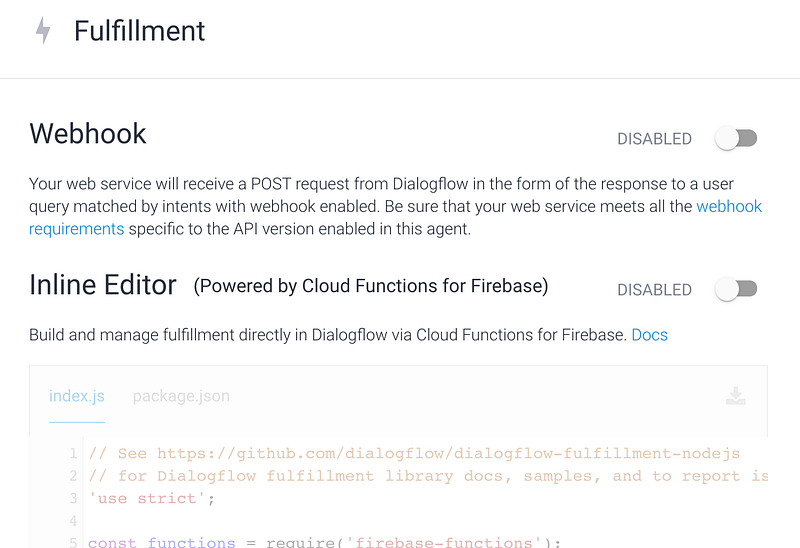
Fulfillment 在Fulfillment下有看到 Webhook 及 Inline Editor兩個實作方式。

  1. Webhook:你可以將程式呼叫的部份寫在外部伺服器,也可以用serverless 的架構來做,例如gcp cloud function , firebase cloud function AWS lambda 等。
  2. Inline Editor:內建的Firebase function,建議用這個,99%表現完美,只有一個問題,Firebase function 的 http request 要收費,請斟酌開啟。但如果你要串外部API就一定會用到…

本文先直接以Inline Editor開始,但不做任何的API,只解釋程式架構,故請放心開啟。 Enable吧
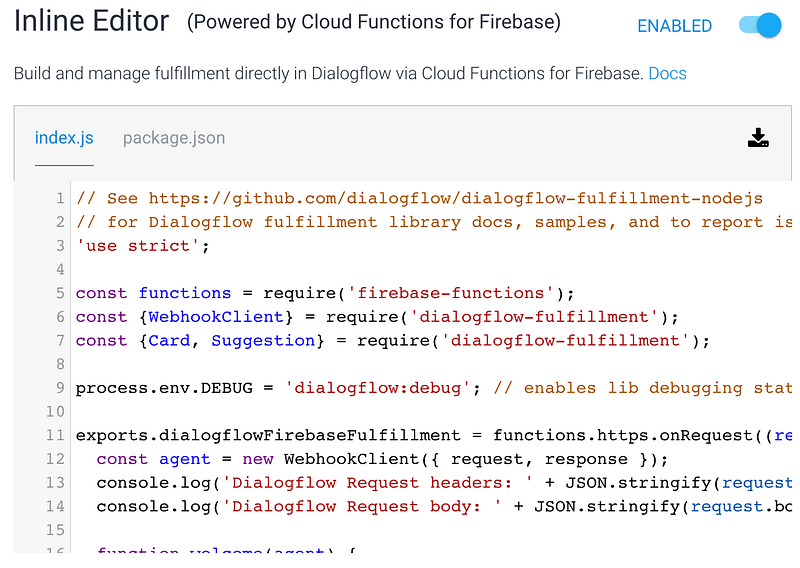
Enable後就會看到下面的對話框可以做填寫了。

firebase是以node.js來做開發;node.js是以javascript程式語言來做撰寫

先看上方有 index.js 及 package.json

package.json:定義這個套件的內容

{
  "name": "dialogflowFirebaseFulfillment",
  "description": "This is the default fulfillment for a Dialogflow agents using Cloud Functions for Firebase",
  "version": "0.0.1",
  "private": true,
  "license": "Apache Version 2.0",
  "author": "Google Inc.",
  "engines": {
    "node": "8"
  },
  "scripts": {
    "start": "firebase serve --only functions:dialogflowFirebaseFulfillment",
    "deploy": "firebase deploy --only functions:dialogflowFirebaseFulfillment"
  },
  "dependencies": {
    "actions-on-google": "^2.2.0",
    "firebase-admin": "^5.13.1",
    "firebase-functions": "^2.0.2",
    "dialogflow": "^0.6.0",
    "dialogflow-fulfillment": "^0.5.0"
  }
}

先看dependencies,指得是會用到的相依套件,可以看到firebase,dialogflow的名稱….,表示這些套件會被用到index.js上

index.js :主程式寫在這裡,反斜線的部份先省略

'use strict';
 
const functions = require('firebase-functions');
const {WebhookClient} = require('dialogflow-fulfillment');
const {Card, Suggestion} = require('dialogflow-fulfillment');

這部份指的是引用到的套件。

exports.dialogflowFirebaseFulfillment = functions.https.onRequest((request, response) => {
  ...
});

exports.dialogflowFirebaseFulfillment就是firebase inline editor 預設會先呼叫的函式。

const agent = new WebhookClient({ request, response });
...
agent.handleRequest(intentMap);

new一個叫做agent的WebhookClient物件,這個物件用來處理intent map

  function welcome(agent) {
    agent.add(`Welcome to my agent!`);
  }
  let intentMap = new Map();
  intentMap.set('Default Welcome Intent', welcome);

重點是這裡:intentMap 是一個Map物件,用來處理各個intent設定於此。這裡將’Default Welcome Intent’這個Intent用welcome這個函式來處理;而welcome 裡則用 agent.add 定義回應的話 Welcome to my agent!

  1. 點擊 Deploy

2. 等待deploy 完成

3. 點擊左邊menu => Intents => 最下面的Fulfillment => Enable webhook for this intent
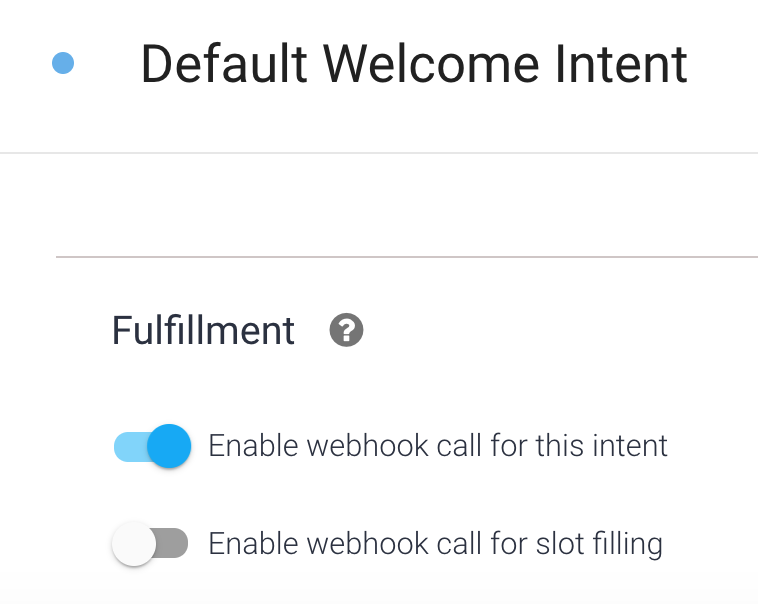
打開後,測試一下
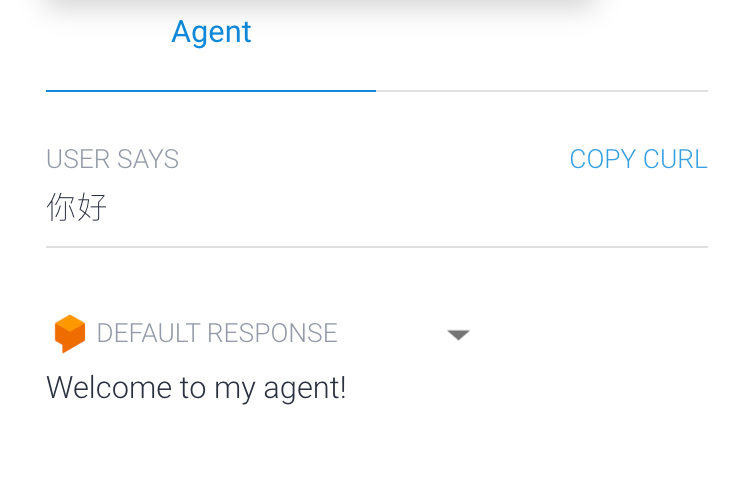
已經不是原本預設的Response內容了。

4. 試著依照相同邏緝將其他intent的response的處理也交至firebase inline editor處理。

例如:Default Fallback Intent 或是自已新增其他的 intent 。

免程式用Dialogflow做LINE Bot及Google語音助理AoG 系列

Story #1 自序 Story #2 回到最初的地方 Story #3 跟隨自己的心

Hands On #A Dialogflow Agnet Intents 建置 Hands On #B Dialogflow X LINE Bot

HomeWork #a 南桃里里長服務助理

Story #4 不同世界的人

Hands On #C Dialogflow Enties 設定 Hands On #D Dialogflow 串AoG

HomeWork #b 南桃美食通

Story#5 有期限的婚姻

Hands On #E Dialogflow Context設定

Story#6 總部成立

Hands On #F Dialogflow X LINE 其他設定

Story#7 找回笑容

Hands On #G Entites with Response 的進階應用

HomeWork #c 南桃事

Hands On #H 用firebase 接intent Hands On #I 使用Google Cloud Function 來串接Dialogflow Webhook Hands On #J 用 Google Cloud function 串 API

HomeWork #d 演唱會資訊

Dialogflow
JavaScript
Recommended from ReadMedium