
GridSearchCV 2.0 — New and Improved
By Michael Chau, Anthony Yu, Richard Liaw
Scikit-Learn is one of the most widely used tools in the ML community, offering dozens of easy-to-use machine learning algorithms. However, to achieve high performance for these algorithms, you often need to tune model hyperparameters. Hyperparameters are the parameters of a model which are not updated during training and are used to configure the model or the training function.
Natively, Scikit-Learn provides two techniques to address hyperparameter tuning: Grid Search (GridSearchCV) and Random Search (RandomizedSearchCV). Though effective, both techniques are brute-force approaches to finding the right hyperparameter configurations, which is an expensive and time-consuming process!
Cutting edge hyperparameter tuning techniques (bayesian optimization, early stopping, distributed execution) can provide significant speedups over grid search and random search.
However, the machine learning ecosystem is missing a solution that provides users with the ability to leverage all of the above listed techniques while allowing users to stay within the Scikit-Learn API. In this blog post, we introduce tune-sklearn to bridge this gap. Tune-sklearn is a drop-in replacement for Scikit-Learn’s model selection module with state-of-the-art optimization features.

Here’s what tune-sklearn has to offer:
- Consistency with Scikit-Learn API: tune-sklearn is a drop-in replacement for GridSearchCV and RandomizedSearchCV, so you only need to change less than 5 lines in a standard Scikit-Learn script to use the API.
- Modern hyperparameter tuning techniques: tune-sklearn is the only Scikit-Learn interface that allows you to easily leverage Bayesian Optimization, HyperBand, and other optimization techniques by simply toggling a few parameters.
- Framework support: tune-sklearn is used primarily for tuning Scikit-Learn models, but it also supports and provides examples for many other frameworks with Scikit-Learn wrappers such as Skorch (Pytorch), KerasClassifiers (Keras), and XGBoostClassifiers (XGBoost).
- Scale up: Tune-sklearn leverages Ray Tune, a library for distributed hyperparameter tuning, to efficiently and transparently parallelize cross validation on multiple cores and even multiple machines.

Tune-sklearn is also fast. To see this, we benchmark tune-sklearn (with early stopping enabled) against native Scikit-Learn on a standard hyperparameter sweep. In our benchmarks we can see significant performance differences on both an average laptop and a large workstation of 48 CPU cores.
For the larger benchmark 48-core computer, Scikit-Learn took 20 minutes for a 40,000-size dataset searching over 75 hyperparameter sets. Tune-sklearn took a mere 3 and a half minutes — sacrificing minimal accuracy.*
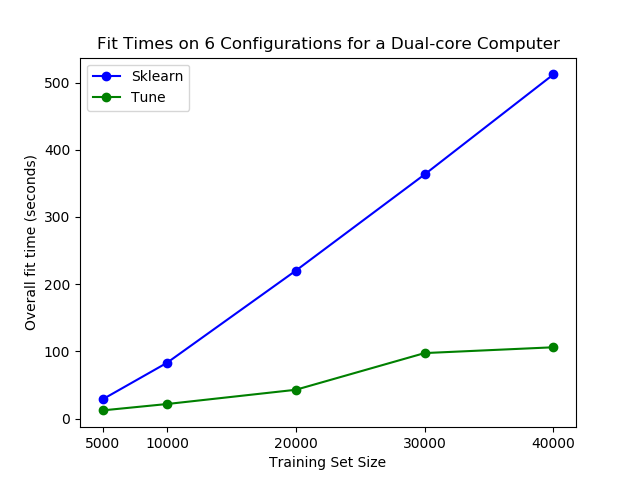
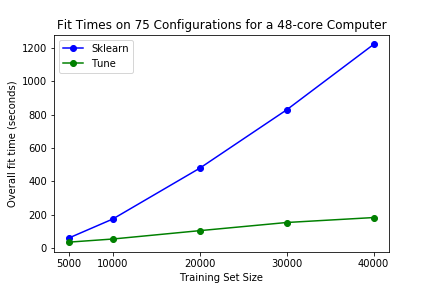
* Note: For smaller datasets (10,000 or fewer data points), there may be a sacrifice in accuracy when attempting to fit with early stopping. We don’t anticipate this to make a difference for users as the library is intended to speed up large training tasks with large datasets.
Simple 60 second Walkthrough
Let’s take a look at how it all works.
Run pip install tune-sklearn ray[tune] or pip install tune-sklearn "ray[tune]"to get started with our example code below.
TuneGridSearchCV Example
To start out, it’s as easy as changing our import statement to get Tune’s grid search cross validation interface:
And from there, we would proceed just like how we would in Scikit-Learn’s interface! Let’s use a “dummy” custom classification dataset and an SGDClassifier to classify the data.
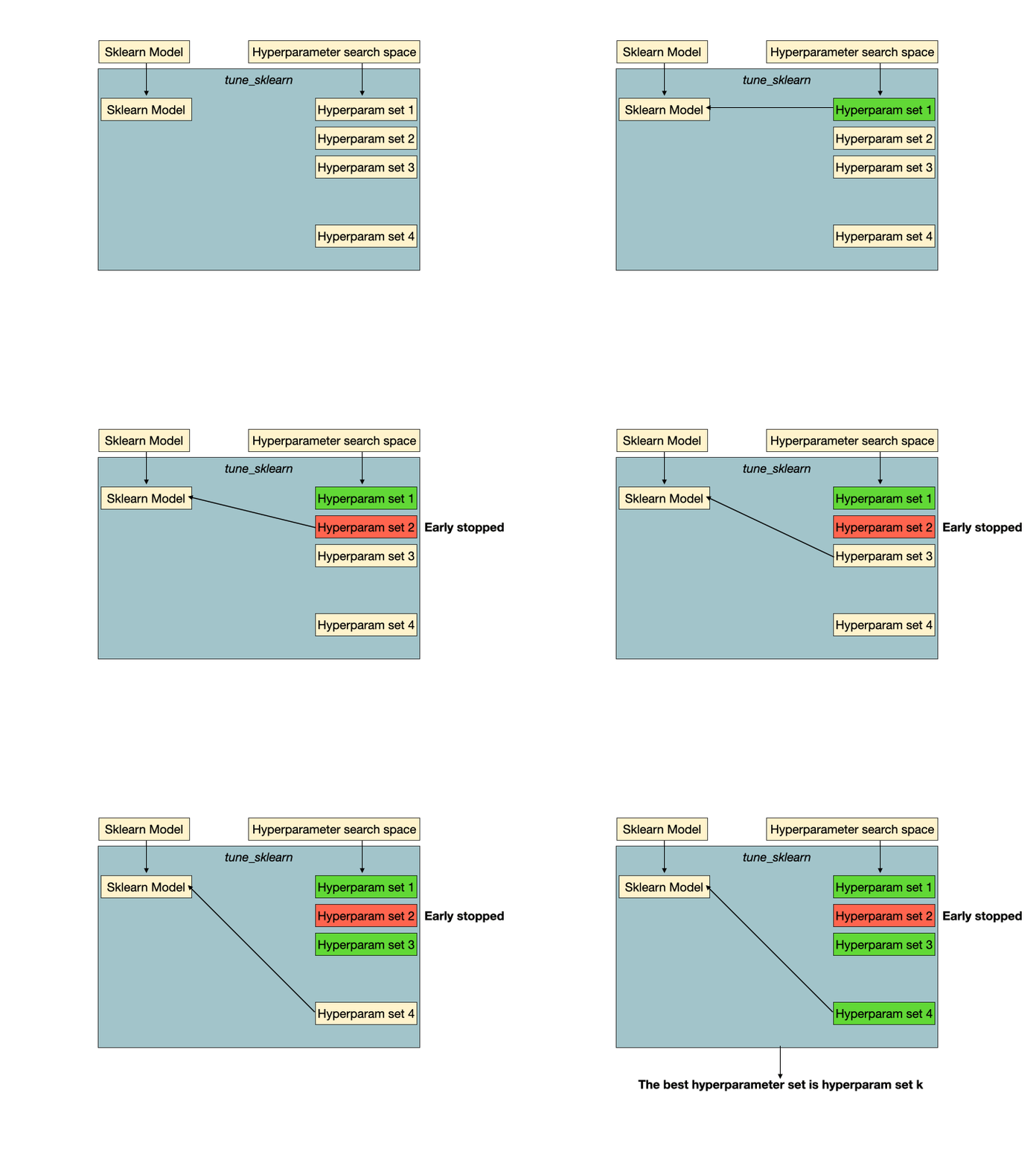
We choose the SGDClassifier because it has a partial_fit API, which enables it to stop fitting to the data for a certain hyperparameter configuration. If the estimator does not support early stopping, we would fall back to a parallel grid search.
As you can see, the setup here is exactly how you would do it for Scikit-Learn! Now, let’s try fitting a model.
Note the slight differences we introduced above:
- a new
early_stoppingvariable, and - a specification of
max_itersparameter
The early_stopping determines when to stop early — MedianStoppingRule is a great default but see Tune’s documentation on schedulers here for a full list to choose from. max_iters is the maximum number of iterations a given hyperparameter set could run for; it may run for fewer iterations if it is early stopped.
Try running this compared to the GridSearchCV equivalent.
TuneSearchCV Bayesian Optimization Example
Other than the grid search interface, tune-sklearn also provides an interface, TuneSearchCV, for sampling from distributions of hyperparameters.
In addition, you can easily enable Bayesian optimization over the distributions in TuneSearchCV in only a few lines of code changes.
Run pip install scikit-optimize to try out this example:
As you can see, it’s very simple to integrate tune-sklearn into existing code. You can check out more detailed examples and get started with tune-sklearn here. Also take a look at Ray’s replacement for joblib, which allows users to parallelize training over multiple nodes, not just one node, further speeding up training. If you have any questions or thoughts about tune-sklearn, you can join our community through Discourse or Slack. If you would like to see how Ray Tune is being used throughout industry, consider joining us at Ray Summit.
Documentation and Examples
- Documentation*
- Example: Skorch with tune-sklearn
- Example: Scikit-Learn Pipelines with tune-sklearn
- Example: XGBoost with tune-sklearn
- Example: KerasClassifier with tune-sklearn
- Example: LightGBM with tune-sklearn
Note: importing from ray.tune as shown in the linked documentation is available only on the nightly Ray wheels and will be available on pip soon.