
GraphQL With Spring Boot
Introduction
In this article I’ll explain the way of integrate GraphQL API with Spring Boot application and perform create, read and delete operations on MySql Database. In here I’m going to implement GraphQL query, mutation and the way of handle GraphQL exceptions.
What is API ?
API is a Application Programming Interface and which is a way to communicate between different software services over internet. Different types of APIs are used in programming hardware and software, including operating systemAPIs, remote APIs and web APIs. A web API or web service API is a set of tools that allow developers to send and receive instructions and data between a web server and a web browser usually in JSON format to build applications.
What is GraphQL ?
Simply it is a open source query language for API and it allowing you to fetch and manipulate your data. Its functionality is most similar to the REST API and behavioural vice and architectural vice it has more improvements than rest.
Why we use GraphQL over traditional REST API?
— Over and Under fetching data is avoided. Over-fetching happens when the response fetches more than is required.Response contains unnesasary data. With GraphQL, you define the fields that you want to fetch and it fetches the data of only requested fields. Under-fetching, on the other hand, is not fetching adequate data in a single API request.It lets you fetch all relevant data in a single query.
— Queries return predictable results.
— Apps are fast and stable because the server isn’t controlling the data.
— Network and memory usage decrease with less bandwidth.
— Frontend or service consumer developers do not want to depend on backend developer works and no need to handle versioning of rest end points.
What are the GraphQL Operation Types?
Query: Used to fetch/read data Mutation: Used to create, update and delete data/manupilate data Subscription: Like queries, subscriptions enable you to fetch data.Unlike queries,change their result over time. Subscriptions are useful for notifying your client in real time about changes to back-end data, such as the creation of a new object or updates to an important field.
What is schema?
It is entry point for the application and place where we specify our GraphQL data types, query and mutations. It has “.graphqls” file extension.
What is resolver?
In our application you can see queryresolver and mutationresolver.Its responsible for map the schema and data model in our application. A resolver is the key architectural component that connects GraphQL fields, graph edges, queries, mutations, and subscriptions to their respective data sources.
I think now you got some sufficient knowledge related to GraphQL and lets start the implementation.
Objective
The goal of this example is to build a GraphQL APIs to perform CRUD operations with MySQL database. This exercise is around post and comment data api and each post has many comments.I have used One-to-Many relationship in here.
Technology
Java 8 Spring Boot 2.7.8.RELEASE (with Spring Web, Spring Data JPA and mysql-connector) graphql-spring-boot-starter 12.0.0 graphiql-spring-boot-starter:11.1.0 Gradle build tool
Project Structure
This is folders & files structure for our Spring Boot + GraphQL + MySQL application:
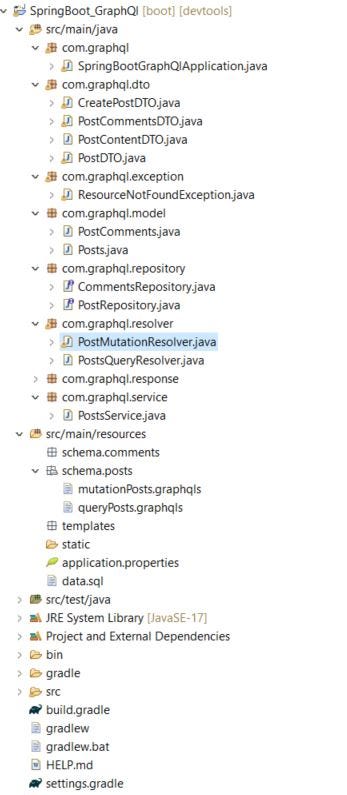
Set up the project
Create spring boot application. — Navigate to https://start.spring.io.
— Choose either Gradle or Maven as build tool. In here I’m using Gradle and Java 18.
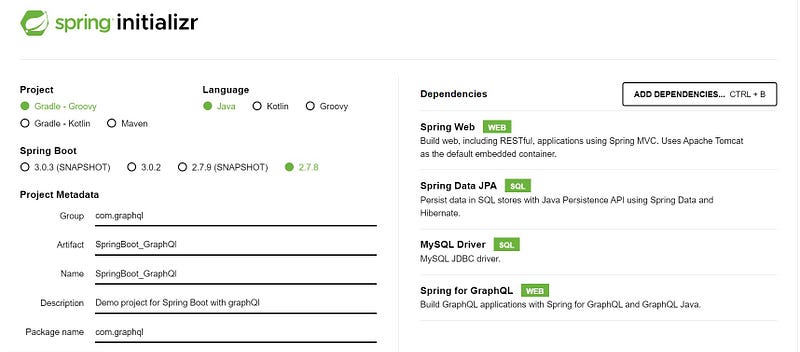
This is my dependencies on build.gradle
plugins {
 id 'java'
 id 'org.springframework.boot' version '2.7.8'
 id 'io.spring.dependency-management' version '1.0.15.RELEASE'
}

group = 'com.graphql'
version = '0.0.1-SNAPSHOT'
sourceCompatibility = '17'

repositories {
 mavenCentral()
}
dependencies {
 implementation 'org.springframework.boot:spring-boot-starter-data-jpa'
 implementation 'com.graphql-java-kickstart:graphql-spring-boot-starter:12.0.0'
 implementation 'com.graphql-java-kickstart:graphiql-spring-boot-starter:11.1.0'
 implementation 'org.springframework.boot:spring-boot-starter-web'
 runtimeOnly 'com.mysql:mysql-connector-j'
 developmentOnly 'org.springframework.boot:spring-boot-devtools'
 implementation group: 'org.modelmapper', name: 'modelmapper', version: '2.1.1'
}
tasks.named('test') {
 useJUnitPlatform()
}
To configure Spring Data source, JPA open the application.properties and add the following configuration
spring.jpa.hibernate.ddl-auto=update
spring.datasource.url=jdbc:mysql://localhost:3306/test_graphql
spring.datasource.username=root
spring.datasource.password=amila
spring.datasource.driver-class-name=com.mysql.cj.jdbc.Driver
Added sample data in data.sql for testing purposes.
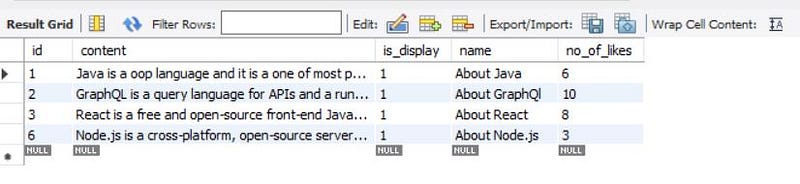
insert into posts (id, content,is_display,name,no_of_likes)
values (1,'Java is a oop language and it is a one of most popular open source language',true,'About Java',6);

insert into posts (id, content,is_display,name,no_of_likes)
values (2,'GraphQL is a query language for APIs and a runtime for fulfilling those queries with your existing data.',true,'About GraphQl',10);

insert into posts (id, content,is_display,name,no_of_likes)
values (3,'React is a free and open-source front-end JavaScript library for building user interfaces based on components',true,'About React',8);

insert into post_comments (id,coment_content,post_id)
values (1,'Very informative', 1);

insert into post_comments (id,coment_content,post_id)
values (2,'Very nice post', 1);

insert into post_comments (id,coment_content,post_id)
values (3,'Please give sample code', 2);

insert into post_comments (id,coment_content,post_id)
values (4,'Very informative', 2);

insert into post_comments (id,coment_content,post_id)
values (5,'You make my day,thanks in advanced', 1);

insert into post_comments (id,coment_content,post_id)
values (6,'Nice article', 3);
Create GraphQL Schema
I have split up schema into two .graphqls files.Those are mutationPosts.graphqls and queryPosts.graphqls respectively. The Spring Boot GraphQL starter will automatically find these schema files.Under src/main/resources/schema.post folder, create queryPosts.graphqls and mutationPosts.graphqls files.
type Query {
    allPosts :PostContentDTO
    getPosts(PostId: Float!) :PostContentDTO
}
type PostContentDTO {
    statusCode:Int!
    totalRecord:Int!
    postList:[PostDTO]
}
type PostDTO {
    id:Float
    name:String
    content:String
    noOfLikes:Int
    isDisplay:Boolean
    comments:[PostCommentsDTO]
}
type PostCommentsDTO {
    id:Float
    comentContent:String
}
type Mutation{
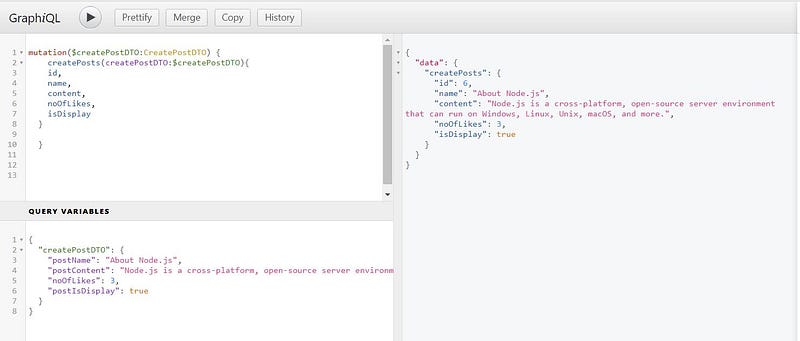
createPosts(createPostDTO : CreatePostDTO):Posts
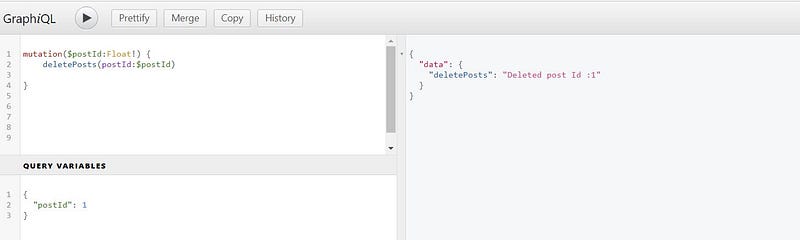
deletePosts(postId:Float!):String
}
input CreatePostDTO{
postName:String
postContent:String
noOfLikes:Int
postIsDisplay:Boolean
}
type Posts{
id:Float
name:String
content:String
noOfLikes:Int
isDisplay:Boolean
comments:[PostComments]
}
type PostComments {
id:Float
comentContent:String
}Define Data Models
Here I have defined two main models with One-to-Many relationship in model package: -Posts.java -PostComments.java
@Entity
public class Posts {
 @Id
 @GeneratedValue(strategy = GenerationType.IDENTITY)
 private Long id;
 private String name;
 private String content;
 private int noOfLikes;
 private boolean isDisplay;

 @OneToMany(cascade = CascadeType.ALL,orphanRemoval = true,fetch = FetchType.EAGER)
 @JoinColumn(name = "post_id")
    private List<PostComments> comments = new ArrayList<>();

//Getters and Setters here
@Entity
public class PostComments {
@Id
@GeneratedValue(strategy = GenerationType.IDENTITY)
private Long id;
private String comentContent;
public PostComments() {
super();
}
//Getters and Setters here
Define DTO(Data Transfer Objects) Models
Dtos used for transfer data between data model classes and resolvers.
public class PostContentDTO extends CommonResponse{
 private List<PostDTO> postList;

 public PostContentDTO() {
  super();
 }
 public List<PostDTO> getPostList() {
  return postList;
 }
 public void setPostList(List<PostDTO> postList) {
  this.postList = postList;
 }
 @Override
 public String toString() {
  return "PostContentDTO [postList=" + postList + "]";
 }
}
public class PostDTO implements Serializable {
private Long id;
private String name;
private String content;
private int noOfLikes;
private boolean isDisplay;
private List<PostCommentsDTO> comments;
//Getters and Setters hereCreate Repositories
In repository package, create two interfaces that implement JpaRepository. Once we extends the JpaRepository, Spring Data JPA will automatically generate implementation with find, save, delete, count methods for the entities.
@Repository
public interface PostRepository extends JpaRepository<Posts, Long> {

}
Define Service Layer
Here specify the business logics and data modeling.
@Service
public class PostsService {

 private PostRepository postRepository;
 private ModelMapper modelMapper;

 @Autowired
 public PostsService(PostRepository postRepository, ModelMapper modelMapper) {
  this.postRepository = postRepository;
  this.modelMapper = modelMapper;
 }

 public PostContentDTO getPosts(Long PostId) {
  PostContentDTO postContentDto=new PostContentDTO();
  Optional<Posts> post=postRepository.findById(PostId);
  if(!post.isPresent()) {
   throw new ResourceNotFoundException("Unable to find post with given post id :"+ PostId);
  }
  PostDTO postDto = this.modelMapper.map(post.get(), PostDTO.class);
  List<PostDTO> objects = Collections.singletonList(postDto);
  postContentDto.setStatusCode(HttpStatus.FOUND.value());
  postContentDto.setTotalRecord(1);
  postContentDto.setPostList(objects);
  return postContentDto;
 }

 public PostContentDTO allPosts() {
  PostContentDTO postContentDto=new PostContentDTO();
  List<Posts> post=postRepository.findAll();
  List<PostDTO> objectList =new  ArrayList<>();
  post.stream().forEach(postObj-> objectList.add(this.modelMapper.map(postObj, PostDTO.class)) );
  postContentDto.setStatusCode(HttpStatus.FOUND.value());
  postContentDto.setTotalRecord(post.size());
  postContentDto.setPostList(objectList);
  return postContentDto;
 }

 public Posts createPost(CreatePostDTO createPostDTO) {
  Posts post = this.modelMapper.map(createPostDTO, Posts.class);
  postRepository.save(post);
  return post;
 }

 public void deletePost(Long postId) {
  Optional<Posts> post =postRepository.findById(postId);
  if(post.isPresent()) {
   postRepository.deleteById(postId);
  }
  else {
   throw new ResourceNotFoundException("Unable to find post with given post id :"+ postId);
  }
 }
Implement GraphQL Query Resolver
Every field in the schema query should have a method in the Query Resolver class with the same name. This PostQueryResolver class implements GraphQLQueryResolver.
@Component
public class PostsQueryResolver implements GraphQLQueryResolver  {
 private final PostsService postsService;

 @Autowired public PostsQueryResolver(PostsService postsService) { super();
 this.postsService = postsService; }

 public PostContentDTO getPosts(Long PostId) { return
 postsService.getPosts(PostId); }

 public PostContentDTO allPosts() { return postsService.allPosts(); }

}
Then PostMutationResolver class implements GraphQLMutationResolver. Just like Query Resolver, every field in the schema mutation query should have a method in the Mutation Resolver class with the same name.
@Component
public class PostMutationResolver implements GraphQLMutationResolver {

 @Autowired
 private ModelMapper modelMapper;

 @Autowired
 private PostsService postsService;

 public Posts createPosts(CreatePostDTO createPostDTO ) {
  return postsService.createPost(createPostDTO);
 }
 public String deletePosts(Long postId) {
  postsService.deletePost(postId);
  return "Deleted post Id :"+postId;
 }
}
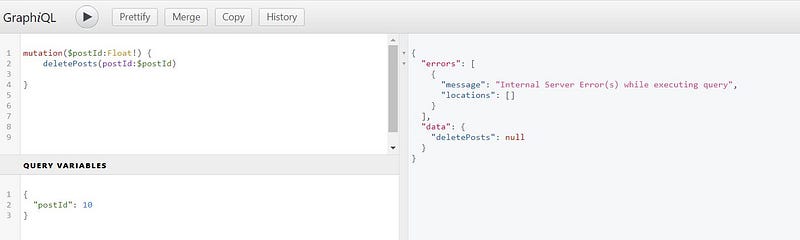
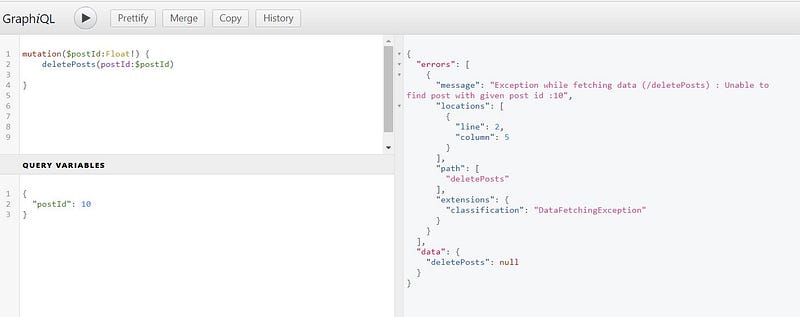
Error Handling
All the errors in GraphQl go through the GraphQlErrorHnadler interface.It implements the DefaultGraphQlErrorHnadler class and it has processError method which excecutes when the graphql related exception occurs.Then the GraphQLError interface used to define our custom graphql error. So lets define our own error handler.
First create package called exception and create class called “ResourceNotFoundException” and extends RuntimeException and implements GraphQLError interface to it.Then you have to override the getLocations() and getErrorType() methods which are derived from GraphQLError interface.The getLocations() is place where we can specify the location where error happens. Then the getErrorType() method is place where you can specify type of the exception. Here I’m using ErrorType enum which contains limited types of graphql related exceptions.
public class ResourceNotFoundException extends RuntimeException implements GraphQLError {

 public ResourceNotFoundException(String message) {
  super(message);
 }
 @Override
 public List<SourceLocation> getLocations() {
  //specify the location where error happens
  return null;
 }
 @Override
 public ErrorClassification getErrorType() {
  return ErrorType.DataFetchingException;
 }
}
Run & Check Result
Run Spring Boot application with command: mvn spring-boot:run.
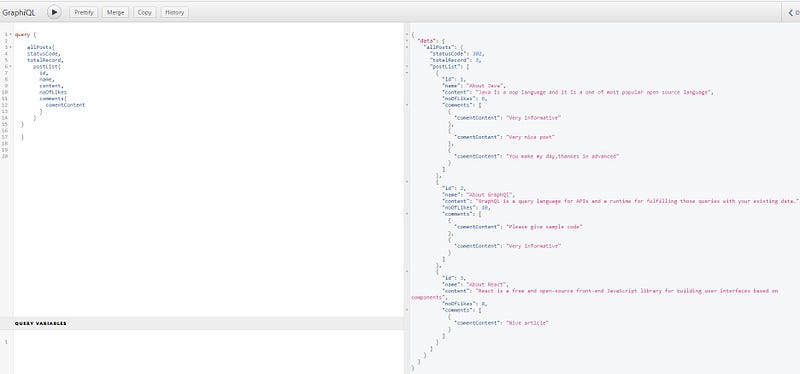
Then acces http://localhost:8080/graphiql. This is graphql play ground and you can querying data from browser.Besides that you can use postman.
Query for fetch post by Id.
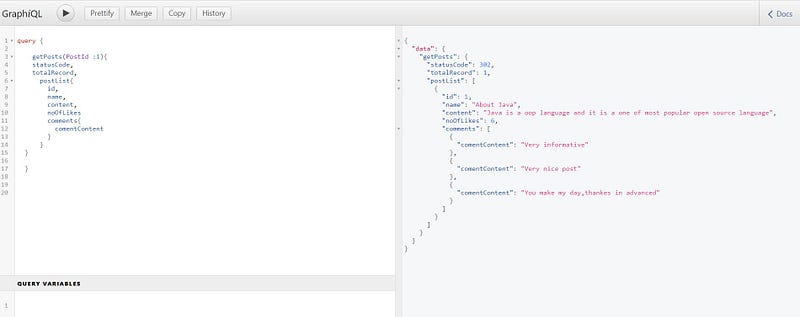
Thank you for read this article and If you like this article, do follow and clap 👏🏻.Happy coding, Cheers !!😊😊
You can find the complete code for this example on GitHub
Do support our publication by following it


