avatarMouad Oumous

Free AI web copilot to create summaries, insights and extended knowledge, download it at here

13090

Abstract

/span> Exception { getLeave(); }

<span class="hljs-keyword">void</span> <span class="hljs-title function_">getLeave</span><span class="hljs-params">()</span> <span class="hljs-keyword">throws</span> NoLeaveGrantedException {
    <span class="hljs-keyword">try</span> {
        howIsTeamLead();
    } <span class="hljs-keyword">catch</span> (TeamLeadUpsetException e) {
        e.printStackTrace();
        <span class="hljs-keyword">throw</span> <span class="hljs-keyword">new</span> <span class="hljs-title class_">NoLeaveGrantedException</span>(<span class="hljs-string">"Leave not sanctioned."</span>);
    }
}

<span class="hljs-keyword">void</span> <span class="hljs-title function_">howIsTeamLead</span><span class="hljs-params">()</span> <span class="hljs-keyword">throws</span> TeamLeadUpsetException {
    <span class="hljs-keyword">throw</span> <span class="hljs-keyword">new</span> <span class="hljs-title class_">TeamLeadUpsetException</span>(<span class="hljs-string">"Team Lead Upset"</span>);
}

}</pre></div><p id="b8ad">In the example above, logs will look like this:</p><div id="cf2a"><pre>com<span class="hljs-selector-class">.baeldung</span><span class="hljs-selector-class">.chainedexception</span><span class="hljs-selector-class">.exceptions</span><span class="hljs-selector-class">.TeamLeadUpsetException</span>: Team lead Upset at com<span class="hljs-selector-class">.baeldung</span><span class="hljs-selector-class">.chainedexception</span><span class="hljs-selector-class">.exceptions</span><span class="hljs-selector-class">.MainClass</span> <span class="hljs-selector-class">.howIsTeamLead</span>(MainClass<span class="hljs-selector-class">.java</span>:<span class="hljs-number">46</span>) at com<span class="hljs-selector-class">.baeldung</span><span class="hljs-selector-class">.chainedexception</span><span class="hljs-selector-class">.exceptions</span><span class="hljs-selector-class">.MainClass</span> <span class="hljs-selector-class">.getLeave</span>(MainClass<span class="hljs-selector-class">.java</span>:<span class="hljs-number">34</span>) at com<span class="hljs-selector-class">.baeldung</span><span class="hljs-selector-class">.chainedexception</span><span class="hljs-selector-class">.exceptions</span><span class="hljs-selector-class">.MainClass</span> <span class="hljs-selector-class">.main</span>(MainClass<span class="hljs-selector-class">.java</span>:<span class="hljs-number">29</span>) Exception <span class="hljs-keyword">in</span> thread <span class="hljs-string">"main"</span> com<span class="hljs-selector-class">.baeldung</span><span class="hljs-selector-class">.chainedexception</span><span class="hljs-selector-class">.exceptions</span>. NoLeaveGrantedException: Leave not sanctioned. at com<span class="hljs-selector-class">.baeldung</span><span class="hljs-selector-class">.chainedexception</span><span class="hljs-selector-class">.exceptions</span><span class="hljs-selector-class">.MainClass</span> <span class="hljs-selector-class">.getLeave</span>(MainClass<span class="hljs-selector-class">.java</span>:<span class="hljs-number">37</span>) at com<span class="hljs-selector-class">.baeldung</span><span class="hljs-selector-class">.chainedexception</span><span class="hljs-selector-class">.exceptions</span><span class="hljs-selector-class">.MainClass</span> <span class="hljs-selector-class">.main</span>(MainClass<span class="hljs-selector-class">.java</span>:<span class="hljs-number">29</span>)</pre></div><p id="341c"><b>With Chaining</b></p><p id="2d47">Next, let’s write an example with chaining our custom exceptions:</p><div id="3f0b"><pre><span class="hljs-keyword">public</span> <span class="hljs-keyword">class</span> <span class="hljs-title class_">MainClass</span> { <span class="hljs-keyword">public</span> <span class="hljs-keyword">void</span> <span class="hljs-title function_">main</span><span class="hljs-params">(String[] args)</span> <span class="hljs-keyword">throws</span> Exception { getLeave(); }

<span class="hljs-keyword">public</span> <span class="hljs-title function_">getLeave</span><span class="hljs-params">()</span> <span class="hljs-keyword">throws</span> NoLeaveGrantedException {
    <span class="hljs-keyword">try</span> {
        howIsTeamLead();
    } <span class="hljs-keyword">catch</span> (TeamLeadUpsetException e) {
         <span class="hljs-keyword">throw</span> <span class="hljs-keyword">new</span> <span class="hljs-title class_">NoLeaveGrantedException</span>(<span class="hljs-string">"Leave not sanctioned."</span>, e);
    }
}

<span class="hljs-keyword">public</span> <span class="hljs-keyword">void</span> <span class="hljs-title function_">howIsTeamLead</span><span class="hljs-params">()</span> <span class="hljs-keyword">throws</span> TeamLeadUpsetException {
    <span class="hljs-keyword">throw</span> <span class="hljs-keyword">new</span> <span class="hljs-title class_">TeamLeadUpsetException</span>(<span class="hljs-string">"Team lead Upset."</span>);
}

}</pre></div><p id="cc5e">Finally, let’s look at the logs obtained with chained exceptions:</p><div id="ba23"><pre>Exception <span class="hljs-keyword">in</span> thread <span class="hljs-string">"main"</span> com<span class="hljs-selector-class">.baeldung</span><span class="hljs-selector-class">.chainedexception</span><span class="hljs-selector-class">.exceptions</span> <span class="hljs-selector-class">.NoLeaveGrantedException</span>: Leave not sanctioned. at com<span class="hljs-selector-class">.baeldung</span><span class="hljs-selector-class">.chainedexception</span><span class="hljs-selector-class">.exceptions</span><span class="hljs-selector-class">.MainClass</span> <span class="hljs-selector-class">.getLeave</span>(MainClass<span class="hljs-selector-class">.java</span>:<span class="hljs-number">36</span>) at com<span class="hljs-selector-class">.baeldung</span><span class="hljs-selector-class">.chainedexception</span><span class="hljs-selector-class">.exceptions</span><span class="hljs-selector-class">.MainClass</span> <span class="hljs-selector-class">.main</span>(MainClass<span class="hljs-selector-class">.java</span>:<span class="hljs-number">29</span>) Caused by: com<span class="hljs-selector-class">.baeldung</span><span class="hljs-selector-class">.chainedexception</span><span class="hljs-selector-class">.exceptions</span> <span class="hljs-selector-class">.TeamLeadUpsetException</span>: Team lead Upset. at com<span class="hljs-selector-class">.baeldung</span><span class="hljs-selector-class">.chainedexception</span><span class="hljs-selector-class">.exceptions</span><span class="hljs-selector-class">.MainClass</span> <span class="hljs-selector-class">.howIsTeamLead</span>(MainClass<span class="hljs-selector-class">.java</span>:<span class="hljs-number">44</span>) at com<span class="hljs-selector-class">.baeldung</span><span class="hljs-selector-class">.chainedexception</span><span class="hljs-selector-class">.exceptions</span><span class="hljs-selector-class">.MainClass</span> <span class="hljs-selector-class">.getLeave</span>(MainClass<span class="hljs-selector-class">.java</span>:<span class="hljs-number">34</span>) ... <span class="hljs-number">1</span> more</pre></div><p id="cc41">We can easily compare shown logs and conclude that the chained exceptions lead to cleaner logs.</p><h1 id="362e">Difficulties with chained exceptions</h1><p id="2b19">We can use exception chaining in situations where another exception causes one exception. However, it’s important to note that chaining can make our code more difficult to read and understand. Therefore, we should use exception chaining sparingly and only when necessary.</p><p id="3e98">If we use chained exceptions, it is a good idea to document the chain in our code. It’ll help others understand our code and make it easier to debug if an error occurs.</p><h1 id="836c">Program</h1><div id="944c"><pre><span class="hljs-comment">//: exceptions/DynamicFields.java</span> <span class="hljs-comment">// A Class that dynamically adds fields to itself. </span> <span class="hljs-comment">// Demonstrates exception chaining. </span> <span class="hljs-keyword">import</span> <span class="hljs-keyword">static</span> net.mindview.util.Print.*; <span class="hljs-keyword">class</span> <span class="hljs-title class_">DynamicFieldsException</span> <span class="hljs-keyword">extends</span> <span class="hljs-title class_">Exception</span> {} <span class="hljs-keyword">public</span> <span class="hljs-keyword">class</span> <span class="hljs-title class_">DynamicFields</span> { <span class="hljs-keyword">private</span> Object[][] fields; <span class="hljs-keyword">public</span> <span class="hljs-title function_">DynamicFields</span><span class="hljs-params">(<span class="hljs-type">int</span> initialSize)</span> { fields = <span class="hljs-keyword">new</span> <span class="hljs-title class_">Object</span>[initialSize][<span class="hljs-number">2</span>]; <span class="hljs-keyword">for</span>(<span class="hljs-type">int</span> <span class="hljs-variable">i</span> <span class="hljs-operator">=</span> <span class="hljs-number">0</span>; i < initialSize; i++) fields[i] = <span class="hljs-keyword">new</span> <span class="hljs-title class_">Object</span>[] { <span class="hljs-literal">null</span>, <span class="hljs-literal">null</span> }; }

<span class="hljs-keyword">public</span> String <span class="hljs-title function_">toString</span><span class="hljs-params">()</span> { <span class="hljs-type">StringBuilder</span> <span class="hljs-variable">result</span> <span class="hljs-operator">=</span> <span class="hljs-keyword">new</span> <span class="hljs-title class_">StringBuilder</span>(); <span class="hljs-keyword">for</span>(Object[] obj : fields) { result.append(obj[<span class="hljs-number">0</span>]); result.append(<span class="hljs-string">": "</span>); result.append(obj[<span class="hljs-number">1</span>]); result.append(<span class="hljs-string">"\n"</span>); } <span class="hljs-keyword">return</span> result.toString(); }

<span class="hljs-comment">//...................hasField(String id)........................//</span> <span class="hljs-keyword">private</span> <span class="hljs-type">int</span> <span class="hljs-title function_">hasField</span><span class="hljs-params">(String id)</span> { <span class="hljs-keyword">for</span>(<span class="hljs-type">int</span> <span class="hljs-variable">i</span> <span class="hljs-operator">=</span> <span class="hljs-number">0</span>; i < fields.length; i++) <span class="hljs-keyword">if</span>(id.equals(fields[i][<span class="hljs-number">0</span>])) <span class="hljs-keyword">return</span> i; <span class="hljs-keyword">return</span> -<span class="hljs-number">1</span>; }

<span class="hljs-comment">//......................getFieldNumber(String id)....................//</span> <span class="hljs-keyword">private</span> <span class="hljs-type">int</span> <span class="hljs-title function_">getFieldNumber</span><span class="hljs-params">(String id)</span> <span class="hljs-keyword">throws</span> NoSuchFieldException { <span class="hljs-type">int</span> <span class="hljs-variable">fieldNum</span> <span class="hljs-operator">=</span> hasField(id); <span class="hljs-keyword">if</span>(fieldNum == -<span class="hljs-number">1</span>) <span class="hljs-keyword">throw</span> <span class="hljs-keyword">new</span> <span class="hljs-title class_">NoSuchFieldException</span>(); <span class="hljs-keyword">return</span> fieldNum; }

<span class="hljs-comment">//........................makeField(String id).....................//</span> <span class="hljs-keyword">private</span> <span class="hljs-type">int</span> <span class="hljs-title function_">makeField</span><span class="hljs-params">(String id)</span> { <span class="hljs-keyword">for</span>(<span class="hljs-type">int</span> <span class="hljs-variable">i</span> <span class="hljs-operator">=</span> <span class="hljs-number">0</span>; i < fields.length; i++) <span class="hljs-keyword">if</span>(fields[i][<span class="hljs-number">0</span>] == <span class="hljs-literal">null</span>) { fields[i][<span class="hljs-number">0</span>] = id; <span class="hljs-keyword">return</span> i; } <span class="hljs-comment">// No empty fields. Add one: </span> Object[][] tmp = <span class="hljs-keyword">new</span> <span class="hljs-title class_">Object</span>[fields.length + <span class="hljs-number">1</span>][<span class="hljs-number">2</span>]; <span class="hljs-keyword">for</span>(<span class="hljs-type">int</span> <span class="hljs-variable">i</span> <span class="hljs-operator">=</span> <span class="hljs-number">0</span>; i < fields.length; i++) tmp[i] = fields[i]

Options

; <span class="hljs-keyword">for</span>(<span class="hljs-type">int</span> <span class="hljs-variable">i</span> <span class="hljs-operator">=</span> fields.length; i < tmp.length; i++) tmp[i] = <span class="hljs-keyword">new</span> <span class="hljs-title class_">Object</span>[] { <span class="hljs-literal">null</span>, <span class="hljs-literal">null</span> }; fields = tmp; <span class="hljs-comment">// Recursive call with expanded fields: </span> <span class="hljs-keyword">return</span> makeField(id); }

<span class="hljs-comment">//.............................getField(String id).......................//</span> <span class="hljs-keyword">public</span> Object <span class="hljs-title function_">getField</span><span class="hljs-params">(String id)</span> <span class="hljs-keyword">throws</span> NoSuchFieldException { <span class="hljs-keyword">return</span> fields[getFieldNumber(id)][<span class="hljs-number">1</span>]; }

<span class="hljs-comment">//.........................setField(String id, Object value)..........................</span> <span class="hljs-keyword">public</span> Object <span class="hljs-title function_">setField</span><span class="hljs-params">(String id, Object value)</span> <span class="hljs-keyword">throws</span> DynamicFieldsException { <span class="hljs-keyword">if</span>(value == <span class="hljs-literal">null</span>) { <span class="hljs-comment">// Most exceptions don’t have a "cause" constructor. </span> <span class="hljs-comment">// In these cases you must use initCause(), </span> <span class="hljs-comment">// available in all Throwable subclasses. </span> <span class="hljs-type">DynamicFieldsException</span> <span class="hljs-variable">dfe</span> <span class="hljs-operator">=</span> <span class="hljs-keyword">new</span> <span class="hljs-title class_">DynamicFieldsException</span>(); dfe.initCause(<span class="hljs-keyword">new</span> <span class="hljs-title class_">NullPointerException</span>()); <span class="hljs-keyword">throw</span> dfe; } <span class="hljs-type">int</span> <span class="hljs-variable">fieldNumber</span> <span class="hljs-operator">=</span> hasField(id); <span class="hljs-keyword">if</span>(fieldNumber == -<span class="hljs-number">1</span>) fieldNumber = makeField(id); <span class="hljs-type">Object</span> <span class="hljs-variable">result</span> <span class="hljs-operator">=</span> <span class="hljs-literal">null</span>; <span class="hljs-keyword">try</span> { result = getField(id); <span class="hljs-comment">// Get old value </span> } <span class="hljs-keyword">catch</span>(NoSuchFieldException e) { <span class="hljs-comment">// Use constructor that takes "cause": </span> <span class="hljs-keyword">throw</span> <span class="hljs-keyword">new</span> <span class="hljs-title class_">RuntimeException</span>(e); } fields[fieldNumber][<span class="hljs-number">1</span>] = value; <span class="hljs-keyword">return</span> result; }

<span class="hljs-comment">// ......................main...................//</span> <span class="hljs-keyword">public</span> <span class="hljs-keyword">static</span> <span class="hljs-keyword">void</span> <span class="hljs-title function_">main</span><span class="hljs-params">(String[] args)</span> { <span class="hljs-type">DynamicFields</span> <span class="hljs-variable">df</span> <span class="hljs-operator">=</span> <span class="hljs-keyword">new</span> <span class="hljs-title class_">DynamicFields</span>(<span class="hljs-number">3</span>); print(df); <span class="hljs-keyword">try</span> { df.setField(<span class="hljs-string">"d"</span>, <span class="hljs-string">"A value for d"</span>); df.setField(<span class="hljs-string">"number"</span>, <span class="hljs-number">47</span>); df.setField(<span class="hljs-string">"number2"</span>, <span class="hljs-number">48</span>); print(df); df.setField(<span class="hljs-string">"d"</span>, <span class="hljs-string">"A new value for d"</span>); df.setField(<span class="hljs-string">"number3"</span>, <span class="hljs-number">11</span>); print(<span class="hljs-string">"df: "</span> + df); print(<span class="hljs-string">"df.getField("d") : "</span> + df.getField(<span class="hljs-string">"d"</span>)); <span class="hljs-type">Object</span> <span class="hljs-variable">field</span> <span class="hljs-operator">=</span> df.setField(<span class="hljs-string">"d"</span>, <span class="hljs-literal">null</span>); <span class="hljs-comment">// Exception </span> } <span class="hljs-keyword">catch</span>(NoSuchFieldException e) { e.printStackTrace(System.out); } <span class="hljs-keyword">catch</span>(DynamicFieldsException e) { e.printStackTrace(System.out); } } } </pre></div><p id="49aa"><b>output</b></p><div id="f85b"><pre><span class="hljs-literal">null</span>: <span class="hljs-literal">null</span> <span class="hljs-literal">null</span>: <span class="hljs-literal">null</span> <span class="hljs-literal">null</span>: <span class="hljs-literal">null</span>

d: A <span class="hljs-built_in">value</span> <span class="hljs-keyword">for</span> d <span class="hljs-built_in">number</span>: <span class="hljs-number">47</span> number2: <span class="hljs-number">48</span>

df: d: A <span class="hljs-built_in">new</span> <span class="hljs-built_in">value</span> <span class="hljs-keyword">for</span> d <span class="hljs-built_in">number</span>: <span class="hljs-number">47</span> number2: <span class="hljs-number">48</span> number3: <span class="hljs-number">11</span>

df.getField(<span class="hljs-string">"d"</span>) : A <span class="hljs-built_in">new</span> <span class="hljs-built_in">value</span> <span class="hljs-keyword">for</span> d DynamicFieldsException <span class="hljs-keyword">at</span> DynamicFields.setField(DynamicFields.java:<span class="hljs-number">64</span>) <span class="hljs-keyword">at</span> DynamicFields.main(DynamicFields.java:<span class="hljs-number">94</span>) Caused <span class="hljs-keyword">by</span>: java.lang.NullPointerException <span class="hljs-keyword">at</span> DynamicFields.setField(DynamicFields.java:<span class="hljs-number">66</span>) ... <span class="hljs-number">1</span> more <span class="hljs-comment">*///:~</span></pre></div><p id="916a">Each <b>DynamicFields</b> object contains an array of Object-Object pairs. The first object is the field identifier (a <b>String</b>), and the second is the field value, which can be any type except an unwrapped primitive. When you create the object, you make an educated guess about how many fields you need. When you call <b>setField( )</b>, it either finds the existing field by that name or creates a new one, and puts in your value. If it runs out of space, it adds new space by creating an array of length one longer and copying the old elements in. If you try to put in a null value, then it throws a <b>DynamicFieldsException</b> by creating one and using <b>initCause( )</b> to insert a <b>NullPointerException</b> as the cause.</p><p id="fa88">As a return value, <b>setField( )</b> also fetches out the old value at that field location using <b>getField( )</b>, which could throw a <b>NoSuchFieldException</b>. If the client programmer calls <b>getField( )</b>, then they are responsible for handling <b>NoSuchFieldException</b>, but if this exception is thrown inside <b>setField( )</b>, it’s a programming error, so the <b>NoSuchFieldException</b> is converted to a RuntimeException using the constructor that takes a cause argument.</p><p id="f18a">You’ll notice that <b>toString( )</b> uses a <b>StringBuilder</b> to create its result. You’ll learn more about <b>StringBuilder</b> in the Strings chapter, but in general you’ll want to use it whenever you’re writing a<b> toString( )</b> that involves looping, as is the case here.</p><p id="30fe">Happy learning 😃</p><p id="1bb4">Join Mouad Oumous Java WhatsApp Group <a href="https://chat.whatsapp.com/JrCC99DWrfbI4VK6Lzpa4D"><b>JOIN</b></a></p><p id="c61d">Join Mouad Oumous Telegram Channel <a href="https://t.me/javaflames"><b>JOIN</b></a></p><p id="fcb4">Do support our publication by following it</p><div id="4e12" class="link-block"> <a href="https://medium.com/thefreshwrites"> <div> <div> <h2>The Fresh Writes</h2> <div><h3>We support small publishers to enhance their articles and increase their growth</h3></div> <div><p>medium.com</p></div> </div> <div> <div style="background-image: url(https://miro.readmedium.com/v2/resize:fit:320/1*Yqvp7nKT1C7ocQ9dzDewfA.png)"></div> </div> </div> </a> </div><div id="8ee3" class="link-block"> <a href="https://readmedium.com/maximising-your-teams-potential-how-to-keep-your-software-delivery-team-busy-8aea3d033325"> <div> <div> <h2>Maximising Your Team’s Potential: How to Keep Your Software Delivery Team Busy</h2> <div><h3>As a product, delivery or engineering manager, it is important to ensure that your team is sufficiently occupied with…</h3></div> <div><p>medium.com</p></div> </div> <div> <div style="background-image: url(https://miro.readmedium.com/v2/resize:fit:320/0*2uqnKVLk_c-rIqk4)"></div> </div> </div> </a> </div><div id="36b3" class="link-block"> <a href="https://readmedium.com/most-commonly-asked-java8-stream-based-interview-question-final-part-bbd4b4029b9a"> <div> <div> <h2>Most Commonly asked Java8 Stream based Interview Question — Final Part</h2> <div><h3>This part is continuation to the already uploaded Part 1 & 2 of Most commonly asked Java 8 Stream Based Interview…</h3></div> <div><p>medium.com</p></div> </div> <div> <div style="background-image: url(https://miro.readmedium.com/v2/resize:fit:320/1*An7__LNG-7Jr9cs-1zECMg.jpeg)"></div> </div> </div> </a> </div><div id="ced7" class="link-block"> <a href="https://readmedium.com/how-to-create-a-simple-quarkus-project-with-database-integration-deb6e5273c84"> <div> <div> <h2>How to Create a Simple Quarkus Project with Database Integration</h2> <div><h3>Quarkus is a modern Java framework that is designed for building cloud-native applications. It offers fast startup…</h3></div> <div><p>medium.com</p></div> </div> <div> <div style="background-image: url(https://miro.readmedium.com/v2/resize:fit:320/0*AbxpiaRmPpduj8Tx)"></div> </div> </div> </a> </div><div id="9f94" class="link-block"> <a href="https://readmedium.com/rethrowing-an-exception-in-java-exception-handling-759f9c286a53"> <div> <div> <h2>Rethrowing An Exception In Java | Exception Handling</h2> <div><h3>To propagate an exception, the catch block can choose to rethrow the exception by using the throw statement.</h3></div> <div><p>medium.com</p></div> </div> <div> <div style="background-image: url(https://miro.readmedium.com/v2/resize:fit:320/1*7tF5oPUP4Jv6jIuMudM-ag.png)"></div> </div> </div> </a> </div><div id="6f5b" class="link-block"> <a href="https://readmedium.com/i-earn-300-by-writing-a-book-in-2-days-here-is-how-faeb9908309f"> <div> <div> <h2>I Earn $300 by Writing a Book in 2 Days — Here is How</h2> <div><h3>Make Money by Writing Book with Tool in Two Days</h3></div> <div><p>medium.com</p></div> </div> <div> <div style="background-image: url(https://miro.readmedium.com/v2/resize:fit:320/0*b1nAJHmvr41eDQYA)"></div> </div> </div> </a> </div><div id="2a91" class="link-block"> <a href="https://readmedium.com/10-simple-but-effective-ways-to-improve-your-quality-of-life-b84f40491893"> <div> <div> <h2>10 Simple but Effective Ways to Improve Your Quality of Life</h2> <div><h3>Practical Tips for a Happier, Healthier and More Fulfilling Life</h3></div> <div><p>medium.com</p></div> </div> <div> <div style="background-image: url(https://miro.readmedium.com/v2/resize:fit:320/0*8_BYoMf1SfN5tLqD)"></div> </div> </div> </a> </div></article></body>

Exception Chaining In Java | Exception Handling

What do you understand by chained exceptions in Java?

Exception chaining, or exception wrapping, is an object-oriented programming technique of handling exceptions. Exception chaining occurs when one exception causes another exception. a chained exception is an exception that is caused by another exception. Chained exceptions are associated such that the previous exception causes each exception in the chain.

· Throwable Class · Using Chained Exceptions · Why chained exceptions? · Difficulties with chained exceptions · Program
Throwable Class

Constructors Of Throwable class Which support chained exceptions in java :

  1. Throwable(Throwable cause) :- Where cause is the exception that causes the current exception.
  2. Throwable(String msg, Throwable cause) :- Where msg is the exception message and cause is the exception that causes the current exception.

Methods Of Throwable class Which support chained exceptions in java :

  1. getCause() method :- This method returns actual cause of an exception.
  2. initCause(Throwable cause) method :- This method sets the cause for the calling exception.

Using Chained Exceptions

Often you want to catch one exception and throw another, but still keep the information about the originating exception — this is called exception chaining. The original exception is the cause of the second exception. So Chained Exceptions allows to relate one exception with another exception, i.e one exception describes cause of another exception.

Prior to JDK 1.4, programmers had to write their own code to preserve the original exception information, but now all Throwable subclasses have the option to take a cause object in their constructor. The cause is intended to be the originating exception, and by passing it in you maintain the stack trace back to its origin, even though you’re creating and throwing a new exception.

Exception chaining is also called exception wrapping because we do this by re-throwing a caught exception after wrapping it inside a new exception. The original exception is saved as a property (such as cause) of the new exception.

Practice

  try {
     // creating an exception
     NullPointerException e = new NullPointerException("Actual cause");
     // wrapping the original exception in a new exception
     ArithmeticException exc = new ArithmeticException("Apearent cause",e);
     // throwing the exception
     throw exc;
  } catch(ArithmeticException e) {
     // display top level exception (aprearent cause)
     System.out.println("Caught: " + e);
     // Getting the actual cause of the exception
     System.out.println("Original cause: " + e.getCause());
  }
}

Output

Caught: java.lang.ArithmeticException: Apearent cause
Original cause: java.lang.NullPointerException: Actual cause

So chained Exception helps to identify a situation in which one exception causes another Exception in an application, it can also help debug and track down the root cause of an error.

For instance, consider a method which throws an ArithmeticException because of an attempt to divide by zero but the actual cause of exception was an I/O error which caused the divisor to be zero.The method will throw the ArithmeticException to the caller. The caller would not know about the actual cause of an Exception. Chained Exception is used in such situations.
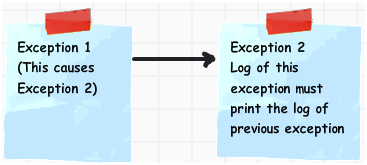
It’s interesting to note that the only Throwable subclasses that provide the cause argument in the constructor are the three fundamental exception classes Error (used by the JVM to report system errors), Exception, and RuntimeException. If you want to chain any other exception types, you do it through the initCause( ) method rather than the constructor.

Example

Here is an example that illustrates the mechanics of handling chained exceptions:

// Demonstrate exception chaining.
class ChainExcDemo {
     static void demoproc() {
         // create an exception
         NullPointerException e = new NullPointerException("top layer");
         // add a cause
         e.initCause(new ArithmeticException("cause"));
         throw e;
     }
public static void main(String args[]) {
        try {
             demoproc();
         } catch (NullPointerException e) {
             // display top level exception
               System.out.println("Caught: " + e);
              // display cause exception
              System.out.println("Original cause: " + e.getCause());
         }
    }
}

Output:

Caught: java.lang.NullPointerException: top layer
Original cause: java.lang.ArithmeticException: cause

In this example, the top-level exception is NullPointerException. To it is added a cause exception, ArithmeticException. When the exception is thrown out of demoproc( ) method, it is caught by main( ). There, the top-level exception is displayed, followed by the underlying exception, which is obtained by calling getCause( ).

Chained exceptions can be carried on to whatever depth is necessary. Thus, the cause exception can, itself, have a cause. Be aware that overly long chains of exceptions may indicate poor design.

Chained exceptions are not something that every program will need. However, in cases in which knowledge of an underlying cause is useful, they offer an elegant solution.

Why chained exceptions?

Exception chaining allows you to map one exception type to another, so that a method can throw exceptions defined at the same abstraction level as the method itself, without discarding important debugging information.

That is, if you have a method that loads some object from a database, you may rather want some ResourceLoadException (closer related to the methods abstraction level) instead of a low-level SQLException even if that was the original source of the problem. However, if you simply catch the SQLException and throw a ResourceLoadException instead, you may loose important debugging information.

Thus, chaining the exceptions is a good alternative. You throw a “high-level” exception, well suited for the particular method, but chain it with the exception that caused it.

We need to chain the exceptions to make logs readable. Let’s write two examples. First without chaining the exceptions and second, with chained exceptions. Later, we will compare how logs behave in both of the cases.

To start, we will create a series of Exceptions:

class NoLeaveGrantedException extends Exception {

    public NoLeaveGrantedException(String message, Throwable cause) {
        super(message, cause);
    }

    public NoLeaveGrantedException(String message) {
        super(message);
    }
}

class TeamLeadUpsetException extends Exception {
    // Both Constructors
}

Without Chaining

Let’s write an example program without chaining our custom exceptions.

public class MainClass {

    public void main(String[] args) throws Exception {
        getLeave();
    }

    void getLeave() throws NoLeaveGrantedException {
        try {
            howIsTeamLead();
        } catch (TeamLeadUpsetException e) {
            e.printStackTrace();
            throw new NoLeaveGrantedException("Leave not sanctioned.");
        }
    }

    void howIsTeamLead() throws TeamLeadUpsetException {
        throw new TeamLeadUpsetException("Team Lead Upset");
    }
}

In the example above, logs will look like this:

com.baeldung.chainedexception.exceptions.TeamLeadUpsetException: 
  Team lead Upset
    at com.baeldung.chainedexception.exceptions.MainClass
      .howIsTeamLead(MainClass.java:46)
    at com.baeldung.chainedexception.exceptions.MainClass
      .getLeave(MainClass.java:34)
    at com.baeldung.chainedexception.exceptions.MainClass
      .main(MainClass.java:29)
Exception in thread "main" com.baeldung.chainedexception.exceptions.
  NoLeaveGrantedException: Leave not sanctioned.
    at com.baeldung.chainedexception.exceptions.MainClass
      .getLeave(MainClass.java:37)
    at com.baeldung.chainedexception.exceptions.MainClass
      .main(MainClass.java:29)

With Chaining

Next, let’s write an example with chaining our custom exceptions:

public class MainClass {
    public void main(String[] args) throws Exception {
        getLeave();
    }

    public getLeave() throws NoLeaveGrantedException {
        try {
            howIsTeamLead();
        } catch (TeamLeadUpsetException e) {
             throw new NoLeaveGrantedException("Leave not sanctioned.", e);
        }
    }

    public void howIsTeamLead() throws TeamLeadUpsetException {
        throw new TeamLeadUpsetException("Team lead Upset.");
    }
}

Finally, let’s look at the logs obtained with chained exceptions:

Exception in thread "main" com.baeldung.chainedexception.exceptions
  .NoLeaveGrantedException: Leave not sanctioned. 
    at com.baeldung.chainedexception.exceptions.MainClass
      .getLeave(MainClass.java:36) 
    at com.baeldung.chainedexception.exceptions.MainClass
      .main(MainClass.java:29) 
Caused by: com.baeldung.chainedexception.exceptions
  .TeamLeadUpsetException: Team lead Upset.
    at com.baeldung.chainedexception.exceptions.MainClass
  .howIsTeamLead(MainClass.java:44) 
    at com.baeldung.chainedexception.exceptions.MainClass
  .getLeave(MainClass.java:34) 
    ... 1 more

We can easily compare shown logs and conclude that the chained exceptions lead to cleaner logs.

Difficulties with chained exceptions

We can use exception chaining in situations where another exception causes one exception. However, it’s important to note that chaining can make our code more difficult to read and understand. Therefore, we should use exception chaining sparingly and only when necessary.

If we use chained exceptions, it is a good idea to document the chain in our code. It’ll help others understand our code and make it easier to debug if an error occurs.

Program

//: exceptions/DynamicFields.java
// A Class that dynamically adds fields to itself. 
// Demonstrates exception chaining. 
import static net.mindview.util.Print.*; 
class DynamicFieldsException extends Exception {} 
public class DynamicFields { 
   private Object[][] fields; 
   public DynamicFields(int initialSize) { 
     fields = new Object[initialSize][2]; 
     for(int i = 0; i < initialSize; i++) 
     fields[i] = new Object[] { null, null }; 
   } 

 public String toString() { 
   StringBuilder result = new StringBuilder(); 
   for(Object[] obj : fields) { 
     result.append(obj[0]); 
     result.append(": "); 
     result.append(obj[1]); 
     result.append("\n");
   } 
   return result.toString(); 
 } 

//...................hasField(String id)........................//
 private int hasField(String id) { 
   for(int i = 0; i < fields.length; i++) 
     if(id.equals(fields[i][0])) 
       return i; 
   return -1; 
  } 

//......................getFieldNumber(String id)....................//
 private int getFieldNumber(String id) throws NoSuchFieldException { 
   int fieldNum = hasField(id); 
   if(fieldNum == -1) 
     throw new NoSuchFieldException(); 
   return fieldNum; 
 }

 //........................makeField(String id).....................//
 private int makeField(String id) { 
   for(int i = 0; i < fields.length; i++) 
     if(fields[i][0] == null) { 
       fields[i][0] = id; 
       return i; 
     } 
   // No empty fields. Add one: 
   Object[][] tmp = new Object[fields.length + 1][2]; 
   for(int i = 0; i < fields.length; i++) 
     tmp[i] = fields[i]; 
   for(int i = fields.length; i < tmp.length; i++) 
     tmp[i] = new Object[] { null, null }; 
   fields = tmp; 
   // Recursive call with expanded fields: 
   return makeField(id); 
 } 

//.............................getField(String id).......................//
 public Object getField(String id) throws NoSuchFieldException { 
   return fields[getFieldNumber(id)][1]; 
 } 

//.........................setField(String id, Object value)..........................
 public Object setField(String id, Object value) throws DynamicFieldsException { 
   if(value == null) { 
     // Most exceptions don’t have a "cause" constructor. 
     // In these cases you must use initCause(), 
     // available in all Throwable subclasses. 
     DynamicFieldsException dfe = new DynamicFieldsException(); 
     dfe.initCause(new NullPointerException()); 
     throw dfe; 
   } 
   int fieldNumber = hasField(id); 
   if(fieldNumber == -1) 
   fieldNumber = makeField(id); 
   Object result = null; 
   try { 
     result = getField(id); // Get old value 
   } catch(NoSuchFieldException e) { 
     // Use constructor that takes "cause": 
     throw new RuntimeException(e); 
    } 
   fields[fieldNumber][1] = value; 
   return result; 
 } 

// ......................main...................//
 public static void main(String[] args) { 
   DynamicFields df = new DynamicFields(3); 
   print(df); 
   try { 
     df.setField("d", "A value for d"); 
     df.setField("number", 47); 
     df.setField("number2", 48); 
     print(df); 
     df.setField("d", "A new value for d"); 
     df.setField("number3", 11); 
     print("df: " + df); 
     print("df.getField(\"d\") : " + df.getField("d")); 
     Object field = df.setField("d", null); // Exception 
   } catch(NoSuchFieldException e) { 
     e.printStackTrace(System.out); 
   } catch(DynamicFieldsException e) { 
     e.printStackTrace(System.out); 
   } 
 } 
} 

output

null: null 
null: null 
null: null 

d: A value for d 
number: 47 
number2: 48 

df: d: A new value for d 
number: 47 
number2: 48 
number3: 11 

df.getField("d") : A new value for d 
DynamicFieldsException 
   at DynamicFields.setField(DynamicFields.java:64) 
   at DynamicFields.main(DynamicFields.java:94) 
Caused by: java.lang.NullPointerException 
   at DynamicFields.setField(DynamicFields.java:66) 
   ... 1 more 
*///:~

Each DynamicFields object contains an array of Object-Object pairs. The first object is the field identifier (a String), and the second is the field value, which can be any type except an unwrapped primitive. When you create the object, you make an educated guess about how many fields you need. When you call setField( ), it either finds the existing field by that name or creates a new one, and puts in your value. If it runs out of space, it adds new space by creating an array of length one longer and copying the old elements in. If you try to put in a null value, then it throws a DynamicFieldsException by creating one and using initCause( ) to insert a NullPointerException as the cause.

As a return value, setField( ) also fetches out the old value at that field location using getField( ), which could throw a NoSuchFieldException. If the client programmer calls getField( ), then they are responsible for handling NoSuchFieldException, but if this exception is thrown inside setField( ), it’s a programming error, so the NoSuchFieldException is converted to a RuntimeException using the constructor that takes a cause argument.

You’ll notice that toString( ) uses a StringBuilder to create its result. You’ll learn more about StringBuilder in the Strings chapter, but in general you’ll want to use it whenever you’re writing a toString( ) that involves looping, as is the case here.

Happy learning 😃

Join Mouad Oumous Java WhatsApp Group JOIN

Join Mouad Oumous Telegram Channel JOIN

Do support our publication by following it

Programming
Coding
Java
Java Tutorial
Exception Handling
Recommended from ReadMedium