
GPU HotSpot Temperature Monitoring for Nvidia GPUs With HWiNFO v6.43–4380 Beta
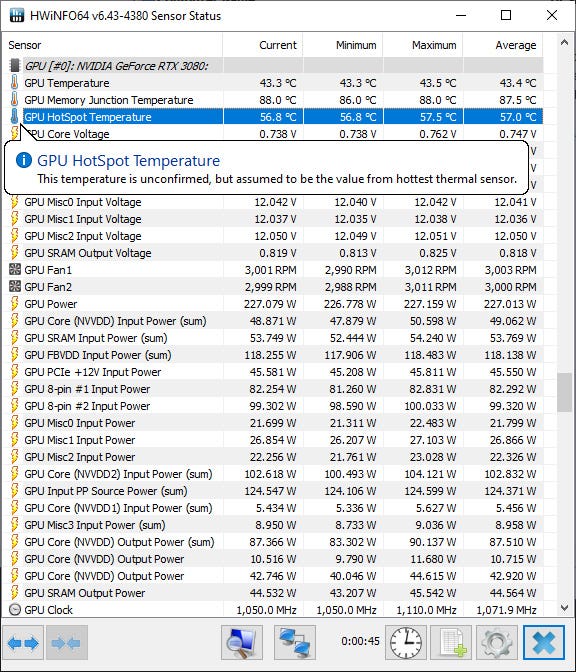
The latest HWiNFO v6.43–4380 Beta version is available now with a number of improvements and new features, but the most interesting new addition is the added monitoring of GPU HotSpot temperature for NVIDIA GPUs. Recently this free tool added the ability for users of the new Nvidia RTX 3080 and RTX 3090 GPUs from Nvidia to monitor the operating temperature of their GDDR6X memory chips, giving access to the hottest operating temperature. The GDDR6X memory chips apparently start to throttle at around 110 degrees and they do run pretty hot under high loads such as Ethereum mining for instance. The new feature is not focused on the memory, but the GPU and its operating temperature and more specifically what is the hottest spot based on the sensors inside the graphics processor.
HWiNFO v6.43–4380 Beta Changes: - Enhanced sensor monitoring on MSI H510 series mainboards. - Fixed monitoring of +12V on some ASUS Z590 series mainboards. - Improved support of LPDDR3/LPDDR4/LPDDR4X memories. - Fixed a possible WHEA error/system crash during long-term monitoring of AMD RX 6000 series GPUs. - Enhanced sensor monitoring on ASRock Z590 Taichi and Z590 PG Velocita. - Consolidated AMD Navi monitoring, added Effective Clock and TGP Power for Navi21. - Added sensor tool tips to provide more details about sensors and their values. - Improved sensor UI responsiveness during some operations. - Improved handling of disappearing/reappearing sensors in custom order. - Fixed a possible hang when logging sensors with large sets of disabled items. - Added monitoring of GPU HotSpot temperature for NVIDIA GPUs.
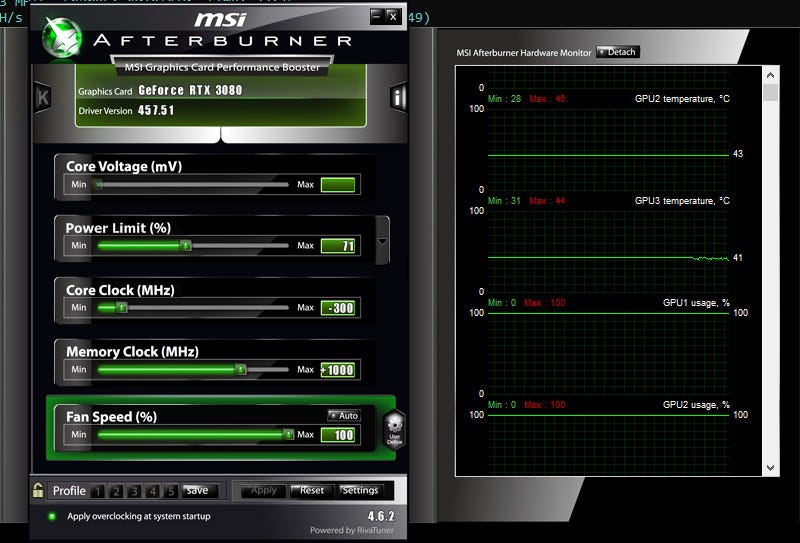
The GPU Operating Temperature and the HotSpot Temperature If you look at a popular software tool such as MSI Afterburner or another one that reports the operating GPU temperature you see one number that is more of an average value taken from a number of sensors inside the GPU. The graphics processor is a large crystal with a lot of transistors inside and different parts of it can be under load while others may be idle at different times during its operation. This results in temperature variation across the crystal and there are a number of sensors inside that supposedly track this difference in temperatures and a special software algorithm that averages the data into a single numerical value that you get as GPU operating temperature.
The HotSpot temperature measurement that HWiNFO does now report in the latest beta version is showing the hottest point as measured on the GPU by the sensors, this value is higher than the normal average temperature you get from other tools such as MSI Afterburner. Do note that it is normal to have a big delta between the hotspot and the regular average temperature reported, this however may be very helpful in finding potential problems with the GPU or the cooler of the video card while mining. Especially if you are having problems with a GPU being unstable while mining, but otherwise seeming to operate normal and with low regular reported temperature. If there is a hotspot with a very big different there could be an issue with the thermal grease in some point of the GPU, or the cooler not properly seated or something else causing the problem.
So, you just got a new extra tool to help you diagnose possible problems with Nvidia GPUs that do not behave as expected while mining. Leave a comment if you try this feature with what GPU and what temperatures you are getting from MSI Afterburner or another tool that reads and reports an average temperature and the hotspot temperature reported by the latest beta of HWiNFO along with what video card you have tested. For instance, on an ASUS RTX 3080 TUF Gaming MSI Afterburner reports 43 degrees Celsius as average operating temperature for the GPU, while HWiNFO reports a hotspot with 56.8 degrees Celsius while the car is consuming about 230W and the fans are running at 100% while mining Ethereum. This is a delta of 13.8 degrees between the average and the hottest spot, the coldest spot is probably with even higher difference, so maybe it will be a good idea to also report the coldest spot as well and not only the hottest one.