avatarBloodys

Free AI web copilot to create summaries, insights and extended knowledge, download it at here

1524

Abstract

need to download the latest HWiNFO, run the tool and go to Monitoring and choose Sensor status and then scroll down to the GPU data and check the GPU Memory Junction Temperature data. Above you can see the results from the water-cooled ASUS EKWB GeForce RTX 3090 GPU, the idle temperature on the left image and the temperature under load with the video card mining Ethereum with 120 MHs after a few minutes. We get 36 degrees Celsius idle temperature and 92 degrees Celsius when mining and remember that this is on a water-cooled GPU with the GPU temp hovering around 50 degrees Celsius under load.</p><blockquote id="9ebe"><p><b>A note regarding the new GDDR6X Memory Junction Temperature:</b> Just like in case of Navi, this is not the external (case) temperature, but internal junction temperature measured inside the silicon. So don’t be scared to see higher values than other common temperatures, it’s expected. Also the limits are set respectively higher (throttling starts around 110 C). EDIT: Adding that the value reported should be the current maximum temperature among all memory chips.</p></blockquote><figure id="ea82"><img src="https://cdn-images-1.readmedium.com/v2/resize:fit:800/1*BaXeIKEzDNUCdimSk9zV9A.jpeg"><figcaption>Thermal Image of RTX 3090 Backplate</figcaption></figure><p id="505c">Measuring the backplate of the water-cooled ASUS RTX 3090 with the help of a thermal camera shows that at stock settings when mining with 105 MHS and 100% TDP the surface temperature is around 72.8 Celsius at the h

Options

ottest spot and with overclocked memory for 120 MHS the hottest place on the backplate goes to 75.8 Celsius. This is to be expected with the actual operating temperature of the memory going to 92 degrees and maybe even higher after some more time as heat accumulates. Which brings us back to the recommendation to place extra cooling fans on the backplate when using Nvidia GeForce RTX 3090 for mining Ethereum with the same also true for RTX 3080 when used for mining. Owners of RTX 3070 and 3060 Ti GPUs used for mining Ethereum could be better due to the lower power usage these video cards have and the use of GDDR6 memory and not the faster and hotter GDDR6X. So, if you check what are the operating GDDR6X memory temperatures of your RTX 30 series GPUs used for mining with the free HWiNFO tool feel free to share the results.</p><ul><li><a href="https://www.hwinfo.com/download/"><b>To download and try GDDR6X monitoring with HWInfo 6.42…</b></a></li></ul><p id="85c6"><b>Update: </b>The latest HWiNFO v6.43–4380 Beta version has added support for <a href="https://readmedium.com/gpu-hotspot-temperature-monitoring-for-nvidia-gpus-with-hwinfo-v6-43-4380-beta-258589b8608b"><b>GPU HotSpot Temperature Monitoring for Nvidia GPUs</b></a>, so you might want to also check out this new parameter when using Nvidia video cards for mining crypto currencies such as Ethereum (ETH).</p><p id="691a"><b>- <a href="https://cryptomining-blog.com/">Want More Information, Visit the Crypto Mining Blog…</a></b></p></article></body>

Check the GDDR6X Memory Temperature on Nvidia RTX 30 Series GPUs With HWInfo 6.42
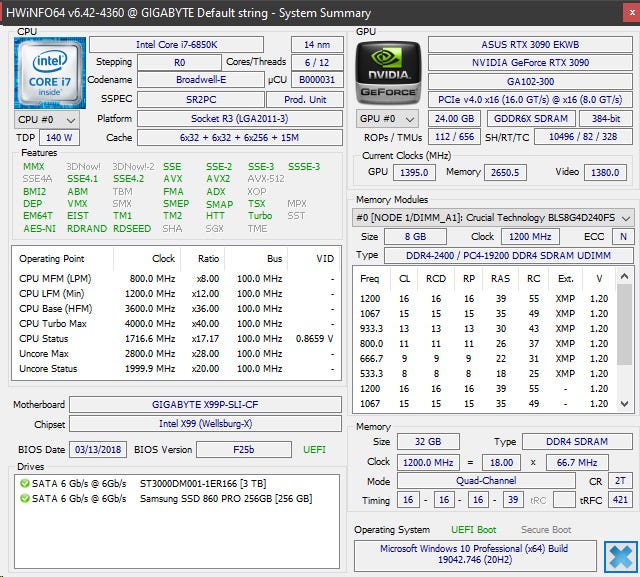
The Latest HWInfo 6.42 Diagnostic Software

The free HWInfo 6.42 diagnostic software is now reporting the operating temperatures of the GDDR6X video memory for the latest Nvidia GeForce RTX 30 series of video cards. This includes RTX 3080 and RTX 3090 GPUs and you can actually see how hot the new fast memory chips get, something that is really important when using these video cards for crypto mining and more specifically for memory-intensive algorithms such as Ethash used by Ethereum (ETH). Knowing the temperature, you should be better prepared to take the appropriate measures to keep things cool for ensuring maximum performance and problem free operation on the long run thinking along the lines of adding extra cooling fans on the backplate. You might be surprised when you see the actual numbers being really high, but that is to be expected, considering the fact that even the surface of the backplate of the video card gets very hot even to the touch.
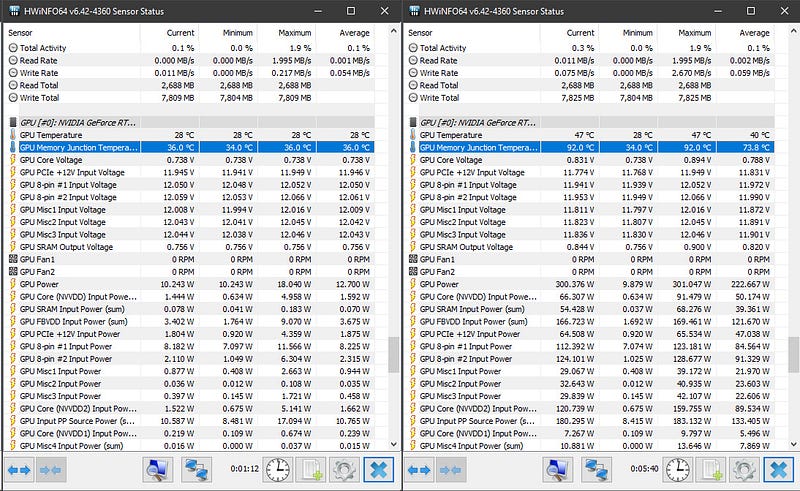
GPU Memory Junction Temperature Reported for RTX 3090’s GDDR6X VRAM

To see how hot your GDDR6X memory is under load you just need to download the latest HWiNFO, run the tool and go to Monitoring and choose Sensor status and then scroll down to the GPU data and check the GPU Memory Junction Temperature data. Above you can see the results from the water-cooled ASUS EKWB GeForce RTX 3090 GPU, the idle temperature on the left image and the temperature under load with the video card mining Ethereum with 120 MHs after a few minutes. We get 36 degrees Celsius idle temperature and 92 degrees Celsius when mining and remember that this is on a water-cooled GPU with the GPU temp hovering around 50 degrees Celsius under load.

A note regarding the new GDDR6X Memory Junction Temperature: Just like in case of Navi, this is not the external (case) temperature, but internal junction temperature measured inside the silicon. So don’t be scared to see higher values than other common temperatures, it’s expected. Also the limits are set respectively higher (throttling starts around 110 C). EDIT: Adding that the value reported should be the current maximum temperature among all memory chips.
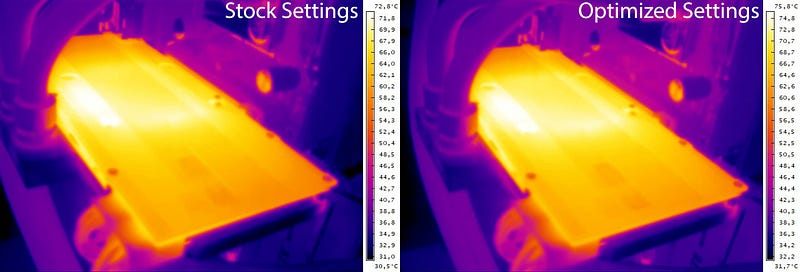
Thermal Image of RTX 3090 Backplate

Measuring the backplate of the water-cooled ASUS RTX 3090 with the help of a thermal camera shows that at stock settings when mining with 105 MHS and 100% TDP the surface temperature is around 72.8 Celsius at the hottest spot and with overclocked memory for 120 MHS the hottest place on the backplate goes to 75.8 Celsius. This is to be expected with the actual operating temperature of the memory going to 92 degrees and maybe even higher after some more time as heat accumulates. Which brings us back to the recommendation to place extra cooling fans on the backplate when using Nvidia GeForce RTX 3090 for mining Ethereum with the same also true for RTX 3080 when used for mining. Owners of RTX 3070 and 3060 Ti GPUs used for mining Ethereum could be better due to the lower power usage these video cards have and the use of GDDR6 memory and not the faster and hotter GDDR6X. So, if you check what are the operating GDDR6X memory temperatures of your RTX 30 series GPUs used for mining with the free HWiNFO tool feel free to share the results.

Update: The latest HWiNFO v6.43–4380 Beta version has added support for GPU HotSpot Temperature Monitoring for Nvidia GPUs, so you might want to also check out this new parameter when using Nvidia video cards for mining crypto currencies such as Ethereum (ETH).

- Want More Information, Visit the Crypto Mining Blog…

Crypto
Cryptocurrency
Mining
Hwinfo
Gddr6x
Recommended from ReadMedium