Reducing Software License Costs with Open Source (Google Cloud Adoption Series)

Welcome to the continuation of the Google Cloud Adoption for the Enterprise, From Strategy to Operation series. In the previous part, we talked some of the key points that need to be covered in your Cloud Adoption Strategy.
Make or Break!!
Now I want to cover a key consideration that can potentially save you more in future IT spend than any other decision you can make: embracing open source as a core element of your cloud strategy.
Alternatively, you can choose not to, and you’re likely to get one or both of the following:
- A doubling or even tripling of your IT costs, once you’re running in cloud.
- Total destruction of many of the key tenets of your cloud strategy.
What is Open Source?
If you’re here, and you’re formulating a cloud adoption strategy, then you know what open source is!! But no lie: I was once (not so long ago) pitching a cloud strategy to a CIO, and he said “I don’t know what open source is. It doesn’t sound like something we should be considering.” This CIO was a person that was difficult to get time with. So I spent the next several weeks kicking myself for having made terrible assumptions about the level of knowledge of my most important stakeholder.
With that in mind, let’s just make it really clear!
Open Source Defined

Open source software typically exhibits a set of “freedoms”:
- Freedom to run the software, for any purpose.
- Freedom to access the software and make changes to it.
- Freedom to distribute the software. It can be distributed in unadulterated form, modified, or as part of other software.
However, the specific freedoms will depend on the license associated with the software. So, when choosing your open source software, be careful about the license! Most ‘big’ and commonly used open source products align to a handful of permissive licenses.
Also, some software can be free AND not open source. And some software can be open source, but offered with some sort of paid-for value-add, such as a commercial support wrapper.
How Has Software Evolved?
Once upon a time, software was predominantly proprietary and costly. There were very few products and few choices, if you wanted to do a thing. There were very few standards. And as a result, there was a high degree of reliance on a particular vendor or product, and a high degree of vendor lock-in.

Today, things are different. We have a lot of choice. Software is generally standards-based, so you can rip out one product and replace it with another, without too much effort. As a result, developer expertise is much more transferable between products. Often, the software is free; and some of the BEST software if free. The source code is freely available, and the software is often maintained by a huge community of developers that love these products. Welcome to the era of open source!
What are the Benefits?
There are many. Let me cover a few significant ones here:
- Software products are available with reduced or zero license cost. (Often with optionality to pay for a commercial support wrapper or other value-adds.)
- We often see significantly higher quality of software, and consequently, better products. Some major open source projects have hundreds, if not THOUSANDS, of regular contributors. Take Kubernetes, for instance.
- We see faster cadence of improvements and fixes.
- We see more innovation. Since the software is open, anyone is free to enhance it, change it, or use it as part of a new idea.
- Improved security. Because… open code means unrestricted scrutiny. Bugs are typically discovered quickly. There are fewer zero day exploits, because defects are not hoarded. There are fewer backdoors, because backdoors would be spotted by the community. When security vulnerabilities are discovered, they are typically resolved quickly. And, major organisations like Google put in a lot of effort in vetting the open source software that they use and that they create. Finally, think of the distributed power of tens, hundreds, or even thousands of organisations, who are collectively performing penetration tests against ubiquitous open source products.
- Decentralised control and avoidance of vendor lock-in.
- Longevity of the product, and of the roadmap. Open source projects with a significant number of contributors and/or a significant number of users are more likely to survive and evolve. And when an open source project with real value dies, we almost always see another project jump in and fill the void. Whereas when a proprietary product dies, then that’s game over for the user of the product!
Some examples of open source software
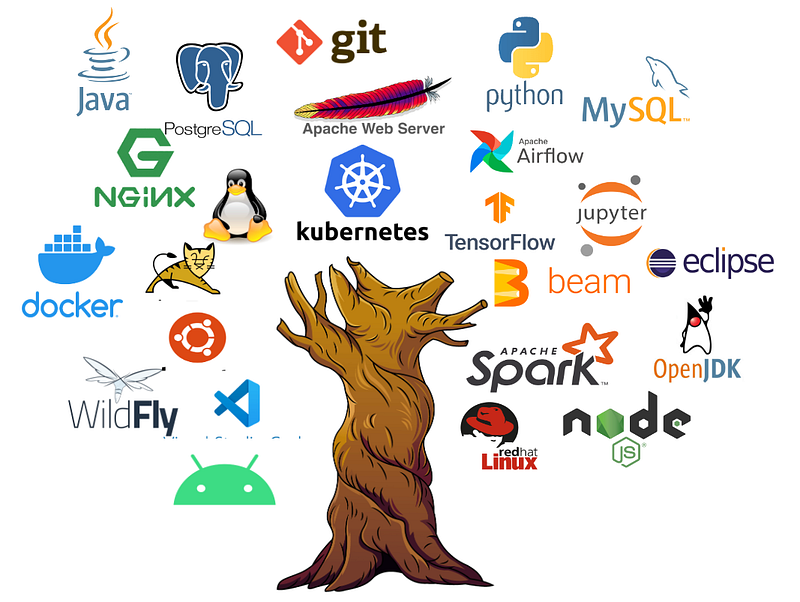
Open source is everywhere.
On the Internet, it makes up the bulk of web servers (e.g. Apache web server, nginx) and application servers (Tomcat, Wildfly, Node JS), of coding runtimes (Java, OpenJDK, Python) and frameworks.
For operating systems and workload hosting: Linux, Android, Docker, and Kubernetes are all open source. Databases like PostgreSQL and MySQL are open source. The most popular data transformation technologies are open source, including Apache Hadoop, Apache Spark, and Apache Beam. We have orchestration, in the form of Apache Airflow. The most popular collaborative data science environment is open source: Jupyter notebooks. For development, git is prefered version control system, and Visual Studio Code is in the top three code development environments.
Who uses open source in a big way?
It’s easier to ask who doesn’t!
- According to the Red Hat Open Source report, 90% of IT leaders (across 1250 surveyed) said their organisations rely on open source.
- Nearly all of the Internet runs on open source. According to w3techs.com, 77% of the top 10 million websites run on Linux. And over 70% of all known web servers on the Internet are running open source.
- NASA’s Perseverence Mars rover runs on Linux!
- Google Cloud is largely based on open source software. Many products we consume in Google Cloud are simply open source software, but with some sort of managed service wrapper, and a whole lot of additional automation.
Here’s just a few names of organisations that are heavily reliant on open source software…
Open Source Contributors?
Contributing to open source doesn’t just mean writing code. It can also include:
- Raising issues and defects.
- Support peer reviews.
- Merging.
- Project governance activities.
- Financial contributions (e.g. from businesses)
- Bounty rewards.
Any many of the contributions actually come from major organisations. Some organisations actively encourage their employees to contribute to open source projects.
You can see the companies that make the biggest contributions to open source through EPAM’s Open Source Contributor Index (OSCI). Here are some of the biggest organisational contributors:

It’s also worth noting that most developers prefer to work with (or work on) open source solutions, over proprietary. And consequently, organisations embracing open source will tend to be more attractive to developer talent.
Why is Open Source Crucial to Your Cloud Strategy?
Finally, the million dollar question. Or maybe, hundreds of millions, depending on the size of your organisation!!
Headlines
- Your existing commercial hosting software licenses — for products you’re currently running on-premises — typically cost a lot more than the infrastructure they run on. And these products will likely be MUCH more expensive in cloud.
- If you’re licensing this software in cloud, you’re no longer able to leverage elasticity and pay-as-you-go.
Why?
Let me be more specific. Here’s the key takeaway:

When I’m talking about commercial hosting software, I’m mainly talking about products like…
- Application servers — like IBM Websphere Application Server (WAS) and Oracle Weblogic.
- Databases — like IBM DB2, Microsoft SQL Server, and Oracle Database.
And the reason why: commercial application servers and commercial databases are REALLY EXPENSIVE. They’re really expensive relative to data centre costs, physical hardware costs, and engineer costs.
The image below is anonymised, and shows relative apportioned annual run costs for 1 vCPU of VMware infrastructure out of a moderately sized data centre. The exact cost will depend on many factors and license agreements in place. But you can see that the application server (the commercial software, not the VM itself) is the single biggest contributor to the cost. And you can see that the application server cost is massive, relative to:
- Data centre costs (including rent of the building itself, power, cooling, maintenance).
- Physical server hardware and support.
- Storage.
- VMware licensing and support.
- Operating system licenses.
- Operating system engineers.
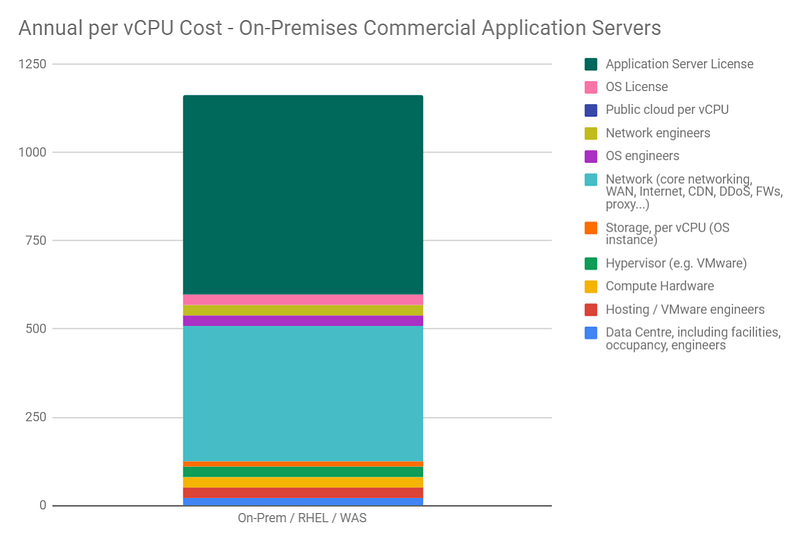
As an aside, this is why the benefit of data centre elimination is tiny, compared to the commercial license avoidance opportunity from adopting open source for “hosting” software. You should always be going after the biggest fish, right?
It’s Worse Than That…

Okay, we’ve established that these hosting products are expensive. But here’s the kicker: the same software that you run on-premises, on VMware, is typically MUCH MORE EXPENSIVE if you run it in public cloud. To understand why, let me explain how these products are typically licensed, on-premises…
Typically, these products are licensed based on either a number of physical sockets, or a number of physical cores. Either way, this means you’re paying based on how many physical servers you have and the compute capacity of those servers.
Time for an example. I’ll use IBM Websphere Application Server (WAS) licensing, for no reason in particular. I’ll use costs that are approximate, but grounded in reality.
- IBM uses a metric called “Processor Value Unit (PVU)” for licensing. A given type of physical core will have a constant PVU value.
- IBM then charges a fixed amount for perpetual IBM WAS licenses, per PVU.
- And then it charges an additional 20% for each year of support.
- Let’s say you have 10 physical servers in your data centre, running IBM Websphere Application Server. And let’s say that these are 2-socket, 20 core (i.e. 10 cores per socket) x86 servers.
- IBM rates these servers at 70 PVUs per core.
- IBM charges you $100 per PVU. (This is a ballpark figure, based on real world licensing.)
So your perpetual license cost is:
- 20 cores * 70 PVUs/core * $100/PVU = $140000 per server
- Thus, $1.4m, for your 10 servers.
Now let’s add in 5 years worth of support and maintenance, at 20% per year:
- 20% * $1.4m * 5 years = $1.4m
Our grand total: $2.8m over 5 years. So our annual IBM WAS cost, depreciated over 5 years, is $560K. For comparison, here are some other annual costs, across all of our 10 servers:
- Physical server hardware, including support and maintenance: $60K
- VMware licensing and support: $50K
- RHEL licensing and support: $50K
Let’s assume you’re running this software on VMware. Pretty standard. If your infrastructure is well-managed and efficient, it is likely that you’re running your VMware-hosted application servers with an average overcommit of approximately 4-to-1. This means: for every physical core you have, you are allocating approximately 4 vCPUs to your virtual machines. This ability to assign more virtual CPUs than you have physical CPUs is one of the standard advantages of running VMware.
So, on-premises, using VMware, you’re allocating approximately 800 vCPUs to your IBM WAS estate. (20 cores * 4 vCPUs/core * 10 servers.)
And here’s what IBM say, if you now want to license your IBM WAS in public cloud… You’ll still be charged $100 per PVU, but now you’ll be rated at 70 PVUs per cloud vCPU, rather than per physical core. (The rationale: unless you’re running bare metal servers in the cloud, the actual physical footprint is invisible to the software you’re licensing.)
So if you still want 800 vCPUs of IBM WAS in public cloud, it will now cost you:
800 vCPUs * 70 PVUs/vCPU * $100 = $5.6m
Now let’s add our 20% annual maintenance for 5 years, and then average to find the yearly cost. Now, the annual cost is $2.24m.
It’s not a surprising number. It’s 4x higher than the on-prem number. And the reason it’s 4x higher is because we’ve lost our 4:1 VMware overcommit advantage.
This isn’t unique to IBM.
Conclusion:
Expect to pay up to 4x as much, to license your commercial hosting software in public cloud.

But It’s Even Worse Than That!
If you’re using these licensed hosting products in public cloud, you’ll need to buy your licenses up-front. And you’ll need to buy enough to cope with your maximum demand. And, as we’ve established, these licenses will cost A LOT more than the PAYG infrastructure.
Conclusion: you’ve lost any ability to leverage elasticity and pay-as-you-go pricing in the cloud. Because most of your cost is now dominated by a fixed amount of licensing, based on your worst case demand.
Cloud Strategy Open Source Conclusions
If you’re going to migrate to public cloud, you have to ditch the traditional commercial hosting products. You need to find suitable alternatives, such as:
- Migrating commercial on-prem transactional relational databases (like Oracle DB and IBM DB2) to managed open source, like Google Cloud SQL PostgreSQL or AlloyDB.
- Migrating commercial application servers (like IBM Websphere Application Server and Oracle Weblogic) to open source alternatives like Tomcat, Wildfly, SpringBoot.
You can also apply the same rule to commercial operating systems (like MS Windows Server), or operating systems with a commercial support wrapper (like Red Hat Enterprise Linux). However, the cost of OS software is relatively small compared to application servers and databases.
Before You Go
- Please share this with anyone that you think will be interested. It might help them, and it really helps me!
- Please give claps. You know you can clap up to 50 times, right?
- Feel free to leave a comment 💬.
- Follow and subscribe, so you don’t miss any of my content. Go to my Profile Page, and click on these icons: