Cloud Adoption: Data Centre Exit, Mainframe Exit, and BYOD (Google Cloud Adoption and Migration in the Enterprise Series)

Welcome to the continuation of the Google Cloud Adoption for the Enterprise, From Strategy to Operation series.
In the previous part, we talked about the importance of joining your cloud strategy with your open source strategy. In this installment, we’ll talk about other significant opportunities that your cloud strategy can help with, including:
- Data centre exit
- Mainframe exit
- Zero trust adoption, EUC strategy, and BYOD.
When Can You Exit the Data Centre?
On-Premises Workloads
Typical on-premises workloads might include:
- A VMware estate
- Legacy IBM Power / AIX
- Mainframes
Excluding cloud options for now, you broadly have two options for hosting these workloads:
- In your own private data centres (owned or rented).
- In a co-location (“colo”) facility from a colo provider (like Equinix), i.e. where you rent a certain amount of space and capacity in a shared data centre.
Colos typically charge based on a combination of:
- Rack units consumed.
- Floor space utilised.
- Power required, in kW.
But all of these metrics are somewhat correlated to power requirement. So we can estimate colo costs based on our power requirement in kW.
Rule of thumb:
- For very large data centre demand, running your own data centres is more cost effective than using a colo.
- And for small demand, it’s much more cost effective to rent space in a colo.
Imagine you have two private data centres that are “full” and at maximum utilisation. All things being equal (though in reality, they’re not!), these private DCs will be more cost effective than renting in a colo.
As workloads are eliminated from your private DCs the overall cost of the DC goes down. But the cost per kW of DC consumption increases. This is because some costs are somewhat proportional to workload demand, such as power and cooling costs. But other costs are somewhat fixed (like building occupancy costs), and these fixed costs start to dominate, as our DC gets emptier and emptier.
Now imagine you have embarked on your cloud migration journey. Let’s say you have a fiveyear migration plan. Over this time:
- A significant proportion of your current data centre workloads will be migrated to public cloud, through rearchitecting, replatforming, and rehost (lift-and-shift).
- A large proportion of your current workloads will be found to be redundant as a result of the migration analysis. They will be decommissioned.
- New workloads will be deployed in cloud, or consumed as SaaS.
Consequently, we’ll see significant reduction in data centre workloads. At some point in the migration journey, we reach the inflection point. I.e. the point where it becomes cheaper to host what remains in a colo. At this point, you need to decide whether to migrate the remaining infrastructure to colo. Whether you do so will depend on:
- How much longer will you need on-premises workloads? 2 years? 10 years? If only 2 years, wasting resource and effort to do a short term migration from private DC to colo is probably not sensible.
- Whether you need to renew your DC lease, and when.
- The effort required for your private-to-colo migration.
One approach I like to take is to plot a graph that shows the cost/kW, and compare our own DCs to colo. Here is a graph where such a comparison has been made.
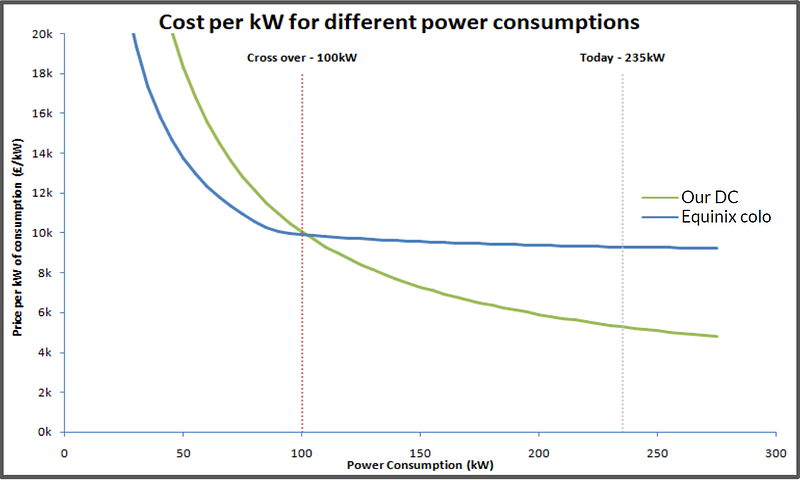
In this example, we can see that colo becomes most cost effective at 100kW, but the current private DC demand is 235kW. So this means we need to remove approximately 60% of the on-premises workloads, before what remains would be cost effective in colo. Actually, the percentage that needs to be removed is slightly higher than this, since we also need to factor in the actual migration cost.
Cloud Strategy and Data Centre: Conclusions
- Your cloud strategy needs to estimate the point at which you could exit your data centres.
- Your cloud strategy needs to be mindful of any data centre lease expiry dates, and consider whether lease renewal could be avoided.
- Your cloud strategy should plan what to do, when you reach the inflection point.
Of course, some on-premises workloads are harder to remove than others. Which brings me to…
Mainframe Exit
The Mainframe Legacy and Challenges
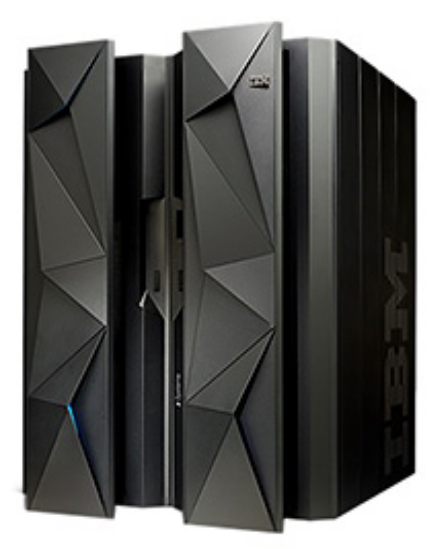
Larger enterprises with more than three or four decades of history commonly own a mainframe. Once upon a time, mainframes were untouchable, from the perspective of high availability, high transaction processing rate, and security.
But today, mainframes are legacy and they carry a number of challenges:
- They tend to be running Cobol applications that are 30, 40, even 50 years old! These applications, and their architectures, tend to be inflexible, point-to-point, and difficult to maintain.
- Cobol is becoming an increasingly rare and niche skillset. Some organisations are training engineers in Cobol, to exploit this situation. But it’s fair to say that Cobol is not a language that attracts the best talent!
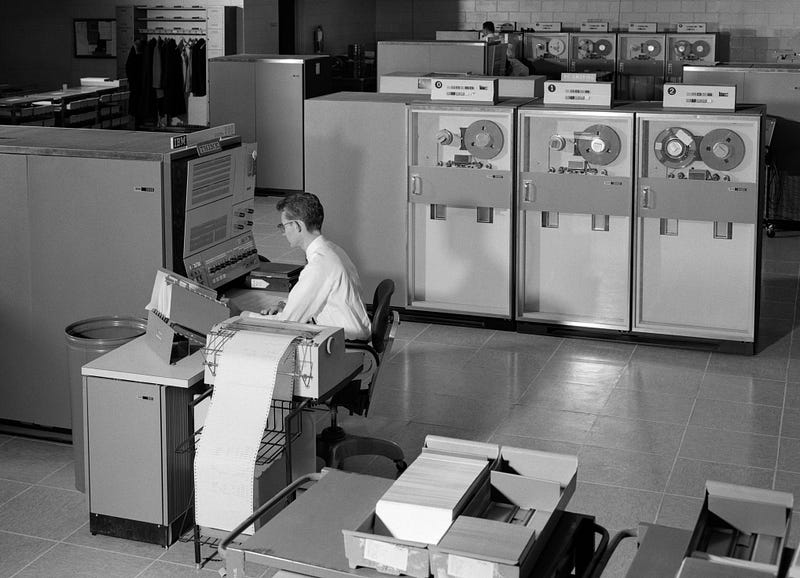
- Organisational mainframe knowledge is disappearing, as mainframe and Cobol experts age-out of the organisation.
- Mainframes are inflexible lumps of tin with high unit price, and owned-mainframes are broadly incompatible with scalability, elasticity, and pay-for-what-you-use pricing.
- Ageing mainframes tend to become significantly more expensive to run, year-on-year. This is because mainframe licensing and support is typically linked to mainframe age. Consequently, organisations are often forced to perform mainframe refreshes every 5 to 10 years.
Mainframe Costs

Because mainframes are single units that host a lot of applications, they certainly appear expensive on the balance sheet. A 20-core x86 server might have a capital cost $25K. But a small enterprise class mainframe might cost you $2.5m.
Note that this capital cost is only a small fraction of the overall mainframe cost. As an example: for an IBM enterprise-class mainframe with a 5 year lifespan, as much as 80% of the cost is attributed to a single software license called the “Monthly License Charge”, or MLC. With a small pair of enterprise mainframes (they are usually deployed in pairs, to provide DR capability) you might expect to pay around $12–$15m over 5 years in MLC, and just $2.5m for the hardware itself. And the MLC goes up in proportion to mainframe age.
Conclusion: you can save a lot, if you can find a way to avoid the MLC!
Mainframe Elimination Options
If you’re running a mainframe or two (they are usually deployed in pairs, to provide DR capability), what can you do? Here are some possibilities:
- Replace: completely replace your legacy applications with new applications.
- Rehost: run mainframe workloads — largely unchanged — in a different environment, such as Google Cloud.
- Refactor and Replatform: convert your legacy Cobol to modern code and run in cloud.
Let’s dive into these…
Replace
Here we’re talking about eliminating all those legacy Cobol and CICS applications, and replacing them with shiny new (often off-the-shelf) applications that will be hosted in cloud, or consumed as SaaS.
But this is extremely difficult and costly to do. Your organisation has decades of intellectual property locked into your mainframe applications and data. A lot of it is not well understood or documented. Often, there are huge dependencies between the various legacy applications, and these will often share common data. This makes it extremely difficult to separate and replace individual mainframe-hosted legacy applications.
At enterprise scale, such a replacement undertaking would be huge. I suspect it would typically be a larger undertaking than your entire cloud strategy!
Rehost
Here we run existing mainframe legacy code (typically COBOL), but run it in an environment that is considerably cheaper. There are a couple of ways this can be done:
- We can run the existing mainframe workloads — typically COBOL and CICS — and run them on a mainframe emulation layer, on top of modern x86 VMs. The underlying VMs might be on-prem (say) with VMware, or it might be in Cloud, using (say) Google Compute Engine (GCE). A popular solution for the mainframe emulation layer is Micro Focus, e.g. with Micro Focus Enterprise Server. We will typically also need to move the data to the same target hosting venue, otherwise we end up with a latency problem. A common way to do this is to migrate from mainframe IBM DB2/z to IBM DB2 LUW, hosted on VMs (such as GCE).
- We can run the existing mainframe COBOL workloads, but “cross-compile” the COBOL into Java executable code, which can be run on modern x86 VMs. The source remains as COBOL, but we no longer need mainframe hardware or even mainframe emulation. A popular way to do this is with a product like Cloudframe Relocate.
In addition, Google Cloud offers the “Dual Run” environment, where your legacy mainframe Cobol and CICS workloads are run in parallel with your emulated or cross-compiled environment in Google Cloud. The technology compares the outputs of each transaction, and validates that the migrated stack on Google Cloud is achieving the same results as the original mainframe stack. This significant reduces migration risks.
Pros of Rehost:
- Migration can be achieved extremely quickly, since it is largely a lift-and-shift. Santander achieved a complete mainframe migration to a shiny new Google Cloud LZ in under a year!
- Elimination of the physical mainframe.
- Significant reduction in overall TCO, largely driven by reduction in license costs. (Santander have claimed to achieve approximately 30% year-on-year cost reduction using Dual Run.)
- Low risk: Dual Run allows side-by-side comparison and validation of mainframe-hosted and cloud-hosted workloads.
- Can be used as the first phase of a more strategic mainframe migration approach.
Cons:
- You’re not getting rid of your Cobol and CICS! You still have a legacy code base, and the associated code maintenance challenges. (Even with the cross-compilation technology, the resulting executable Java is not human-maintainable.)
- You’re still paying for some commercial licenses. For example, Micro Focus licensing is based on your code base. And your DB2 LUW is IBM commercial software that must be licensed. However, these license costs are considerably lower than the original mainframe MLC.
Refactor and Replatform
Here, we use automated conversion tools to convert your Cobol and CICS into maintainable code. Probably Java. Then host the converted applications in the cloud. The new code looks like a cloud-native application. For example, we can run the converted code in containers, e.g. on GKE.
There are a couple of tools that can achieve this automated code conversion. Google has G4, acquired from Cornerstone Technology. And then there’s Cloudframe Renovate.
Pros of the Refactor and Replatform approach:
- Complete removal of the mainframe.
- Complete removal of the legacy code, i.e. Cobol and CICS.
- The new code base can now be maintained and enhanced using modern technologies.
- We can even convert the code base to microservices, and (say) host on an elastic managed Kubernetes environment, like Google Kubernetes Engine.
- You can leverage a modern talent pool.
Cons:
- It will take a while. Much longer than a simple Rehost.
- Not all conversions can be automated.
- Validation that your new code functions exactly like the old code is difficult. You need a good testing strategy.
Two-Phase Migration Strategy?
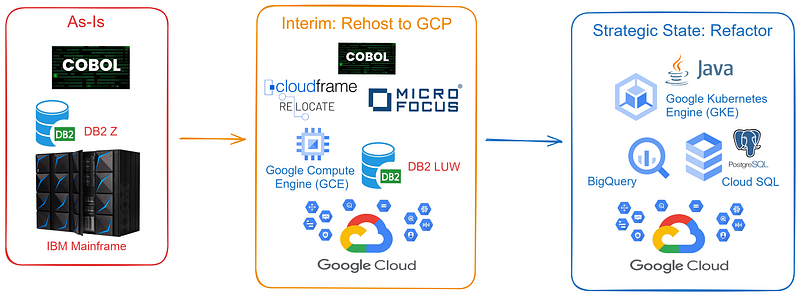
I’m a fan of this approach. The idea is:
- First, you Rehost to Google Cloud. You eliminate much (or all) of your mainframe workloads, and you considerably reduce your TCO, because you no longer have mainframe license charge. This can be done quickly.
- Then, you Refactor to modern code. This allows you to remove your COBOL-related risks, as well as modernise your applications. This takes a while. It requires more assessment, more planning, and more testing. But that’s okay… You’ve got time, because you’ve already eliminated a lot of your mainframe run costs, and you don’t have to worry about any impending mainframe refreshes!
You’ll Probably Need Help
Migration from the mainframe is a daunting task. Whether you go with Rehost or Refactor/Replatform, you’re probably going to need an experienced mainframe modernisation parter.
Since I happen to be an employee of EPAM, I should mention that they have a mainframe modernisation practice, and they are a Cloudframe partner. (But I should also mention that this article is my own views and opinions. It is not a sales article, and it doesn’t necessarily reflect the views of my employer!)
Cloud Strategy and Mainframe: Conclusions
Five years ago, mainframe-exit was mostly a myth. Many organisations had tried, but successes were generally limited to very small mainframes. But today we have several proven technologies that can help you migrate your mainframe to Google Cloud. And we have some real mainframe-exit stories at banking scale!
Your overall cloud strategy should consider:
- Whether mainframe-exit is included in its scope.
- Whether mainframe-exit is a component of your data centre-exit strategy.
- Which type of mainframe-elimination (if any) that you will undertake.
Bring Your Own Device (BYOD)
Historical Approach to Client Devices
Enterprises typically hand out expensive laptops with locked-down corporate builds. Why do we do this?
- We often need to deploy specific client software to these devices.
- We need a way to install this software.
- We often need to deploy a corporate VPN, in order to connect to the corporate network.
- We need to be able to manage these devices remotely.
These devices are often frustrating to our employees. But what if…
- We didn’t need to install any client sofware? Because all the software we need is available over the Internet.
- We didn’t need a corporate VPN? Because we no longer have a corporate network and we no longer have on-prem applications to worry about.
- We no longer need to manage devices?
Modern Options
When we combine cloud adoption, SaaS adoption, and DC elimination, we find that all these what-ifs become true. In this scenario, we unlock options. We can even allow users to use their own devices! If you do, your employees are happier; especially developers!!
Of course, we still need to ensure that:
- Users are only able to consume applications that they are authorised to use.
- Users can’t steal data.
- Clients (i.e. end user devices and software) are suitably secure.
But this is all achievable. And Google provides technology to help you do this. For example, with BeyondCorp Enterprise, which is part of Google’s Zero Trust Network Access (ZTNA) offering.
Quick Segway — Zero Trust Defined
- Zero trust network access is an approach to provide secure remote access to applications and services, based on a user’s identity and context-aware access control policies. Policies like: What type of device am I using? Does my device have endpoint-protection / AV installed? Is it up to date? Is my OS patched? What location am I coming from?
- Zero trust assumes starts from the premise that “deny” is the default action on requesting a resource, and that all users and client devices must be authenticated and authorised before granting access. This differs from the legacy approach of assuming that any device inside the corporate perimeter is trusted. This legacy of doing security is a bad approach, since it does not mitigate against internal threats, or compromised devices within the network.
- And as such, zero trust is a way we can eliminate the need for VPN, which is historically a way of granting broad access to a corporate network.
How Does BeyondCorp Help?
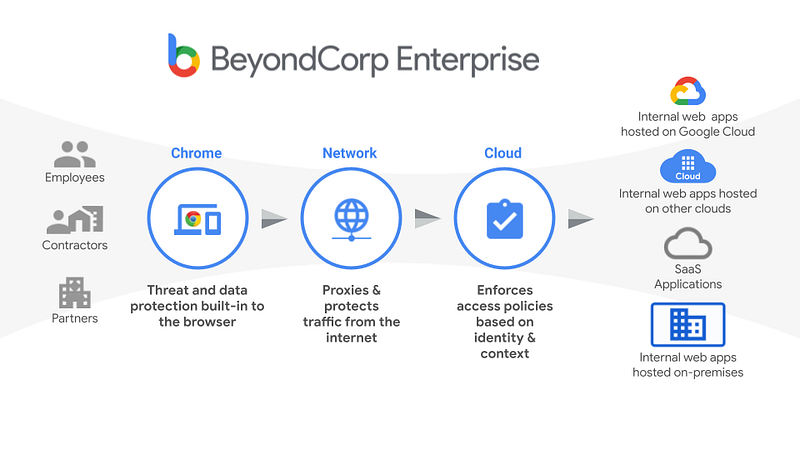
BeyondCorp essentially creates a secure connection between the Chrome browser, and the services you’re requesting.
- Users are granted access to resources based on their identity, and after passing a multi-factor authentication check.
- BeyondCorp uses the browser to perform a posture check of the client device. Consequently, it can work with managed devices and non-managed devices, whether corporate-issued or BYOD.
- BeyondCorp encrypts traffic between the browser and the remote resource.
- BeyondCorp enforces data leak prevention (DLP) policies.
- BeyondCorp performs centralised logging and auditing of user activity.
Cloud Strategy and End User Computing (EUC): Conclusions
- Evaluate whether your cloud strategy can help your security posture AND end user experience, e.g. by introducing ZTNA.
- Evaluate whether your cloud strategy can help you reduce your device costs and introduce BYOD.
Before You Go
- Please share this with anyone that you think will be interested. It might help them, and it really helps me!
- Please give claps. You know you can clap up to 50 times, right?
- Feel free to leave a comment 💬.
- Follow and subscribe, so you don’t miss my content. Go to my Profile Page, and click on these icons: