
Goodbye Canva: Try Out Microsoft’s AI Designer and Create Designs That Will Blow Your Mind!
It has now become a viable alternative to Canva, offering a range of powerful design features and capabilities.

Ah, the good old days of limited AI and non-AI tools! We had Quillbot, Canva, and a few others to make our lives easier.
But then, ChatGPT burst onto the scene and suddenly we were swimming in a sea of new tools and possibilities. It’s hard to keep track of them all, but don’t worry — I’ve got you covered.
If you want to stay on top of the latest and best tools, head on over to my Medium profile. I’ve written all about them, from the serious to the downright silly.
Now, let’s get to the main event.
Microsoft is continuously working to improve its product, launching new tools and services to better compete with Google. As a result, their tools are becoming increasingly advanced and user-friendly, making tasks that were once difficult much easier.
In fact, Microsoft Designer has now become a viable alternative to Canva(it even added several AI features), offering a range of powerful design features and capabilities.
Well, Microsoft just dropped a bombshell: they’ve released a new tool called Microsoft Designer and it’s available for free to everyone. Yes, you read that right — free!
So let’s dive in and see what this tool can do.
Introduction to Microsoft Designer
Microsoft Designer is a powerful design tool that leverages the power of artificial intelligence to help users create stunning designs with ease. One of the standout features of this tool is its ability to generate high-quality designs based on simple prompts.
With Microsoft Designer, users can craft the perfect prompt to describe what they need, and the tool will quickly provide a range of great-looking options from its extensive catalog of professional images.
But what if you want to add your own personal touch? No problem. Microsoft Designer allows you to upload your own images from your device, so you can make your design truly your own.
And if you’re having trouble finding the perfect picture, Microsoft Designer can even generate new images using AI. Simply describe what you need and let the Designer do the rest.
Whether you need a specific color scheme, a certain type of image, or anything in between, Microsoft Designer has got you covered. With its powerful AI capabilities, this tool makes it easier than ever to create professional-quality designs that look like they were crafted by an expert.
With that said, let's take an example.
For to use it, go to the official website, and log in with your Microsoft account(if you don’t have then create one).
And then you can write the prompt that you want for instance: an Instagram post about my cosmetic product launch on May 1st.
And as you can see it creates a number of designs from which you can choose.
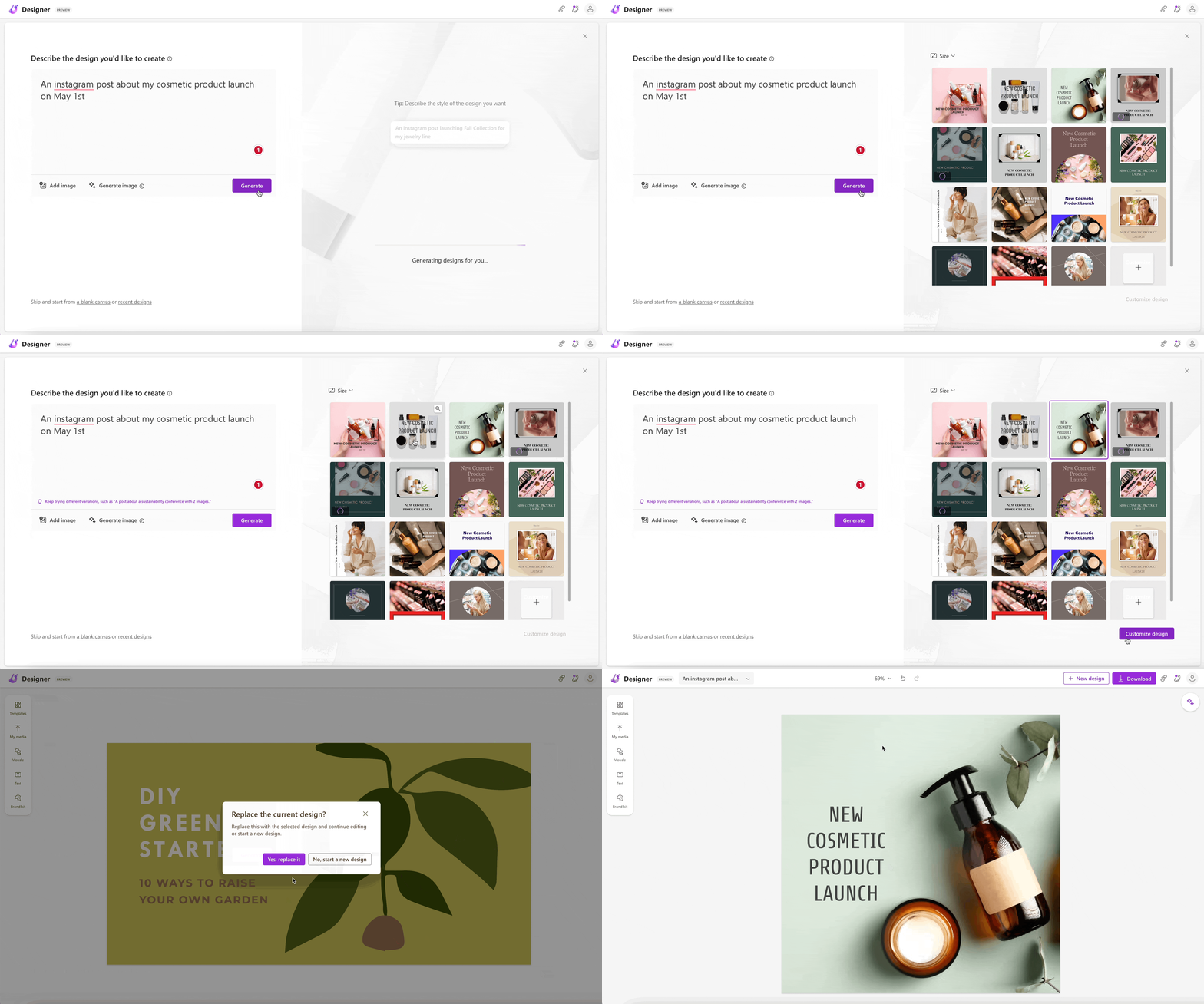
Similarly, you can create a number of designs based on what you want. Just give it a try, and see how it can help you.
Simplify your design process with Microsoft designer’s features
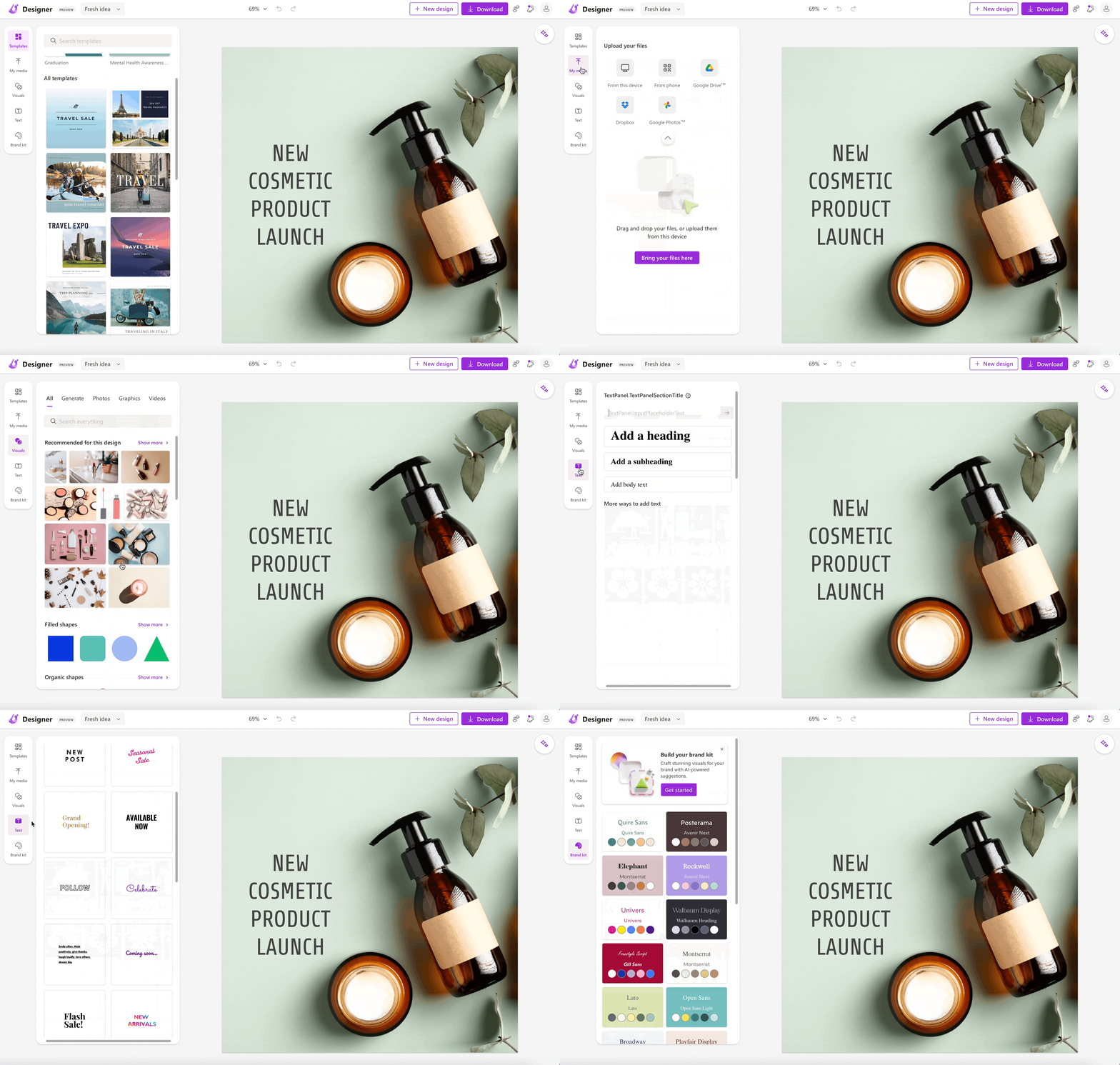
In addition to its AI-powered design capabilities, Microsoft Designer offers a range of other features that make it a comprehensive design solution. One such feature is the ability to choose from a variety of templates that can help jumpstart your design process. But that’s just the beginning.
Microsoft Designer also allows you to add your own media, including images and videos, to your designs. And if you want to add some extra flair, you can incorporate a variety of visual elements and fonts to make your designs truly stand out.
But perhaps one of the most useful features of Microsoft Designer is its brand kit feature. This feature allows you to craft stunning visuals for your brand with AI-powered suggestions.
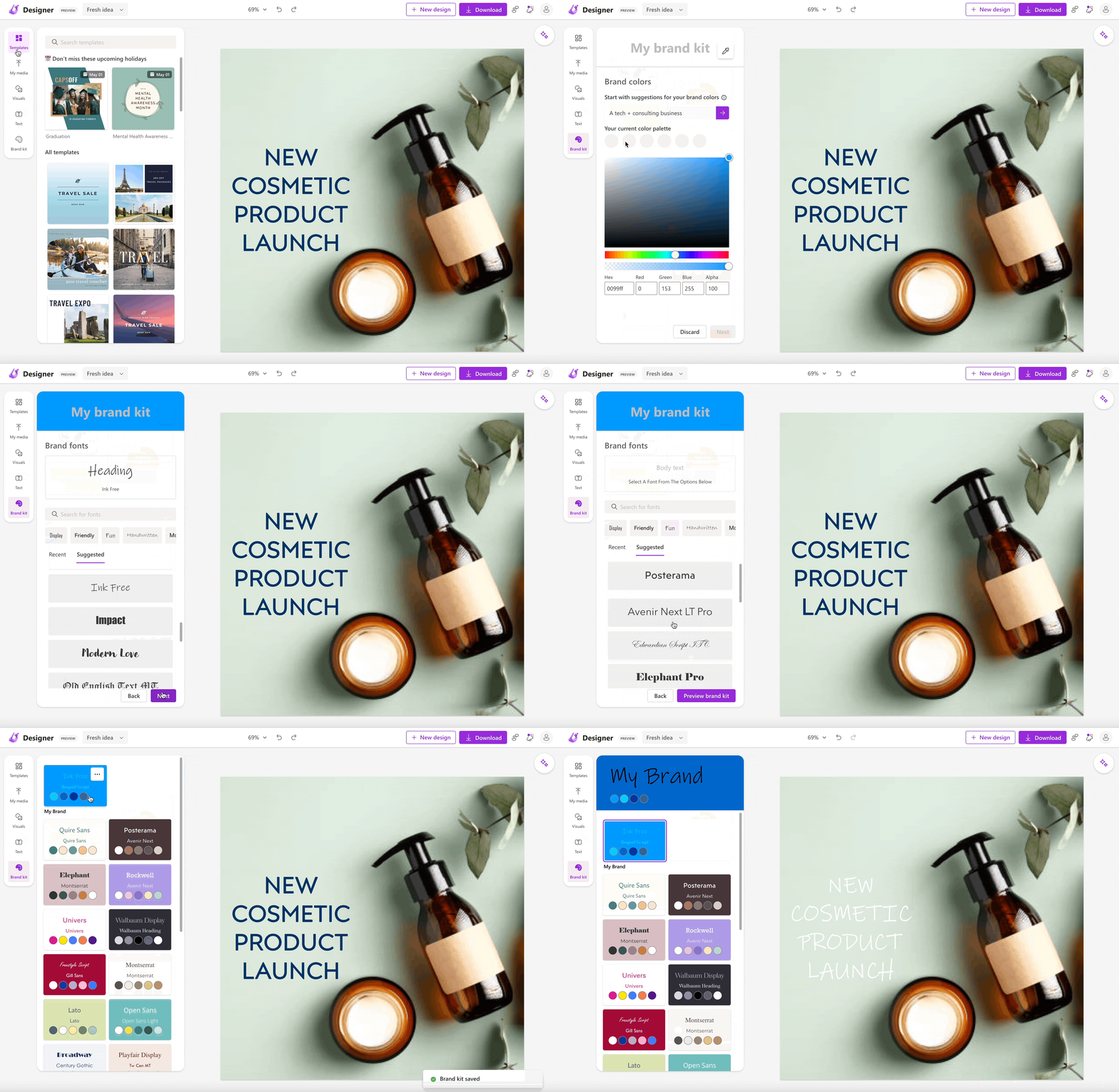
You will be asked to define your brand, with the color you want, the headline, the subheadline, and the body text. And then it will generate a brand kit that you can use for all your designs that you create in the future.
Cool, right?
Let’s Wrap Up
In conclusion, Microsoft Designer is a user-friendly design tool that leverages the power of AI to simplify the design process.
While it shares some similarities with Canva, Microsoft Designer offers unique features such as its brand kit feature, which allows users to create a cohesive visual identity for their brand with AI-powered suggestions.
Even, the Microsoft team is continuously working to improve the tool’s functionality and trying to add new features. It is worth noting that Microsoft is committed to integrating AI functionality into all of its Microsoft 365 apps, which shows its dedication to enhancing the user experience.
If you are interested in learning more about the integration of AI into Microsoft’s suite of apps, you can check out the video provided.
Overall, Microsoft Designer is a promising design tool that is worth exploring for anyone looking to streamline their design process.
Hope you like it.
That’s it — thanks.
Consider becoming a Medium member if you appreciate reading stories like this and want to help me as a writer. It costs $5 per month and gives you unlimited access to Medium content. I’ll get a little commission if you sign up via my link.


