
Giving Your Cloud Credentials to Another Cloud Provider
ACM.323 How does this affect your quantifiable risk score?
~~~~~~~~~~~~~~~~~~~~~~~~~~~~~~~~~~~~~~~~~~~~~~~~~~~~~
⚙️ Check out my series on Automating Cybersecurity Metrics | Code.
🔒 Related Stories: Network Security | AWS Security | Application Security
💻 Free Content on Jobs in Cybersecurity | ✉️ Sign up for the Email List
~~~~~~~~~~~~~~~~~~~~~~~~~~~~~~~~~~~~~~~~~~~~~~~~~~~~~
I am working with credentials a lot in these last few posts as part of a series. In the very last one I showed you what *not* to do with your credentials in a Lambda function, but we got our function to mirror a repository from GitHub to AWS CodeCommit.
I was going to fix that in this post but I just saw something on Twitter or X or whatever it is called these days that is making me stop to write this post. In the prior post, we did a lot of threat modeling and thinking about how a breach like the LastPass breach might affect our credentials given the architecture I’ve been showing you over this sub series for static website deployments.
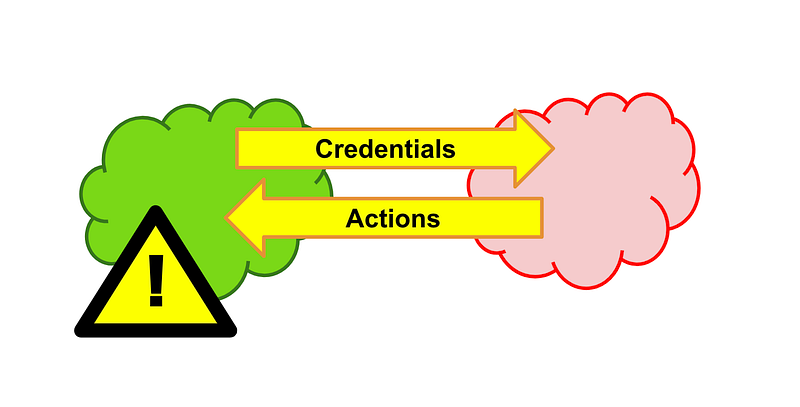
The post I saw wants you to integrate AWS roles with Azure DevOps. I don’t know if it was giving access to Azure DevOps commands from AWS or letting Azure DevOps control AWS. Either way, let’s think about this for a minute. It’s simple math.
How many possible ways can an attacker access your AWS infrastructure and application deployments if you use roles inside compute resources like Lambda as I’ve been doing in the last few posts? I’ve gone over a number of scenarios and potential attacks and how we are mitigating them with the infrastructure we are building.
How does that change when you provide those roles to Azure DevOps?
The converse would also be true if you are allowing AWS to control Azure DevOps somehow.
Now Azure DevOps is really cool in terms of functionality and I like the concepts of policies. That got me to actually read the Azure DevOps documentation to see if I could use it due to weaknesses in the GitHub security controls. I also like the idea of governance in DevOps systems as we’ve been designing throughout this series.
Why didn’t I use it? Once I read the network requirements I quickly nixed the thought. There are so many holes in your network when you use Azure DevOps it becomes what I refer to as a “Swiss Cheese Network.” It’s impossible to truly have security if you have to basically open 50 ports to domains that lead to an exponential number of IP addresses to make it work. That makes things exponentially harder to manage and increases the risk for every port and IP you have to open as there’s some resource behind that port and IP address which could be misconfigured, attacked, or leveraged by a malicious insider.
What? That would never happen, you say. While working on Azure I created a zero trust policy for a storage resource. Then I started getting blocked by my own network policy — only the IP address wasn’t my IP. It was a Microsoft IP address. Either something was misconfigured, or there was a bigger problem. I don’t know but I got a message from Microsoft Support saying they had an internal incident and could not tell me what happened because it was confidential but that it was “fixed.”
What if I never had put that zero trust network policy on my resource? I don’t know. And we can’t know unless work at Microsoft and are privy to that information. But what we can do is limit the risk as much as possible on our side of the equation and monitor the access logs.
So now you’re thinking you want to let Azure DevOps control your AWS roles potentially and take actions in AWS? OK.
Before you do that go take a look at all the security incidents on Azure recently. I understand why people use Microsoft and Azure and it has some good features. In fact, I almost went to work for Microsoft when I got out of college and Amazon didn’t exist, let alone AWS. I’m a fan of this world-changing company that came out of my home state and I hope they can improve the situation. But at the moment the risk quantification is not looking so great.
And even if that wasn’t the case and Microsoft wasn’t having very many public security and outage incidents, you can do the math to figure out that by giving your credentials to another cloud provider, you have exponentially increased your risk. Instead of worrying about one cloud provider’s infrastructure being compromised and attackers gaining access to your resources, now you have to worry about two. And cloud provider infrastructure is insanely complex and vast. There are many potential threats with one cloud provider, let alone giving access to two.
Walk through the threat model as I’ve been doing in recent posts. How many endpoints can potentially access your credentials — or leverage them. Could they gain access to Azure DevOps and trigger actions on AWS? Not to mention gaining access to the AWS resources themselves. How many additional attack points are there on the network once you open up access to make changes from Azure on AWS or vice versa?
Can you distinguish the traffic from the external cloud provider as friend or foe? Often companies just open up all of Azure or all of AWS because it’s too hard to make the restrictive rules to lock things down to your own account or the specific services you want to use (though I’ve been showing you how to do that in my blog series.) Full access to another cloud provider opens systems up to attacks such as they did in SolarWinds when attackers used cloud accounts to carry out their attacks.
I’ll let you do your homework as to how any integration between AWS and Azure might affect your environment. But consider what I’ve been doing to integrate GitHub and AWS in these last few posts. So far, the GitHub role I created and stored *on AWS* only has *read-only access*. It can’t make changes to my GitHub account or repositories. Of course, I have to think through what code is inserted on the GitHub side and how and where that is used on AWS, but right now we are publishing static websites.
Now, if you’re running a local GitHub server that you control and it doesn’t interact with online services that can inject rogue code, then that’s a different story. Your code and network is locked down and in that case, GitHub actions may be fine. You’re storing your credentials on your own server and not giving them to GitHub. You’ve locked everything down to a private network. You have governance and MFA and code reviews.
On the flip side, I don’t want to give a GitHub action permission to change my AWS account. Perhaps it could trigger a hard-coded Lambda function but not if that function pulled code that got auto-deployed on AWS, for example. In that case, the attacker could insert code into a GitHub repo that got executed on AWS depending on the design.
Pssshhhtt…you say. You’re such a worry wart. Oh, am I? I just read this today:
And by the way, credentials WILL get stolen. Especially if you work at a large corporation with 11,000 developers like I did and more at some other companies. In fact, I worry about my own machine becoming compromised or my own credentials being stolen even though I specialize in cybersecurity. It’s too easy to find a hole and there are way too many zero day exploits of vulnerabilities to presume you will never have your systems accessed or credentials stolen.
Therefore, your best defense is the defense in depth approach I’ve been taking in this series, and to limit what your credentials can do. Use a segregation of duties approach. Require phishing resistant MFA where possible. Store parts of credentials in two different locations. Have different machines, networks, accounts, and devices or different parts of your architecture. Separate those who grant the permissions for those who can use them. Limit your exposure using network controls and encryption along with your access and identity management.
And don’t give one cloud provider access to all your other clouds.
This is why I’m looking into using OKTA for user management but assigning the permissions in the cloud providers. Unfortunately, you cannot truly federate your Azure authentication to OKTA. Azure always requires you to sync but maybe that will change in the future. And, OKTA has some potential weaknesses I’ve written about and still looking into — but I love the idea of not giving any one cloud provider all your credentials.
With Okta, you can add users there, but the Okta admins and Okta itself cannot create or change permission — or use them — in another cloud provider. Especially if you use hardware MFA without seeds, as I expleind in one of my blog posts. Seeds are a risk. But in an ideal scenario, you get good separation of duties to limit escalation attacks.
No one cloud provider has access to all the things. However, since you can’t fully federate to Okta with Azure, then Azure still has both the credentials and is where permission controls are configured as well. There’s no way to segregate the two unless something has changed recently.
Anyway, whatever you choose to do, hopefully you will read through my blog posts and use a similar thought process when designing systems. In each of my posts I’m not just handing you working code. I’m going through the thought process of how do we secure all the things? What are the risks? How can we mitigate them?
There is no foolproof solution and I probably missed something along the way, but I am guessing what I am designing and developing here is far more secure than what exists in most organizations on this particular date and time of this writing.
When I see a solution like hey let AWS trigger Azure DevOps or let Azure DevOps use your IAM roles…I get concerned. But I’m not going to read through that whole post because it’s more of a distraction since I don’t plan to ever do that (unless Azure DevOps magically fixes the network issues which I don’t foresee happening — AWS and GitHub are complicated enough.) Also, the Microsoft licensing model is not my favorite. It seems to be much more expensive than AWS to do simple things.
Anyway, back to what I was doing. Cloning a GitHub repo to AWS CodeCommit. GitHub does not support enforcing MFA on clone commands right now. AWS does. I want to see if I can mimic enforcing MFA on a GitHub clone command with an AWS Lambda function. That’s what I’m supposed to be working on right now. 😊
Follow for updates.
Teri Radichel | © 2nd Sight Lab 2023
About Teri Radichel:
~~~~~~~~~~~~~~~~~~~~
⭐️ Author: Cybersecurity Books
⭐️ Presentations: Presentations by Teri Radichel
⭐️ Recognition: SANS Award, AWS Security Hero, IANS Faculty
⭐️ Certifications: SANS ~ GSE 240
⭐️ Education: BA Business, Master of Software Engineering, Master of Infosec
⭐️ Company: Penetration Tests, Assessments, Phone Consulting ~ 2nd Sight Lab
Need Help With Cybersecurity, Cloud, or Application Security?
~~~~~~~~~~~~~~~~~~~~~~~~~~~~~~~~~~~~~~~~~~~~~~~~~~~~~~~~~~~~~
🔒 Request a penetration test or security assessment
🔒 Schedule a consulting call
🔒 Cybersecurity Speaker for PresentationFollow for more stories like this:
~~~~~~~~~~~~~~~~~~~~~~~~~~~~~~~~~~~~~~~~~~~~~~~~~~~~~~~~~~~~~
❤️ Sign Up my Medium Email List
❤️ Twitter: @teriradichel
❤️ LinkedIn: https://www.linkedin.com/in/teriradichel
❤️ Mastodon: @teriradichel@infosec.exchange
❤️ Facebook: 2nd Sight Lab
❤️ YouTube: @2ndsightlab