
GitLab: Merge blocked: fast-forward merge is not possible. To merge this request, first rebase locally.
If you are working with Merge Requests in GitLab, you may see this message quite often. So what can be done to fix this and merge the branch?
So what is wrong?
If you go to any merge request displaying this message, you will see that the branch does not have all changes from the main branch. Also, GitLab cannot rebase this as there are some conflicts.
This occurs when you are using fast-forward merges.

Usually, you can rebase directly from the Merge Request in GitLab, unless there is a merge conflict. In that case, you can’t do that through the UI and get this message:

How to fix “Merge blocked”?
The first step is to clone the repository on your computer and to go into the respective branch.
git clone git@gitlab.com:some-group/my-project.gitThis assumes you have already configured your local Git installation to work with GitLab.
cd my-projectIf you already have the repository cloned, let’s go into the main branch and make sure it has the latest changes:
git checkout master
git pull origin master
The next step would be to go into the feature branch and rebase:
git checkout feature/changeTemplate
git rebase master
This will most likely issue a merge conflict in one or more files. Example:
CONFLICT (content): Merge conflict in src/pages/index.jsYou can manually resolve this conflict with a regular text editor or use an IDE. I am using Visual Studio Code for this project and this will make my life a bit easier.

Right on top, I will choose the most appropriate setting, which for me is “Accept Both Changes”. However, may depend on your needs. You can edit the file as you need.
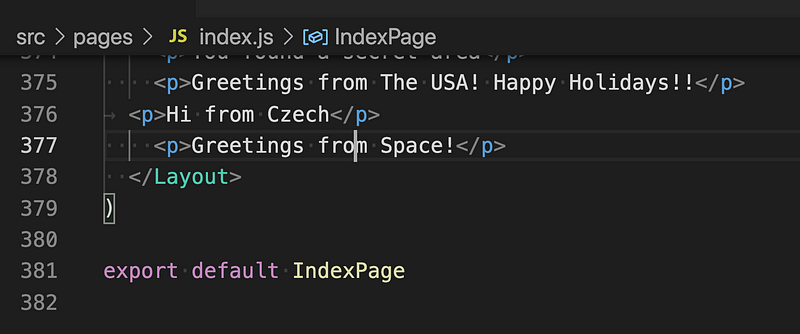
Now I need to add the file or files modified:
git add src/pages/index.jsSince we are still in a rebase, I will run:
git rebase --continueThe rebase will show other conflicts (if any) or complete. Check your Git log and the changes made. Make sure everything looks right.
With rebase, we have rewritten the history. So if we try something like:
git push origin feature/changeTemplateThe push will be rejected with an error similar to this one:
! [rejected] feature/changeTemplate -> feature/changeTemplate (non-fast-forward)
error: failed to push some refs to ‘[email protected]:some-group/my-project.git’
Updates were rejected because the tip of your current branch is behind its remote counterpart. Integrate the remote changes (e.g.
‘git pull …’) before pushing again.
See the ‘Note about fast-forwards’ in ‘git push — help’ for details.
So once we have rewritten the Git history, we can no longer push to the old branch. So we need to override the branch completely, by adding the — force flag.
git push origin feature/changeTemplate --force
If you enjoy content like this and it helped you solve a problem, help me create more. Please leave a comment, share, and press that 👏 a few times (up to 50 times). And consider subscribing to Medium for more amazing content.
Conclusion
I hope this tutorial helped you fix this error while working with Merge Requests in GitLab. Leave a comment in the section below if you have any questions. I would love to hear from you!
Thank you for sticking with this article until the end. If you enjoyed it, please leave a comment, share, and press that 👏 a few times (up to 50 times). It will help others discover this information and maybe it will help someone else as well.
Follow me on Medium and YouTube if you’re interested in more tutorials like this one.


