
Getting the Actual Path of a Script Included with Bash Source
ACM.250 Resolving relative path issues in source code
~~~~~~~~~~~~~~~~~~~~~~~~~~~~~~~~~~~~~~~~~~~~~~~~~~~~~
⚙️ Check out my series on Automating Cybersecurity Metrics | Code.
🔒 Related Stories: Application Security | Secure Code
💻 Free Content on Jobs in Cybersecurity | ✉️ Sign up for the Email List
~~~~~~~~~~~~~~~~~~~~~~~~~~~~~~~~~~~~~~~~~~~~~~~~~~~~~
So now I’m completely distracted from my goal of an S3 bucket for a static website. Hopefully next post. I ran into another problem after I fixed the deletion of DNS records in the last post.
Somewhere, something is changing the path and I don’t know where. Maybe it’s my code but I couldn’t find it. And then I started trying to switch the path back to what it needs to be and ran into all kinds of problems. But these problems led to an interesting idea.
Instead of having the script that calls change_dir pass in the base path why not just have change_dir calculate the base path? Sounds simple right? Nope.
To get this out of the way — why am I just not using an environment variable or something like that? It’s a hassle. I worked in Java for years and JAVA_HOME was annoying. Conflicts were annoying. I want everything to be relative. The code should just run.
Unfortunately when looking for the magical solution I seek? I did not come up with very nice answers. I looked a bazillion posts (exaggeration so you feel my pain of wasted time) like these:
They all provide similar solutions that don’t work. The reason they don’t work may be in some cases that Amazon Linux does not have a particular function.
But the real problem is that I am using “source” to include the file contents. The context I get is for the script that initially executed, not the file where the sources is derived.
Well, I figured out a solution — but it’s not very nice. The reason it is not nice is that you must install a program to use it — locate. So now anyone that wants to use my code has to ensure they install locate. On AWS Linux:
sudo yum install locateThe other problem is, the way I have currently written it, if you have two files with the same name on the system, it might throw an error. So what I eventually want to do is allow overriding the base path. But first I’m going to try to convert all my existing code to use this new functionality.
You also need to keep the name of the repository as is, or it will break. So if you don’t like any of that, you can override this function to use an environment variable or whatever method you prefer. I like the idea of ensuring I’m always using the correct directory by calculating it dynamically — presuming there’s no bug in the underlying code I’m using to perform this calculation. I need to test this more to see how it works out.
Here’s the function I ended up writing, which includes all the caveats in the description:
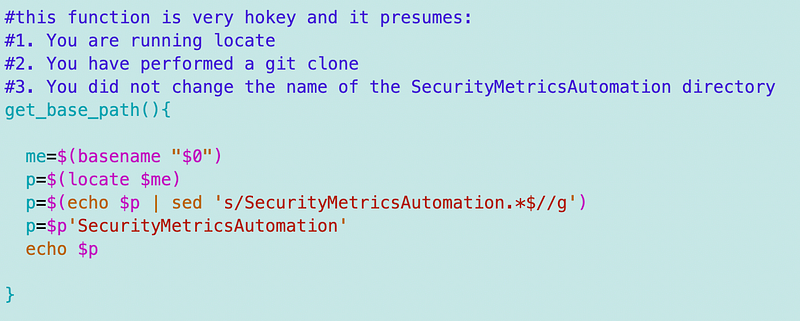
By including a call to this function from my change_dir function which switches to the correct context for whatever code you want to run, I no longer have to calculate the base path everywhere else.
I also changed the change_dir function to use the current profile if no profile is passed in. So the top of the function now looks like this:
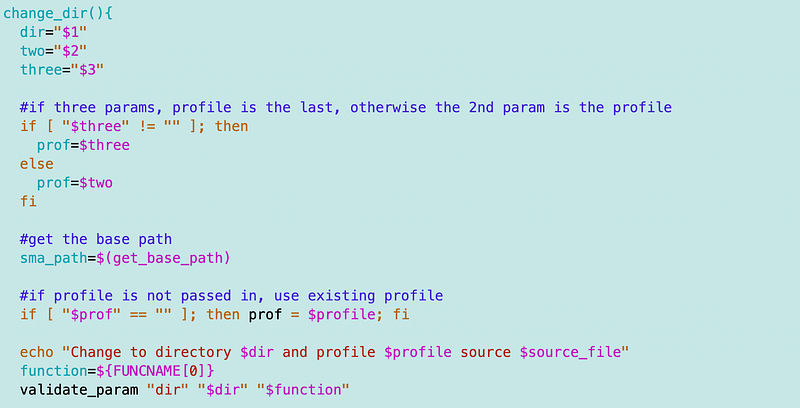
So now to switch to a different context and use a different batch of functions, should only require the name of the context (IAM, DNS, TLS, etc) which roughly relates to the directories in the framework.
And…after changing that I was able to get the code to the correct directory to update the CNAME that wouldn’t update and started all this madness.
Really all of this is solved by this post:
If that existed, I wouldn’t have had to write the three additional posts. But this is an interesting post is an improvement and possible reduction of code.
I wish that bash provided a way to get the full path for the code from a sourced file. That would be great for issues like this, troubleshooting — and security. The security problem is related to what I wrote about in this blog post:
Update:
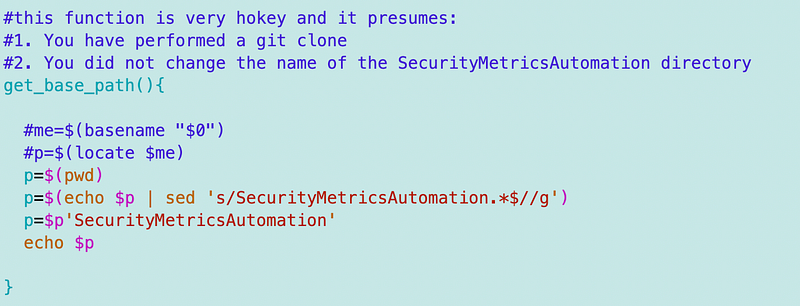
After using this code in different places throughout my code base I realized it has a problem and a much simpler solution (duh). The problem is that if multiple files exist with the same name you get back multiple paths. I knew this was hokey to begin with and bash is not the greates programming language but it works for prototyping all these things.
Anyway instead of locate I switched it to use pwd (print working directory) and that seems to work much better.
On to S3 buckets, I hope.
Follow for updates.
Teri Radichel | © 2nd Sight Lab 2023
About Teri Radichel:
~~~~~~~~~~~~~~~~~~~~
⭐️ Author: Cybersecurity Books
⭐️ Presentations: Presentations by Teri Radichel
⭐️ Recognition: SANS Award, AWS Security Hero, IANS Faculty
⭐️ Certifications: SANS ~ GSE 240
⭐️ Education: BA Business, Master of Software Engineering, Master of Infosec
⭐️ Company: Penetration Tests, Assessments, Phone Consulting ~ 2nd Sight Lab
Need Help With Cybersecurity, Cloud, or Application Security?
~~~~~~~~~~~~~~~~~~~~~~~~~~~~~~~~~~~~~~~~~~~~~~~~~~~~~~~~~~~~~
🔒 Request a penetration test or security assessment
🔒 Schedule a consulting call
🔒 Cybersecurity Speaker for PresentationFollow for more stories like this:
~~~~~~~~~~~~~~~~~~~~~~~~~~~~~~~~~~~~~~~~~~~~~~~~~~~~~~~~~~~~~
❤️ Sign Up my Medium Email List
❤️ Twitter: @teriradichel
❤️ LinkedIn: https://www.linkedin.com/in/teriradichel
❤️ Mastodon: @teriradichel@infosec.exchange
❤️ Facebook: 2nd Sight Lab
❤️ YouTube: @2ndsightlab


