
Getting Git Credentials Out of the URL
ACM.327 Attempting to use Git Credential Helper cache option in Lambda not working — alternate solution
~~~~~~~~~~~~~~~~~~~~~~~~~~~~~~~~~~~~~~~~~~~~~~~~~~~~~~~
⚙️ Check out my series on Automating Cybersecurity Metrics | Code.
🔒 Related Stories: AWS Security | GitHub Security | IAM
💻 Free Content on Jobs in Cybersecurity | ✉️ Sign up for the Email List
~~~~~~~~~~~~~~~~~~~~~~~~~~~~~~~~~~~~~~~~~~~~~~~~~~~~~~~
In the last post, I wrote about parsing Lambda functions and ensuring they meet a particular character set requirement to help prevent injection attacks such as cross-site scripting (XSS).
In this post I’m going to switch away from using the URL for Git credentials and instead use use the Git credential helper. I wrote about using the git credential helped by caching variables to ensure they are not stored to disk and why this option is my preferred option here:
Before trying to remove the credentials from the URL I wanted to consider the risk we’re mitigating here.
Where might someone see our credentials if in the URL?
At first glance, I do not see any places within the AWS console where that URL gets logged. That’s because I removed any statements that would echo out that echo the URL into those logs. That’s the type of thing QA professionals and penetration testers should be checking. Makes sure developers are not writing sensitive data to any logs files or anywhere the values can be stored and read by unauthorized parties.
Where else might someone see those credentials in a URL? If we were using a browser to access that URL, we would have a number of different risks to consider. But if the git app is correctly using TLS then the request should be encrypted end to end including the credentials in the URL. One risk, besides wherever you might log the URL in your Lambda function, would be any logging of the URL by GitHub. I presume those logs are propertly secured at Microsoft, but just in case, we can remove the credentials from the URL and send them in the request body instead.
Testing the Code for Git Credential Helper in Lambda
When we use Git Credential Helper it seems to require both a user name and password. Recall that I created a specific user just for this automation process with very limited permissions.
To use Git Credential Helper, I’m going to add the username to Secrets Manager and retrieve that as well.
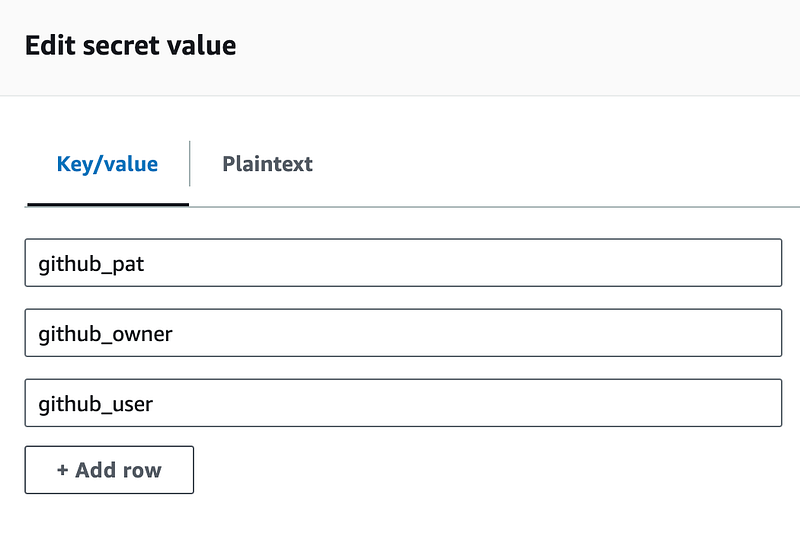
I can get the value of the github_user the same way I got the other values in a prior post:

Now I can attempt to run the code proposed above and see if we can get Git Credential Helper working in our container used by our Lambda function.
Now, the problem is that I have an interactive script when using the git cache option.
I try to set the credentials like this:

However, when I run my git command it says the username is not found.
The other problem is that the above commands seem to be pushing my credentials to a file, and that’s not what I want.
If I add this command to my function:
git config -l --show-originI can see:
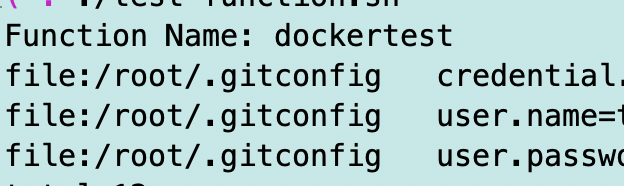
So those commands actually are pushing the credentials to a file.
Nix that.
I tried to interactively pass the credentials to the clone command in various ways, but that didn’t work either. I tried a lot of different options.
Then I ran across the option to send the token in an HTTP header instead. Finally. This works:
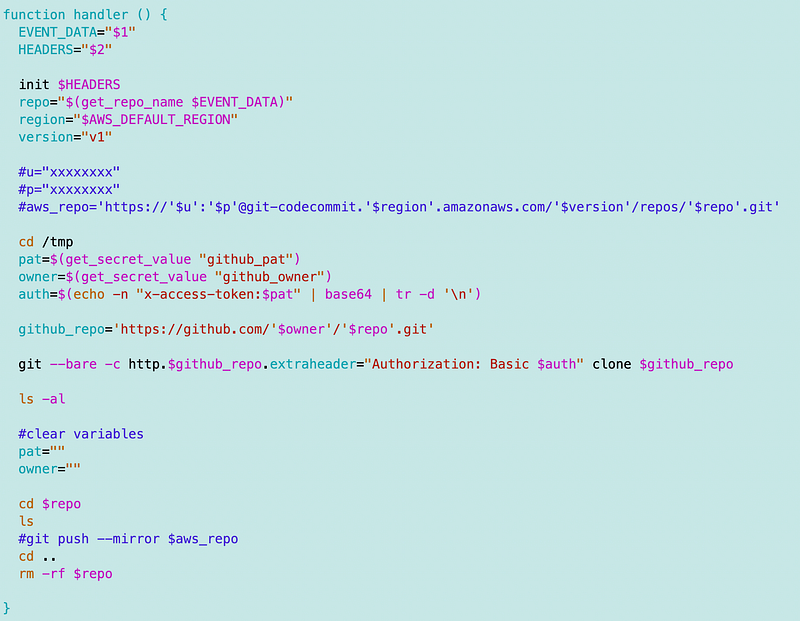
The other thing I like aout this approach is that it does not require a username in Secrets Manager so I can remove that.
Now I can move on to AWS CodeCommit and exploring MFA with Lambda. I can’t enforce MFA with the above via GitHub at the time of this writing but I can emulate it but wrapping it in AWS Lambda.
Follow for updates.
Teri Radichel | © 2nd Sight Lab 2023
About Teri Radichel:
~~~~~~~~~~~~~~~~~~~~
⭐️ Author: Cybersecurity Books
⭐️ Presentations: Presentations by Teri Radichel
⭐️ Recognition: SANS Award, AWS Security Hero, IANS Faculty
⭐️ Certifications: SANS ~ GSE 240
⭐️ Education: BA Business, Master of Software Engineering, Master of Infosec
⭐️ Company: Penetration Tests, Assessments, Phone Consulting ~ 2nd Sight Lab
Need Help With Cybersecurity, Cloud, or Application Security?
~~~~~~~~~~~~~~~~~~~~~~~~~~~~~~~~~~~~~~~~~~~~~~~~~~~~~~~~~~~~~
🔒 Request a penetration test or security assessment
🔒 Schedule a consulting call
🔒 Cybersecurity Speaker for PresentationFollow for more stories like this:
~~~~~~~~~~~~~~~~~~~~~~~~~~~~~~~~~~~~~~~~~~~~~~~~~~~~~~~~~~~~~
❤️ Sign Up my Medium Email List
❤️ Twitter: @teriradichel
❤️ LinkedIn: https://www.linkedin.com/in/teriradichel
❤️ Mastodon: @teriradichel@infosec.exchange
❤️ Facebook: 2nd Sight Lab
❤️ YouTube: @2ndsightlab