
From Aversion to Passion: How to Write Documentation in Python
Code is more often read than written

To whoever is reading this article, you must be one of the top-notch engineers in the world who cares about documentation :). The skill of documenting never gets enough attention in the developer community.
Why is there such an aversion? Well, writing is not hard, writing clearly is very hard. This applies to everyone, including developers. It requires us to organize our thoughts and express them clearly. Quite often, there is no single solution for a problem, so apart from writing what has been done, we also need a rationale behind it. And if you don’t write it well, it will just backfire.
But to me, the main reason for such phenomenon is — not documenting won’t prevent the software from being functional. Crappy code with zero documentation will still be shipped as long as it works. It’s like a tech debt waiting for a pioneer to bring it to the table. For fast-growing companies, it’s mostly sitting at the bottom of their backlogs.
In this article, I don’t want to convince you to work on those stale tickets from today. However, I want to tell you a few tips to make this documenting process easier and more enjoyable from the very beginning of the project. You can apply them in your next project with a fresh mind and a positive attitude towards documenting.
As the scope of this article, I will be talking about 4 steps on documenting your source code. Generic project documentation like README or diagrams is beyond the scope.

The simplest way — do not document anything
Yeah, you read it correctly. A big issue with documents is that they get outdated as the software evolves. As a reader, if you constantly find discrepancies between documents and code, you will give up reading it at some point.
That’s why the idea of self-documenting-code stands out. And Python is a perfect example. I want to shares two tips on creating self-documenting-code.
The first tip is to follow the Python idiom as much as you can. Python was designed to be a highly readable language. It uses English keywords more frequently whereas other languages use punctuations. Python does bring a lot of syntax sugar, so code like needs no comments.
If you want to refresh your knowledge of Python idiom, check out this Youtube video and my previous article about writing Pythonic code.
Using the correct Python idiom helps readers understand the code to its lowest level. But is it always necessary to read every single line in order to understand what the code is doing?
This question brings us to the second tip — create conceptual models and design your code structure from the top to the bottom. Let’s first read this example.
This function examines whether the passenger is allowed to travel based on its vaccination record and PCR test. Although the code follows Python idiom, it kind of takes users down the rabbit hole by putting too much information. The code can be refactored to a much cleaner format. Let’s read another version.
Obviously, this version has more lines. But what users care about is limited to the function is_allowed_to_travel() which itself is reading like a documentation. Users can decide whether they want to dig into details (e.g. check the definition of a valid PCR test).
If we split the function into several logic units, that would be — retrieve user vaccination data -> validate user’s vaccination record -> retrieve user PCR test data -> validate user’s PCR test. And the visual representation looks like this:
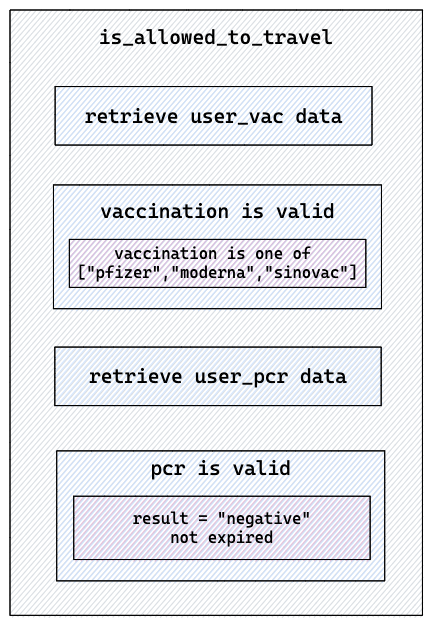
Each blue box might contain low-level logic units. The rule of thumb is to treat your top-level function as a ‘glue function’ that stitches your underlying logic units. Each logic unit is an action.
This brings us two benefits. One, the code is much more readable and self-explained. Two, the codebase is more maintainable, reusable, and testable by decoupling independent logic units. Whenever a new vaccination is introduced, we only need to change VaccinationRecord class without updating any other function. This is also called Separation of Concerns — a design pattern for separating the program into distinct sections.
Apart from separating the logic, this code also creates several conceptual models such as VaccinationRecord , PCRRecord and DBConnection . Each model manages the attributes and behaviors around its object. We are gradually entering the world of object-oriented programming, which I won’t narrate too much in this article. But in general, OOP takes a big problem and breaks it down into solvable chunks, which helps both developers and users to solve or understand the problem.
In summary, following Python idiom, separating logic units, and applying object-oriented design improves the overall readability, and hence frees you up from maintaining outdated documents.
Link document to code
Writing self-documenting code is a big step, but it can’t solve all the problems. This is kind of sad because not everybody understands the code and hence developers must write documents in natural language and keep them up-to-date.
The question is how to bind documents and code in a way that the change of one side will affect the other side. The solution we are looking for is one of these two:
- A framework that can automatically generate documents based on code.
- A framework that can automatically generate code based on documents.
For the first scenario, a good example is the auto-generation of Swagger, a set of tools built around OpenAPI specification that helps you design, build and document REST API. Many existing Python API frameworks like FastAPI and connexion support auto-generation of Swagger UI, which describes your entire API including endpoints, parameters, authentication, etc. It fully relies on the actual implementation, so no comment or docstring is needed.
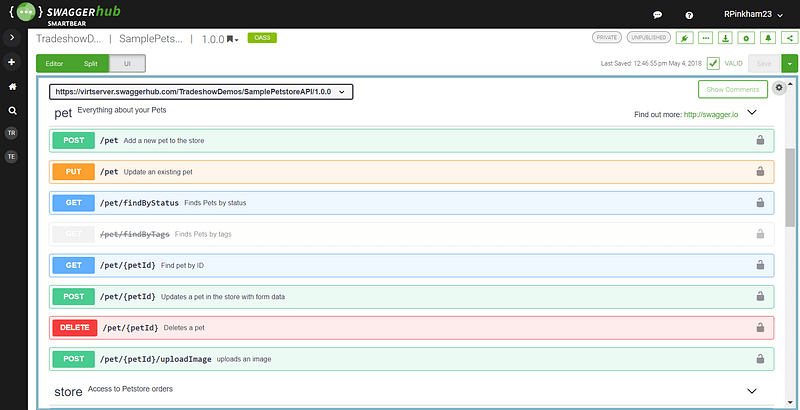
The Swagger UI is updated every time you change the API design. So developers don’t need to worry about its freshness.
On the other hand, the second scenario introduces a different way of working in which documents are created upfront. In agile software development, this process is called Behaviour Driven Design (BDD) — a process that encourages collaboration among developers and businesses in a software project. Different from traditional software development, BDD requires developers to list the requirements in a structured natural language before coding.
And such language is called Gherkin which allows expected software behaviors to be specified in a logical language that consumers can understand. In Python, pytest-bdd implements the Gehkerin language to enable automating project requirements testing and to facilitate BDD.
Let’s implement the above example in pytest-bdd. Developers first describe the expected behaviors in Gherkin language with keywords Given, When, Then.
- Given describes the precondition and initial state before a test — the situation of the passenger.
- When describes the action — examine the passenger.
- Then describes the outcome of the action — the passenger is allowed / not allowed.
The second step is to create a test function for each statement. This is where the integration is happening. The test connects the document to the code and makes sure that the logical change of one side will affect the other side.
For each statement in the feature file, a test function must be created. And the text in the Python file must match the feature file character by character. Its primary advantage is to ensure the freshness and correctness of the documents.
I’ve used pytest-bdd for about 2.5 years. I find it extremely useful in an environment where collaboration mostly happens between developers and non-developers. The value of collaboration is in the initial brainstorming sessions, not in those follow-up meetings where developers keep explaining how things should work to different stakeholders. The stakeholders might later give engineers kudos thanks to their support, but in my opinion, this is a wasteful collaboration because time is not spent on creating new stuff but on explaining how existing things should work.
The approach of BDD encourages multiple stakeholders to have a high-quality collaboration in the initial brainstorming stage. The outcome (aka feature file) becomes the input of the program and the reading materials for business users. This should reduce the number of unnecessary meetings.
In this section, we’ve seen 2 different ways of integrating documentation and code. The goal is to ensure its freshness and correctness and hence improve the efficiency of collaboration between developers and users.
Docstring v.s. Comments
Although BDD is helpful during the development process, its main intended audience is non-tech users. For programs that are designed for developers, writing feature file can be an overhead. Developers normally prefer to document and comment right on top of their code.
Before we go deep, we need to distinguish documenting from commenting. In general, documenting describes the functionality to the users, while commenting describes the code to maintainers and developers.
According to Wikipedia, comments serve multiple purposes:
- Planning and Reviewing: Write pseudocode to outline the intention prior to writing the actual code. It should be removed after the implementation is finished.
- Code description: Summarize the code and explain the programmer’s intention. Note that it might be a sign that the code should be refactored and self-explained.
- Rationale: Explain the reason to choose a technique or algorithm over the other.
- Tagging: Add codetags like TODO, BUG, FIXME. They may be able to be searched by IDE tools like Todo Tree in vscode.
There are not many restrictions on the format of comments except for the maximum length of 72 characters defined in PEP8. On the other hand, docstring has its own convention described in PEP 257. Docstring can be further broken up into three categories:
- Class docstring
- Package and module docstring
- Script docstring
There are a few well-known docstring formats used in many Python packages. It doesn’t matter which format you choose, but you should stick to the same format throughout your project.
- reStructuredText: The official Python documentation standard. It’s a very rich format that is not only for docstring but also widely used as Markdown format for documenting.
- Google docstrings: Google’s recommended form of documentation. It’s also my favorite format.
- Numpy docstring: NumPy’s combination of reStructuredText and Google Docstrings.
It’s possible to use a tool like Pyment to automatically generate docstring or to convert docstring from one format to another format. Extension of Vscode like autoDocstring is also able to create a docstring structure using a simple shortcut.
99% of the software and packages have docstring and comments regardless of other formats of documentation. In general, docstring and comments should be kept concise to be easy to maintain but still be elaborate enough for the new users to understand how to use the object.
Python documentation server
The last step is to publish your docstring on a web server and make it accessible to the users. Therefore, users are able to understand how to use it before actually downloading the packages. There are a couple of existing tools that can automatically generate documentation in HTML based on docstrings.
- sphinx: By far the most comprehensive documentation generator. It was originally created for Python and has expanded its functionalities to a wide range of languages. It reads docstring in reStructuredText and produces HTML output. Most of the famous Python packages are using it to generate their documentation like Flask, Pytest, Jinja, etc. But honestly, the setup requires some effort assuming you work on a fresh project.
- pdoc: A lightweight documentation generator. It’s more straightforward than sphinx because it requires no configuration. Good for small projects. But compared to sphinx, it has fewer customization options, thus not suitable for large projects.
- Doxygen: Another documentation tool that supports multi programming languages. But it’s not as popular as Sphinx in the Python community because it was not primarily designed for Python and the looking is not as nice as Sphinx.
The output they produce is HTML pages. You can use additional tools like Read the Docs to host these static files and make it available to the world.
Conclusion
We’ve discussed a couple of techniques to make the documenting process easier and more enjoyable.
Writing self-documenting code is what every developer should do. It keeps the codebase clean and much easier to maintain and resonate with. Python developers should take advantage of Python’s syntax sugar.
Using frameworks like FastAPI or pytest-bdd integrates the document and the code. A logical change on one side will automatically affect the other side so that we can always avoid outdated documentation.
But it’s inevitable that as the program becomes big or public, developers will spend time writing docstring and comments for the users and co-maintainers. The intention is to inform others on how to use the object or the rationale behind a deliberate choice. It’s important to keep the words concise but also informative enough for the new users.
Last but not least, you want to publish your docstring to reach a larger audience. Tools like Sphinx and pydoc produce static HTML pages that can be hosted on web servers such as Nginx and Read the docs.
Documentation is not created just for the sake of it. Developers must make sure the documents are creating values rather than confusing users. I hope this article can somewhat eliminate your aversion towards documenting. If you have more tips, comment below and let us know.


