avatarXiaoxu Gao

Free AI web copilot to create summaries, insights and extended knowledge, download it at here

14054

Abstract

/span> arn <span class="hljs-keyword">in</span> arns: matched = re.<span class="hljs-keyword">match</span>(ARN_REGEX, arn) <span class="hljs-keyword">if</span> matched <span class="hljs-keyword">is</span> <span class="hljs-keyword">not</span> <span class="hljs-literal">None</span>: account_id = matched.groupdict()[<span class="hljs-string">"account_id"</span>] collected_account_ids.add(account_id) <span class="hljs-keyword">return</span> collected_account_ids</pre></div><p id="bbf8">This is the version with comprehension.</p><div id="03db"><pre><span class="hljs-keyword">def</span> <span class="hljs-title function_">collect_account_ids_from_arns</span>(<span class="hljs-params">arns</span>): matched_arns = <span class="hljs-built_in">filter</span>(<span class="hljs-literal">None</span>, (re.<span class="hljs-keyword">match</span>(ARN_REGEX, arn) <span class="hljs-keyword">for</span> arn <span class="hljs-keyword">in</span> arns)) <span class="hljs-keyword">return</span> {m.groupdict()[<span class="hljs-string">"account_id"</span>] <span class="hljs-keyword">for</span> m <span class="hljs-keyword">in</span> matched_arns}</pre></div><p id="48e6">Another even more compact version is using walrus operator. This example pushes the code to an actual one-liner. But this is not necessarily better than the second approach.</p><div id="c0da"><pre><span class="hljs-keyword">def</span> <span class="hljs-title function_">collect_account_ids_from_arns</span>(<span class="hljs-params">arns</span>): <span class="hljs-keyword">return</span> { matched.groupdict()[<span class="hljs-string">"account_id"</span>] <span class="hljs-keyword">for</span> arn <span class="hljs-keyword">in</span> arns <span class="hljs-keyword">if</span> (matched := re.<span class="hljs-keyword">match</span>(ARN_REGEX, arn)) <span class="hljs-keyword">is</span> <span class="hljs-keyword">not</span> <span class="hljs-literal">None</span> }</pre></div><p id="15a4">Comprehension can simplify the code and improve the performance, but taking into consideration the readability is also imperative.</p><h2 id="0705">Underscores</h2><p id="fd44">There are more than one way of using underscore in Python. Each type represents different characteristics of the attribute.</p><p id="9497">By default, all the attributes of an object are public. There is no <i>private</i> keyword that prevents you from accessing an attribute. Python uses an underscore in front of the function name (e.g. <code>def _build()</code> ) to delimit the interface of an object. Attributes starting with underscore should be respected as private and not be called externally. Private methods/attributes of a class are intended to be called only internally. If the class gets too many internal methods, it could be a sign that this class breaks the single responsibility principle, perhaps you want to extract some of the responsibilities to other classes.</p><p id="6a02">Another Pythonic feature with underscore is so called <a href="https://rszalski.github.io/magicmethods/"><i>magic</i> methods</a>. Magic methods are surrounded by double underscores like <code>init</code> . Fun fact, according to <a href="https://www.dourish.com/goodies/jargon.html"><i>The Original Hacker’s Dictionary</i></a>, magic means</p><blockquote id="4f33"><p><i>A feature not generally publicised which allows something otherwise impossible.</i></p></blockquote><p id="2b4b">Python community adopts this term after Ruby community. They allow users to have access to the core features of the language from which creating rich and powerful objects. Being an expert on magic methods levels up your client with clean code. Sounds abstract? Let’s look at an example:</p><div id="aa95"><pre><span class="hljs-keyword">class</span> <span class="hljs-title class_">House</span>: <span class="hljs-keyword">def</span> <span class="hljs-title function_">init</span>(<span class="hljs-params"><span class="hljs-variable language_">self</span>, area</span>): <span class="hljs-variable language_">self</span>.area = area <span class="hljs-keyword">def</span> <span class="hljs-title function_">gt</span>(<span class="hljs-params"><span class="hljs-variable language_">self</span>, other</span>): <span class="hljs-keyword">return</span> <span class="hljs-variable language_">self</span>.area > other.area</pre></div><div id="074a"><pre><span class="hljs-attribute">house1</span> <span class="hljs-operator">=</span> House(<span class="hljs-number">120</span>) <span class="hljs-attribute">house2</span> <span class="hljs-operator">=</span> House(<span class="hljs-number">100</span>)</pre></div><p id="f3f9">By overwriting magic method <code>gt</code> , the client who uses class <code>House</code> can compare 2 houses with <code>house1 > house2</code> instead of something like <code>house1.size() > house2.size()</code> .</p><p id="0486">Another example is to change the representation of a class. If you print <code>house1</code> , you will get a Python object with an id.</p><div id="0281"><pre><span class="hljs-built_in">print</span>(house1) <span class="hljs-comment"># <main.House object at 0x10181f430></span></pre></div><p id="ae39">With magic method <code>repr</code> , the print statement becomes more self-explained. magic methods hide implementation details from the client, and meanwhile give developers the power to change its original behaviours.</p><div id="0f51"><pre><span class="hljs-keyword">def</span> <span class="hljs-title function_">repr</span>(<span class="hljs-params">self</span>) -> <span class="hljs-built_in">str</span>: <span class="hljs-keyword">return</span> <span class="hljs-string">f"This house has <span class="hljs-subst">{self.area}</span> square meters."</span></pre></div><div id="5e0b"><pre><span class="hljs-built_in">print</span>(house1) <span class="hljs-comment"># This house has 120 square meters.</span></pre></div><p id="1883">Although using underscore is very common, do not define attributes with leading double underscores or define your own magic method. It’s not Pythonic and will just confuse your peers. I’ve written an article dedicated to this topic. You can check it out <a href="https://towardsdatascience.com/5-different-meanings-of-underscore-in-python-3fafa6cd0379">here</a>.</p><div id="2c86" class="link-block"> <a href="https://towardsdatascience.com/5-different-meanings-of-underscore-in-python-3fafa6cd0379"> <div> <div> <h2>5 Different Meanings of Underscore in Python</h2> <div><h3>Make sure you use the right syntax</h3></div> <div><p>towardsdatascience.com</p></div> </div> <div> <div style="background-image: url(https://miro.readmedium.com/v2/resize:fit:320/0*O_1yzv-RP0MXIHKE)"></div> </div> </div> </a> </div><h2 id="16fd">Context Manager</h2><p id="9031">Context Manager deserves an article on its own. It’s a distinctively useful feature to help you in the situations where you want to run things before and after certain actions. Resources management is a good use case of it. You want to make sure files or connections are closed after the processing.</p><p id="3ff2">In Python, you can use two approaches to allocate and release resources:</p><ul><li>Use <code>try .. finally</code>block</li><li>Use <code>with</code> construct</li></ul><p id="7571">For example, I want to open a file, read the content and then close it. This is how it looks like using <code>try .. finally</code>. <code>finally</code> statement guarantees that the resources are closed properly no matter what happens.</p><div id="045f"><pre>f = <span class="hljs-built_in">open</span>(<span class="hljs-string">"data.txt"</span>,<span class="hljs-string">"r"</span>) <span class="hljs-keyword">try</span>: <span class="hljs-keyword">text</span> = f.<span class="hljs-built_in">read</span>() <span class="hljs-keyword">finally</span>: f.<span class="hljs-built_in">close</span>()</pre></div><p id="0d3e">Nonetheless, you can make it more Pythonic using <code>with</code> statement. As you can see, a lot of boilerplate code is eliminated. When you use <code>with</code> statement, you enter a context manager which means the file will be closed when the block is finished, even if an exception occurred.</p><div id="3b50"><pre><span class="hljs-keyword">with</span> <span class="hljs-built_in">open</span>(<span class="hljs-string">"data.txt"</span>, <span class="hljs-string">"r"</span>) <span class="hljs-keyword">as</span> f: <span class="hljs-keyword">text</span> = f.<span class="hljs-built_in">read</span>()</pre></div><p id="73a7">How does that happen? Any context manager consists of two magic methods: <code>enter</code> and <code>exit</code> . The <code>with</code> statement will call the method <code>enter</code> and whatever it returns will be assigned to the variable after <code>as</code> . After the last line of the code in that block finishes, Python will call <code>exit</code> in which the resource is closed.</p><p id="0ffe">In general, we are free to implement a context manager with our own logic. I want to show you 3 different ways to implement a context manager (yeah .. we are breaking the rule of <i>the Zen of Python</i>). Let’s say I want to create a database handler for the backup. The database should go offline before the backup and restart after the backup.</p><ul><li><b>Create a context manager class.</b> In this example, nothing needs to be returned in the <code>enter</code> sector and this is ok. The <code>exit</code> sector receives the exceptions raised from the block. You can decide how to handle the exception. If you do nothing, then the exception will be raised to the caller after the resource is properly closed. Or you can handle exceptions in <code>exit</code> block based on the exception type. But the general rule is not silently swallowing the errors. Another general tip is don’t return <code>True</code> in <code>exit</code> block unless you know what you are doing. Returning <code>True</code> will ignore all the exceptions and they won’t be raised to the caller.</li></ul><div id="236a"><pre><span class="hljs-keyword">def</span> <span class="hljs-title function_">stop_db</span>(): <span class="hljs-comment"># stop database</span></pre></div><div id="54a3"><pre><span class="hljs-keyword">def</span> <span class="hljs-title function_">start_db</span>(): <span class="hljs-comment"># start database</span></pre></div><div id="08a1"><pre><span class="hljs-keyword">def</span> <span class="hljs-title function_">backup_db</span>(): <span class="hljs-comment"># backup database</span></pre></div><div id="956d"><pre><span class="hljs-keyword">class</span> <span class="hljs-symbol">DatabaseHandler: <span class="hljs-symbol">def</span></span> <span class="hljs-symbol">enter</span>(<span class="hljs-symbol">self</span>): <span class="hljs-symbol">stop_db</span>()</pre></div><div id="497a"><pre><span class="hljs-keyword">def</span> <span class="hljs-title function_">exit</span>(<span class="hljs-params"><span class="hljs-variable language_">self</span>, exc_type, ex_value, ex_traceback</span>): start_db()</pre></div><div id="46e9"><pre><span class="hljs-function"><span class="hljs-keyword">with</span> <span class="hljs-title">DatabaseHandler</span>(): <span class="hljs-title">backup_db</span>()</span></pre></div><ul><li><b>Use <code>contextmanager</code> decorator. </b>You don’t have to create a class each time. Imagine you want to turn existing functions into context managers without refactoring the code too much. In that case, you can make use of the decorator. Decorator is another topic on its own. But what it essentially does is to turn the original function into a generator. Everything before the <code>yield</code> will be part of <code>enter</code> , the yielded value becomes the variable after <code>as</code> . In this example, nothing needs to be yielded. In general, if you just need a context manager function without preserving too many states, this is a better approach.</li></ul><div id="96af"><pre><span class="hljs-keyword">import</span> contextlib</pre></div><div id="952b"><pre>@contextlib.<span class="hljs-function">contextmanager def <span class="hljs-title">db_handler</span>():
<span class="hljs-keyword">try</span>:
<span class="hljs-title">stop_db</span>()
<span class="hljs-keyword">yield</span>
<span class="hljs-keyword">finally</span>:
<span class="hljs-title">start_db</span>()</span></pre></div><div id="72bc"><pre><span class="hljs-function"><span class="hljs-keyword">with</span> <span class="hljs-title">db_handler</span>():
<span class="hljs-title">db_backup</span>()</span></pre></div><ul><li><b>Create a decorator class based on <code>contextlib.ContextDecorator</code></b> : the third option which is a mix of the previous two is to create a decorator class. Instead of using <code>with</code> statement which you still can, you use it as a decorator on top of the function. This has the advantage that you can reuse it as many times as you want by simply applying the decorators to other functions.</li></ul><div id="b999"><pre><span class="hljs-class"><span class="hljs-keyword">class</span> db_handler_decorator(<span class="hljs-title">contextlib</span>.<span class="hljs-type">ContextDecorator</span>): def enter(<span class="hljs-title">self</span>): stop_db()</span></pre></div><div id="68fb"><pre> <span class="hljs-keyword">def</span> <span class="hljs-title function_">exit</span>(<span class="hljs-params"><span class="hljs-variable language_">self</span>, ext_type, ex_value, ex_traceback</span>): start_db()</pre></div><div id="c9ed"><pre><span class="hljs-variable">@db_handler_decorator</span

Options

() <span class="hljs-keyword">def</span> <span class="hljs-title function_">db_backup</span>(): <span class="hljs-comment"># backup process</span></pre></div><p id="9ab2">Wow, quite a long section for one item. I will not deep dive too much here on context manager. But the general tip is you should at least understand its working principle even if you are a beginner. As an intermediate or expert, just get your hands dirty with it and try to create a few context managers from scratch to discover its more nitty gritty.</p><h2 id="a590">Generator</h2><p id="4fd1">In the previous item, I touched upon a concept called generator, which is also a peculiar feature that differentiates Python. Generator is an iterable which has a <code>next()</code> method defined. But the special thing is you can only iterate it once because they don’t store all the values in memory.</p><p id="9782">Generator is implemented as a function, but instead of using <code>return</code> like a regular function, it uses <code>yield</code> .</p><div id="abfe"><pre><span class="hljs-keyword">def</span> <span class="hljs-title function_">generator</span>(): <span class="hljs-keyword">for</span> i <span class="hljs-keyword">in</span> range(<span class="hljs-number">10</span>): <span class="hljs-keyword">yield</span> i**<span class="hljs-number">2</span></pre></div><div id="cfa4"><pre><span class="hljs-built_in">print</span>(generator) <span class="hljs-comment"># <function generator at 0x109663d90></span></pre></div><p id="68fe">You will see this being used a lot in <code>asyncio</code> as coroutine is essentially a generator. Nevertheless, one of its advantages is reducing memory usage which could have a huge impact on big datasets. Let’s say I want to do some calculations for 1M records.</p><p id="ae59">This is how you’d do it before knowing <code>yield</code> . The problem is you have to store the result of all 1M records in memory.</p><div id="65ba"><pre><span class="hljs-keyword">def</span> calculate(<span class="hljs-keyword">size</span>): result = [] <span class="hljs-keyword">for</span> i in range(<span class="hljs-keyword">size</span>): result.<span class="hljs-keyword">append</span>(i**<span class="hljs-number">2</span>) <span class="hljs-keyword">return</span> result</pre></div><div id="ae8a"><pre><span class="hljs-variable">for</span> <span class="hljs-variable">val</span> <span class="hljs-variable"><span class="hljs-keyword">in</span></span> <span class="hljs-function"><span class="hljs-title">calculate</span>(<span class="hljs-number">1</span><span class="hljs-variable">_000_000</span>): <span class="hljs-title">print</span>(<span class="hljs-variable">val</span>)</span></pre></div><p id="056e">This is an alternative using <code>yield</code> . The result is only calculated when it’s its turn, thus saving a lot of memory usage.</p><div id="f0ba"><pre><span class="hljs-keyword">def</span> <span class="hljs-title function_">calculate</span>(<span class="hljs-params">size</span>): <span class="hljs-keyword">for</span> i <span class="hljs-keyword">in</span> <span class="hljs-built_in">range</span>(size): <span class="hljs-keyword">yield</span> i**<span class="hljs-number">2</span></pre></div><div id="0b46"><pre><span class="hljs-variable">for</span> <span class="hljs-variable">val</span> <span class="hljs-variable"><span class="hljs-keyword">in</span></span> <span class="hljs-function"><span class="hljs-title">calculate</span>(<span class="hljs-number">1</span><span class="hljs-variable">_000_000</span>): <span class="hljs-title">print</span>(<span class="hljs-variable">val</span>)</span></pre></div><p id="f734">Generator is also the secret behind lazy evaluation which I wrote another article about it. Feel free to check it.</p><div id="3f37" class="link-block"> <a href="https://towardsdatascience.com/what-is-lazy-evaluation-in-python-9efb1d3bfed0"> <div> <div> <h2>What is Lazy Evaluation in Python?</h2> <div><h3>You‘ve no idea how much Python has optimized the code for you</h3></div> <div><p>towardsdatascience.com</p></div> </div> <div> <div style="background-image: url(https://miro.readmedium.com/v2/resize:fit:320/0*UdQcLVB0noUConNV)"></div> </div> </div> </a> </div><h2 id="a4fa">Namespace and Scope</h2><p id="c158">As the last line of <i>the Zen of Python</i>, let’s talk about namespace and scope in Python. A namespace is a system in Python to make sure that all the names (attributes, functions, classes, modules) are unique in the program. Namespaces are managed as a dictionary in Python where the keys are object names and the values are objects themselves.</p><p id="89f6">Generally speaking, there are 4 types of namespaces in Python: Python built-in, Global, Enclosing and Local ordered by the hierarchy. This graph is also called <b>LEGB</b> rule. The interpreter first searches for the name in Local, then Enclosing, then Global, finally in Built-in, meaning a name in low level (e.g. Local) will overwrite the same name in higher level (e.g. Enclosing).</p><figure id="d0bf"><img src="https://cdn-images-1.readmedium.com/v2/resize:fit:800/1*Eli1TLfTKteacoADWpayjw.png"><figcaption>Created by <a href="undefined">Xiaoxu Gao</a></figcaption></figure><p id="cf60">How does it effect our coding? Most of the time, if you just follow <b>LEGB</b> rule, you don’t have to do anything special. Given an example here. Think about it for a second before moving on. What is the output?</p><div id="c3c4"><pre><span class="hljs-attribute">val</span> <span class="hljs-operator">=</span> <span class="hljs-number">1</span></pre></div><div id="ae19"><pre><span class="hljs-variable">def</span> <span class="hljs-function"><span class="hljs-title">outer</span>(): <span class="hljs-variable">val</span> = <span class="hljs-number">2</span>

<span class="hljs-variable">def</span> <span class="hljs-title">inner</span>(): <span class="hljs-variable">val</span> = <span class="hljs-number">3</span> <span class="hljs-title">print</span>(<span class="hljs-variable">val</span>)</span>

<span class="hljs-function"><span class="hljs-title">inner</span>()</span></pre></div><div id="9e47"><pre><span class="hljs-function"><span class="hljs-title">print</span><span class="hljs-params">(outer()</span></span>) <span class="hljs-function"><span class="hljs-title">print</span><span class="hljs-params">(val)</span></span></pre></div><p id="5f48">According to the LEBG rule, the lower level should overwrite the higher level. In function <code>inner()</code> , <code>val</code> has value 3, so calling function <code>outer()</code> will return 3. However, if you just print out <code>val</code> as <code>print(val)</code> does, you will get 1 because you are currently outside the function and trying to access the global value <code>val = 1</code> .</p><p id="12be">But if you want to modify a global value from lower levels, this is possible with <code>global</code> keyword. What you need is to add <code>global val</code> at the point where you want to change the global value.</p><div id="1881"><pre><span class="hljs-attribute">val</span> <span class="hljs-operator">=</span> <span class="hljs-number">1</span></pre></div><div id="e022"><pre><span class="hljs-variable">def</span> <span class="hljs-function"><span class="hljs-title">outer</span>(): <span class="hljs-variable">val</span> = <span class="hljs-number">2</span>

<span class="hljs-variable">def</span> <span class="hljs-title">inner</span>(): <span class="hljs-variable">global</span> <span class="hljs-variable">val</span> <span class="hljs-variable">val</span> = <span class="hljs-number">3</span> <span class="hljs-title">print</span>(<span class="hljs-variable">val</span>)</span>

<span class="hljs-function"><span class="hljs-title">inner</span>()</span></pre></div><div id="55c4"><pre><span class="hljs-keyword">print</span>(<span class="hljs-keyword">outer</span>()) <span class="hljs-meta"># 3</span> <span class="hljs-keyword">print</span>(val) <span class="hljs-meta"># 3</span></pre></div><p id="ae50">It’s only a declaration, syntax like <code>global val = 3</code> is not correct. An alternative is <code>globals()[“val”] = 3</code> .</p><h2 id="7fc0">Mutable Default Argument</h2><p id="4cfb">Last but not least, I want to show you a Pythonic caveat which you might think is a <i>bug</i>, but is actually a feature. Despite the fact that it’s confusing, it’s still a Pythonic feature that everyone must get along with it.</p><p id="ab90">Consider the following example. The function <code>add_to_shopping_cart</code> adds <code>food</code> to <code>shopping_cart</code>. <code>shopping_cart</code> is by default an empty list if it isn’t provided. In this example, calling the function twice without providing <code>shopping_cart</code> should expect 2 lists with 1 element each.</p><div id="28b4"><pre><span class="hljs-keyword">def</span> <span class="hljs-title function_">add_to_shopping_cart</span>(<span class="hljs-params">food, shopping_cart = []</span>): shopping_cart.append(food) <span class="hljs-keyword">return</span> shopping_cart</pre></div><div id="7909"><pre><span class="hljs-keyword">print</span>(add_to_shopping_cart(<span class="hljs-string">"egg"</span>)) <span class="hljs-meta"># [<span class="hljs-string">"egg"</span>]</span> <span class="hljs-keyword">print</span>(add_to_shopping_cart(<span class="hljs-string">"milk"</span>)) <span class="hljs-meta"># [<span class="hljs-string">"egg"</span>,<span class="hljs-string">"milk"</span>]</span></pre></div><p id="5108">But this is what actually happened. The explanation is — the variable <code>shopping_cart</code> is <b>created only once on the definition of the function</b>, which is the first moment this function is called. From that point on, Python interpreter will use the same variable every time the function is called, meaning whenever the value is changed, Python will pass it to the next call instead of recreating it with the default value.</p><p id="3d8c">The fix is simple — use <code>None</code> as the default sentinel value and assign the actual default value <code>[]</code> in the body of the function. Because of the namespace and local scope, <code>shopping_cart</code> will be recreated every time it is <code>None</code>.</p><div id="dd03"><pre>def <span class="hljs-keyword">add_to_shopping_cart(food, </span><span class="hljs-keyword">shopping_cart=None): </span> <span class="hljs-keyword">shopping_cart </span>= <span class="hljs-keyword">shopping_cart </span><span class="hljs-keyword">or </span>[] <span class="hljs-keyword">shopping_cart.append(food) </span> return <span class="hljs-keyword">shopping_cart</span></pre></div><div id="af60"><pre><span class="hljs-selector-tag">print</span>(<span class="hljs-built_in">add_to_shopping_cart</span>(<span class="hljs-string">"egg"</span>))

<span class="hljs-selector-attr">[<span class="hljs-string">'egg'</span>]</span>

<span class="hljs-selector-tag">print</span>(<span class="hljs-built_in">add_to_shopping_cart</span>(<span class="hljs-string">"milk"</span>))

<span class="hljs-selector-attr">[<span class="hljs-string">"milk"</span>]</span></pre></div><p id="02c1">My rule of thumb is do not mutate mutable default arguments unless you know what you are doing.</p><h2 id="b38a">Write a Pythonic library</h2><p id="1372">What has been discussed so far is all about each individual Python feature. When it comes to writing a Python library or framework, we should also think about how to design a Python API. Besides following common Python idioms, the interface aimed to be used by others is in general smaller and more lightweight than other languages. It’s considered not Pythonic if the library reinvents the wheels too much. Thinking about <i>‘only one way to do it’ , </i>it’s preferred to install the other third party package into your library.</p><p id="12bc">Another general tip is, don’t write boilerplate code just for the sack of following design patterns like Java. An example is <a href="https://stackoverflow.com/questions/6760685/creating-a-singleton-in-python">how to write a singleton in Python</a>.</p><h2 id="5279">Other free resources</h2><p id="c174">What I didn’t cover is some basic Pythonic expression like using <code>for i, color in enumerate(colors)</code> instead of <code>for i in range(len(colors))</code> . Here are some awesome Youtube videos for you to refresh the knowledge.</p><p id="3be1"><a href="https://www.youtube.com/watch?v=OSGv2VnC0go">https://www.youtube.com/watch?v=OSGv2VnC0go</a> (Transforming Code into Beautiful, Idiomatic Python)</p><p id="18d5"><a href="https://www.youtube.com/watch?v=x-kB2o8sd5c">https://www.youtube.com/watch?v=x-kB2o8sd5c</a> (A Python Æsthetic: Beauty and Why I Python)</p><p id="1b65">You can also checkout this <a href="https://mail.python.org/pipermail/tutor/2003-October/025930.html">thread of 2003</a> when people discussed what was Pythonic back then. An interesting one! I love this paragraph:</p><blockquote id="1f46"><p>Unpythonic is doing lots of type checking, or trying really hard to make

something private/protected. Or using an index to loop through a list rather than just doing "for item in mylist". Basically anything people do because that's how they do it in other languages, thinking it's as good as it gets.</p></blockquote><h2 id="821b">Conclusion</h2><p id="1e6a">Thanks for making it here. Appreciate your time! This 15-minute article is only the tip of the iceberg in terms of <i>Pythonic</i> features. There are a lot more to say beyond each item and many other items not included in the article. Anyway, I hope this can inspire you to revisit your Python code and be able to give more valuable review comments to your peers. Any thoughts is more than welcome in the comment section!</p></article></body>

How to Write Pythonic Code

Make the best out of this beautiful language

Photo by Hitesh Choudhary on Unsplash

Every programming language has its own idioms defined by its users. In the Python community, Pythonic is the word describing code that doesn’t just get the syntax right but uses the language in the way it is intended to be used. It improves the overall code quality from maintainability, readability and efficiency perspective. Broadly speaking, it also creates a pattern of the code for the entire development team to focus on the true essence of the problem. For a library to be Pythonic is to make it natural for a Python developer to use in their codebase. Remember this, code is read more often than it is written.

But what does it actually mean by Pythonic? This sounds like a vague concept. How am I gonna crack the Python interview by showing them ‘authentic’ Python code? In this article, I want to tell you 8 widely promoted Pythonic features that will bring your code to the next level. They are primarily for Python beginners who want to quickly improve their skills, but there are a couple of tips for intermediates and experts too. In the end, I will give you tips on writing a Pythonic library or framework, and some good free resources for your self-learning.

I know this is a long article. To give you some expectations, here is the content. Feel free to skip what you’ve already known.

  • The Zen of Python
  • PEP8
  • Value Swapping & Multiple Assignment
  • Passing multiple arguments (*args and **kwargs)
  • Comprehension
  • Underscores
  • Context Manager
  • Generator
  • Namespace and Scope
  • Mutable Default Argument
  • Write a Pythonic library
  • Other free resources

The Zen of Python

The article wouldn’t be complete if I don’t start with The Zen of Python. You can find it at any given time by typing import this . It’s a summary of 19 ‘guiding principles’ for writing Python code. I would rather consider it as a mindset than an actual syntax guideline. Nevertheless, the philosophy in this poem has influenced tons of Python developers globally.
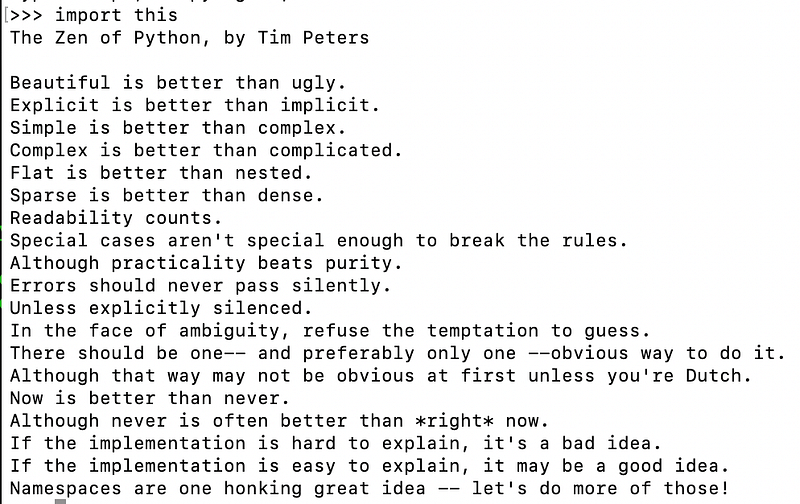
The Zen of Python (Photo by the Xiaoxu Gao)

The examples I’m gonna show you later are definitely following this philosophy. Please read it through. I will convey some of the core concepts to you so you are ready for the examples.

Simplicity, Clarity & Readability

I put these 3 characteristics in the same bucket because altogether it means writing simple and clean code that everybody understands. You can interpret it in many different ways. An example from the poem is flat is better than nested meaning do not have too may sub-categories (modules/package) in your project. sparse is better than dense means do not cram too many functions in 1-line of code (79-characters rule will break the line anyway).

It’s OK to break rules

Python is less strict than other programming languages for instance Java in terms of structure. You can write pure procedures like script or object-oriented paradigm like Java, or both. The point is you don’t have to put your code into shoes that are not right for you. Adhering rules too much can result in highly-abstract and boilerplate code.

Pay attention to error handling

Errors should not be silently passed. It’s better to fail fast and catch them than to silence the error and continue the program. Bugs become harder to debug when they’re far away from the original place, thus raising the exception now instead of later.

There should be one — and preferably only one — obvious way to do it

Although it is written as a guideline, I feel it’s really hard to achieve this in Python. Python is considered as a flexible programming language that is supported by a large community, meaning people can just come up with new ideas on the existing solutions everyday. However, the main message it tries to send out is it doesn’t worth the effort to learn every possible way. The community has already made some efforts to standardise the formats which I will talk about in a second.

PEP8

As I mentioned previously, Python is a flexible language without too many restrictions on the formatting. That’s how PEP8 comes into the picture. You are welcome to write Python code any way you want as long as it’s valid. However, using a consistent style makes your code easier to read and maintain. PEP8 provides a rich list of items. Definitely worth to check it.

Some well-known linters like Flake8 and Pylint can spot the issues before you push the code, thus saving review time for your co-workers. Libraries like Black can even automatically fix formatting issues. A common practice is to integrate these tools into your IDE (e.g. vscode) and CI/CD pipeline.

Value Swapping & Multiple Assignment

You’ve probably seen this question before: how to swap 2 bottles of water? The answer is getting the third empty bottle. It is how it’s handled in most of the languages where you need an extra variable to swap the values.

However in Python, life becomes easier. You can swap 2 values like this:

a = 1
b = 2
a, b = b, a

It looks so magic. The line a,b=b,a is called an assignment in which on the right side is an expression and left side is a couple of variables. The expression b,a on the right side is actually a tuple. Don’t believe? Try this out in a terminal:

>>> 1,2
(1, 2)

The parentheses are not really necessary in a tuple.

Besides, Python supports multiple assignment meaning there could be multiple variables on the left side and each of them is assigned to a value in the tuple. This is also called an unpacking assignment. Another example of unpacking assignment is list:

fruits = ["apple", "banana"]
f1,f2 = fruits

The outcome would be f1="apple" , f2="banana" .

By doing so, you can easily, elegantly and naturally assign variables without boilerplate code.

Passing multiple arguments (*args and **kwargs)

Related to the previous point, Python allows you to pass multiple arguments to a function without having them defined in the function. An example could be a function which sums up a few numbers, but the size of numbers is unknown.

A naive approach is to create a list variable as the input of the function.

def calculate(values):
    for val in values:
        ....
calculate([1,2,3,4])

However, in Python you can have an interface without providing a list.

def calculate(*values):
    for val in values:
        ....
calculate(1,2,3,4)
calculate(*[1,2,3,4]) # this works too

*values is equal to (1,2,3,4) which is a tuple (an iterable), and the logic inside the function can remain the same.

Similar to *args , **kwargs accepts named arguments and will unpack them into key, value pairs. This is useful when you have a bunch of optional arguments which have different meaning on its own. In this example, a house can be composed of different types of rooms. If you end up don’t like having too many arguments, you can always provide a dictionary instead.

def build_house(**kwargs):
    for room,num in **kwargs:
        ...
build_house(bedroom=2,kitchen=1,bathroom=1,garden=1)
build_house(bedroom=2,kitchen=1,bathroom=2,storage_room=1)

Another interesting thing with unpacking is you can easily merge 2 lists or dictionary.

first = [1,2,3]
second = [4,5,6]
result = [*first, *second] 
# [1,2,3,4,5,6]
first = {"k1":"v1"}
second = {"k2":"v2"}
result = {**first, **second}
# {"k1":"v1", "k2":"v2"}

Comprehension

Comprehension is cool. That was my first impression on it. Comprehension is used to create data structures in a single instruction instead of multiple operations. A classic example is to covert a for loop into 1 line of code.

result = []
for i in range(10):
    result.append(i**2)
# use list comprehension
result = [i**2 for i in range(10)]

Comprehension in general performs better because it has less operations, thus no need to execute .append() for every item. In complex functions, comprehension can clearly reduce the line of code and makes it easy for readers to understand. Another comparable way is to use lambda expression. The same expression can be written like this:

result = list(map(lambda x:x**2, [i for i in range(3)]))

But, don’t force your code to be a one-liner if it creates convoluted expressions. I read the book Clean Code in Python which has a good example about this. The collect_account_ids_from_arns function receives a list of values and then parse, match and finally add them into collected_account_ids .

This is the naive solution with for loop.

def collect_account_ids_from_arns(arns):
    collected_account_ids = set()
    for arn in arns:
        matched = re.match(ARN_REGEX, arn)
        if matched is not None:
            account_id = matched.groupdict()["account_id"]
            collected_account_ids.add(account_id)
    return collected_account_ids

This is the version with comprehension.

def collect_account_ids_from_arns(arns):
    matched_arns = filter(None, (re.match(ARN_REGEX, arn) for arn in arns))
    return {m.groupdict()["account_id"] for m in matched_arns}

Another even more compact version is using walrus operator. This example pushes the code to an actual one-liner. But this is not necessarily better than the second approach.

def collect_account_ids_from_arns(arns):
    return { matched.groupdict()["account_id"] for arn in arns if (matched := re.match(ARN_REGEX, arn)) is not None }

Comprehension can simplify the code and improve the performance, but taking into consideration the readability is also imperative.

Underscores

There are more than one way of using underscore in Python. Each type represents different characteristics of the attribute.

By default, all the attributes of an object are public. There is no private keyword that prevents you from accessing an attribute. Python uses an underscore in front of the function name (e.g. def _build() ) to delimit the interface of an object. Attributes starting with underscore should be respected as private and not be called externally. Private methods/attributes of a class are intended to be called only internally. If the class gets too many internal methods, it could be a sign that this class breaks the single responsibility principle, perhaps you want to extract some of the responsibilities to other classes.

Another Pythonic feature with underscore is so called magic methods. Magic methods are surrounded by double underscores like __init__ . Fun fact, according to The Original Hacker’s Dictionary, magic means

A feature not generally publicised which allows something otherwise impossible.

Python community adopts this term after Ruby community. They allow users to have access to the core features of the language from which creating rich and powerful objects. Being an expert on magic methods levels up your client with clean code. Sounds abstract? Let’s look at an example:

class House:
    def __init__(self, area):
        self.area = area
    def __gt__(self, other):
        return self.area > other.area
house1 = House(120)
house2 = House(100)

By overwriting magic method __gt__ , the client who uses class House can compare 2 houses with house1 > house2 instead of something like house1.size() > house2.size() .

Another example is to change the representation of a class. If you print house1 , you will get a Python object with an id.

print(house1)
# <__main__.House object at 0x10181f430>

With magic method __repr__ , the print statement becomes more self-explained. magic methods hide implementation details from the client, and meanwhile give developers the power to change its original behaviours.

def __repr__(self) -> str:
    return f"This house has {self.area} square meters."
print(house1)
# This house has 120 square meters.

Although using underscore is very common, do not define attributes with leading double underscores or define your own magic method. It’s not Pythonic and will just confuse your peers. I’ve written an article dedicated to this topic. You can check it out here.

Context Manager

Context Manager deserves an article on its own. It’s a distinctively useful feature to help you in the situations where you want to run things before and after certain actions. Resources management is a good use case of it. You want to make sure files or connections are closed after the processing.

In Python, you can use two approaches to allocate and release resources:

  • Use try .. finallyblock
  • Use with construct

For example, I want to open a file, read the content and then close it. This is how it looks like using try .. finally. finally statement guarantees that the resources are closed properly no matter what happens.

f = open("data.txt","r") 
try:
  text = f.read()
finally:
  f.close()

Nonetheless, you can make it more Pythonic using with statement. As you can see, a lot of boilerplate code is eliminated. When you use with statement, you enter a context manager which means the file will be closed when the block is finished, even if an exception occurred.

with open("data.txt", "r") as f:
  text = f.read()

How does that happen? Any context manager consists of two magic methods: __enter__ and __exit__ . The with statement will call the method __enter__ and whatever it returns will be assigned to the variable after as . After the last line of the code in that block finishes, Python will call __exit__ in which the resource is closed.

In general, we are free to implement a context manager with our own logic. I want to show you 3 different ways to implement a context manager (yeah .. we are breaking the rule of the Zen of Python). Let’s say I want to create a database handler for the backup. The database should go offline before the backup and restart after the backup.

  • Create a context manager class. In this example, nothing needs to be returned in the __enter__ sector and this is ok. The __exit__ sector receives the exceptions raised from the block. You can decide how to handle the exception. If you do nothing, then the exception will be raised to the caller after the resource is properly closed. Or you can handle exceptions in __exit__ block based on the exception type. But the general rule is not silently swallowing the errors. Another general tip is don’t return True in __exit__ block unless you know what you are doing. Returning True will ignore all the exceptions and they won’t be raised to the caller.
def stop_db():
  # stop database
def start_db():
  # start database
def backup_db():
  # backup database
class DatabaseHandler:
  def __enter__(self):
    stop_db()
def __exit__(self, exc_type, ex_value, ex_traceback):
    start_db()
with DatabaseHandler():
  backup_db()
  • Use contextmanager decorator. You don’t have to create a class each time. Imagine you want to turn existing functions into context managers without refactoring the code too much. In that case, you can make use of the decorator. Decorator is another topic on its own. But what it essentially does is to turn the original function into a generator. Everything before the yield will be part of __enter__ , the yielded value becomes the variable after as . In this example, nothing needs to be yielded. In general, if you just need a context manager function without preserving too many states, this is a better approach.
import contextlib
@contextlib.contextmanager
def db_handler():     
  try:         
    stop_db()         
    yield     
  finally:        
    start_db()
with db_handler():     
  db_backup()
  • Create a decorator class based on contextlib.ContextDecorator : the third option which is a mix of the previous two is to create a decorator class. Instead of using with statement which you still can, you use it as a decorator on top of the function. This has the advantage that you can reuse it as many times as you want by simply applying the decorators to other functions.
class db_handler_decorator(contextlib.ContextDecorator):
  def __enter__(self):
    stop_db()
  def __exit__(self, ext_type, ex_value, ex_traceback):
    start_db()
@db_handler_decorator()
def db_backup():
  # backup process

Wow, quite a long section for one item. I will not deep dive too much here on context manager. But the general tip is you should at least understand its working principle even if you are a beginner. As an intermediate or expert, just get your hands dirty with it and try to create a few context managers from scratch to discover its more nitty gritty.

Generator

In the previous item, I touched upon a concept called generator, which is also a peculiar feature that differentiates Python. Generator is an iterable which has a next() method defined. But the special thing is you can only iterate it once because they don’t store all the values in memory.

Generator is implemented as a function, but instead of using return like a regular function, it uses yield .

def generator():
  for i in range(10):
    yield i**2
print(generator)
# <function generator at 0x109663d90>

You will see this being used a lot in asyncio as coroutine is essentially a generator. Nevertheless, one of its advantages is reducing memory usage which could have a huge impact on big datasets. Let’s say I want to do some calculations for 1M records.

This is how you’d do it before knowing yield . The problem is you have to store the result of all 1M records in memory.

def calculate(size):
  result = []
  for i in range(size):
    result.append(i**2)
  return result
for val in calculate(1_000_000):
  print(val)

This is an alternative using yield . The result is only calculated when it’s its turn, thus saving a lot of memory usage.

def calculate(size):
  for i in range(size):
    yield i**2
for val in calculate(1_000_000):
  print(val)

Generator is also the secret behind lazy evaluation which I wrote another article about it. Feel free to check it.

Namespace and Scope

As the last line of the Zen of Python, let’s talk about namespace and scope in Python. A namespace is a system in Python to make sure that all the names (attributes, functions, classes, modules) are unique in the program. Namespaces are managed as a dictionary in Python where the keys are object names and the values are objects themselves.

Generally speaking, there are 4 types of namespaces in Python: Python built-in, Global, Enclosing and Local ordered by the hierarchy. This graph is also called LEGB rule. The interpreter first searches for the name in Local, then Enclosing, then Global, finally in Built-in, meaning a name in low level (e.g. Local) will overwrite the same name in higher level (e.g. Enclosing).
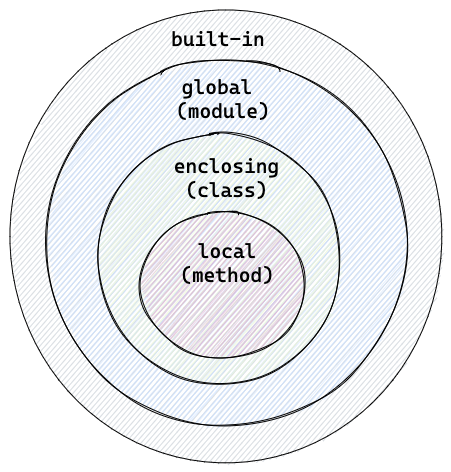
Created by Xiaoxu Gao

How does it effect our coding? Most of the time, if you just follow LEGB rule, you don’t have to do anything special. Given an example here. Think about it for a second before moving on. What is the output?

val = 1
def outer():
  val = 2
  
  def inner():
    val = 3
    print(val)
  
  inner()
print(outer())
print(val)

According to the LEBG rule, the lower level should overwrite the higher level. In function inner() , val has value 3, so calling function outer() will return 3. However, if you just print out val as print(val) does, you will get 1 because you are currently outside the function and trying to access the global value val = 1 .

But if you want to modify a global value from lower levels, this is possible with global keyword. What you need is to add global val at the point where you want to change the global value.

val = 1
def outer():
  val = 2
  
  def inner():
    global val
    val = 3
    print(val)
  
  inner()
print(outer()) # 3
print(val) # 3

It’s only a declaration, syntax like global val = 3 is not correct. An alternative is globals()[“val”] = 3 .

Mutable Default Argument

Last but not least, I want to show you a Pythonic caveat which you might think is a bug, but is actually a feature. Despite the fact that it’s confusing, it’s still a Pythonic feature that everyone must get along with it.

Consider the following example. The function add_to_shopping_cart adds food to shopping_cart. shopping_cart is by default an empty list if it isn’t provided. In this example, calling the function twice without providing shopping_cart should expect 2 lists with 1 element each.

def add_to_shopping_cart(food, shopping_cart = []):
  shopping_cart.append(food)
  return shopping_cart
print(add_to_shopping_cart("egg"))
# ["egg"]
print(add_to_shopping_cart("milk"))
# ["egg","milk"]

But this is what actually happened. The explanation is — the variable shopping_cart is created only once on the definition of the function, which is the first moment this function is called. From that point on, Python interpreter will use the same variable every time the function is called, meaning whenever the value is changed, Python will pass it to the next call instead of recreating it with the default value.

The fix is simple — use None as the default sentinel value and assign the actual default value [] in the body of the function. Because of the namespace and local scope, shopping_cart will be recreated every time it is None.

def add_to_shopping_cart(food, shopping_cart=None):
  shopping_cart = shopping_cart or []
  shopping_cart.append(food)
  return shopping_cart
print(add_to_shopping_cart("egg"))
# ['egg']
print(add_to_shopping_cart("milk"))
# ["milk"]

My rule of thumb is do not mutate mutable default arguments unless you know what you are doing.

Write a Pythonic library

What has been discussed so far is all about each individual Python feature. When it comes to writing a Python library or framework, we should also think about how to design a Python API. Besides following common Python idioms, the interface aimed to be used by others is in general smaller and more lightweight than other languages. It’s considered not Pythonic if the library reinvents the wheels too much. Thinking about ‘only one way to do it’ , it’s preferred to install the other third party package into your library.

Another general tip is, don’t write boilerplate code just for the sack of following design patterns like Java. An example is how to write a singleton in Python.

Other free resources

What I didn’t cover is some basic Pythonic expression like using for i, color in enumerate(colors) instead of for i in range(len(colors)) . Here are some awesome Youtube videos for you to refresh the knowledge.

https://www.youtube.com/watch?v=OSGv2VnC0go (Transforming Code into Beautiful, Idiomatic Python)

https://www.youtube.com/watch?v=x-kB2o8sd5c (A Python Æsthetic: Beauty and Why I Python)

You can also checkout this thread of 2003 when people discussed what was Pythonic back then. An interesting one! I love this paragraph:

Unpythonic is doing lots of type checking, or trying really hard to make something private/protected. Or using an index to loop through a list rather than just doing "for item in mylist". Basically anything people do because that's how they do it in other languages, thinking it's as good as it gets.

Conclusion

Thanks for making it here. Appreciate your time! This 15-minute article is only the tip of the iceberg in terms of Pythonic features. There are a lot more to say beyond each item and many other items not included in the article. Anyway, I hope this can inspire you to revisit your Python code and be able to give more valuable review comments to your peers. Any thoughts is more than welcome in the comment section!

Python
Programming
Software Development
Data Science
Machine Learning
Recommended from ReadMedium