
help
Friendly Reminders and Helpful Tips
Include Key Elements in Your Stories to Help Overall Impact

Hi Writers! Repeatedly seeing the same missing elements from posts and wanted to share a friendly reminder. Following the tips below will not only help get your stories published faster but serve to improve your online visibility. Faster because when editors look and see you’ve already tackled these tasks, Medium editors won’t stop to recraft your draft.
Missing Alt text on images
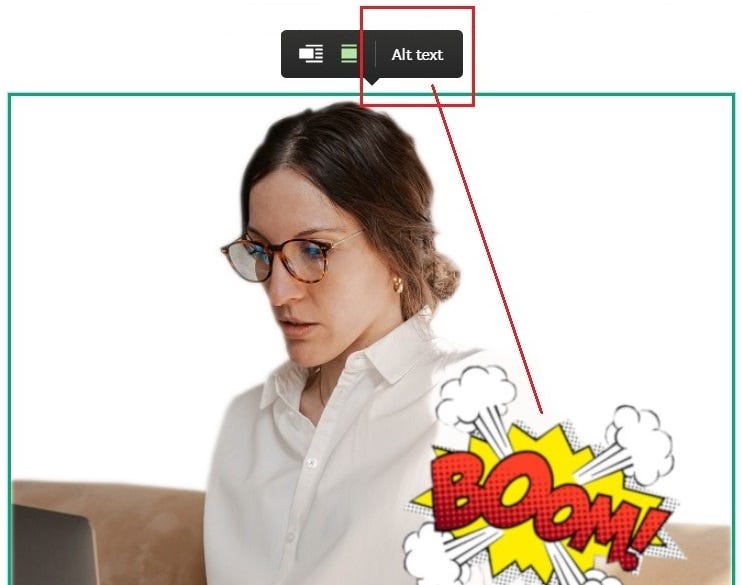
Hidden and often overlooked, adding text to your images helps to boost your story in search results. Your story, with complete image formatting, will be chosen to appear on search results above other stories that are missing Alt text. (not only Medium, everywhere engine-crawlers reach)— It’s that simple.
How? — Simply click on your image for the option to add text. ie: (above) Woman working on laptop, sitting on a couch. Photo-edited transparent layer with caption, BOOM!, overlay feature image.
Search Engine Optimization
Here’s a very important element to include to help BOOST your story. Dig into your SEO settings on your post. Click the 3 dots … then click More Settings. On the left you’ll see SEO Settings. Not required for Be Open submissions, but is highly encouraged.
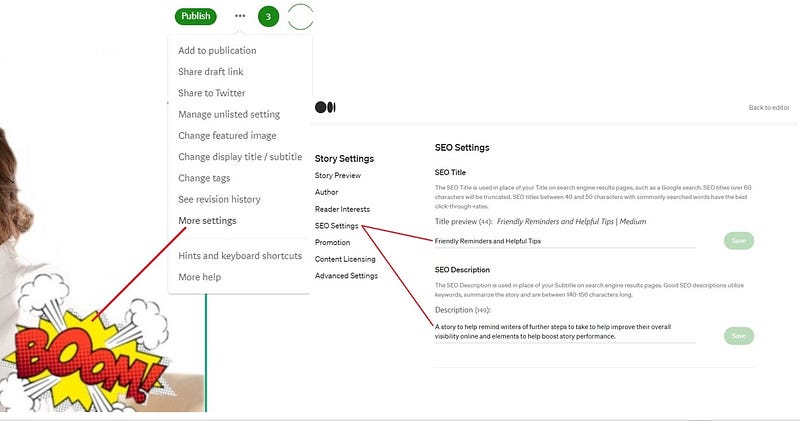
I always take time to double check and be sure these elements are being utilized in every story. But it’s a great idea for every writer to get in the practice of filling in the Alt text on all images and work on SEO settings for all your posts. It benefits you and can directly impact your earnings for every story. — And of course tags, but I haven’t seen anyone missing tags yet.
Keep up the great work! Loving reading your submissions!
Bonus Tip
To make part of an image background transparent, making the image POP, I play around with gimp (a free photoshop alternate).
Must be in this order, or transparency is wonky.
- Import your image choice
- Layer, transparency, add to alpha
- click the Lasoo (usually defaults to upper L, 3rd to R)
- Drag mouse, click, select/outline image you wish to keep
- Close last selection by clicking last node (must connect both ends of your selection)
- Select, feather (for natural edges)
- Select, invert (to clear unselected and keep what you outlined)
- Edit, clear
- Select, none (to deselect, you’re done)
- Export As (must be export as), .png — change the jpg to .png file to keep transparency
More writing tips for your Medium journey here.
Be Open Says,
Proudly we present to you one of Be Open Platinum Stories created by: Aria J.
Approved by Be Open’s Editors: A Shayens Abran & Karen Falcon