avatarsimbu

Free AI web copilot to create summaries, insights and extended knowledge, download it at here

2452

Abstract

is ready to publish.</p><div id="1ea3"><pre>flutter packages pub publish <span class="hljs-comment">--dry-run</span></pre></div><p id="e2bf">Once the code passes the checks, check it in.</p><p id="9c61">For now we are going to use it directly from the Git repository e.g.</p><div id="e33c"><pre><span class="hljs-symbol">dependencies:</span> <span class="hljs-symbol"> digestable_lego:</span> <span class="hljs-symbol"> git:</span> https:<span class="hljs-comment">//gitlab.com/simbu-mobile/digestablelego.git</span></pre></div><p id="7611">It is likely that in the future I move to a privately hosted pub.dev repository to get the version and update benefits. You can find more details here:</p><ul><li><a href="https://dart.dev/tools/pub/dependencies#git-packages">Git packages</a></li><li><a href="https://dart.dev/tools/pub/custom-package-repositories">Custom package repository</a></li></ul><h2 id="50ea">Application Types</h2><p id="0869">We are now up to four:</p><ul><li>MaterialApp</li><li>CupertinoApp</li><li>FluentApp</li><li>MacosApp</li></ul><p id="796f">They reflect the different design systems/guidelines, Material on Android, Google, Linux and the Web, Cupertino on iOS, Fluent on windows and MacOs on macs.</p><p id="6620">Currently we are only targeting iOS & Android and extending to the web, so that narrows it down to two:</p><ul><li>MaterialApp</li><li>CupertinoApp</li></ul><p id="6d83">For simplicities sake I’ve now started to move away from device detection and use the application type to differentiate in the widgets that require cross platform support.</p><div id="3e43"><pre>import <span class="hljs-string">'package:flutter/cupertino.dart'</span>;

extension BuildContextExtension <span class="hljs-keyword">on</span> BuildContext { <span class="hljs-function"><span class="hljs-built_in">bool</span> <span class="hljs-title">isCupertinoApp</span>()</span> { <span class="hljs-keyword">var</span> cupertinoApp = findAncestorWidgetOfExactType<CupertinoApp>(); <span class="hljs-keyword">return</span> cupertinoApp != <span class="hljs-literal">null</span>; } }

<span class="hljs-comment">// And usage in the cross platform widget</span>

<span class="hljs-keyword">return</span> context.isCupertinoApp() ? <span class="hljs-function"><span class="hljs-keyword">const</span> <span class="hljs-title">CupertinoListTile</span>() : <span class="hljs-keyword">const</sp

Options

an> <span class="hljs-title">ListTile</span>()</span>;</pre></div><p id="5d7f">NB: findAncestorWidgetOfExactType is powerful stuff and has a number of uses.</p><h2 id="a6c4">Testing & Development Rhythm</h2><p id="3dae">Packaging the UI widgets has given me a moment of clarity with regard to test types.</p><p id="94ff">I would now expect widget and unit tests in the DigestableLego project and feature and unit tests in the DigestableMe project.</p><p id="251f">Whilst there could possible be the need for widgets tests in DigestableMe it is unlikely, so we shall see how that pans out.</p><p id="9680">Just looking to build a development rhythm e.g. new UI, build widgets in DigestibleLego and showcase, agree on look and feel and style. Then move to API data side calls and mapping etc… Finally run through the Dev done checklist. More on this later on.</p><h2 id="06ee">Sound and Vision</h2><figure id="907d"><img src="https://cdn-images-1.readmedium.com/v2/resize:fit:800/1*xrLC6QYYKEcEUrWl2ENrGA.png"><figcaption>Better call Saul (Netflix)</figcaption></figure><h2 id="dc01">Links</h2><ul><li><a href="https://docs.flutter.dev/development/packages-and-plugins/using-packages">Using packages</a></li><li><a href="https://docs.flutter.dev/development/packages-and-plugins/developing-packages">Developing packages & plugins</a></li><li><a href="https://dart.dev/tools/pub/dependencies#git-packages">Git packages</a></li><li><a href="https://dart.dev/tools/pub/custom-package-repositories">Custom package repositories</a></li><li><a href="https://readmedium.com/how-to-create-publish-and-manage-flutter-packages-b4f2cd2c6b90">How to Create, Publish and Manage Flutter Packages</a>-</li><li><a href="https://readmedium.com/hosting-a-private-dart-package-repository-774c3c51dff9">Hosting a private Dart package repository</a></li><li><a href="https://suragch.medium.com/a-complete-guide-to-flutters-listtile-597a20a3d449">A complete guide to Flutter’s ListTile</a></li><li><a href="https://www.kindacode.com/article/flutter-adding-separators-to-list-view/">3 Ways to Add Separators between Items in a ListView</a></li><li><a href="https://itnext.io/design-shapes-in-flutter-introduction-to-the-morphable-shape-package-30e0d33c60a7">Morphable Shapes</a></li><li><a href="https://www.raywenderlich.com/19421827-creating-and-publishing-a-flutter-package">Raywenderlich.com: Creating and Publishing a Flutter Package</a></li></ul></article></body>

Join Medium to view all my articles.

Flutter — Packages

The number of files in the project has grown to a point where it is more difficult to work with. I know because I now need to use ⌘ + P to find files rather than the file explorer.

It now makes sense to start to break up the solution into packages to help make it easier to understand and maintain, and help to ensure each part has a single responsibility.

I started by pulling out the UI widgets as a precursor for creating a storybook to show case them to the stakeholders.

To do this I created a new project called DigestableLego and hosted it on GitLab.

I then moved in the Listview and Listitem widgets, built the package and included it back in DigestableMe Application.

Ta Da
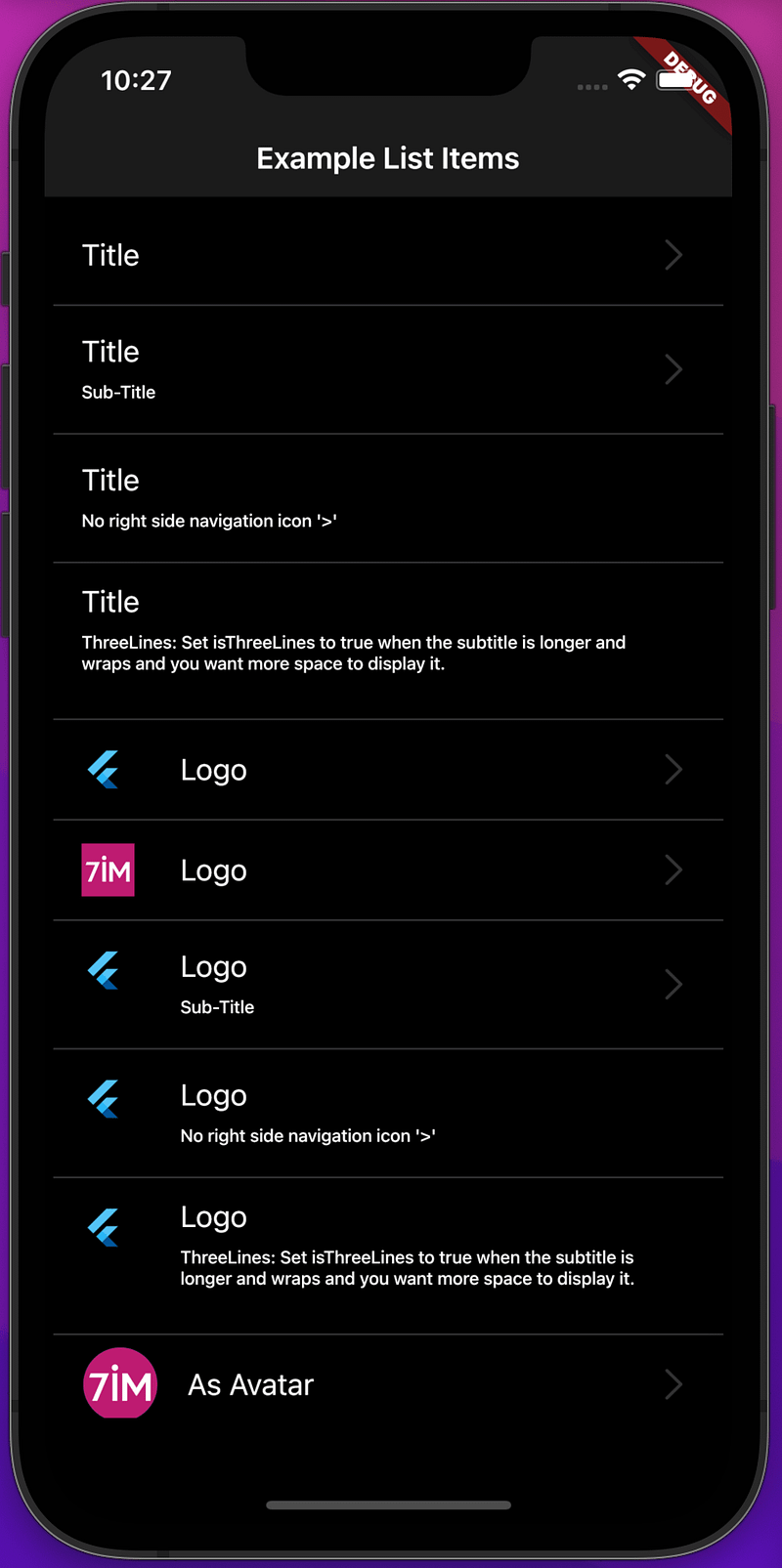
Digestable Lego: List item examples
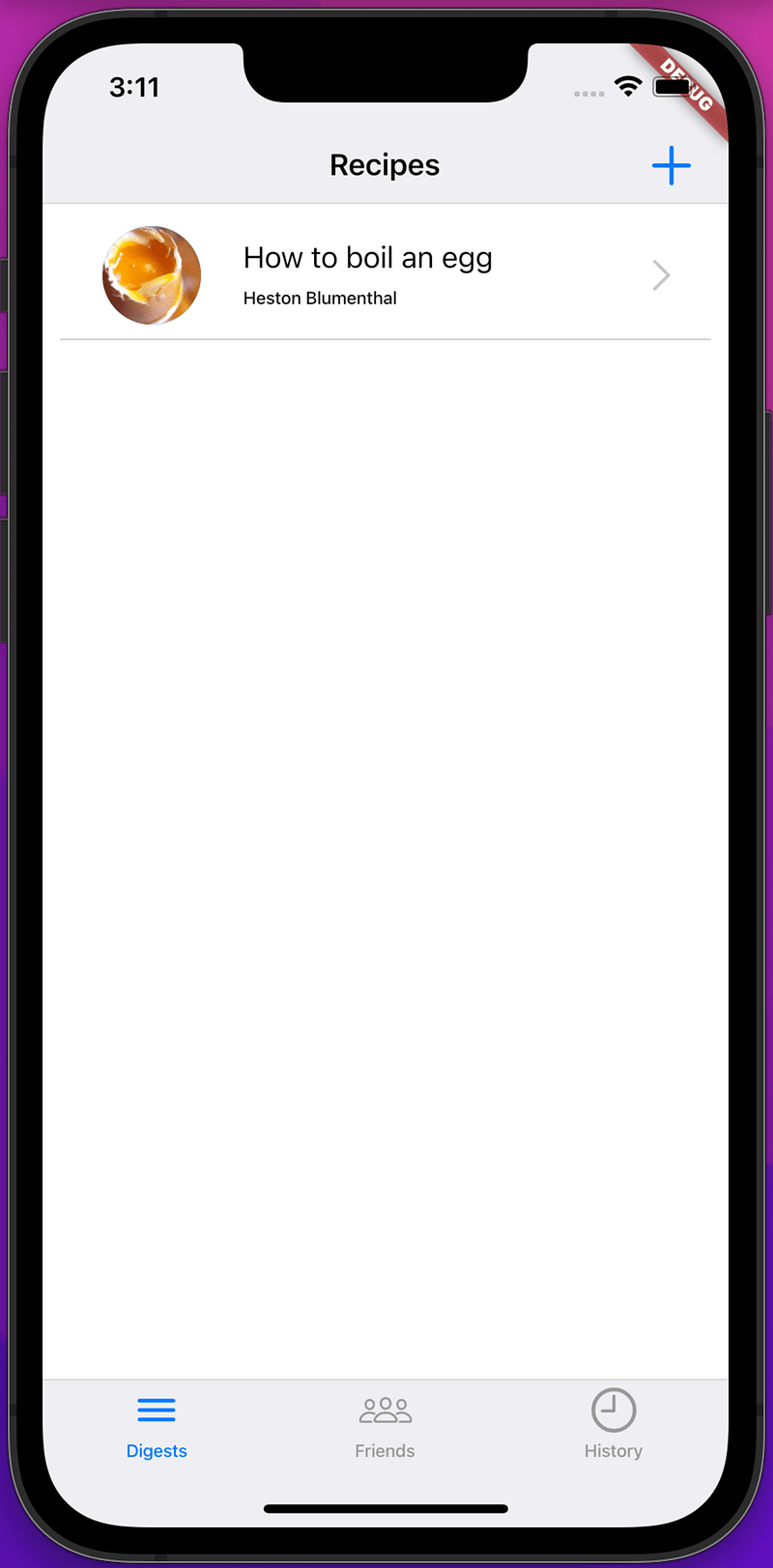
Using the DigestableLego list widget in the project.

Xp

Creating and using a package

Create package.

flutter create --template=package digestablelego

Create a new Git repository.

git init
git add --all
git commit -m "initial commit"
git remote add origin https://gitlab.com/simbu-mobile/DigestableLego.git
git push -u origin master

Add code and examples to the project.

Check Package is ready to publish.

flutter packages pub publish --dry-run

Once the code passes the checks, check it in.

For now we are going to use it directly from the Git repository e.g.

dependencies:
  digestable_lego:
    git: https://gitlab.com/simbu-mobile/digestablelego.git

It is likely that in the future I move to a privately hosted pub.dev repository to get the version and update benefits. You can find more details here:

Application Types

We are now up to four:

  • MaterialApp
  • CupertinoApp
  • FluentApp
  • MacosApp

They reflect the different design systems/guidelines, Material on Android, Google, Linux and the Web, Cupertino on iOS, Fluent on windows and MacOs on macs.

Currently we are only targeting iOS & Android and extending to the web, so that narrows it down to two:

  • MaterialApp
  • CupertinoApp

For simplicities sake I’ve now started to move away from device detection and use the application type to differentiate in the widgets that require cross platform support.

import 'package:flutter/cupertino.dart';

extension BuildContextExtension on BuildContext {
  bool isCupertinoApp() {
    var cupertinoApp = findAncestorWidgetOfExactType<CupertinoApp>();
    return cupertinoApp != null;
  }
}

// And usage in the cross platform widget

return context.isCupertinoApp()
              ? const CupertinoListTile()
              : const ListTile();

NB: findAncestorWidgetOfExactType is powerful stuff and has a number of uses.

Testing & Development Rhythm

Packaging the UI widgets has given me a moment of clarity with regard to test types.

I would now expect widget and unit tests in the DigestableLego project and feature and unit tests in the DigestableMe project.

Whilst there could possible be the need for widgets tests in DigestableMe it is unlikely, so we shall see how that pans out.

Just looking to build a development rhythm e.g. new UI, build widgets in DigestibleLego and showcase, agree on look and feel and style. Then move to API data side calls and mapping etc… Finally run through the Dev done checklist. More on this later on.

Sound and Vision

Better call Saul (Netflix)

Links

Flutter
Programming
Mobile
iOS
UI
Recommended from ReadMedium