

How to Create, Publish and Manage Flutter Packages
Dart Package vs Plugin Package
Dart packages: Only packages are written using Flutter and Dart SDKs independent of native platforms such which are Android and iOS. The meet_network_image package is an example of a Dart package.
Plugin packages: A special Dart package for Android (using Java or Kotlin) and/or iOS (using ObjC or Swift) platform-specific application that includes an API written in the Dart code. The image_picker plugin allows you to take pictures or retrieve an existing image from your gallery using separate APIs for iOS and Android.
Creating Dart Package
Step 1
Open the command line in your operating system, and type the following line with your package_name
flutter create --template=package package_nameOR
If you are using an IntelliJ IDEA or Android Studio, you can convert the project type to a package when creating a Flutter project.
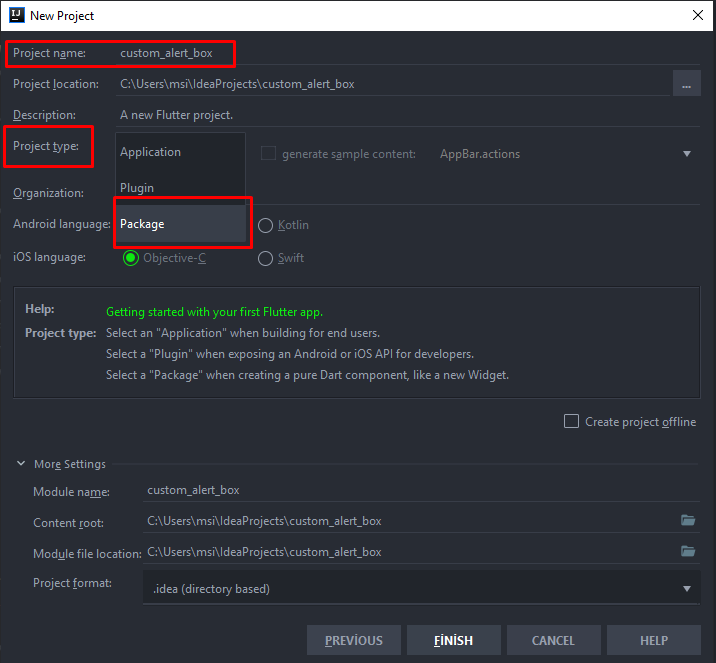
Step 2
Let’s put your project to the GitHub
After opening a repository via Github, you can upload these commands one by one from the directory where your project is located to Github, remember to enter your own remote address!
git init
git add --all
git commit -m "initial commit"
git remote add origin https://github.com/onatcipli/custom_alert_box.git
git push -u origin master
After pushing all project files to GitHub repository, We can begin with editing pubspec.yaml.
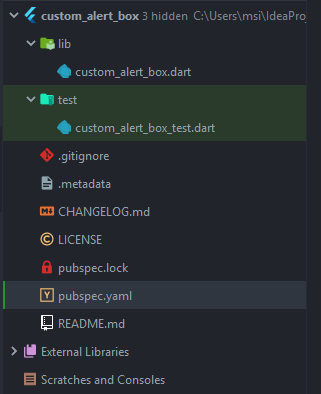
This is how our project files look like, lib/ is the folder that we will create and write the package codes (In Step 3)
pubspec.yaml
Let's begin with editing pubspec.yaml file.
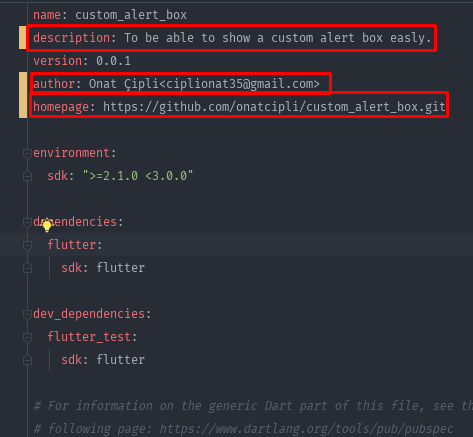
In the description part, you can write a brief description of the package and what the package does.
In the author part, you need to write to people who support this package by using the following pattern
FirstName LastName
Onat Çipli
In the homepage part, you can enter the package repository URL
CHANGELOG.md
As you can see at the following part, we’ll list the changes in our package one by one in the changelog.md file.
## [version] - Date
* explanations about changes.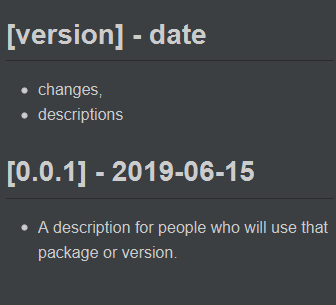
## [0.0.1] - 2019-06-15

* A description for people who will use that package or version.
LICENSE
Choose an open source license,
I will use MIT LICENSE, you only need to write your name and the year
Copyright © [year] [fullname]
Copyright (c) 2019 Onat ÇipliPermission is hereby granted, free of charge, to any person obtaining a copy
of this software and associated documentation files (the "Software"), to deal
in the Software without restriction, including without limitation the rights
to use, copy, modify, merge, publish, distribute, sublicense, and/or sell
copies of the Software, and to permit persons to whom the Software is
furnished to do so, subject to the following conditions:The above copyright notice and this permission notice shall be included in all
copies or substantial portions of the Software.THE SOFTWARE IS PROVIDED "AS IS", WITHOUT WARRANTY OF ANY KIND, EXPRESS OR
IMPLIED, INCLUDING BUT NOT LIMITED TO THE WARRANTIES OF MERCHANTABILITY,
FITNESS FOR A PARTICULAR PURPOSE AND NONINFRINGEMENT. IN NO EVENT SHALL THE
AUTHORS OR COPYRIGHT HOLDERS BE LIABLE FOR ANY CLAIM, DAMAGES OR OTHER
LIABILITY, WHETHER IN AN ACTION OF CONTRACT, TORT OR OTHERWISE, ARISING FROM,
OUT OF OR IN CONNECTION WITH THE SOFTWARE OR THE USE OR OTHER DEALINGS IN THE
SOFTWARE.Step 3 (Writing package code /lib)
Now it’s time for implementing our dart package code,
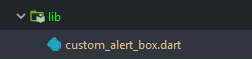
We will delete the codes inside the custom_alert_box.dart file, to be able to create our code. (You need to fix test folder when you delete the code inside the custom_alert_box.dart, you can comment on the tests for now)
I just create a CustomAlertBox class, and inside that class, I create a static method named showCustomAlertBox to be able to show an alert box with using our package.
Step 4
Creating Example
Our package should include example project which using our Dart package code with help of that example project you can easily test your package code, by the way, is an example for other users to learn how to use your package.
In our package directory,
C:\Users\msi\IdeaProjects\custom_alert_box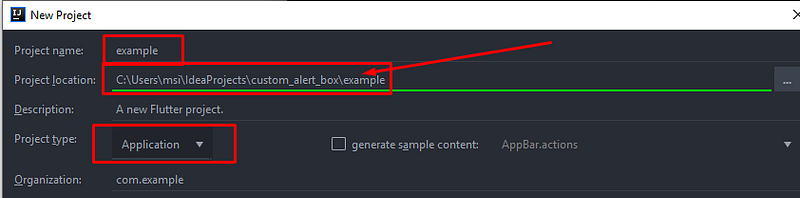
We are creating a new Flutter project in our Dart Package directory as bellow and inside the example project inside the pubspec.yaml file we need to add our package like following,
...
dependencies:
  flutter:
    sdk: flutter
custom_alert_box:
path: ../
...After that point, we able to import our package and use it in the example project.
import 'package:custom_alert_box/custom_alert_box.dart';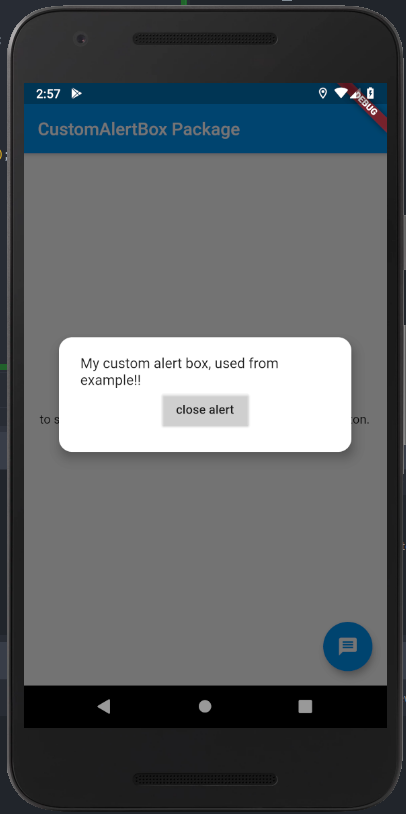
Step 5(Publish package)
Before this step we need to push all changes to GitHub remote.
We able to publish our package to pub.dev with the following command,
flutter packages pub publish
After that, Command line gives you a link to verify your E-mail and pub.dev send you a mail about your package,
Dear package maintainer,
[email protected] has published a new version (0.0.1) of the custom_alert_box package to the Dart package site (pub.dev).
For details, go to https://pub.dev/packages/custom_alert_box/versions/0.0.1
If you have any concerns about this package, file an issue at https://github.com/dart-lang/pub-dev/issues.
Thanks for your contributions to the Dart community!
With appreciation, the Dart package site admin
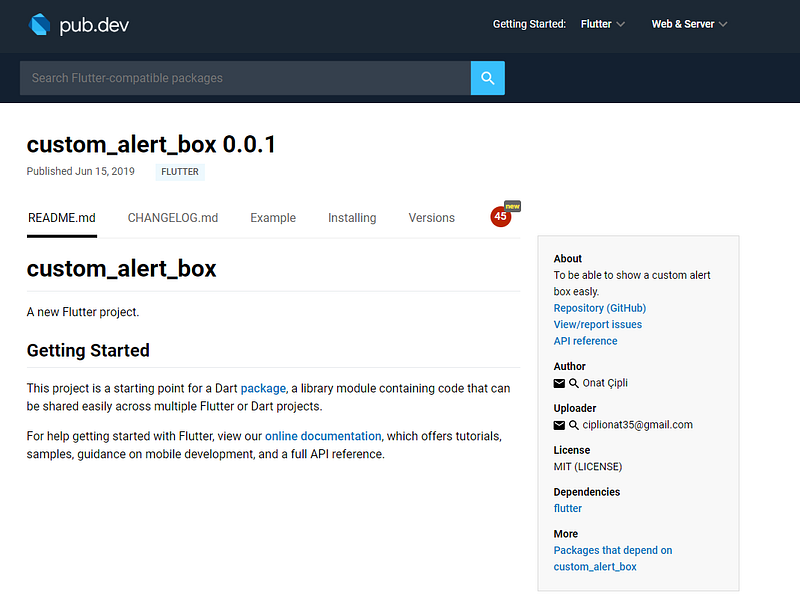
Managing Package
Every time you make changes in your package, you can publish the new version with flutter packages pub publish but you need to push all the changes to GitHub and do not forget to write the changes to your CHANGELOG.md, change pubspec.yaml version
Package source code custom_alert_box Package example source code Published package custom_alert_box 0.0.1 in pub.dev
You can reach and follow me on twitter @CipliOnat or Linkedin.


