
Fine-Tuning BigQuery Costs: Best Practices and Advanced Techniques
BigQuery Cost Control
BigQuery is an incredibly powerful cloud data warehouse that can help businesses of all sizes store, process, and analyze massive amounts of data quickly and efficiently. However, as with any powerful tool, it’s important to understand and manage the associated costs in order to make the most of your investment.
In this article, I am going to dive into the nitty-gritty of fine-tuning BQ costs, exploring a range of strategies and techniques for optimizing your usage and minimizing expenses. I try to cover everything from understanding the BQ pricing model to implementing advanced techniques like cost allocation tags and ML algorithms.
So one question is why is it so important to optimize your costs? Well, for one thing, BQ can get expensive pretty quickly if you’re not careful. With pricing based on the amount of data stored and the number of queries processed, it’s easy to rack up large bills if you’re not keeping an eye on things. But beyond the financial considerations, optimizing your costs can also help you make the most of the platform’s performance and capabilities.
Understanding BigQuery Costs
So, if you want to optimize your costs, the first step is to understand how BQ pricing works. At a high level, it charges you based on two main factors: data storage and query processing.
Data Storage: BQ charges you based on the amount of data you store in the platform. Specifically, you’ll be charged based on the amount of data you store in the “active storage” tier — this is the data that’s readily available for querying. Data that’s in the “long-term storage” tier — i.e., data that’s been inactive for more than 90 days — is charged at a lower rate.
Query Processing: The second main factor is query processing. Essentially, BQ charges based on the number of queries you run and the amount of data processed by each query. The more complex and resource-intensive your queries, the more you’ll be charged.
Tips for Optimizing BigQuery Costs
Here are a few tips to get you started:
- Minimize data storage: Keep your active storage to a minimum by regularly deleting any unnecessary data or archiving it to long-term storage.
- Use data partitioning: Partitioning your data can help reduce query costs by limiting the amount of data that needs to be scanned. You can partition your data based on time, geography, or any other relevant factors.
- Write efficient queries: The more efficient your queries, the less data you’ll need to process, and the less you’ll be charged. Make sure to use appropriate filters, aggregates, and other query optimizations to minimize resource usage. BQ internally has some ways to optimize your query, but it’s still limited to some of your decisions.
- Use caching: BQ has a built-in caching feature that can help reduce query costs by reusing the results of previous queries. Make sure to configure caching settings appropriately to take advantage of this feature.
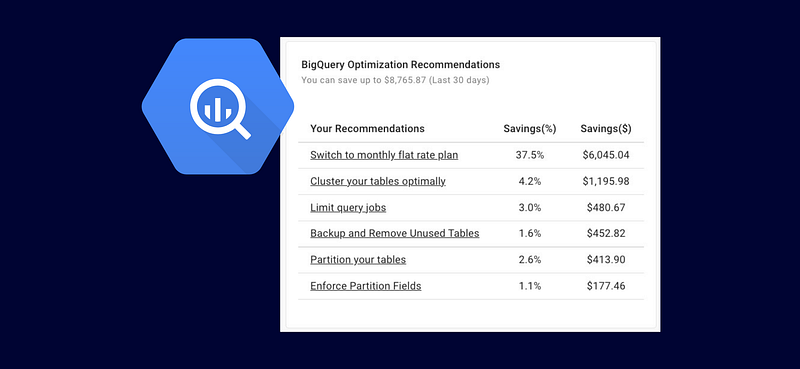
Below you can find some of the recommended BQ recommendations on an example project.
Controlling Costs in BigQuery
Let’s talk about some strategies for controlling costs. There are a few key things you can do to manage your expenses and prevent unexpected billing surprises.
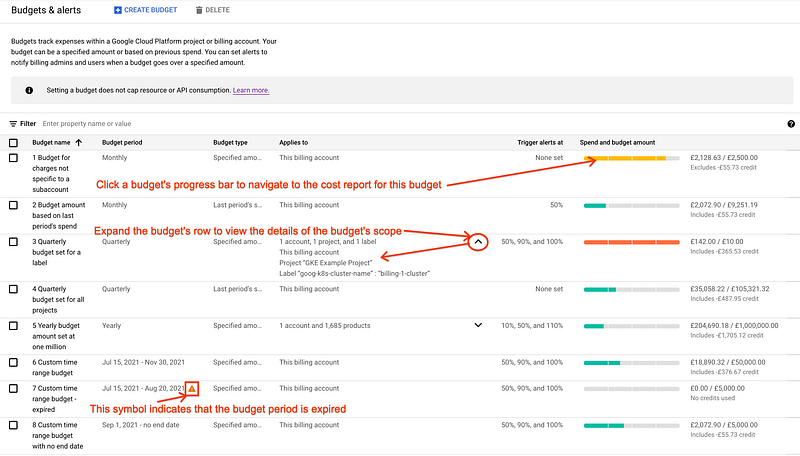
Set up Billing Alerts: One of the easiest and most effective ways to control your costs is to set up billing alerts. This allows you to receive notifications when your spending reaches a certain threshold or when unexpected expenses occur. You can set up alerts via email, SMS, or in the Cloud Console.
Understand Query Pricing: As I mentioned earlier, query processing is one of the main factors and understanding its pricing is key to controlling expenses. BQ charges based on the amount of scanned data, so make sure to monitor your query usage and optimize your queries to minimize data processing. You can get how much data BQ scans through either UI or API.
Reduce Storage Costs: I mentioned earlier that amount of active storage matters. By regularly removing any unnecessary data or archiving it to long-term storage, you can minimize this cost.
Reduce Data Transfer Costs: Finally, you can also reduce costs by minimizing data transfer costs. BQ charges you for transferring data into and out of the platform, so make sure to keep an eye on your data transfer usage and optimize accordingly. For example, you can reduce data transfer costs by using regional data transfer, compressing your data, or using a Content Delivery Network (CDN).
Fine-Tuning BigQuery Performance
Optimizing your performance is another key factor in controlling costs and getting the most out of the platform. In this section, I am planning to cover some techniques for fine-tuning BigQuery performance and making your queries run more efficiently.
Understand Query Performance: BQ uses a combination of CPU, memory, and I/O resources to execute queries, and performance can vary based on a number of factors, including query complexity, data size, and concurrency.
Improve Query Efficiency: There are a number of techniques you can use to make your queries run faster and more efficiently, including:
- Use appropriate filters and aggregates (with appropriate partitioning and clustering)
- Avoid joins when possible
- join optimization (e.g. use larger table first followed by smaller table, or filter before join, etc)
- Late aggregation (except when it helps with join)
- Nest repeated data (in a denormalized data)
- Use the correct data types
- Use caching to avoid redundant work
- Use query plan explanations to identify performance bottlenecks
Optimize Data Storage: This includes using partitioning, clustering, and other techniques to minimize the amount of data that needs to be processed, as well as using appropriate data compression techniques to reduce storage requirements.
Cache Queries: As I said earlier, BQ has a built-in caching feature that allows you to reuse the results of previous queries, avoiding redundant work and reducing processing time. You can configure caching settings via the BigQuery web UI or the API.
Query Tuning in Action
Assuming you are an e-commerce company and you want to find your total sales for a certain product and for each of the past three months. You can find it using below code.
SELECT
  FORMAT_DATE('%Y-%m', DATE_TRUNC(DATE(sale_timestamp), MONTH)) AS month,
  product_name,
  SUM(sale_amount) AS total_sales
FROM
  my_dataset.sales_table
GROUP BY
  month, product_name
HAVING
  product_name = 'Your Product Name'
  AND month >= FORMAT_DATE('%Y-%m', DATE_SUB(CURRENT_DATE(), INTERVAL 3 MONTH))
ORDER BY
  month DESC
As you see, in this scenario the entire table is scanned and aggregated and then the product and the data range are selected. Fortunately, BQ is super smart and knows that the query is not efficient and it optimizes it under the hood, but obviously there is a limit to automatic fine tuning. It’s important to know what are the flaws in your query. For example, in this case, you can use partitioning and filtering (WHERE clause) to limit the data scanned data. In below code, I ask my query to only look for my product (assuming it’s well partitioned, it would save me a lot of cost), and then limit the date range my query scans.
SELECT
  FORMAT_DATE('%Y-%m', DATE_TRUNC(DATE(sale_timestamp), MONTH)) AS month,
  product_name,
  SUM(sale_amount) AS total_sales
FROM
  my_dataset.sales_table
WHERE
  _PARTITIONTIME >= TIMESTAMP_SUB(CURRENT_TIMESTAMP(), INTERVAL 3 MONTH)
  AND product_name = 'Your Product Name'
GROUP BY
  month, product_name
ORDER BY
  month DESC
Another simple win in your query tuning is your data types. If any of your time/date column are stored as string, it takes resources to convert them to timestamp/date for processing. You can fine tune your model and change the data types in the original table.
You can also use query plan execution to identify performance bottlenecks in your queries. Suppose you have a large table of e-commerce transactions with the following schema:
CREATE TABLE my_dataset.transactions (
  transaction_id STRING,
  customer_id STRING,
  order_date DATE,
  order_amount FLOAT64,
  -- other columns
)
If you want to find the total sales for each customer in the past month, you might write a query like this:
SELECT
  customer_id,
  SUM(order_amount) AS total_sales
FROM
  my_dataset.transactions
WHERE
  order_date >= DATE_SUB(CURRENT_DATE(), INTERVAL 1 MONTH)
GROUP BY
  customer_id
To see the plan execution, you can click on the “Query Plan” button in the BigQuery UI or add the --explain flag to your query. The query plan execution shows the steps that takes to execute, including the estimated number of bytes processed and the cost of each step. If you want to understand the details of execution plan, Google has a good video tutorial here.
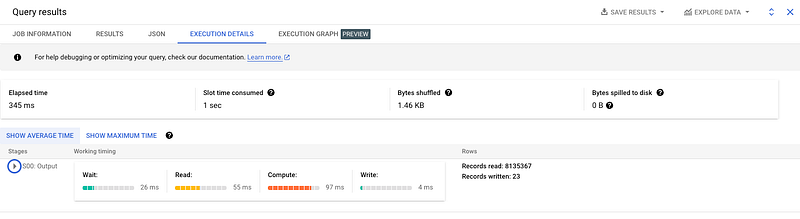
Recently BQ has added a feature for execution graph as well, which illustrates the execution plan even better and with more details.
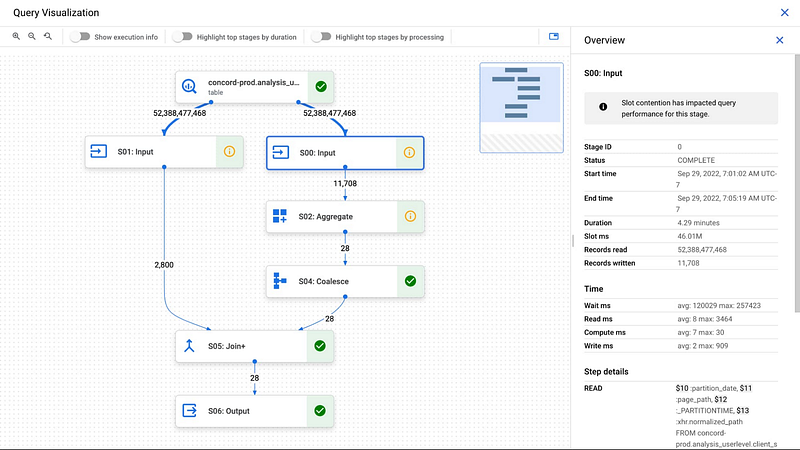
In this example, the plan might show that the table scan for the transactions table is the most expensive step, indicating that this is a potential bottleneck. To optimize the query, you can add a partitioning scheme to the transactions table based on the order_date column, so that BQ can skip over partitions that don't contain data for the past month.
Alternatively, the plan might show that the query is being processed by a single node, indicating that it could benefit from parallelization. In this case, you can consider modifying the query to use a HASH or RANGE partitioned table, which allows to parallelize the processing of the query across multiple nodes.
Another use case of query execution plan is for finding data skews. If there is a huge difference between average worker time and maximum worker time, it suggests that you have a data skew and you need to rethink about partitioning, clustering, or indexing.
Another example of fine tuning is when you look at your query and see that having a composite index can improve your query. Although BQ is heavily indexed, you can still benefit from creating composite and customized indexes. here’s an example code for creating a composite index on two columns, order_date and order_amount, in a table called transactions in a dataset called my_dataset
CREATE INDEX my_dataset.transactions_index ON my_dataset.transactions(order_date, order_amount)Another approach, especially in large and complex queries is to break it down into multiple CTEs and avoid using joins. dbt labs have studied the use of CTEs and found out they can be a better alternative to subqueries in modern data warehouse and if used appropriately they can simplify sql queries and improve the performance. You can read their findings here.
Another advanced technique that might be handy time to time is to use approximate aggregates for faster query execution when the exact value is not highly important. These functions trade off accuracy for speed and resource usage. One scenario for using these approximates is when you notice high amount of CPU usage in your query execution plan, and you want to reduce it significantly. Sometimes an approximate function uses 1/100 CPU without losing that much accuracy. One such function is APPROX_COUNT_DISTINCT. Here's an example:
SELECT
  product_name,
  APPROX_COUNT_DISTINCT(customer_id) AS approx_unique_customers
FROM
  my_dataset.sales_table
WHERE
  _PARTITIONTIME >= TIMESTAMP_SUB(CURRENT_TIMESTAMP(), INTERVAL 3 MONTH)
  AND product_name = 'Your Product Name'
GROUP BY
  product_name
You can also benefit from caching techniques for your ad hoc works. BQ automatically caches the results of a query for 24 hours. You can enable or disable query caching by setting the useQueryCache flag in your query options. You can also use the CREATE TABLE ... AS SELECT statement to cache the results of a query in a new table for faster access.
Finally, window function could become very useful for complex calculations. So, try your best to take advantage of their power whenever you can. Window functions can be used to perform complex calculations that require information from other rows in the result set. For example, if you want to calculate the month-over-month sales growth, you can use the LAG() window function:
WITH monthly_sales AS (
  SELECT
    FORMAT_DATE('%Y-%m', DATE_TRUNC(DATE(sale_timestamp), MONTH)) AS month,
    product_name,
    SUM(sale_amount) AS total_sales
  FROM
    my_dataset.sales_table
  WHERE
    _PARTITIONTIME >= TIMESTAMP_SUB(CURRENT_TIMESTAMP(), INTERVAL 3 MONTH)
    AND product_name = 'Your Product Name'
  GROUP BY
    month, product_name
)
SELECT
  month,
  product_name,
  total_sales,
  (total_sales - LAG(total_sales) OVER (PARTITION BY product_name ORDER BY month)) / LAG(total_sales) OVER (PARTITION BY product_name ORDER BY month) * 100 AS sales_growth_percentage
FROM
  monthly_sales
ORDER BY
  month DESC
Advanced Techniques for Cost Optimization
In the previous sections, I covered some basic strategies for optimizing costs and performance. Here, I try to cover some advanced techniques.
Use Partitioning and Clustering: Partitioning allows you to limit your data scan and clustering helps to optimize query performance by grouping related data together.
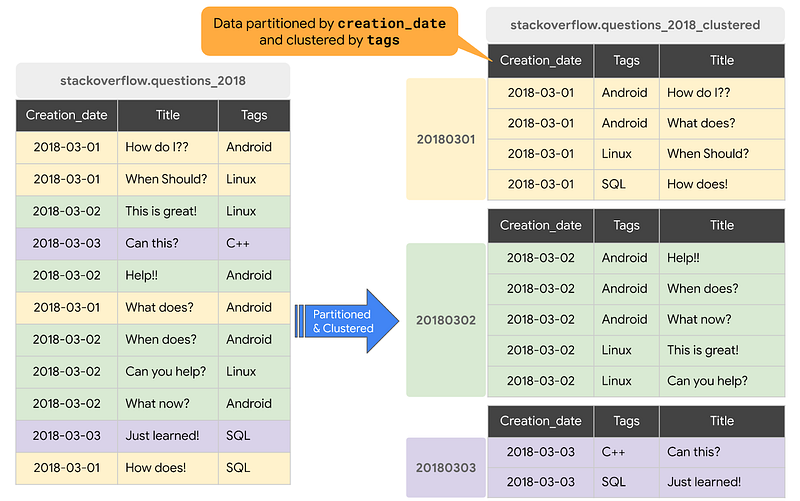
Implement Cost Allocation Tags: This allows you to allocate costs to specific departments or projects, making it easier to track spending and identify areas for optimization. Cost allocation tags can be set up via the Cloud Console or API.
Use ML: Finally, you can also use ML to predict and optimize BQ costs. By analyzing query patterns and usage data, ML algorithms can identify areas for cost optimization and make recommendations for improving efficiency. This can be especially useful for larger organizations with complex usage patterns and multiple departments or teams using BQ. Hopefully, in the future, it becomes a standard tool that comes with BQ.
Best Practices for Cost Optimization
Let’s explore some best practices for cost optimization. That way you can establish a sustainable cost optimization framework.
Establish Governance Policies and Guidelines: This can include setting up access controls, defining usage policies, and establishing cost allocation rules. By having clear guidelines and policies in place, you can ensure that your usage is optimized for cost and performance.
Conduct Regular Cost Reviews: This helps you to identify areas for optimization, track your progress over time, and ensure that your cost optimization efforts are effective. You can use tools like Cloud Billing reports and BigQuery Audit logs to track usage and identify areas for improvement. There are also third party tools you can use to analyze query performance and optimize based on insights.
Careful Planning: It’s important to design your pipelines carefully and consider your users and their usage patterns. For example, schedule data loads during off-peak hours because scheduling data loads and heavy processing tasks during off-peak hours could minimize the impact on query performance and costs.
Incorporate Cost Optimization into DE Workflows: Finally, it’s important to incorporate cost optimization into your DE workflows. This can include using CI/CD tools to catch expensive queries, or build automation tools to optimize queries and data storage, establishing performance and cost thresholds for your data pipelines, and regularly monitoring and adjusting your usage based on changing needs and priorities.
Establish Rules for Writing Queries: It’s important to establish rules for writing queries to ensure that your data analysts or whoever is building models follow best practices. For instance, you can encourage the use of views and materialized views, as well as incremental materialization when needed. It’s also important to discourage the use of “SELECT *” and instead use “SELECT” statements with relevant columns to limit the amount of data scanned. Additionally, discouraging excessive use of nested and repeated fields can help prevent complex and resource-intensive queries. You can recommend flattening data whenever possible to improve query performance and reduce costs. Finally, it’s essential to discourage running large-scale ad hoc queries without optimization.
Conclusion
In conclusion, BQ is an incredibly powerful cloud data warehouse that can offer great benefits to businesses of all sizes. However, optimizing costs and making the most of the platform’s performance is essential. By understanding the pricing model, implementing advanced techniques, and following best practices, you can effectively manage expenses while taking full advantage of BQ’s capabilities.
In this article, I explored a range of strategies, including minimizing data storage, using partitioning and clustering, writing efficient queries, and leveraging ML algorithms. Remember, establishing governance policies and guidelines, conducting regular cost reviews, and incorporating cost optimization into your data engineering workflows are key steps in building a sustainable cost optimization framework. So, take charge of your BQ costs and enjoy the full benefits this platform has to offer.
References
- How does query processing work in BigQuery? (link)
- Strategies for optimizing your BigQuery queries (link)
- Query Optimization 101: Techniques and Best Practices (link)
- Advanced Strategies for Partitioning and Clustering in BigQuery (link)
- My pick for top 48 advanced database systems interview questions (link)
- Five must-read books for data engineers (link)
- The Evolution of SQL: A Look at the Past, Present, and Future of SQL Standards (link)
- Advanced Dynamic SQL Topics: Stored Procedures, ORM, and BI Tools (link)
- ACID Properties: A Deep Dive into Database System Transactions (link)
- How ACID, BASE, and CAP Affect Database Design and Performance (link)
- Designing a data warehouse from the ground up: Tips and Best Practices (link)
- How to Build a Data Platform: A Comprehensive Guide for Technical Teams (link)
- Data Solution Architects: The Future of Data Management (link)
I hope you enjoyed reading this 🙂. If you’d like to support me as a writer consider signing up to become a Medium member. It’s just $5 a month and you get unlimited access to Medium 🙏 . Before leaving this page, I appreciate if you follow me on Medium and Linkedin 👉 Also, if you are a medium writer yourself, you can join my Linkedin group. In that group, I share curated articles about data and technology. You can find it: Linkedin Group. Also, if you like to collaborate, please join me as a group admin.
Subscribe to DDIntel Here.
Visit our website here: https://www.datadriveninvestor.com
Join our network here: https://datadriveninvestor.com/collaborate


