avatarSalvatore Cagliari

Free AI web copilot to create summaries, insights and extended knowledge, download it at here

7135

Abstract

e38d">In this case, you might use the Custom Visual “Hierarchy Slicer,” which can hide elements with the same name as the parent.</p><h1 id="a818">Finding all Managers (and non-Managers)</h1><p id="41ec">Now that we have the data prepared, we can use it in Power BI to ask some questions.</p><p id="e0d8">The first is to find all the Managers in the organization.</p><p id="8306">Vice-versa is interesting as well: Who is not a Manager?</p><p id="5653">To answer this question, we need one more calculated column.</p><p id="30b2">My first approach was to use a variant proposed by one of my colleagues using the <a href="https://dax.guide/earlier/">EARLIER()</a> function:</p><div id="da19"><pre>Is Manager (<span class="hljs-name">V1</span>) = IF ( <span class="hljs-name">CALCULATE</span> ( <span class="hljs-name">COUNTROWS</span> ( 'Org' ) ,ALL ( 'Org' ) ,'Org'[Mgr] = EARLIER ( 'Org'[ID] ) ) = <span class="hljs-number">0</span> ,<span class="hljs-string">"Not Manager"</span> ,<span class="hljs-string">"Manager"</span> )</pre></div><p id="6207">This function uses context transition to search the entire table for rows with the ID of the current row in the Mgr column.</p><p id="e7eb">If you don’t know the concept of context transition, read my article on this topic:</p><div id="967d" class="link-block"> <a href="https://towardsdatascience.com/whats-fancy-about-context-transition-in-dax-efb5d5bc4c01"> <div> <div> <h2>What’s fancy about context transition in DAX</h2> <div><h3>Row and filter context are well-known concepts in DAX. But we can switch between these two with context transition.</h3></div> <div><p>towardsdatascience.com</p></div> </div> <div> <div style="background-image: url(https://miro.readmedium.com/v2/resize:fit:320/0*z2jvqYBLoqgfmbMA)"></div> </div> </div> </a> </div><p id="7bda">While exploring this approach, I noticed that the EARLIER() function is marked with a “Not recommended” label on <a href="https://dax.guide">DAX.guide</a>, and there is a performance warning on the Microsoft page for <a href="https://learn.microsoft.com/en-us/dax/earlier-function-dax#remarks">EARLIER()</a>.</p><p id="1582">For this reason, I developed my version of this column, which looks much more efficient:</p><div id="344e"><pre><span class="hljs-keyword">Is</span> Manager (V2) = VAR PersNo = <span class="hljs-string">'Org'</span>[ID] <span class="hljs-keyword">RETURN</span> <span class="hljs-keyword">IF</span> ( CALCULATE ( COUNTROWS ( <span class="hljs-string">'Org'</span> ) ,REMOVEFILTERS ( <span class="hljs-string">'Org'</span> ) // <span class="hljs-keyword">Only</span> <span class="hljs-keyword">rows</span> <span class="hljs-keyword">with</span> the actual Person <span class="hljs-keyword">in</span> the hierarchy ,PATHCONTAINS ( Org[<span class="hljs-type">Path</span>] ,CONVERT ( PersNo ,STRING ) ) ) > <span class="hljs-number">1</span> ,"Manager" ,"Not Manager" )</pre></div><p id="a453">As recommended by DAX.guide, I use a Variable to store the current row context. Then, I still use context transition to search for rows with the ID of the current row in the Path columns.</p><p id="8335">If I find more than one row with the actual ID in the Path column, then the Person is a Manager.</p><p id="37b5">Each Person is contained at least once in the Path column. Therefore, I must find the IDs with multiple occurrences to find the Managers.</p><p id="7f6a">The result is identical; I use the same logic but a different technique.</p><p id="d1c2">Moreover, this formula is easier to understand than the previous one.</p><p id="1043">The list of Managers is the following:</p><figure id="aed9"><img src="https://cdn-images-1.readmedium.com/v2/resize:fit:800/1*CdlwHgtJbkSCpKkysoYTOw.png"><figcaption>Figure 4 — List of Managers (Figure by the Author)</figcaption></figure><h1 id="6cc0">Finding Managers of Managers</h1><p id="bed1">This question is more complicated to answer.</p><p id="1b55">In this case, I must find all Managers with subordinates who are also Managers.</p><p id="7cc1">I start with the same pattern as before, but I need one more check to do:</p><div id="e417"><pre>Is Manager of Manager = VAR PersNo = <span class="hljs-string">'Org'</span><span class="hljs-selector-attr">[ID]</span> VAR PathLen = <span class="hljs-string">'Org'</span><span class="hljs-selector-attr">[Path Length]</span> RETURN IF ( CALCULATE ( COUNTROWS ( <span class="hljs-string">'Org'</span> ), REMOVEFILTERS ( <span class="hljs-string">'Org'</span> ) <span class="hljs-comment">// Only rows with the actual Person in the hierarchy</span> ,PATHCONTAINS ( Org<span class="hljs-selector-attr">[Path]</span>, CONVERT ( PersNo, STRING ) ) && <span class="hljs-comment">// Only Rows which are not for the actual Person</span> Org<span class="hljs-selector-attr">[ID]</span> <> PersNo && <span class="hljs-comment">// Check for Manager of Manager</span> <span class="hljs-comment">// Look at the level below --> If it is not empty, it should be different from the next level</span> PATHITEM ( Org<span class="hljs-selector-attr">[Path]</span>, PathLen + <span class="hljs-number">1</span> ) <> IF ( PATHITEM ( Org<span class="hljs-selector-attr">[Path]</span>, PathLen + <span class="hljs-number">2</span> ) = <span class="hljs-string">""</span>, PATHITEM ( Org<span class="hljs-selector-attr">[Path]</span>, PathLen + <span class="hljs-number">1</span> ), PATHITEM ( Org<span class="hljs-selector-attr">[Path]</span>, PathLen + <span class="hljs-number">2</span> ) ) ) > <span class="hljs-number">0</span>, <span class="hljs-string">"Is Manager of Manager"</span>, IF ( <span class="hljs-string">'Org'</span><span class="hljs-selector-attr">[Is Manager (V2)]</span> = <span class="hljs-string">"Manager"</span>, <span class="hljs-string">"No Manager of Manager"</span>, <span class="hljs-string">"Not Manager"</span> ) )</pre></div><p id="5391">To find all Manager of Managers, I must check all rows to get all rows with the current ID in the Path but with rows with one mor

Options

e ID in the Path.</p><p id="8cb6">For example:</p><ul><li>Mandy Ho has the ID 1235</li><li>Now I search all rows with this ID in the Path, which also has one more level in the Path. For example, Andrea Jones (ID: 1037), who is the Manager for Andrea Miller (ID: 1049)</li></ul><p id="ab00">Therefore, Mandy Ho is a Manager of Andrea Jones, who is also a manager.</p><p id="a05e">Again, the approach to storing the current row context is critical to solving the question “Who is a Manager of Managers”.</p><h1 id="7a2f">Check the result for “Manager of Managers”</h1><p id="e813">To check the result of this calculated column, I follow this process:</p><ul><li>I get the list of all “Manager of Manager” and copy the result into Excel</li></ul><figure id="d4ba"><img src="https://cdn-images-1.readmedium.com/v2/resize:fit:800/1*lIeVx62VxREbEHkYxGRucQ.png"><figcaption></figcaption></figure><ul><li>Then, I check the data in the Table view of Power BI Desktop, filtering the column Path with the ID of each Entry (Contains “|1235|”:</li></ul><figure id="69cf"><img src="https://cdn-images-1.readmedium.com/v2/resize:fit:800/1*Jlt8RrZUCiq0cBy8dbL6Wg.png"><figcaption></figcaption></figure><p id="3091">These two rows prove that Mandy Ho is indeed a Manager of Managers.</p><p id="0cfc">We get no result Only for Benedict Jones, as he is at the top level and has no lead separator (“1091|”) in the Path column.</p><p id="07cc">I can perform the negative test by checking all Managers, which are “No Manager of Managers,” in the same way.</p><h1 id="c6e1">Conclusion</h1><p id="a881">While unbalanced hierarchies are often used with Power BI, answering the questions above can be challenging if we don’t know the proper techniques, like context transition.</p><p id="915c">Even after building the result, we must know how to test the results.</p><p id="9cef">It would be fatal for our users to accept our report if they discover discrepancies in the results.</p><p id="0407">Another lesson I learned while writing this piece was to try to understand how a piece of code works that I didn’t write myself.</p><p id="b82b">The first attempt to get the list of managers worked, but it had two issues:</p><ul><li>I couldn’t fully understand how it works.</li><li>It was flawed with performance issues.</li></ul><p id="7229">So, I decided to create my version to solve the problem, which I fully understand and can explain in detail.</p><p id="0b76">This is the third, and for now, the last installment of my series on how to work with hierarchies in DAX.</p><p id="d6ec">The previous two are the following:</p><div id="17d1" class="link-block"> <a href="https://readmedium.com/about-calculating-the-percentage-of-a-total-in-dax-13a9bde3aa9d"> <div> <div> <h2>About calculating the percentage of a total in Dax</h2> <div><h3>Calculating a percentage of a whole is a fundamental task in DAX. But it can become complex when handling hierarchies…</h3></div> <div><p>medium.com</p></div> </div> <div> <div style="background-image: url(https://miro.readmedium.com/v2/resize:fit:320/0*hu-qxhOuYIeQHfoc)"></div> </div> </div> </a> </div><div id="6ae3" class="link-block"> <a href="https://readmedium.com/creating-dynamic-texts-based-on-hierarchies-in-power-bi-97ff6cf3517e"> <div> <div> <h2>Creating dynamic texts based on hierarchies in Power BI</h2> <div><h3>Space is precious in Power BI reports. But how do we know what we selected from each slicer when we hide our Slicers…</h3></div> <div><p>medium.com</p></div> </div> <div> <div style="background-image: url(https://miro.readmedium.com/v2/resize:fit:320/0*Uk1-Q1Io3Y3X-7KM)"></div> </div> </div> </a> </div><p id="104d">Please let me know in the comments if you have any questions or challenges with hierarchies, which I can cover in a future article.</p><figure id="5358"><img src="https://cdn-images-1.readmedium.com/v2/resize:fit:800/0*jRzIf_X40RtQ4Mvs"><figcaption>Photo by <a href="https://unsplash.com/@olav_ahrens?utm_source=medium&amp;utm_medium=referral">Olav Ahrens Røtne</a> on <a href="https://unsplash.com?utm_source=medium&amp;utm_medium=referral">Unsplash</a></figcaption></figure><h1 id="afe5">References</h1><p id="544d">The data is self-generated with phantasy names.</p><p id="f150">I generated this complete list by multiplying a list of First- and Last-Names with each other.</p><p id="ceef">Working with Parent-child hierarchies on DAX-Patterns:</p><div id="a0aa" class="link-block"> <a href="https://www.daxpatterns.com/parent-child-hierarchies/"> <div> <div> <h2>Parent-child hierarchies</h2> <div><h3>Parent-child hierarchies are often used to represent charts of accounts, stores, salespersons and such. Parent-child…</h3></div> <div><p>www.daxpatterns.com</p></div> </div> <div> <div style="background-image: url(https://miro.readmedium.com/v2/resize:fit:320/0*j9bHcbxcrMBJQI91)"></div> </div> </div> </a> </div><p id="dd84">Understanding Parent-child Hierarchies on Data Mozart:</p><div id="9156" class="link-block"> <a href="https://data-mozart.com/finding-the-right-path-understanding-parent-child-hierarchies-in-power-bi/"> <div> <div> <h2>Finding the right PATH - Understanding parent-child hierarchies in Power BI! - Data Mozart</h2> <div><h3>Different data source systems store the data in different ways! Parent-child hierarchies may be a decent challenge to…</h3></div> <div><p>data-mozart.com</p></div> </div> <div> <div style="background-image: url(https://miro.readmedium.com/v2/resize:fit:320/0*4n0TnbhJAhzBi2Ij)"></div> </div> </div> </a> </div><div id="bf8b" class="link-block"> <a href="https://medium.com/@salvatorecagliari/subscribe"> <div> <div> <h2>Get an email whenever Salvatore Cagliari publishes.</h2> <div><h3>Get an email whenever Salvatore Cagliari publishes. By signing up, you will create a Medium account if you don't…</h3></div> <div><p>medium.com</p></div> </div> <div> <div style="background-image: url(https://miro.readmedium.com/v2/resize:fit:320/0*Gy7J0WK_qaHnRDmm)"></div> </div> </div> </a> </div><p id="33be" type="7">Don’t forget to subscribe to</p><p id="5f74" type="7">👉 Power BI Publication</p><p id="5918" type="7">👉 Power BI Newsletter</p><p id="692c" type="7">and join our Power BI community</p><p id="fca0" type="7">👉 Power BI Masterclass</p></article></body>

Finding managers in organizational hierarchies

Organizational hierarchies are one of the most common hierarchies in organizational data. However, finding managers in such hierarchies can be challenging. Let’s look at how we can do that.

Photo by Raychan on Unsplash

Introduction

First things first — Why is an organizational hierarchy something special?

Because it is an unbalanced hierarchy.

Unbalanced hierarchies are hierarchies in which the leaf element is not always at the same distance from the root element.

The product hierarchy in the Contoso data model is balanced because it always follows the same path: Product Categories à Product Subcategories à Products.

Consequently, the Product is always at the same distance from the root (Product Category).

A typical unbalanced hierarchy is an organizational hierarchy.

A few examples:

  • The assistant to the CEO is 1 level below the top element (the CEO).
  • A team leader is below a manager. And the manager is below the CEO. So, two levels.
  • A team member is below a team leader. A team leader is below a manager. And the manager is below the CEO. He is three levels below the CEO.

The best example of an unbalanced hierarchy is a tree, where each leaf has a different distance from the trunk.

With this analogy, you can understand why each person in an organizational hierarchy is a “leaf.”

You can skip the following section if you are familiar with parent-child hierarchies.

The data

Usually, such a hierarchy is stored as a parent-child hierarchy.

Each element has an additional column, which points to his manager.

Look at the following table:
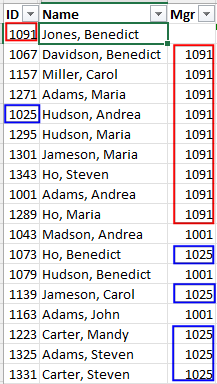
Figure 1 — Extract of Organizational data (Figure by the Author)

You can see that everyone with the ID 1091 in the column Mgr is a subordinate of Benedict Jones, the company’s CEO.

And everyone with ID 1025 in the column Mgr is a subordinate of Andrea Hudson.

This is how a parent-child hierarchy is stored with the least space.

Flattening the hierarchy

Unfortunately, Power BI cannot work with parent-child hierarchies.

This means we must flatten the parent-child hierarchy to a classic column-oriented hierarchy.

To transform the parent-child hierarchy into a classic hierarchy, I follow the methods described by Data Mozart:

For all levels after the first, I added logic to make sure that each column is filled:

Level2 = IF( 'Org'[Path Length] >= 2
          ,LOOKUPVALUE(Org[Name]
                ,'Org'[ID]
                ,PATHITEM('Org'[Path]
                ,2,INTEGER) )
          ,'Org'[Level1]
          )

This logic has the effect of copying the Name into the current column when an element in the hierarchy has no child below.

The result is the following table (extract of the entire table):

Figure 2 — Flattened hierarchy of the organization (Figure by the Author)

When you look at Mandy Davidson, you can see that each level is different.

But when you look at Carol Davidson, you can see she is at the fourth level. No further subordinate exists, so the name is copied to the fifth level.

The same applies to Carol Miller, located at the organization’s second level.

This is the best practice when modeling such kind of data.

Anyway, SQLBI has written an article on how to avoid this multiplication of Names and how to write Measures to cope with them:

It’s an interesting approach. I need to explore this method in more depth very soon.

When we add the hierarchy to a Slicer, it looks like this:
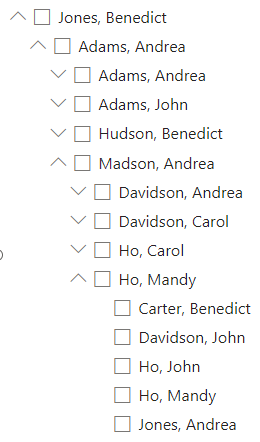
Figure 3 — Part of the hierarchy in a Slicer (Figure by the Author)

As you can see, Andrea Adams is shown as a node and as a Person in the hierarchy. This is correct in this case, as we will have data assigned to Andrea Adams while she is a Manager, and we want to see an aggregation of the data assigned to the part of the organization for which she is the manager.

This might be different for other types or hierarchies.

In this case, you might use the Custom Visual “Hierarchy Slicer,” which can hide elements with the same name as the parent.

Finding all Managers (and non-Managers)

Now that we have the data prepared, we can use it in Power BI to ask some questions.

The first is to find all the Managers in the organization.

Vice-versa is interesting as well: Who is not a Manager?

To answer this question, we need one more calculated column.

My first approach was to use a variant proposed by one of my colleagues using the EARLIER() function:

Is Manager (V1) =
IF (
    CALCULATE (
        COUNTROWS ( 'Org' )
        ,ALL ( 'Org' )
        ,'Org'[Mgr] = EARLIER ( 'Org'[ID] )
    ) = 0
    ,"Not Manager"
    ,"Manager"
)

This function uses context transition to search the entire table for rows with the ID of the current row in the Mgr column.

If you don’t know the concept of context transition, read my article on this topic:

While exploring this approach, I noticed that the EARLIER() function is marked with a “Not recommended” label on DAX.guide, and there is a performance warning on the Microsoft page for EARLIER().

For this reason, I developed my version of this column, which looks much more efficient:

Is Manager (V2) =
VAR PersNo = 'Org'[ID]
RETURN
    IF (
        CALCULATE (
            COUNTROWS ( 'Org' )
            ,REMOVEFILTERS ( 'Org' ) // Only rows with the actual Person in the hierarchy
            ,PATHCONTAINS (
                Org[Path]
                ,CONVERT (
                    PersNo
                    ,STRING
                )
            )
        ) > 1
        ,"Manager"
        ,"Not Manager"
    )

As recommended by DAX.guide, I use a Variable to store the current row context. Then, I still use context transition to search for rows with the ID of the current row in the Path columns.

If I find more than one row with the actual ID in the Path column, then the Person is a Manager.

Each Person is contained at least once in the Path column. Therefore, I must find the IDs with multiple occurrences to find the Managers.

The result is identical; I use the same logic but a different technique.

Moreover, this formula is easier to understand than the previous one.

The list of Managers is the following:
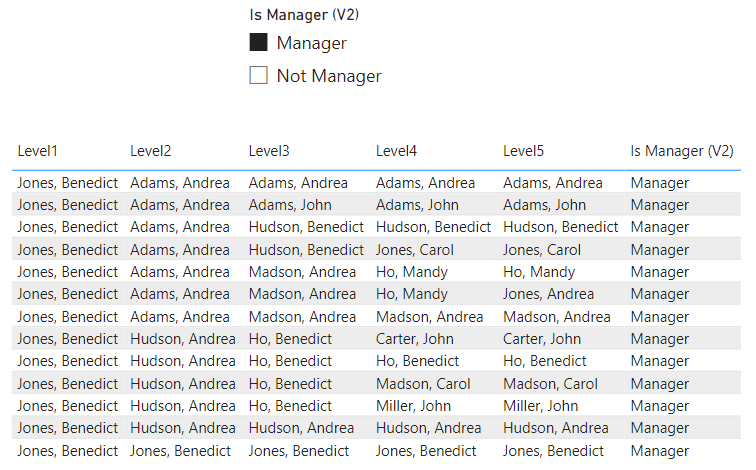
Figure 4 — List of Managers (Figure by the Author)

Finding Managers of Managers

This question is more complicated to answer.

In this case, I must find all Managers with subordinates who are also Managers.

I start with the same pattern as before, but I need one more check to do:

Is Manager of Manager =
VAR PersNo = 'Org'[ID]
VAR PathLen = 'Org'[Path Length]
RETURN
    IF (
        CALCULATE (
            COUNTROWS ( 'Org' ),
            REMOVEFILTERS ( 'Org' ) // Only rows with the actual Person in the hierarchy
            ,PATHCONTAINS (
                Org[Path],
                CONVERT (
                    PersNo,
                    STRING
                )
            )
                && // Only Rows which are not for the actual Person
            Org[ID] <> PersNo
                && // Check for Manager of Manager
                // Look at the level below --> If it is not empty, it should be different from the next level
                PATHITEM (
                    Org[Path],
                    PathLen + 1
                )
                    <> IF (
                        PATHITEM (
                            Org[Path],
                            PathLen + 2
                        ) = "",
                        PATHITEM (
                            Org[Path],
                            PathLen + 1
                        ),
                        PATHITEM (
                            Org[Path],
                            PathLen + 2
                        )
                    )
        ) > 0,
        "Is Manager of Manager",
        IF (
            'Org'[Is Manager (V2)] = "Manager",
            "No Manager of Manager",
            "Not Manager"
        )
    )

To find all Manager of Managers, I must check all rows to get all rows with the current ID in the Path but with rows with one more ID in the Path.

For example:

  • Mandy Ho has the ID 1235
  • Now I search all rows with this ID in the Path, which also has one more level in the Path. For example, Andrea Jones (ID: 1037), who is the Manager for Andrea Miller (ID: 1049)

Therefore, Mandy Ho is a Manager of Andrea Jones, who is also a manager.

Again, the approach to storing the current row context is critical to solving the question “Who is a Manager of Managers”.

Check the result for “Manager of Managers”

To check the result of this calculated column, I follow this process:

  • I get the list of all “Manager of Manager” and copy the result into Excel
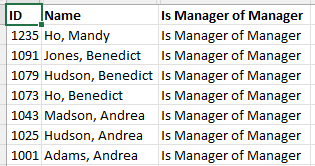
  • Then, I check the data in the Table view of Power BI Desktop, filtering the column Path with the ID of each Entry (Contains “|1235|”:
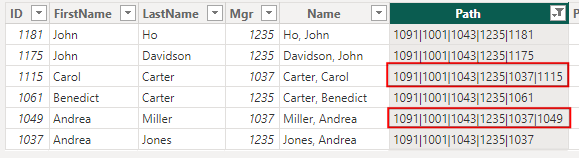
These two rows prove that Mandy Ho is indeed a Manager of Managers.

We get no result Only for Benedict Jones, as he is at the top level and has no lead separator (“1091|”) in the Path column.

I can perform the negative test by checking all Managers, which are “No Manager of Managers,” in the same way.

Conclusion

While unbalanced hierarchies are often used with Power BI, answering the questions above can be challenging if we don’t know the proper techniques, like context transition.

Even after building the result, we must know how to test the results.

It would be fatal for our users to accept our report if they discover discrepancies in the results.

Another lesson I learned while writing this piece was to try to understand how a piece of code works that I didn’t write myself.

The first attempt to get the list of managers worked, but it had two issues:

  • I couldn’t fully understand how it works.
  • It was flawed with performance issues.

So, I decided to create my version to solve the problem, which I fully understand and can explain in detail.

This is the third, and for now, the last installment of my series on how to work with hierarchies in DAX.

The previous two are the following:

Please let me know in the comments if you have any questions or challenges with hierarchies, which I can cover in a future article.

Photo by Olav Ahrens Røtne on Unsplash

References

The data is self-generated with phantasy names.

I generated this complete list by multiplying a list of First- and Last-Names with each other.

Working with Parent-child hierarchies on DAX-Patterns:

Understanding Parent-child Hierarchies on Data Mozart:

Don’t forget to subscribe to

👉 Power BI Publication

👉 Power BI Newsletter

and join our Power BI community

👉 Power BI Masterclass

Power Bi
Hierarchy
Data Analysis
Reporting
Dax
Recommended from ReadMedium