
Falcon 180B: The new future of LLM’s (Better Performance than ChatGPT 3.5)
Dive deep into the world’s largest open language model, its capabilities, and how to harness its advanced configurations

The world of Natural Language Processing (NLP) is ever-evolving, with new models and techniques emerging regularly. One such breakthrough is the Falcon 180B, a model that has taken the NLP community by storm. In this article, we’ll delve deep into what makes Falcon 180B a game-changer and why it’s creating waves in the world of open models.
Falcon 180B typically sits somewhere between GPT 3.5 and GPT4 depending on the evaluation benchmark and further finetuning from the community will be very interesting to follow now that it’s openly released.
Introduction
Hugging Face, a leading player in the NLP space, recently introduced the Falcon 180B to its platform. This model, with a whopping 180 billion parameters, is the largest openly available language model.
It was trained on an impressive 3.5 trillion tokens using TII’s RefinedWeb dataset, marking the longest single-epoch pretraining for an open model.
But what does this mean for the average user or developer?
Simply put, Falcon 180B is setting new standards in terms of capabilities, achieving state-of-the-art results across various natural language tasks. It’s not just about the size; it’s about the power and potential this model holds.
What Makes Falcon 180B Stand Out?
- Unprecedented Scale: Falcon 180B is a scaled-up version of its predecessor, Falcon 40B. It incorporates innovations like multiquery attention for enhanced scalability. The model was trained on 3.5 trillion tokens using up to 4096 GPUs simultaneously on Amazon SageMaker, totaling around 7,000,000 GPU hours. This makes Falcon 180B 2.5 times larger than Llama 2 and trained with 4x more compute.
- Diverse Training Data: The dataset for Falcon 180B is predominantly sourced from RefinedWeb (around 85%). Additionally, it has been trained on a mix of curated data, including conversations, technical papers, and a small fraction of code.
- Commercial Use: While Falcon 180B can be used commercially, it comes with certain restrictions, especially concerning “hosting use.” It’s always advisable to consult the license and seek legal advice if you’re considering commercial applications.
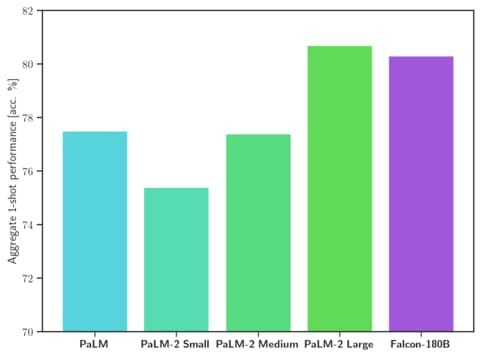
- Benchmark Performance: Falcon 180B outperforms other models like Llama 2 70B and even OpenAI’s GPT-3.5 on various benchmarks. It’s on par with Google’s PaLM 2-Large on several tasks, making it one of the most potent LLMs available to the public.
Harnessing the Power of Falcon 180B
For developers and NLP enthusiasts, Falcon 180B is available in the Hugging Face ecosystem, starting with Transformers version 4.33. The model can be easily tried out, but it’s essential to be aware of the hardware requirements, given the model’s size.
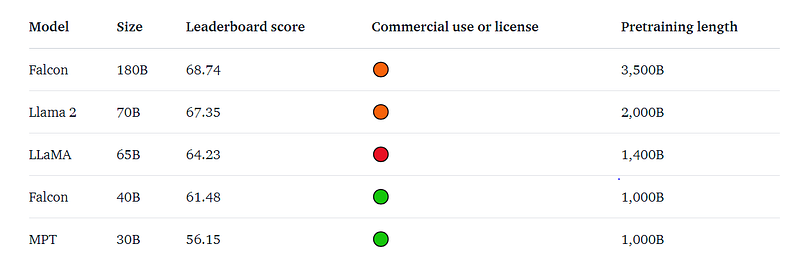
With 68.74 on the Hugging Face Leaderboard, Falcon 180B is the highest-scoring openly released pre-trained LLM, surpassing Meta’s LLaMA 2 (67.35).
The base model doesn’t have a specific prompt format, making it versatile for various applications.
However, it’s crucial to remember that it’s not inherently a conversational model. For conversational applications, the chat model version of Falcon 180B offers a simple conversation structure, making interactions seamless.
Demo
You can easily try the Big Falcon Model (180 billion parameters!) in this Space or in the playground embedded below, I tried Japanese language just to see it other language capabilities:

Hardware requirements
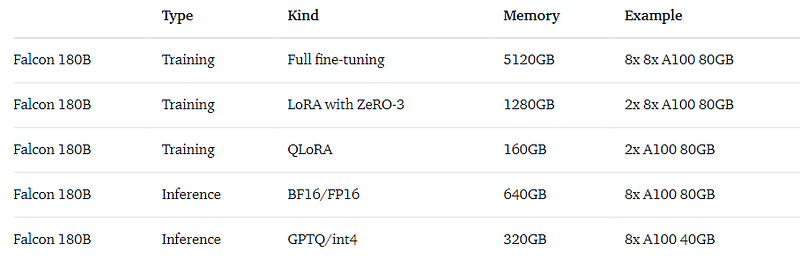
Hardware needed to run the model for different use cases mentioned on hugging face hub.
Lets Try
Use of the model requires you to accept its license and terms of use. Please, make sure you are logged into your Hugging Face account and ensure you have the latest version of the transformers:
pip install --upgrade transformers
huggingface-cli logi
1. bfloat16
This is how you’d use the base model in bfloat16. Falcon 180B is a big model, so please take into account the hardware requirements summarized in the table above.
from transformers import AutoTokenizer, AutoModelForCausalLM
import transformers
import torch
model_id = "tiiuae/falcon-180B"
tokenizer = AutoTokenizer.from_pretrained(model_id)
model = AutoModelForCausalLM.from_pretrained(
    model_id,
    torch_dtype=torch.bfloat16,
    device_map="auto",
)
prompt = "My name is Pedro, I live in"
inputs = tokenizer(prompt, return_tensors="pt").to("cuda")
output = model.generate(
    input_ids=inputs["input_ids"],
    attention_mask=inputs["attention_mask"],
    do_sample=True,
    temperature=0.6,
    top_p=0.9,
    max_new_tokens=50,
)
output = output[0].to("cpu")
print(tokenizer.decode(output)
This could produce an output such as:
my name is Pedro, I live in Portugal and I am 25 years old. I am a graphic designer, but I am also passionate about photography and video.
I love to travel and I am always looking for new adventures. I love to meet new people and explore new places.
2. 8-bit and 4-bit with bitsandbytes
The Falcon 180B model offers quantized versions that can be utilized for inference. These quantized models, especially the 8-bit and 4-bit versions, show almost no difference in evaluation when compared to the bfloat16 reference. This is a significant advantage as it allows for reduced hardware requirements without compromising on performance.
After applying 4-bit precision quantization, its size diminishes to a mere 90 GB (calculated as 180 billion parameters * 0.5 Bytes). Loading the 4-bit Falcon 180B model requires approximately 100 GB of memory, accounting for the 90 GB size and some memory overhead.
If you possess 24 GB of VRAM, you will need approximately 75 GB of CPU RAM, which, while still substantial, proves to be a more cost-effective solution compared to loading the original model. Additionally, it avoids the need to offload model layers onto the hard drive during inference. Note that you should maintain at least 100 GB of free space on your hard drive to accommodate the model.
Moreover, having a GPU is not a necessity. With 128 GB of CPU RAM, you can perform inference using just your CPU.
We can already find quantized versions online. TheBloke released 4-bit versions made with GPTQ:
Steps to Use the 8-bit and 4-bit Configurations:
- First, you need to install the
bitsandbyteslibrary. This library facilitates the quantization process. - Once installed, you can enable the corresponding flag when loading the model. Here’s a quick code snippet to guide you:
from transformers import AutoModelForCausalLM

model_id = "tiiuae/falcon-180B"

# For 8-bit configuration
model = AutoModelForCausalLM.from_pretrained(
    model_id,
    torch_dtype=torch.bfloat16,
    load_in_8bit=True,
    device_map="auto",
)
Note: Using the 8-bit inference is generally faster than the 4-bit configuration. Choose based on your specific needs and hardware capabilities.
3. GGUF Configuration
GGUF is a new format introduced by the llama.cpp team on August 21st 2023. It is a replacement for GGML, which is no longer supported by llama.cpp.
The key benefit of GGUF is that it is a extensible, future-proof format which stores more information about the model as metadata. It also includes significantly improved tokenization code, including for the first time full support for special tokens. This should improve performance, especially with models that use new special tokens and implement custom prompt templates.
How to run from Python code
You can use GGUF models from Python using the llama-cpp-python or ctransformers libraries.
How to load this model from Python using ctransformers
First install the package
# Base ctransformers with no GPU acceleration
pip install ctransformers>=0.2.24
# Or with CUDA GPU acceleration
pip install ctransformers[cuda]>=0.2.24
# Or with ROCm GPU acceleration
CT_HIPBLAS=1 pip install ctransformers>=0.2.24 --no-binary ctransformers
# Or with Metal GPU acceleration for macOS systems
CT_METAL=1 pip install ctransformers>=0.2.24 --no-binary ctransformers
Simple example code to load one of these GGUF models
from ctransformers import AutoModelForCausalLM
# Set gpu_layers to the number of layers to offload to GPU. Set to 0 if no GPU acceleration is available on your system.
llm = AutoModelForCausalLM.from_pretrained("TheBloke/Falcon-180B-Chat-GGUF", model_file="falcon-180b-chat.q4_K_M.gguf", model_type="falcon", gpu_layers=50)
print(llm("AI is going to")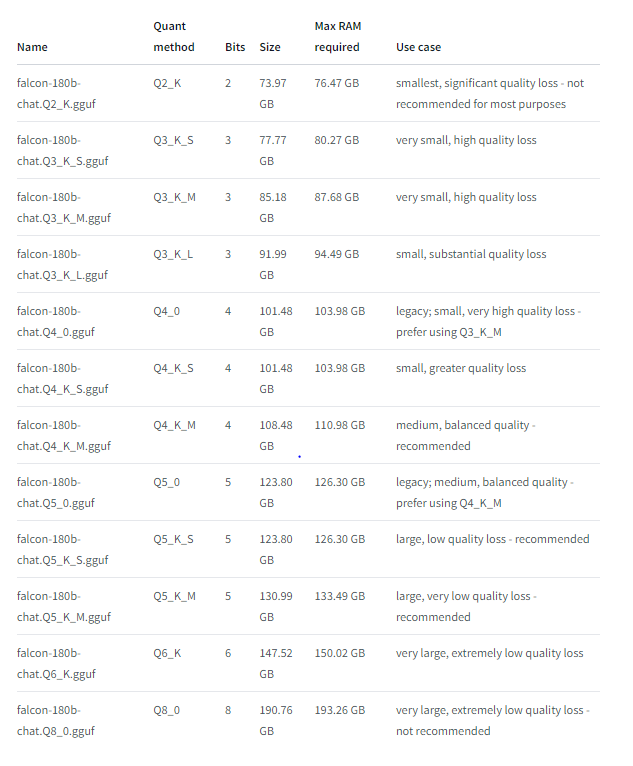
4. GPTQ Configuration
GPTQ, or Generalized Quantization for Transformer models, is another configuration that developers can explore.
If using transformers:
#install necessary packages
pip3 install transformers>=4.33.0 optimum>=1.12.0
pip3 install auto-gptq --extra-index-url https://huggingface.github.io/autogptq-index/whl/cu118/  # Use cu117 if on CUDA 11.7
from transformers import AutoModelForCausalLM, AutoTokenizer, pipeline
model_name_or_path = "TheBloke/Falcon-180B-Chat-GPTQ"
# To use a different branch, change revision
# For example: revision="gptq-3bit--1g-actorder_True"
model = AutoModelForCausalLM.from_pretrained(model_name_or_path,
device_map="auto",
revision="main")
tokenizer = AutoTokenizer.from_pretrained(model_name_or_path, use_fast=True)
prompt = "Tell me about AI"
prompt_template=f'''User: {prompt}
Assistant: '''
print("\n\n*** Generate:")
input_ids = tokenizer(prompt_template, return_tensors='pt').input_ids.cuda()
output = model.generate(inputs=input_ids, do_sample=True, temperature=0.7, max_new_tokens=512)
print(tokenizer.decode(output[0]))
# Inference can also be done using transformers' pipeline
print("*** Pipeline:")
pipe = pipeline(
"text-generation",
model=model,
tokenizer=tokenizer,
max_new_tokens=512,
temperature=0.7,
do_sample=True,
top_p=0.95,
repetition_penalty=1.15
)
print(pipe(prompt_template)[0]['generated_text'])5. Chat Model Configuration
The Falcon 180B also offers a chat model configuration, fine-tuned for conversational applications. This model uses a straightforward training template, and for inference, you need to follow a specific pattern:
def format_prompt(message, history, system_prompt):
    prompt = ""
    if system_prompt:
        prompt += f"System: {system_prompt}\n"
    for user_prompt, bot_response in history:
        prompt += f"User: {user_prompt}\n"
        prompt += f"Falcon: {bot_response}\n"
    prompt += f"User: {message}\nFalcon:"
    return prompt
This function ensures that interactions from the user and responses by the model are formatted correctly, allowing for a seamless conversational experience.
Conclusion
In the ever-evolving landscape of NLP, Falcon 180B is a testament to the advancements we’re witnessing. Its introduction to the Hugging Face platform is a significant step forward, opening up a world of possibilities for developers, researchers, and businesses alike.
With its state-of-the-art capabilities, diverse training data, and impressive benchmark performance, Falcon 180B is set to redefine the standards of open language models. Whether you’re an NLP enthusiast, a developer, or someone curious about the latest in tech, Falcon 180B is a model you should keep an eye on.
Note: Always ensure you’re logged into your Hugging Face account and have the latest version of transformers when using the model.

If you like to read below:


